1. Bubuka
Thank you for choosing the FERM Cordless Li-ion Screwdriver 4V, model CDM1178. This manual provides essential information for the safe and effective use of your new tool. Please read these instructions carefully before operating the screwdriver and keep them for future reference. Proper use and maintenance will ensure long-lasting performance and safety.
2. Parentah Kasalametan
Always observe the following basic safety precautions when using electric tools to reduce the risk of fire, electric shock, and personal injury.
2.1 Umum Power Alat Kasalametan
- Kasalametan Area Gawé: Tetep wewengkon gawé beresih jeung well-cahayana. Wewengkon nu pabalatak atawa poek ngondang kacilakaan. Ulah ngajalankeun parabot kakuatan dina atmosfir ngabeledug, kayaning ku ayana cair kaduruk, gas, atawa lebu.
- Kasalametan listrik: Hindarkeun kontak awak sareng permukaan bumi atanapi grounded sapertos pipa, radiator, rentang, sareng kulkas. Aya ngaronjat résiko shock listrik lamun awak anjeun earthed atawa grounded.
- Kasalametan Pribadi: Salawasna nganggo pelindung panon. Anggo alat pelindung diri sapertos masker lebu, sapatu kaamanan anti selip, topi keras, atanapi pelindung dédéngéan upami diperyogikeun. Tetep waspada, ati-ati kana naon anu anjeun lakukeun, sareng anggo akal sehat nalika ngoperasikeun alat listrik.
- Pamakéan sareng Perawatan Alat: Do not force the power tool. Use the correct power tool for your application. It will do the job better and safer at the rate for which it was designed. Disconnect the plug from the power source and/or the battery pack from the power tool before making any adjustments, changing accessories, or storing power tools.
2.2 Battery Safety (Li-ion)
- Ukur ngecas nganggo carjer anu ditunjuk ku produsén. Pangecas anu cocog pikeun hiji jinis pak batré tiasa nyababkeun résiko kahuruan nalika dianggo sareng pak batré anu sanés.
- Anggo alat-alat listrik ngan nganggo bungkus batré anu ditunjuk sacara khusus. Pamakéan bungkusan batré anu sanés tiasa nyababkeun résiko tatu sareng seuneu.
- Lamun pak batré teu dipake, jauhkeun tina objék logam lianna, kawas klip kertas, koin, kenop, paku, screws, atawa objék logam leutik lianna, nu bisa nyieun sambungan ti hiji terminal ka nu sejen. Kosot terminal batré babarengan bisa ngabalukarkeun kaduruk atawa seuneu.
- Dina kaayaan kasar, cairan bisa ejected tina batréna; nyingkahan kontak. Upami kontak teu kahaja, siram ku cai. Lamun cairan kontak panon, tambahan neangan pitulung médis. Cairan anu dikaluarkeun tina batré tiasa nyababkeun iritasi atanapi kaduruk.
3. Produk Langkungview
The FERM Cordless Li-ion Screwdriver 4V is designed for various light-duty screwing tasks around the home. It features a compact design, USB-C charging, and multiple torque settings for versatile use.
3.1 Komponén
- Cordless Screwdriver Unit
- Kabel Ngecas USB-C
- Screwdriver Bits (5 included, plus an additional 21-piece bit set)
- Integrated Li-ion Battery
3.2 Pituduh Visual
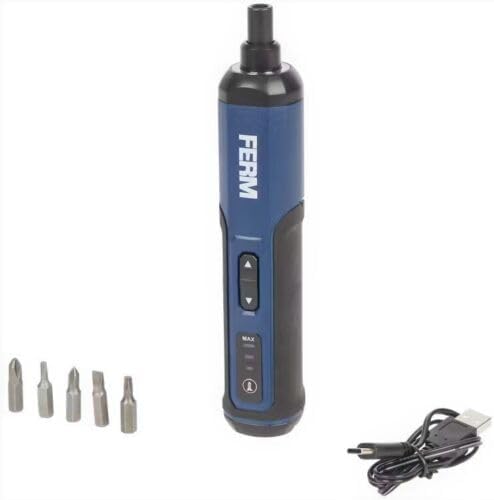
Gambar 1: The FERM Cordless Li-ion Screwdriver 4V shown with its included screwdriver bits and USB-C charging cable. This image illustrates the compact design and essential accessories.
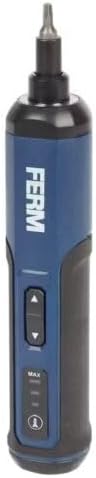
Gambar 2: A lengkep view of the FERM Cordless Screwdriver, highlighting the forward/reverse buttons, torque setting indicators (MAX, MID, MIN), and the power/battery indicator light.
4. Setélan
4.1 Ngecas Batré
The screwdriver is equipped with an integrated Li-ion battery. Before first use, fully charge the battery.
- Panggihan port ngecas USB-C dina obeng.
- Connect the provided USB-C cable to the screwdriver's charging port.
- Connect the other end of the USB-C cable to a compatible USB power adapter (not included) or a USB port on a computer.
- The battery indicator lights will show the charging status. Allow the screwdriver to charge until the indicator shows a full charge.
- Saatos dicas pinuh, cabut kabel USB-C.
Catetan: Only use the provided USB-C cable for charging. Do not attempt to charge with damaged cables or non-compatible chargers.
4.2 Installing Screwdriver Bits
The screwdriver uses standard 1/4-inch hex shank bits.
- Ensure the screwdriver is turned off and not operating.
- Pilih bit obeng luyu pikeun tugas anjeun.
- Insert the hex shank of the bit firmly into the screwdriver's chuck until it clicks into place.
- To remove a bit, pull it straight out from the chuck.
5. Parentah Operasi
5.1 Powering On/Off and Direction Selection
The screwdriver features a simple control for forward and reverse rotation.
- To drive screws (forward rotation), press the upper button.
- To remove screws (reverse rotation), press the lower button.
- Lepaskeun tombol pikeun ngeureunkeun obeng.
5.2 Nyaluyukeun Setélan Torsi
The FERM screwdriver offers 3 torque speed settings to match different applications.
- Locate the torque selection button/switch (refer to Figure 2).
- Cycle through the settings (e.g., MIN, MID, MAX) to select the desired torque.
- Use lower torque settings for delicate materials or small screws to prevent overtightening or damage.
- Use higher torque settings for larger screws or tougher materials.
Tip: Always start with a lower torque setting and increase it if necessary to avoid stripping screw heads or damaging the workpiece.
6. Pangropéa
Regular maintenance ensures the longevity and safe operation of your FERM screwdriver.
- beberesih: Jaga liang ventilasi alat tetep bersih pikeun nyegah panas teuing. Anggo lawon anu lemes sarengamp lawon pikeun ngabersihkeun wadahna. Entong nganggo bahan kimia anu keras atanapi pembersih anu abrasif.
- Panyimpenan: Store the screwdriver in a dry, secure place, out of reach of children. Ensure the battery is partially charged before long-term storage.
- Perawatan batré: Do not allow the battery to fully discharge for extended periods. Recharge the battery periodically if the tool is not used frequently. Avoid exposing the battery to extreme temperatures.
- Pamariksaan: Regularly check the screwdriver for any signs of damage, loose parts, or wear. If any issues are found, do not use the tool and contact customer support.
7. Cara ngungkulan
This section addresses common issues you might encounter with your FERM Cordless Screwdriver.
| Masalah | Mungkin Cukang lantaranana | Solusi |
|---|---|---|
| Obeng teu hurung. | Batré discharged. | Cas batréna nganggo kabel USB-C. |
| Obeng teu boga daya atawa bisa eureun nalika dipaké. | Ngecas batré low. Overload. | Recharge the battery. Reduce the load or use a higher torque setting if appropriate. |
| Bit slips in screw head. | Incorrect bit size. Torque setting too low. | Ensure the correct bit size is used. Increase the torque setting. Apply firm, steady pressure. |
| Screwdriver gets hot. | Panggunaan anu beurat dina waktos anu lami. Ventilasi tersumbat. | Allow the tool to cool down. Ensure ventilation slots are clear. Avoid continuous heavy-duty tasks. |
If you encounter problems not listed here or if solutions do not resolve the issue, please contact FERM customer support.
8. Spésifikasi
Key technical specifications for the FERM Cordless Li-ion Screwdriver 4V, model CDM1178.
| Nomer modél | CDM1178 |
| merek | FERM |
| Voltage | 4 V |
| Jenis Batré | Lithium-ion (integrated) |
| Métode ngecas | USB-C |
| Setélan torsi | 3 kagancangan |
| Komponén Kaasup | Screwdriver, Li-ion battery, USB-C cable, 5 bits (+ 21-piece bit set) |
| Dimensi (Pakét) | 22.3 x 8.9 x 7.1 cm |
| Beurat (Produk) | 530 gram |
9. Garansi jeung Rojongan
For warranty information, technical support, or spare parts availability, please refer to the warranty card included with your product or visit the official FERM websitus. Simpen bukti pameseran anjeun pikeun klaim garansi.
Pabrikan: FERM power since 1965


