Bubuka
This manual provides detailed instructions for the Eacam QW33 Smart Sports Watch. It covers essential information regarding product setup, operation, maintenance, and troubleshooting to ensure optimal performance and user experience. The QW33 is a versatile fitness tracker featuring a 1.28-inch high-resolution display, multiple sports modes, and IP67 water and dust resistance.

Figure 1: Eacam QW33 Smart Sports Watch, showcasing its round black design and digital watch face.
Disetél
1. Ngecas Alat
Before first use, fully charge your Eacam QW33 Smart Sports Watch.
- Connect the provided magnetic charging cable to the charging points on the back of the watch.
- Plug the USB end of the cable into a standard USB power adapter (5V/1A recommended) or a computer USB port.
- Layar jam tangan bakal nunjukkeun status ngecas. Ngecas pinuh biasana peryogi waktos sakitar 2 jam.
2. Instalasi App sarta Papasangan
Pikeun muka konci fitur lengkep jam tangan pinter anjeun, unduh sareng pasang aplikasi pendamping dina smartphone anjeun.
- Scan the QR code in the included user manual or search for the official Eacam app in your smartphone's app store (compatible with Android 5.0+ and iOS 10.0+).
- Install and open the application. Follow the on-screen instructions to create an account or log in.
- Aktipkeun Bluetooth dina smartphone Anjeun.
- Within the app, navigate to the device pairing section and select "Add Device" or similar.
- Select "QW33" from the list of available devices. Confirm the pairing request on both your phone and the watch if prompted.
- Once paired, the watch will synchronize data with your phone, including time and date.
Parentah Operasi
1. Napigasi Dasar
The Eacam QW33 features a full touch screen and a rotatable knob for intuitive navigation.
- Layar cabak: Gesek ka kenca/katuhu, ka luhur/handap pikeun nganapigasi menu sareng bewara. Ketok pikeun milih item.
- Rotatable Knob: Rotate the knob on the side of the watch to scroll through menus or switch watch faces without touching the screen. Press the knob to return to the previous screen or confirm a selection.

Figure 2: The rotatable knob allows for easy menu navigation.

Figure 3: The watch supports multiple menu styles for user preference.
2. Ngaropea Watch Faces
The Eacam QW33 offers over 100 customizable watch faces.
- Long-press the watch face to enter the watch face selection mode.
- Swipe left or right to browse through pre-installed watch faces.
- For more options, open the companion app on your smartphone and navigate to the "Dial Market" or "Watch Face" section to download and sync new designs.

Figure 4: Choose from over 100 creative dials to personalize your watch.
3. Modeu Olahraga sareng Pelacakan Kabugaran
The watch supports multiple sports modes to track your physical activity accurately.
- Access the sports mode menu from the main interface.
- Pilih kagiatan anu dipikahoyong (contona, lumpat, sapedah, leumpang).
- The watch will begin tracking relevant metrics such as heart rate, steps, distance, and calories burned.
- End your workout by following the on-screen prompts. Data will be synchronized with the app.

Figure 5: The watch supports a variety of professional sports modes.
4. Pangimeutan Kaséhatan
The QW33 provides continuous health monitoring features.
- Ngawaskeun Laju haté: The watch intelligently monitors your heart rate 24 hours a day using an AI heart rate algorithm. View your current heart rate on the watch or detailed historical data in the app.
- Pangimeutan Saré: Wear the watch to bed to track your sleep patterns, including deep sleep, light sleep, and awake times. Analyze your sleep quality in the companion app.

Figure 6: The watch features an intelligent heart rate monitoring system.
5. Telepon sareng Bewara Bluetooth
Once paired with your smartphone, the watch allows for convenient communication.
- Nelepon: You can make and receive phone calls directly from your watch using its built-in high-definition speakers and microphone. Access the dial pad or contact list on the watch.
- Narima Bewara: The watch will display notifications for incoming calls, messages, and app alerts from your paired smartphone.

Figure 7: Make and receive phone calls directly from your watch.
6. Fitur tambahan
- Ramalan Cuaca: View real-time weather updates and future forecasts directly on your watch.
- NFC Access Control & QR Code Payment: The watch supports NFC for access control and quick response code payment after linking your payment account (without internet connection).
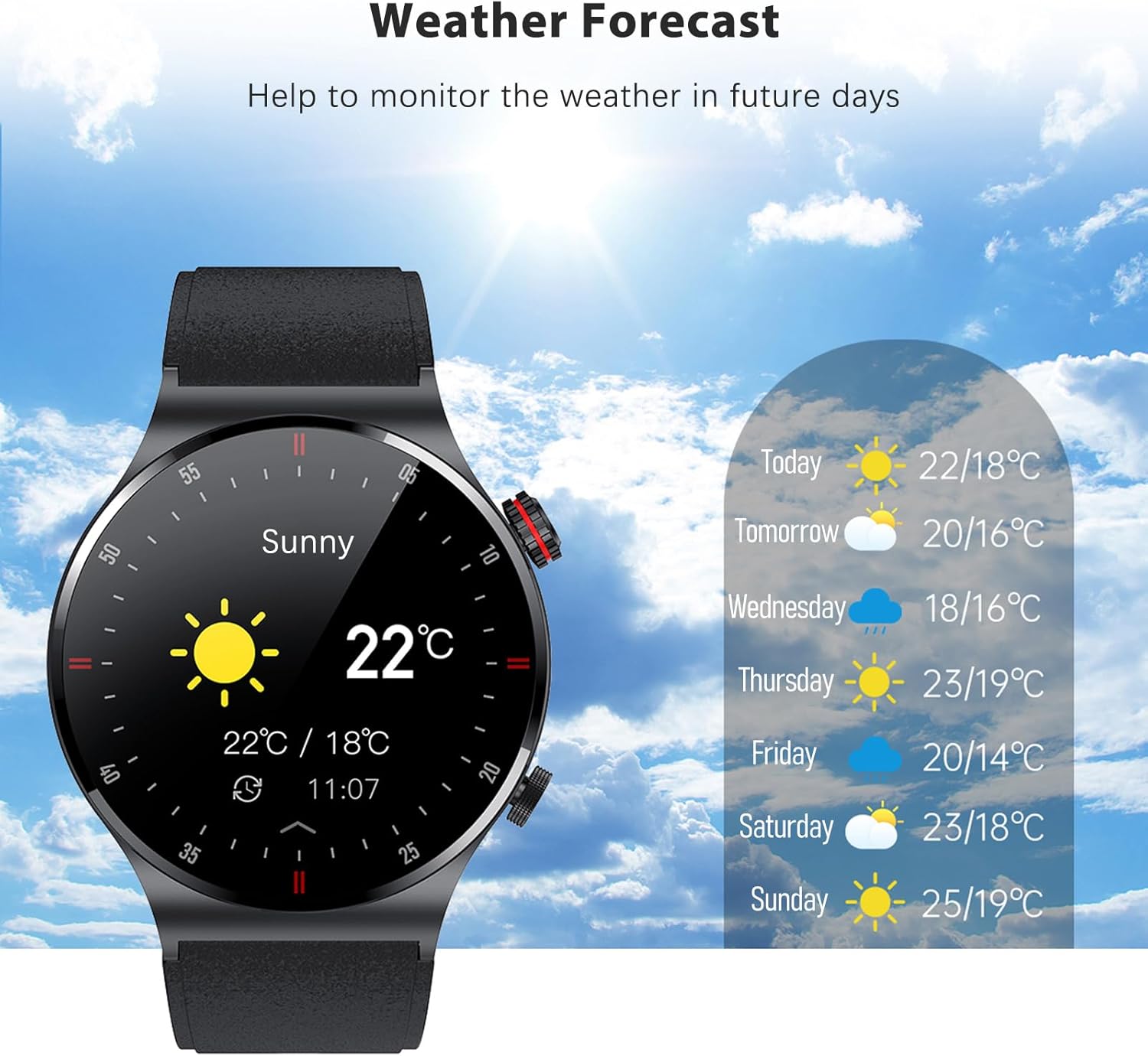
Figure 8: Monitor the weather directly from your watch.
Pangropéa
1. Tahan Cai sareng Lebu (IP67)
The Eacam QW33 Smart Sports Watch is rated IP67 for water and dust resistance. This means it is protected against dust ingress and can withstand immersion in water up to 1 meter for 30 minutes.
- It is suitable for daily use, such as hand washing, rain, and accidental splashes.
- Avoid prolonged immersion, hot water, steam, or high-pressure water jets.
- Do not operate the watch buttons or touch the screen while submerged in water.
- After contact with water, wipe the watch dry with a soft cloth.

Figure 9: The watch is designed with IP67 water resistance.
2. beberesih sarta perawatan
- Rutin ngabersihan arloji sareng tali nganggo kaén anu lemes sareng garing.
- Upami diperlukeun, make rada damp usap ku sabun hampang, teras usap nepi ka garing.
- Ulah nganggo bahan kimia anu kasar, pembersih anu abrasif, atanapi pangleyur, sabab ieu tiasa ngaruksak lapisan sareng segel jam tangan.
- Keep the charging contacts clean and free of debris to ensure proper charging.
Pamérésan masalah
If you encounter issues with your Eacam QW33 Smart Sports Watch, refer to the following common solutions.
| Masalah | Solusi anu mungkin |
|---|---|
| Arloji teu hurung. | Ensure the watch is fully charged. Connect it to the charger for at least 30 minutes. If it still doesn't turn on, perform a hard reset by pressing and holding the side button for 10-15 seconds. |
| Teu tiasa dipasangkeun sareng smartphone. |
|
| Inaccurate health data (e.g., heart rate). | Pastikeun arloji dipaké pas dina pigeulang anjeun, ngeunaan rubak hiji ramo luhureun tulang pigeulang. Ngabersihan sénsor dina tonggong arloji. Hindarkeun gerakan kaleuleuwihan salami pangukuran. |
| Bewara teu némbongan. |
|
spésifikasi
| Fitur | Rincian |
|---|---|
| Nomer modél | QW33 |
| Dimensi (Produk) | 45.7 x 45.7 x 12 mm |
| Beurat (Produk) | 58 gram |
| tampilan | 1.28-inch IPS, 240 x 240 pixels, Full Touch Screen |
| CPU | GR5515 |
| Kapasitas batré | Batré Litium 260 mAh |
| Waktu sayaga | Nepi ka 15 dinten |
| Waktos Gawé | 5-7 poé |
| Mode ngecas | Nyeuseup Magnét |
| Vérsi Bluetooth | BLE 5.1 |
| Peunteun waterproof | IP67 |
| Kasaluyuan Sistim | Android 5.0 ka luhur, ios 10.0 sareng di luhur |
| Fitur husus | Heart Rate Monitor, Sleep Monitor, NFC Access Control, QR Code Payment, Bluetooth Calling, Multiple Sports Modes, Customizable Dials, Weather Forecast |
| Sayogi Basa | Simplified Chinese, English, Italian, Japanese, German, Spanish, French, Russian, Portuguese, Polish, Turkish, Greek, Hebrew, Czech, Hungarian, Arabic |
| Negara asal | Cina |
Émbaran jaminan
Specific warranty details for the Eacam QW33 Smart Sports Watch are typically provided with your purchase documentation or on the manufacturer's official website. Please refer to these resources for information regarding warranty period, coverage, and claims process.
Ngarojong
For technical support, product inquiries, or assistance with your Eacam QW33 Smart Sports Watch, please contact Eacam customer service through their official websitus atanapi inpormasi kontak anu disayogikeun dina bungkusan produk anjeun.


