1. Bubuka
This manual provides essential information for the safe and efficient operation of your Anern AN-SCI-EVO Hybrid Solar Inverter. Please read this manual thoroughly before installation and use, and keep it for future reference.
The Anern AN-SCI-EVO is a high-frequency, grid-connected hybrid inverter designed to integrate solar power with your electrical grid. It can operate without batteries but is compatible with lead-acid, gel, and lithium battery types. Its comprehensive LCD display allows for easy configuration of various functions, including battery charging current, AC/solar charger priority, and input voltage setélan.
2. Émbaran Kasalametan
Pitunjuk Kasalametan Penting:
- Read all instructions and cautionary markings on the unit and in this manual before operating the inverter.
- Installation must be performed by qualified personnel in accordance with all local electrical codes.
- Do not disassemble the inverter. There are no user-serviceable parts inside. Refer servicing to qualified service personnel.
- Ensure all connections are tight to avoid loose connections that can cause overheating.
- Do not connect the inverter to a power source that exceeds its rated input voltage.
- Always disconnect all power sources (PV, battery, AC) before performing any maintenance or cleaning.
- This inverter is designed for indoor use. Protect it from direct sunlight, rain, snow, and excessive dust.
- Pastikeun ventilasi nyukupan sabudeureun inverter pikeun nyegah overheating.
3. Fitur Produk
- Hybrid Operation: Grid-tied inverter capable of operating with or without batteries.
- Kaluaran Gelombang Sinus Murni: Provides high-quality, stable AC power, protecting sensitive electronics and extending their lifespan.
- Kompatibilitas Batré anu Lega: Supports lead-acid, gel, and lithium battery types.
- Advanced MPPT Technology: Maximum Power Point Tracking for efficient solar energy harvesting with a wide PV input voltage rentang 30-400 VDC.
- Comprehensive LCD Display: User-friendly interface for monitoring system status and configuring settings such as battery charging current, AC/solar charger priority, and input voltage rentang.
- Pangimeutan jauh: Supports WIFI/GPRS remote monitoring for accessing data and controlling the inverter from anywhere (WiFi module included).
- Sababaraha panyalindungan: Includes overcurrent, low voltage, short circuit, overheating, and overcharge protection.

Gambar 3.1: Hareupeun view of the Anern AN-SCI-EVO-2000 Hybrid Solar Inverter, showing the LCD display and control buttons.
4. Eusi Paket
Upon unpacking, please verify that all items are included and undamaged:
- Anern AN-SCI-EVO Hybrid Solar Inverter (1 unit)
- WiFi Module (1 unit)
- Manual pangguna (dokumén ieu)
- Mounting accessories (if applicable, not specified in detail)
5. Instalasi jeung Setup
Proper installation is crucial for the safe and efficient operation of the inverter. It is recommended that installation be performed by a certified electrician.
5.1 Pamilihan Loka
- Install the inverter indoors, away from direct sunlight, moisture, and corrosive substances.
- Ensure the ambient temperature is within the operating range (refer to specifications).
- Provide at least 20 cm of clearance around the inverter for proper ventilation.
- Mount the inverter vertically on a sturdy surface.
5.2 Sambungan Wiring
Before making any connections, ensure all power sources (PV array, battery, AC grid) are disconnected and secured against accidental re-connection.
- Sambungan batré: Connect the battery bank to the inverter's battery terminals. Ensure correct polarity (+ to + and - to -). The inverter requires a battery connection to operate.
- PV Array Connection: Connect the solar panel array to the inverter's PV input terminals. Observe correct polarity and ensure the PV input voltage is within the specified MPPT range (30-400 VDC) and does not exceed the maximum PV VOC (400 VDC). Recommended PV cable size is 16 AWG.
- Sambungan Kaluaran AC: Connect your household loads or distribution panel to the inverter's AC output terminals.
- AC Input Connection (Grid/Generator): If connecting to the utility grid or a generator, connect it to the inverter's AC input terminals.
- Grounding: Mastikeun inverter bener grounded nurutkeun kode listrik lokal.

Figure 5.1: System connection diagram illustrating various power sources and loads for the hybrid inverter.
5.3 WiFi Module Installation
The included WiFi module allows for remote monitoring. Connect the module to the designated communication port on the inverter. Follow the instructions provided with the WiFi module for network configuration and app setup.

Gambar 5.2: Leuwihview of inverter protection features and WiFi monitoring capability.
6. Parentah Operasi
6.1 Mimiti Power-Up
- After all connections are secure, switch on the battery breaker.
- Switch on the PV array breaker.
- Switch on the AC input breaker (if connected to grid/generator).
- The inverter will power on, and the LCD display will illuminate.
6.2 Layar LCD sareng Setélan
The LCD display provides real-time system information and allows for configuration of various parameters. Use the buttons below the display to navigate menus and adjust settings.
- Ngawaskeun: View batré voltage, PV input voltage, kaluaran AC voltage, charging current, and load power.
- Ngecas Ayeuna: Saluyukeun arus ngecas batré.
- Charger Priority: Set the priority for AC charger or solar charger.
- Masukan Voltage Rentang: Configure acceptable input voltage ranges for different applications.
6.3 Modeu operasi
The inverter supports multiple charging and output modes to meet diverse user requirements:
- Solar Energy Priority: Solar power is primarily used to power loads and charge batteries. Utility power is used only when solar power is insufficient.
- Solar Energy + Utility Simultaneously: Solar power and utility power are used concurrently to power loads and charge batteries.
- Battery Only Charging: The inverter charges batteries from solar or utility, but does not directly power loads from these sources.
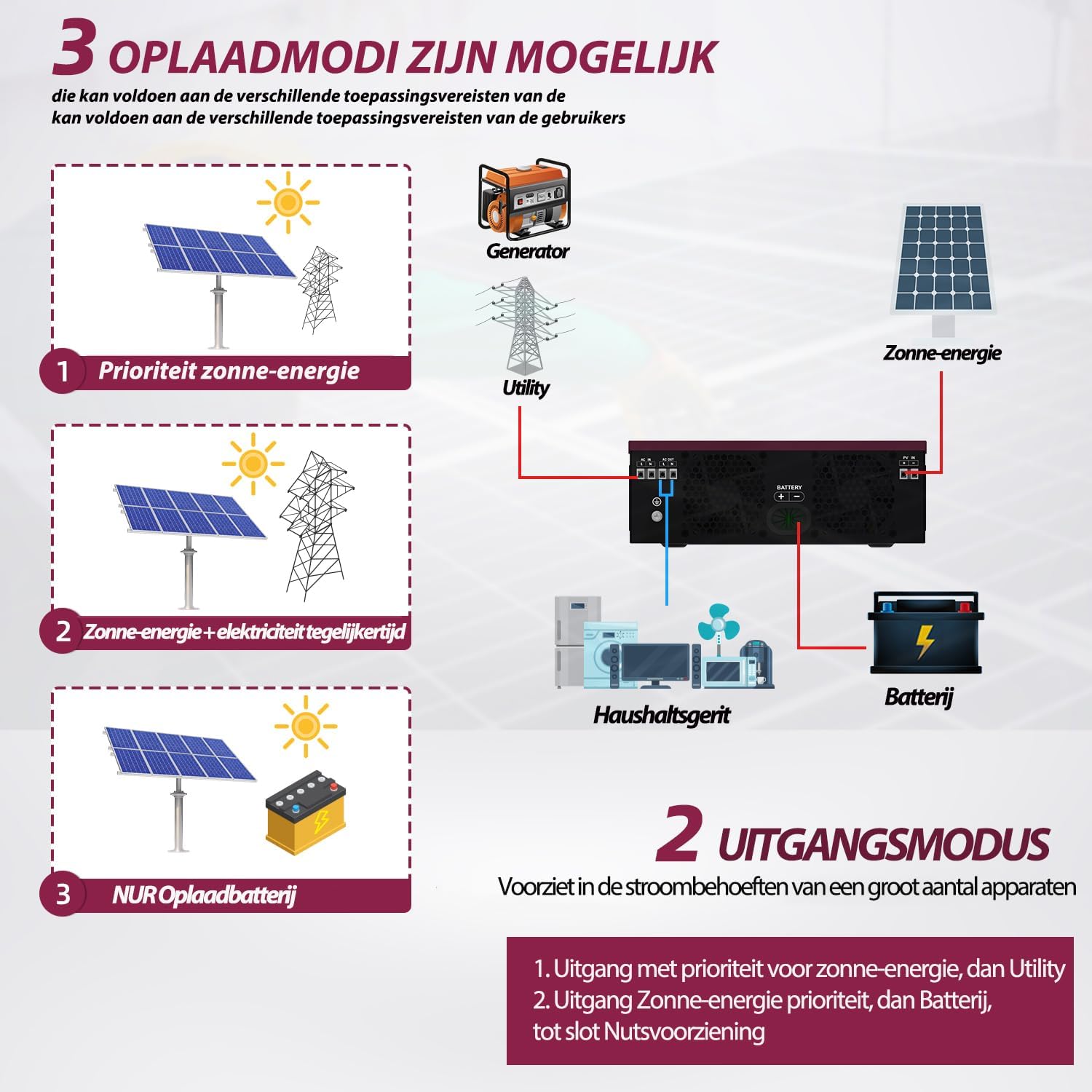
Figure 6.1: Available charging modes for the hybrid solar inverter.
6.4 Pangimeutan jauh
Once the WiFi module is configured, you can monitor the inverter's performance and adjust settings remotely via a mobile application. This allows for real-time data access and control.
7. Pangropéa
Pangropéa rutin ngajamin umur panjang sareng kinerja optimal inverter anjeun.
- beberesih: Periodically clean the inverter's exterior with a dry cloth. Ensure ventilation openings are free from dust and debris. Do not use liquid cleaners.
- Pariksa sambungan: Annually inspect all electrical connections (PV, battery, AC) for tightness and signs of corrosion. Tighten any loose connections.
- Ventilasi: Pastikeun daérah di sakitar inverter tetep bersih pikeun ngamungkinkeun aliran hawa sareng pembuangan panas anu leres.
- Pamariksaan batré: If using batteries, follow the battery manufacturer's maintenance guidelines.
8. Cara ngungkulan
This section provides solutions to common issues. If the problem persists, contact customer support.
| Masalah | Mungkin Cukang lantaranana | Solusi |
|---|---|---|
| Inverter does not power on. | No battery connection or low battery voltage. | Ensure battery is connected and charged. The inverter requires a battery to operate. |
| Henteu aya kaluaran AC. | Overload, short circuit, or internal fault. | Reduce load. Check for short circuits in wiring. Restart inverter. If fault persists, contact support. |
| Inverter reports an error when load is connected. | Load exceeds inverter capacity, or specific load type incompatibility. | Ensure total load does not exceed 2000W. Some inductive loads (e.g., motors, refrigerators) have high startup currents; ensure the inverter's surge capacity (2000W) is sufficient. Try connecting a smaller, resistive load to test. |
| PV input not detected or low. | Insufficient sunlight, incorrect PV wiring, or PV voltage outside MPPT range. | Check solar panel connections and ensure adequate sunlight. Verify PV voltage is within 30-400 VDC. |
| Peringatan overheating. | Poor ventilation or excessive ambient temperature. | Ensure adequate clearance around the inverter. Clean ventilation openings. Reduce ambient temperature if possible. |
9. Spésifikasi
| Parameter | Nilai |
|---|---|
| Modél | AN-SCI-EVO-2000 (ECO-2000) |
| Max. Daya Input PV | 2000 W |
| PV Voltage Rentang | 30-400 V DC |
| Max. PV VOC (Open Circuit Voltage) | 400 V DC |
| Mimitian Voltage | > 130 V |
| Recommended PV Cable Size | 16 AWG |
| Max. Ngecas Ayeuna | 80A |
| Frékuénsi Input nominal | 50/60 Hz |
| Daya Kaluaran | 2000 W |
| Kapasitas surge | 2000 W |
| Ukuran (L x W x H) | 45.5 x 35.5 x 20 cm |
| Beurat | 6 kg |
10. Garansi jeung Rojongan
Garansi: Anern provides a 3-year warranty for this inverter. Please retain your proof of purchase for warranty claims.
Kabijakan pamulangan: A 30-day, uncomplicated return policy is offered.
Rojongan Palanggan: For technical assistance, troubleshooting, or to obtain a German language manual, please contact Anern customer service through the platform where you purchased the product.


