Bubuka
Thank you for choosing the GOBOULT Z60 Wireless Earbuds. This manual provides detailed instructions to help you set up, operate, and maintain your earbuds for an optimal audio experience. Please read this manual thoroughly before use and retain it for future reference.

Image: GOBOULT Z60 Earbuds, illustrating the brand transition from BOULT to GOBOULT, highlighting the new logo and packaging while assuring consistent product performance.
Naon dina Box
Pastikeun sadaya item aya dina bungkusan:
- GOBOULT Z60 Wireless Earbuds (Left and Right)
- Ngecas Case
- Kabel Ngecas USB Tipe-C
- Eartips (rupa-rupa ukuran)
- Manual pamaké
- Kartu Garansi

Image: The GOBOULT Z60 Wireless Earbuds and their charging case, showcasing the product's design and included accessories.
Produk Leuwihview
The GOBOULT Z60 earbuds are designed for comfort and high-quality audio. Each earbud features a 13mm bass driver and multiple microphones for clear calls. The charging case provides extended battery life.
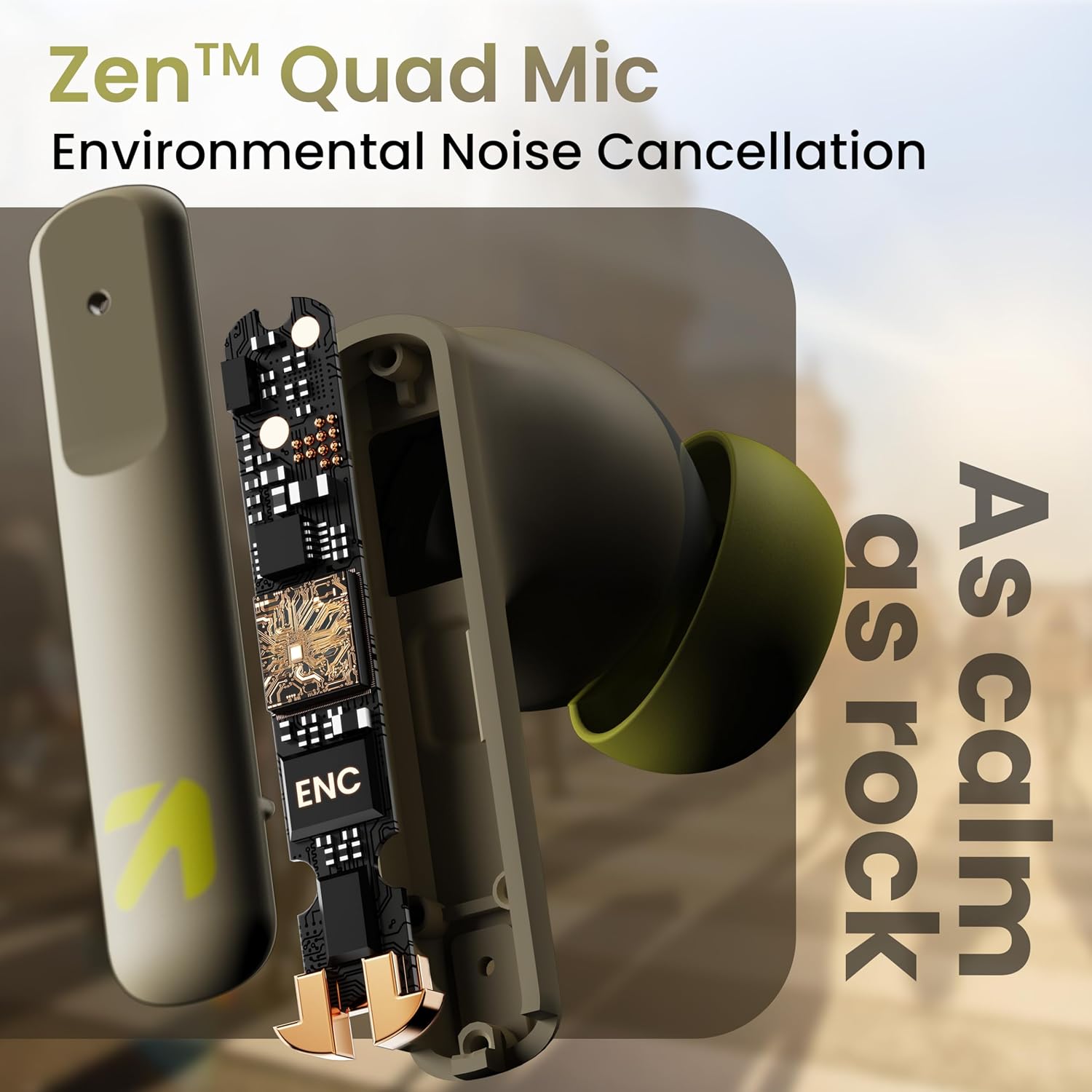
Gambar: Hiji internal view of a GOBOULT Z60 earbud, highlighting the Zen Quad Mic Environmental Noise Cancellation (ENC) technology for clear audio.

Image: A close-up of a GOBOULT Z60 earbud, emphasizing the 13mm BoomX Drivers responsible for rich bass and superior sound quality.
Ngecas
To charge your GOBOULT Z60 earbuds and charging case:
- Teundeun earbuds kana wadah ngecas. Pastikeun aranjeunna leres seated.
- Sambungkeun kabel ngecas USB Type-C ka port ngecas dina casing sareng ka sumber listrik.
- Indikator LED dina kasus bakal nunjukkeun status ngecas.
A full charge provides up to 60 hours of total playtime with the charging case. A quick 10-minute charge can provide up to 150 minutes of playtime.

Image: The GOBOULT Z60 charging case connected via a Type-C cable, illustrating the fast charging capability with indicators for 10 minutes charge yielding 150 minutes playtime.

Image: GOBOULT Z60 earbuds in their charging case, highlighting the impressive 60 hours of total playtime and 8 hours of playtime on a single earbud charge.
Setup: Pairing with Your Device
The GOBOULT Z60 earbuds utilize Bluetooth 5.3 for stable and efficient wireless connectivity.
- Papasangan awal:
- Buka wadah ngecas. Earbuds bakal otomatis asup kana mode papasangan.
- Dina alat anjeun (smartphone, tablet, laptop), aktipkeun Bluetooth.
- Milarian pikeun "GOBOULT Z60" in the list of available Bluetooth devices and select it to connect.
- Once connected, you will hear an audio prompt, and the LED indicator on the case will change.
- Papasangan deui: The earbuds will automatically connect to the last paired device when taken out of the case, if Bluetooth is enabled on the device.

Image: GOBOULT Z60 earbuds and their open charging case next to a smartphone, illustrating the Bluetooth 5.3 "Blink & Pair" feature for quick and stable connection.
Ngoperasikeun Earbuds Anjeun
Toél Kontrol
The GOBOULT Z60 earbuds feature intuitive touch controls. The specific functions are:
- Puteran musik:
- Ketok tunggal: Puter/Reureuh
- Double tap (Right earbud): Next track
- Double tap (Left earbud): Previous track
- Triple tap (Right earbud): Volume Up
- Triple tap (Left earbud): Volume Down
- Manajemén Telepon:
- Single tap: Answer/End call
- Long press: Reject call
- Asistén Sora: Long press (either earbud) to activate Google Assistant or Siri.
- Mode Kaulinan: Tap 4 times on either earbud to activate/deactivate Combat Gaming Mode (50ms low latency).

Image: A visual guide to the GOBOULT Z60's touch controls, detailing actions for music playback (play/pause, next/back, volume), call management, activating voice assistance, and toggling game/music mode.
Modeu kaulinan
Activate the 50ms low latency Combat Gaming Mode for a synchronized audio-visual experience during gaming. Tap 4 times on either earbud to switch between gaming and normal modes.

Image: GOBOULT Z60 earbuds in use with a smartphone displaying a racing game, emphasizing the "Combat Gaming Mode" with 50ms ultra-low latency, activated by tapping the earbud 4 times.
Asisten sora
Access your device's voice assistant (Google Assistant or Siri) by long-pressing either earbud. This allows for hands-free control of your device.

Image: GOBOULT Z60 earbuds and their charging case, illustrating how to activate voice assistance (Ok Google, Hey Siri) with a long press on an earbud.
Pangropéa
To ensure the longevity and optimal performance of your GOBOULT Z60 earbuds:
- beberesih: Rutin ngabersihkeun earbuds sareng wadah ngecas ku kaén anu lembut sareng garing. Ulah make bahan kimia kasar atawa bahan abrasive.
- Eartips: Remove and clean the eartips periodically. Ensure they are dry before reattaching.
- Tahan cai: The earbuds are IPX5 water-resistant, meaning they can withstand sweat and light rain. Do not submerge them in water or expose them to heavy downpours. Ensure the charging port is dry before charging.
- Panyimpenan: Nalika henteu dianggo, simpen earbuds dina wadah ngecasna pikeun ngajagi sareng tetep dicas.

Image: A GOBOULT Z60 earbud with water droplets on its surface, illustrating its IPX5 water resistance, suitable for protection against sweat, rain, and splashes.
Pamérésan masalah
If you encounter issues with your GOBOULT Z60 earbuds, refer to the following common solutions:
| Masalah | Solusi anu mungkin |
|---|---|
| Earbuds teu dipasangkeun |
|
| Teu aya sora ti hiji earbud |
|
| Earbuds teu ngecas |
|
| Volume lemah atawa kualitas sora goréng |
|
spésifikasi
| Fitur | Rincian |
|---|---|
| Ngaran modél | AirBass (Z60) |
| Téhnologi konektipitas | Nirkabel (Bluetooth) |
| Vérsi Bluetooth | 5.3 |
| Rentang Bluetooth | 10 Méter |
| Ukuran Supir Audio | 13 Milimeter |
| Tipe Supir Audio | Supir dinamis |
| Kahirupan Batré (Total) | Nepi ka 60 Jam (kalayan wadah ngecas) |
| Waktu Ngecas | Kurang leuwih 90 Menit |
| Ngecas Gancang | 10 mins charge = 150 mins playtime |
| Port ngecas | Tipe-C |
| Mikropon | 4 ENC Mics for Clear Calling |
| Latén Audio | 50 Milidetik (Modeu Kaulinan) |
| Tahan cai | IPX5 (Tahan Késang, Tahan Hujan, Tahan Cipratan) |
| Métode kontrol | Toél, Sora |
| Item Beurat | 41.5 gram |
| Negara asal | India |
Garansi sareng Rojongan
Your GOBOULT Z60 Wireless Earbuds come with a 1 Taun Garansi Produsén ti tanggal beuli.
For any support, warranty claims, or technical assistance, please refer to the contact information provided on your warranty card or visit the official GOBOULT support websitus.


