Bubuka
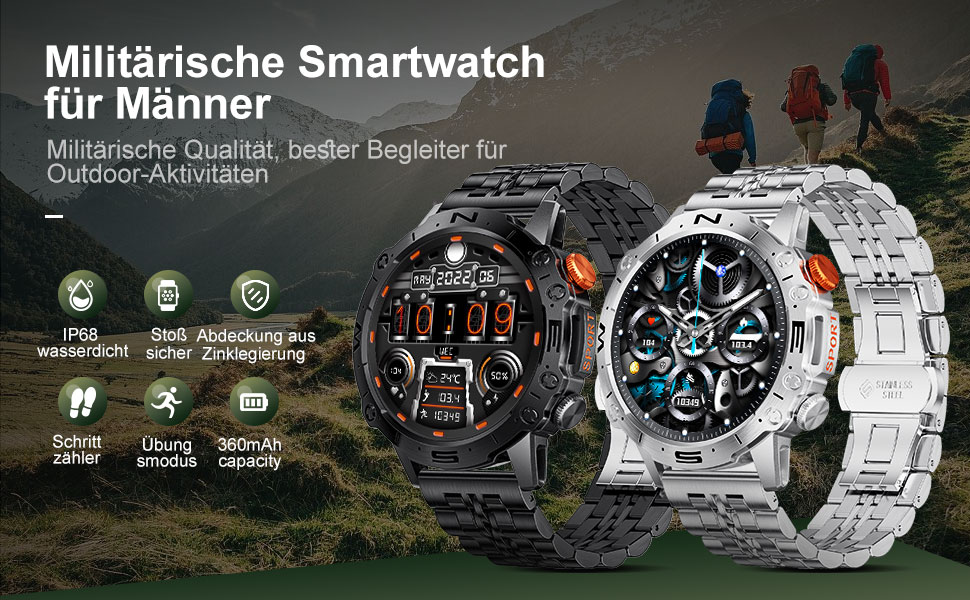
This manual provides detailed instructions for the setup, operation, and maintenance of your LIGE ST19-A Smartwatch. Designed for durability and functionality, this smartwatch features a 1.43-inch AMOLED touchscreen, Bluetooth calling, comprehensive health monitoring, and multiple sports modes. Please read this manual carefully to ensure proper use and to maximize your device's potential.
1. Setélan
1.1 Ngecas Smartwatch
Before first use, fully charge your LIGE ST19-A Smartwatch. Use the provided magnetic charging cable.
- Connect the magnetic end of the charging cable to the charging contacts on the back of the smartwatch.
- Sambungkeun tungtung kabel USB kana adaptor daya USB standar (disarankeun 5V/1A) atanapi port USB komputer.
- The watch display will indicate charging status. A full charge typically takes 2-3 hours.
- Once fully charged, the watch offers approximately 3-7 days of working time and up to 30 days of standby time.
1.2 Pamasangan Aplikasi sareng Pamasangan Alat
To unlock the full functionality of your smartwatch, you need to install the companion application on your smartphone and pair the devices.
- Aktipkeun Bluetooth: Dina telepon pinter anjeun, buka setélan sareng pastikeun Bluetooth diaktipkeun.
- Unduh Aplikasi: Scan the QR code provided in the watch's packaging or search for "FitCloudPro" in your smartphone's app store (Google Play Store for Android, Apple App Store for iOS). Alternatively, you can visit link ieu for download options.
- Pasang sareng Buka: Pasang aplikasi "FitCloudPro" sareng buka.
- Tambahkeun Alat: In the app, navigate to the "Device" or "Add Device" section. The app will search for available devices. Select "ST19-A" from the list to initiate pairing.
- Konfirmasi pasangan: Follow the on-screen prompts on both your phone and smartwatch to confirm the pairing request.
- Aktipkeun Bewara: Grant the necessary permissions for the app to display notifications from your phone on the smartwatch.
- Fungsi Telepon Bluetooth: After successful connection, you can enable or disable the call function on the watch. If the connection is successful, you can add/answer calls and play music.

2. Parentah Operasi
2.1 Napigasi Dasar
- Layar cabak: Gesek ka kenca, ka katuhu, ka luhur, atawa ka handap pikeun napigasi ngaliwatan ménu jeung fitur. Ketok pikeun milih.
- Kancing samping: The smartwatch features physical buttons for quick access to functions or to return to the home screen. Refer to the watch's interface for specific button assignments.
2.2 Bluetooth Nelepon
Sakali dipasangkeun sareng smartphone anjeun, anjeun tiasa nelepon sareng nampi telepon langsung tina smartwatch anjeun.
- Nelepon: Access the dialer on your watch or select a contact from your synced phonebook.
- Narima Telepon: When a call comes in, the watch will display the caller ID. You can answer or decline the call directly from your wrist.
- The watch includes a microphone and speaker for hands-free communication.

2.3 Bewara pinter
Receive instant notifications for incoming calls, text messages, and alerts from various social media applications directly on your wrist.
- Ensure notification permissions are granted in the "FitCloudPro" app for desired applications.
- Supported apps include Line, Messenger, Facebook, Twitter, Kakao Talk, Skype, and WhatsApp.

2.4 Nyukcruk Kaséhatan
The smartwatch provides 24-hour real-time monitoring of various health metrics.
- Ngawaskeun Laju haté: Ngalacak denyut jantung anjeun sacara terus-terusan sapanjang dinten.
- Pangukuran Tekanan Darah: Nyadiakeun bacaan tekanan darah.
- Ngawaskeun Oksigén Darah (SpO2): Ukur tingkat jenuh oksigén getih anjeun.
- Pangimeutan Saré: Nganalisis pola sare anjeun, kalebet sare tibra, sare hampang, sareng waktos hudang.
- Pedometer: Counts your daily steps, distance, and estimated calorie burn.
- Latihan napas: Latihan pernapasan anu dipandu pikeun ngabantosan ngatur setrés.
Note: Health data provided by this device is for reference only and should not be used for medical diagnosis or treatment. Consult a medical professional for health concerns.

2.5 Modeu Olahraga
The smartwatch supports over 100 sports modes to track your workout data accurately.
- Select your desired sport mode from the watch's menu to begin tracking.
- The watch records data such as duration, distance, calories burned, and heart rate during your activity.
- Examples of supported activities include walking, running, cycling, swimming, and various gym exercises.

2.6 Fitur tambahan
- Témbongkeun Cuaca: Get real-time weather updates directly on your watch face.
- Kontrol Musik: Control music playback on your smartphone (play, pause, skip tracks) from your wrist.
- Salawasna Dina Pintonan (AOD): The 1.43-inch AMOLED screen supports an Always On Display feature, providing continuous time visibility.
- Asisten Sora AI: Interact with your smartwatch using voice commands for various tasks.


3. Pangropéa
- beberesih: Lap layar sareng tali jam tangan sacara rutin nganggo lawon anu lemes sareng garing. Upami diperyogikeun, anggo sakedikamp lawon lajeng garing tuntas. Hindarkeun bahan kimia anu kasar atanapi bahan abrasive.
- Tahan cai: The LIGE ST19-A Smartwatch is IP68 rated, meaning it is resistant to dust and can withstand immersion in water up to 1.5 meters for 30 minutes. It is suitable for daily use, hand washing, and rain exposure. However, it is not recommended for hot showers, saunas, or diving, as steam and hot water can compromise the seals.
- Perawatan batré: Pikeun manjangkeun umur batréna, ulah sering-sering ngosongkeun batré jam tangan. Cas nalika batréna lemah. Simpen jam tangan di tempat anu tiis sareng garing nalika henteu dianggo kanggo waktos anu lami.
- Hindarkeun Suhu Ekstrim: Ulah ngalaan jam tangan kana suhu anu panas atanapi tiis pisan, sabab ieu tiasa ngaruksak batré sareng komponén internal.
4. Cara ngungkulan
| Masalah | Solusi anu mungkin |
|---|---|
| Arloji teu hurung | Pastikeun arloji dicas pinuh. Sambungkeun ka carjer sahenteuna 30 menit. |
| Teu tiasa dipasangkeun sareng smartphone |
|
| Taya béja nu katarima |
|
| Data kaséhatan teu akurat |
|
| hirup batré pondok |
|
5. Spésifikasi
| Fitur | Rincian |
|---|---|
| Ngaran modél | ST19-A |
| merek | LIGE |
| Ukuran layar | 1.43 inci |
| Tipe tampilan | Layar rampa AMOLED |
| Téhnologi konektipitas | Bluetooth |
| Kapasitas batré | 360 mAh (Litium-ion) |
| Waktos Pamakéan Biasa | 3-7 poé |
| Waktu sayaga | Pendek. 30 poé |
| Tahan cai | IP68 (Dustproof, Water resistant up to 1.5m for 30 min) |
| Fitur husus | Voice Call, Music Player, Heart Rate Monitor, Activity Tracker, Blood Pressure Monitor, Blood Oxygen Monitor, Sleep Monitor, GPS (integrated) |
| Kasaluyuan | Android, ios |
| Beurat | 290 g |
6. Garansi jeung Rojongan
LIGE prioritizes customer satisfaction. Your LIGE ST19-A Smartwatch comes with the following support:
- 30-Day Refund: If any issues arise during use, you are eligible for a refund within 30 days of purchase.
- Layanan Perbaikan 2 Taun: A 2-year repair service is provided after the sale for manufacturing defects.
- For any problems or inquiries, please contact LIGE customer support. Your satisfaction is important to us.


