Bubuka
This manual provides comprehensive instructions for setting up and operating your Tapo TP-Link C111 2K Indoor Security Camera. With crystal clear 2K HD video, the Tapo C111 allows you to monitor your home, family, and pets. Key features include person and motion detection with instant notifications, 2-way audio, night vision, and flexible storage options. This guide will help you maximize the functionality of your device for optimal home security and monitoring.
Naon dina Box
- Kaméra Tapo C111
- Adaptor DC DC
- Gancang Mimitian Guide
- Pamasangan screws
- Pamasangan Témplat
Guide Setup
1. Unduh Aplikasi Tapo
Download the Tapo app from the App Store (iOS) or Google Play Store (Android) to your smartphone. The app is essential for setting up and managing your camera.

2. Hurungkeun Kaméra Anjeun
Plug in your Tapo C111 camera using the provided DC Power Adapter. Wait for the LED indicator to blink red and green, indicating it's ready for setup.
3. Follow In-App Guide
Open the Tapo app and follow the on-screen instructions to connect your camera to your home Wi-Fi network. This process will guide you through pairing the camera with your account and configuring initial settings.
Camera Features & Operation
Hirup View & Kadali
Access the live feed of your camera through the Tapo app. From the live view screen, you can perform various actions such as taking snapshots, recording video clips, and using 2-way audio.

2K High Definition Video
The Tapo C111 captures video in crystal-clear 2K HD resolution (2304x1296 pixels), allowing you to see finer details in your monitoring area.

Motion Detection & Instant Notifications
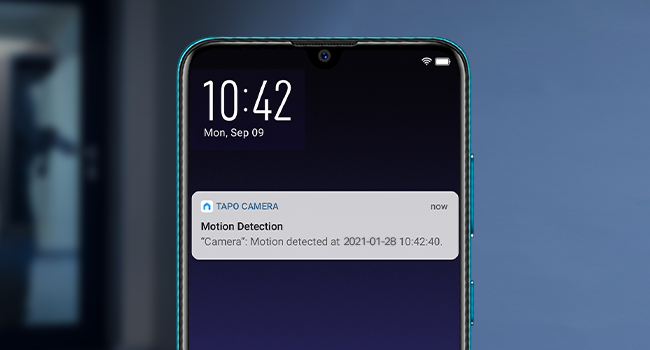
Receive instant push notifications on your phone when motion, a person, or baby crying is detected. This feature helps you stay informed about important activities without constant monitoring.

2-Way Audio with Built-In Siren
Communicate in real-time through the camera's built-in microphone and speaker. You can also activate the built-in siren and light alarm to deter unwanted visitors.
Visi Peuting
The integrated IR sensor provides clear night vision, allowing you to monitor your home even in low-light conditions.
Modeu Privasi
Enable Privacy Mode to temporarily disable streaming and recording functions, protecting your privacy when needed.
Playback & Download
Review dirékam footage from your microSD card or Tapo Care cloud storage. You can easily navigate through detected events and download clips directly to your device.
Pilihan Panyimpenan
Panyimpenan Lokal
The Tapo C111 supports continuous recording onto a microSD card (up to 512 GB, not included). Ensure compatibility by checking the TP-Link website FAQ before purchasing a microSD card.
Panyimpenan awan
Subscribe to Tapo Care for cloud storage, which offers 30-day video history and additional benefits like motion tracking, baby crying detection, and rich notifications.
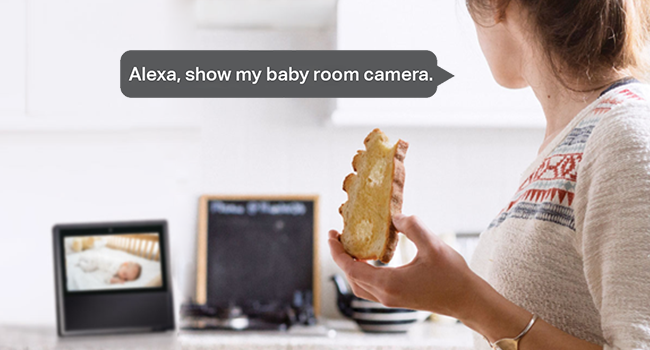
Pamaduan Smart Home
The Tapo C111 is fully compatible with Amazon Alexa and Google Assistant. Use simple voice commands to view your camera's live stream on compatible devices like Echo Show or Google Chrome Cast with a screen.
spésifikasi
| Fitur | Rincian |
|---|---|
| Nomer modél | C111 kap |
| Pamakéan jero rohangan / outdoor | jero rohangan |
| Resolusi Capture Video | 1296p (2K HD) |
| Téhnologi konektipitas | Nirkabel (Wi-Fi) |
| Protokol konektipitas | Wifi |
| Tipe Controller | Amazon Alexa, Asisten Google |
| Fitur husus | 2-Way Audio, HD Resolution, Motion Sensor, Night Vision |
| Sumber Daya | Kabel Listrik |
| Panyimpenan Lokal | Up to 512 GB microSD card (not included) |
| Diménsi | 2.66 x 2.15 x 3.89 inci |
| Item Beurat | 9.6 ons |
Pamérésan masalah
- Masalah konektipitas: Ensure your camera is within range of your 2.4GHz Wi-Fi network and has a strong signal.
- MicroSD Card Not Detected: Verify the microSD card is compatible with your Tapo C111 camera by checking the TP-Link website FAQ. Ensure it is inserted correctly.
- Teu Aya Bewara: Check your Tapo app notification settings and your phone's system notification settings to ensure they are enabled for the Tapo app.
- Kualitas pidéo goréng: Ensure your Wi-Fi connection is stable and strong. Adjust video quality settings in the Tapo app if necessary.
Garansi & Rojongan
For warranty information, technical support, or further assistance, please visit the official TP-Link website or contact their customer support. You can find contact details and FAQs on the TP-Link support page.
Dukungan TP-Link:
- Telepon: (866) 225-8139
- Websitus: myproducts.tp-link.com/us
- Surélék: support.USA@tp-link.com


