1. Bubuka
This user manual provides comprehensive instructions for the Symcode Wireless Bluetooth Barcode Scanner, Model USA-6709DA-Green. This device is designed for accurate and efficient data capture, supporting various 1D and 2D barcode types. It offers versatile connectivity options including Bluetooth, 2.4G wireless, and USB wired connections, making it suitable for a wide range of business applications.

Image 1: Symcode Wireless Bluetooth Barcode Scanner and accessories.
2. Eusi Paket
Punten parios yén sadaya barang aya dina pakét anjeun:
- Symcode Barcode Scanner (Model: USA-6706DA-Green)
- Kabel Ngecas USB
- 2.4G USB Dongle
- Manual pamaké

Image 2: Components included with the Symcode Barcode Scanner.
3. Fitur Produk
- Téknologi Scanning Canggih: CMOS optical imaging for quick and precise scanning of 1D and 2D barcodes (QR, DataMatrix, PDF417, Aztec, Hanxin, etc.) even on damaged or poorly printed labels.
- Modeu Konéktivitas Tilu Kali: Supports Bluetooth, 2.4G wireless, and USB wired connections for maximum flexibility.
- Jangkauan Wireless diperpanjang: Up to 200m in open environments and 30m indoors with the 2.4G USB dongle.
- Hirup batré anu panjang: 2000mAh battery provides up to 30 hours of continuous scanning, with a full recharge in approximately 2 hours.
- Konfigurasi serbaguna: Features include hands-free intelligent sensor mode, trigger scan mode, vibration/buzzer settings, data storage/instant upload modes, multiple keyboard languages, and customizable prefix/suffix options.
- Daya tahan unggul: Constructed with strong ABS material, designed to withstand drops of up to 2.4 meters (8 ft) and features an integrated dustproof housing (IP67 rated).
4. Setup jeung Connection
The scanner offers three primary connection methods:
4.1. 2.4G Wireless Connection
- Colokkeun dongle USB 2.4G kana port USB anu sayogi dina komputer anjeun.
- Turn on the scanner. It will automatically pair with the dongle.
- A successful connection is indicated by a specific beep sound and LED indicator.
4.2. Sambungan Bluetooth
- Ensure your device (smartphone, tablet, computer) has Bluetooth enabled.
- Scan the Bluetooth pairing barcode (usually found in the user manual or on a setup card).
- On your device, search for Bluetooth devices and select "Symcode Scanner" (or similar name).
- Konfirmasi papasangan.
4.3. Sambungan Kabel USB
- Sambungkeun scanner ka komputer Anjeun nganggo kabel USB nu disadiakeun.
- Pamiarsa bakal fungsina salaku alat kabel sareng ogé ngecas sacara simultan.

Image 3: Connectivity options for the Symcode Barcode Scanner.

Image 4: Operating system compatibility.
5. Parentah Operasi
5.1. Operasi Pamindaian Dasar
To scan a barcode, point the scanner's window at the barcode and press the trigger button. A successful scan will be indicated by a beep and/or vibration, and the data will be transmitted to your connected device.
5.2. Modeu Unggah Data
Pamindai ieu ngadukung dua mode unggah data:
- Modeu Unggah Instan: Data is transmitted to the connected device immediately after each scan. This is the default mode.
- Modeu Panyimpenan Offline: Scanned data is stored in the scanner's internal memory (up to 10,000 codes). To upload stored data, scan the specific setup code for 'Upload Data' found in your detailed user manual.

Image 5: Instant Upload Mode vs. Offline Storage Mode.
5.3. Kamampuh Dekoding
The scanner can decode a wide array of barcode types, including:
- Kodeu 1D: UPC/EAN, Code 39, Code 128, Codabar, Interleaved 2 of 5, Code 93, MSI, Code 11, RSS variants, etc.
- Kodeu 2D: QR Code, Data Matrix, PDF417, Aztec, Hanxin.
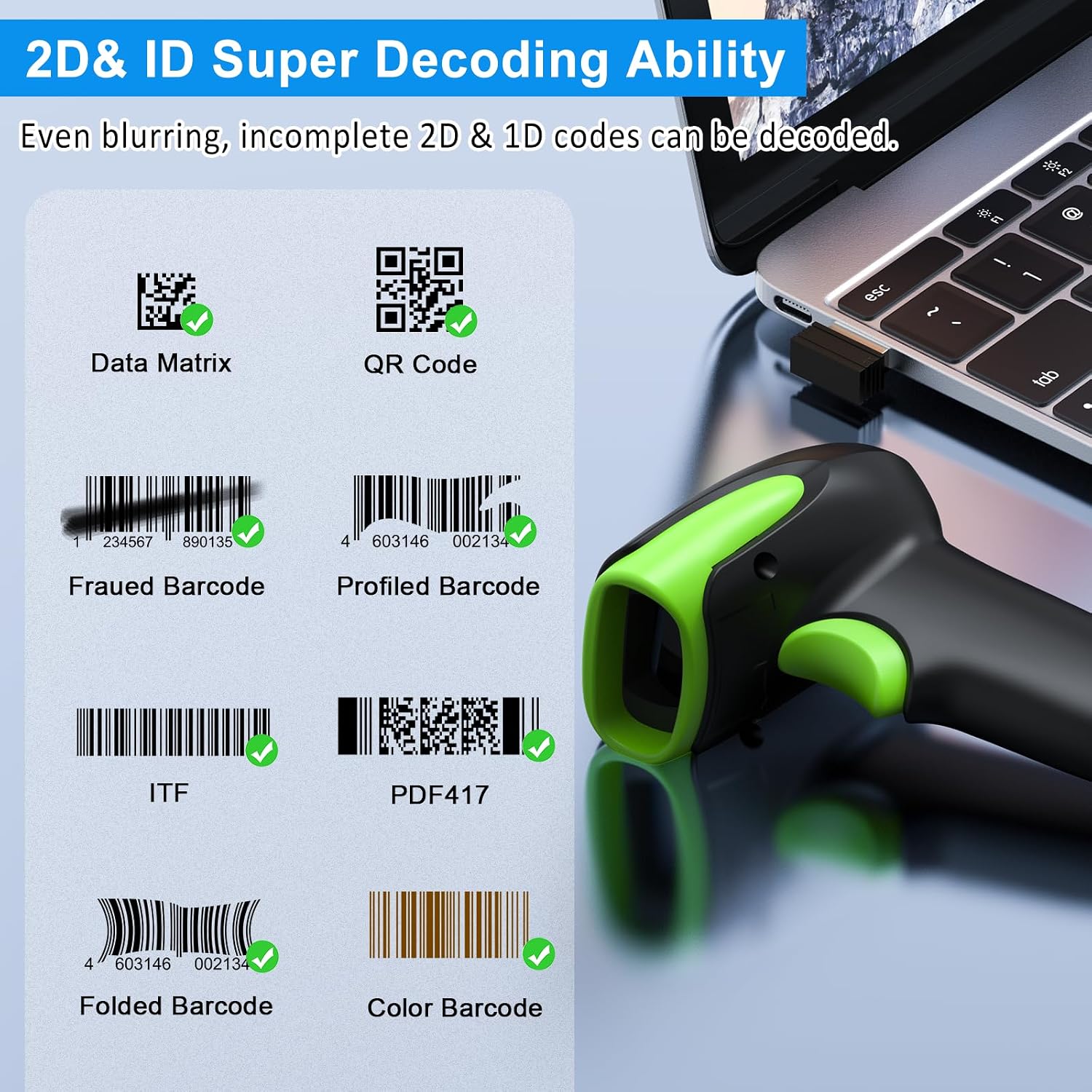
Gambar 6: Examples of decodable 1D and 2D barcodes.
6. Pangropéa
To ensure optimal performance and longevity of your scanner:
- beberesih: Anggo lawon anu lemes sareng garing pikeun ngabersihkeun bagian luar scanner. Pikeun jandela scanning, anggo lawon pembersih lénsa pikeun nyingkahan goresan. Entong nganggo pembersih atanapi pangleyur anu abrasif.
- Ngecas: Recharge the battery using the provided USB cable. Avoid overcharging or completely draining the battery for extended periods.
- Panyimpenan: Simpen alat panyeken di tempat anu tiis sareng garing jauh tina sinar panonpoé langsung sareng suhu anu ekstrim.
- Daya tahan: While rugged, avoid intentional drops or impacts. The scanner is designed to withstand accidental drops up to 2.4 meters.

Image 7: The scanner's rugged design and drop resistance.
7. Cara ngungkulan
Upami anjeun ngalaman masalah sareng scanner anjeun, mangga tingal masalah sareng solusi umum ieu:
- Scanner teu nyambung:
- Pastikeun scanner tos dicas.
- Verify the correct connection mode (Bluetooth, 2.4G, USB) is selected and properly set up.
- For 2.4G, ensure the dongle is securely plugged in. For Bluetooth, ensure your device's Bluetooth is on and the scanner is paired.
- Cobi hurungkeun deui heula pamindai sareng alat host.
- Scanner henteu maca barkod:
- Pastikeun barkod henteu ruksak teuing, noda, atanapi citakna goréng.
- Pariksa jarak sareng sudut pamindai kana barkod.
- Verify that the barcode type is supported by the scanner.
- Bersihkeun jandela scan upami kotor.
- Data not transmitting:
- Confirm the scanner is successfully connected to your device.
- Check if the scanner is in 'Offline Storage Mode' and needs to be manually uploaded.
- Ensure the application on your device is ready to receive input.
For further assistance, please refer to the comprehensive troubleshooting section in the full user manual or contact Symcode customer support.
8. Spésifikasi
| Fitur | Spésifikasi |
|---|---|
| Nomer modél | USA-6709DA-Green |
| Masukan Voltage | DC5V±0.25v |
| Current (Work/Instantaneous) | 25 mah / 95 mah |
| Decoding Speed | 100 kali / detik |
| Wireless Range (2.4G) | Up to 200m (open air), 30m (indoors) |
| Waktu Ngecas | Kira-kira. 2.5 jam |
| Kahirupan batré | Up to 30 Hours (continuous scanning) |
| Jenis Batré | 1 batré Litium Polimér (kaasup) |
| Konektipitas | Bluetooth 6.1, Wireless 2.4G, USB Cable |
| Alat nu cocog | Desktop, Laptop, Smartphone, POS systems |
| Sistem Operasi | Windows 11/10/8/7/XP, Mac OS, iOS, Android, Linux |
| Item Beurat | 10.2 ons |
| Ukuran Paket | 6.89 x 4.49 x 3.31 inci |

Image 8: Wireless transmission range.
9. Garansi jeung Rojongan
This Symcode product is manufactured by USA Scanner. For any product inquiries, technical support, or warranty claims, please contact USA Scanner directly. Refer to the contact information provided in your product packaging or visit the official Symcode brand store on Amazon for support resources.
Nganjang ka Symcode Store pikeun inpo nu leuwih lengkep.


