1. Produk Langkungview
The AILRINNI Smart Lock is a versatile 4-in-1 keyless entry electronic door handle designed for enhanced security and convenience in homes, offices, bedrooms, and apartments. It offers multiple unlocking methods including fingerprint recognition, digital keypad codes, Bluetooth via the Tuya application, and traditional mechanical keys for emergency access.

2. Komponén Kaasup
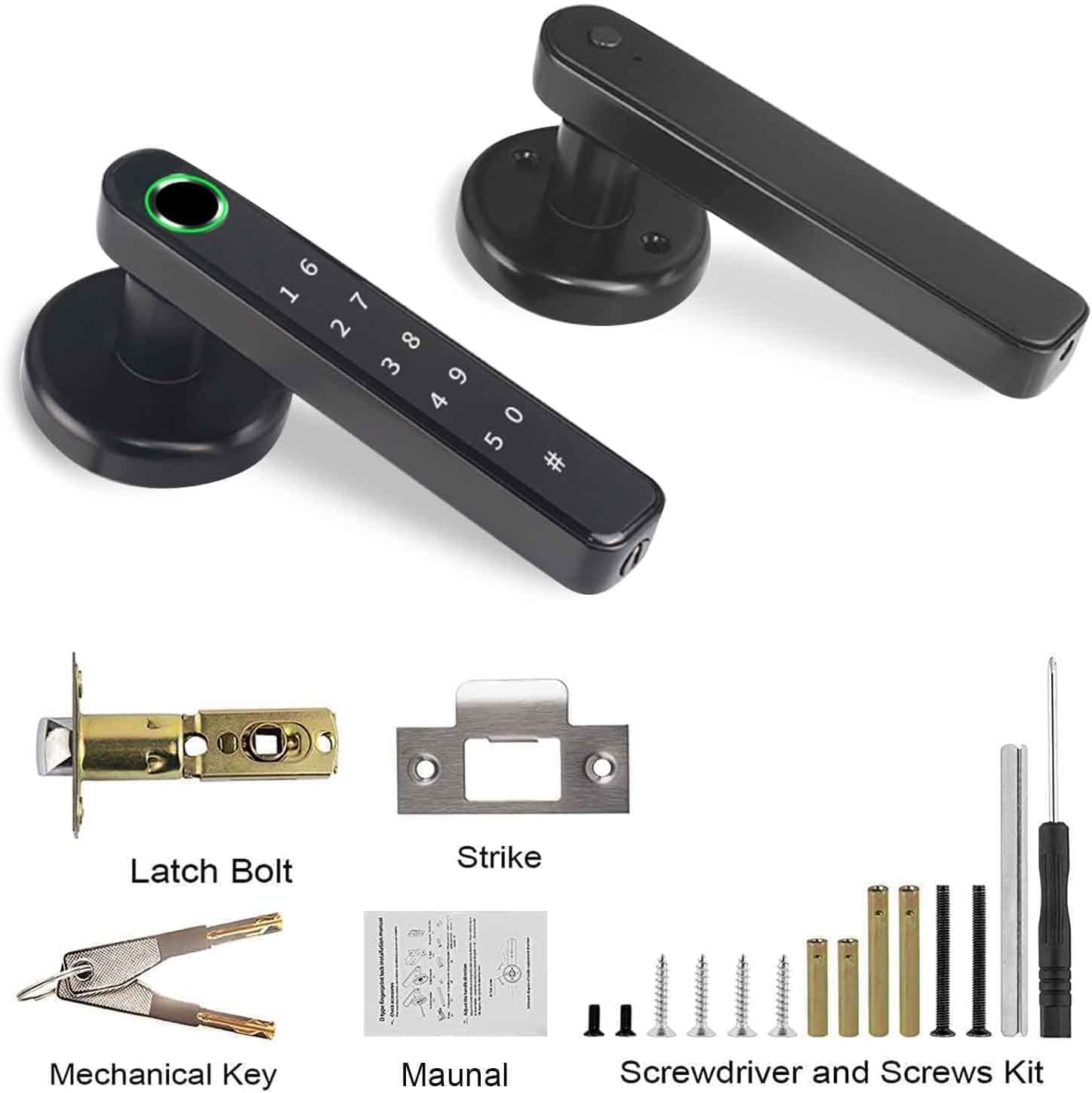
Please verify that all the following components are present in your package before beginning installation:
- Smart Lock Handle (Exterior and Interior)
- Kancing Bolt
- Piring neunggeul
- Konci mékanis (2)
- Installation Hardware (Screws, Spindles)
- Obeng
- Manual pangguna (dokumén ieu)
3. Spésifikasi
| Fitur | Rincian |
|---|---|
| merek | AILRINNI |
| Nomer modél | Konci pinter |
| Warna | Hideung |
| Bahan | Stainless Steel, Alloy Steel |
| Dimensi produk | 25 x 18 x 1.4 cm |
| Item Beurat | 920 gram |
| Tipe Konci | Biometric, Keypad |
| Fitur husus | Keyless, Fingerprint, Easy to Install, Sturdy, Auto-Lock |
| Sumber Daya | 4 x AAA Alkaline Batteries (Not Included) |

4. Setup jeung Instalasi
The AILRINNI Smart Lock is designed for straightforward installation, typically taking around 20 minutes with basic tools. It is compatible with most standard left and right wooden doors, as well as metal doors, provided they meet the specified dimensions.
4.1 Sarat Panto
- Ketebalan Panto: 1.49 - 1.88 inci (38 - 48 mm)
- Diaméter liang: 2-1/8 inci (54 mm)
4.2 Pakakas Diperlukeun
- Obeng (kaasup)
- Drill bit (if new holes are required)
4.3 Léngkah-léngkah Instalasi
- Nyiapkeun lawang: Ensure your door meets the thickness and hole diameter requirements. If replacing an existing lock, remove the old hardware.
- Pasang Latch Bolt: Insert the latch bolt into the door edge, ensuring the bevel faces the door frame. Secure it with screws.
- Pasang Gagang Luar: Place the exterior handle assembly through the door, aligning the spindle with the latch bolt.
- Pasang Gagang Interior: Connect the interior handle assembly to the exterior handle, ensuring all cables are properly routed and connected. Secure with mounting screws.
- Pasang Batré: Open the battery cover on the interior handle and insert 4 AAA alkaline batteries (not included), observing polarity.
- Operasi tés: Before closing the door, test the handle's mechanical operation and ensure the latch retracts smoothly.
- Pasang Strike Plate: Secure the strike plate to the door frame, aligning it with the latch bolt.
5. Parentah Operasi
The AILRINNI Smart Lock offers multiple convenient ways to unlock your door.
5.1 Métode Muka konci
5.1.1 Muka konci sidik
The biometric fingerprint sensor provides quick and secure access. To register fingerprints, follow the instructions within the Tuya application. The lock supports up to 100 fingerprints.
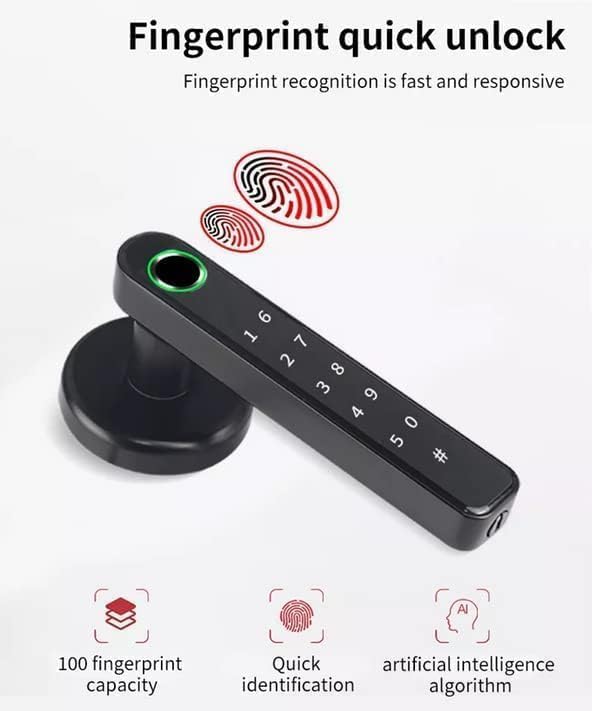
Image: The smart lock's fingerprint sensor in action, illustrating its quick identification capability. To unlock: Place your registered finger firmly on the fingerprint sensor. The lock will unlock if the fingerprint is recognized.
5.1.2 Digital Keypad Unlocking
You can set and use digital passcodes for entry. The keypad features an anti-peep function, allowing you to enter random digits before or after your actual code to prevent others from guessing your password.

Image: The digital keypad, demonstrating the anti-peep feature where fake digits can be entered before and after the correct password. To unlock: Enter your registered passcode followed by the '#' key. You may include random digits before and after your actual code for privacy.
5.1.3 Bluetooth (Tuya App) Unlocking
Connect the smart lock to the Tuya application on your smartphone via Bluetooth. This allows you to unlock the door remotely when within Bluetooth range, manage users, set temporary passwords, and view real-time unlocking records.

Gambar: Leuwihview of unlocking options including mechanical key, USB charging for emergency power, fingerprint, and smartphone app control. To unlock: Open the Tuya app, ensure Bluetooth is enabled, and tap the unlock icon for your smart lock.
5.1.4 Muka konci konci mékanis
In case of battery depletion or electronic malfunction, the smart lock can be opened using the provided mechanical keys. The keyhole is discreetly located on the handle.
To unlock: Insert the mechanical key into the keyhole and turn to unlock the door.
5.2 Passage Mode and Auto-Lock
- Konci Otomatis: The lock is designed to automatically lock after a set period (configurable via the app) to ensure security, preventing you from forgetting to lock the door.
- Mode Passage: This mode allows the door to remain unlocked for continuous access, useful for periods of high traffic. This can be enabled or disabled via the Tuya app.
6. Pangropéa
Proper maintenance ensures the longevity and optimal performance of your AILRINNI Smart Lock.
6.1 Ngagantian batré
The lock operates on 4 AAA alkaline batteries. When the battery level is low, the lock will provide a low voltage reminder. Replace all four batteries simultaneously to ensure consistent power.
- Open the battery compartment on the interior handle.
- Leupaskeun batré heubeul.
- Insert new AAA alkaline batteries, ensuring correct polarity.
- Tutup kompartemen batré anu aman.
6.2 beberesih
Regularly clean the exterior of the lock, especially the fingerprint sensor and keypad, with a soft, dry cloth. Avoid using abrasive cleaners or solvents that could damage the finish or electronic components.
7. Cara ngungkulan
If you encounter issues with your AILRINNI Smart Lock, refer to the following common solutions:
- Konci Teu Ngabales: Check battery levels. If batteries are depleted, use the mechanical key or connect a power bank to the USB interface for emergency power.
- Sidik ramo Teu Dipikawanoh: Ensure your finger is clean and dry. Try re-registering your fingerprint through the app if the issue persists.
- Keypad Teu Ngabales: Ensure the keypad is clean and dry. Re-enter the code carefully.
- Masalah Konektipitas Aplikasi: Pastikeun Bluetooth diaktipkeun dina telepon anjeun sareng anjeun aya dina jangkauan konci. Pareuman terus hurungkeun deui aplikasi atanapi telepon anjeun upami diperyogikeun.
- Abnormal Alarm: The lock may trigger an alarm for abnormal activity (e.g., forced entry attempts, multiple incorrect entries). Check the app for real-time records to identify the cause.
- Masalah mékanis: If the handle or latch mechanism feels stiff or is not operating correctly, ensure all installation screws are properly tightened and components are aligned. Do not force the handle.
8. Garansi jeung Rojongan
For detailed warranty information, including coverage period and terms, please refer to the official AILRINNI website or the warranty card included with your product. For technical support, troubleshooting assistance beyond this manual, or to inquire about replacement parts, please contact AILRINNI customer service through their official channels.
Punten tahan bukti pameseran anjeun pikeun klaim garansi.


