Bubuka
This manual provides comprehensive instructions for the installation, usage, and maintenance of your PITAKA MagEZ Case 3 for Samsung Galaxy Z Flip 5. Designed with advanced 600D aramid fiber, this case offers robust protection while maintaining a slim and lightweight profile, enhancing your device's functionality with MagSafe compatibility.
Fitur konci
- Premium 600D Aramid Fiber: Crafted from military-grade aramid fiber, this case is exceptionally strong, durable, and non-conducting. Its textured surface provides an enhanced grip and comfortable feel.
- Desain Ultra-Ipis & Enteng: Weighing approximately 0.97 oz (27.5g) and measuring just 0.04 inches (1mm) in thickness, the case adds minimal bulk to your Samsung Galaxy Z Flip 5, preserving its original form factor.
- Kasaluyuan MagSafe: Integrated metal strips allow for seamless attachment to PITAKA MagSafe wireless chargers and accessories, such as the MagEZ Car Mount Pro and MagEZ Slider, for a stable and efficient charging experience.
- Wireless Charging & PowerShare Friendly: The case supports wireless charging and PowerShare functionality without interference. Note: Not compatible with Apple MagSafe Charger due to differences in Wireless Power Consortium standards.
- Perlindungan ditingkatkeun: Features a raised metal ring around the camera lenses for added protection and precise cutouts for easy access to all buttons and ports.
- Stylish Fusion Weaving: The Overture design incorporates exotic-looking stripes with a classic black and grey twill, offering a unique and minimalist aesthetic.

Image: The case highlights its premium aramid fiber material, emphasizing comfort, non-slip properties, and scratch resistance.

Image: A side-by-side comparison illustrating the minimal thickness and weight added by the PITAKA case to the phone.
Setup sareng Instalasi
The PITAKA MagEZ Case 3 is designed for easy installation and removal. Follow these steps to properly secure your Samsung Galaxy Z Flip 5 within the case.
- Pamasangan:
- Ensure your phone is clean and free of dust or debris.
- Align the top half of the case with the top section of your Z Flip 5, ensuring the camera cutouts match. Gently press the phone into the case until it snaps securely into place (indicated by arrow A in the diagram).
- Repeat the process for the bottom half of the case, aligning it with the bottom section of your Z Flip 5 and pressing firmly (indicated by arrow B in the diagram).
- Verify that both halves of the case are flush with the phone and all edges are covered.
- Ngahapus:
- To remove the case, gently push the phone out from the top corners of the case (indicated by arrow A in the diagram).
- Then, carefully peel the bottom half of the case away from the phone (indicated by arrow B in the diagram).
- Avoid excessive force to prevent damage to the case or phone.

Image: Diagrams illustrating the step-by-step process for installing and removing the PITAKA MagEZ Case 3 on the Samsung Galaxy Z Flip 5.
Parentah Operasi
The MagEZ Case 3 enhances your Samsung Galaxy Z Flip 5 experience, particularly with its MagSafe compatibility and wireless charging features.
Kasaluyuan MagSafe
The integrated metal strips within the case allow for secure attachment to PITAKA MagSafe-compatible accessories. Simply align your cased phone with the MagSafe accessory, and the magnets will ensure a firm connection.

Image: The PITAKA MagEZ Case 3 seamlessly integrates with PITAKA MagEZ Slider 2 for desktop charging and MagEZ Car Mount Pro for in-car use, demonstrating secure magnetic attachment.
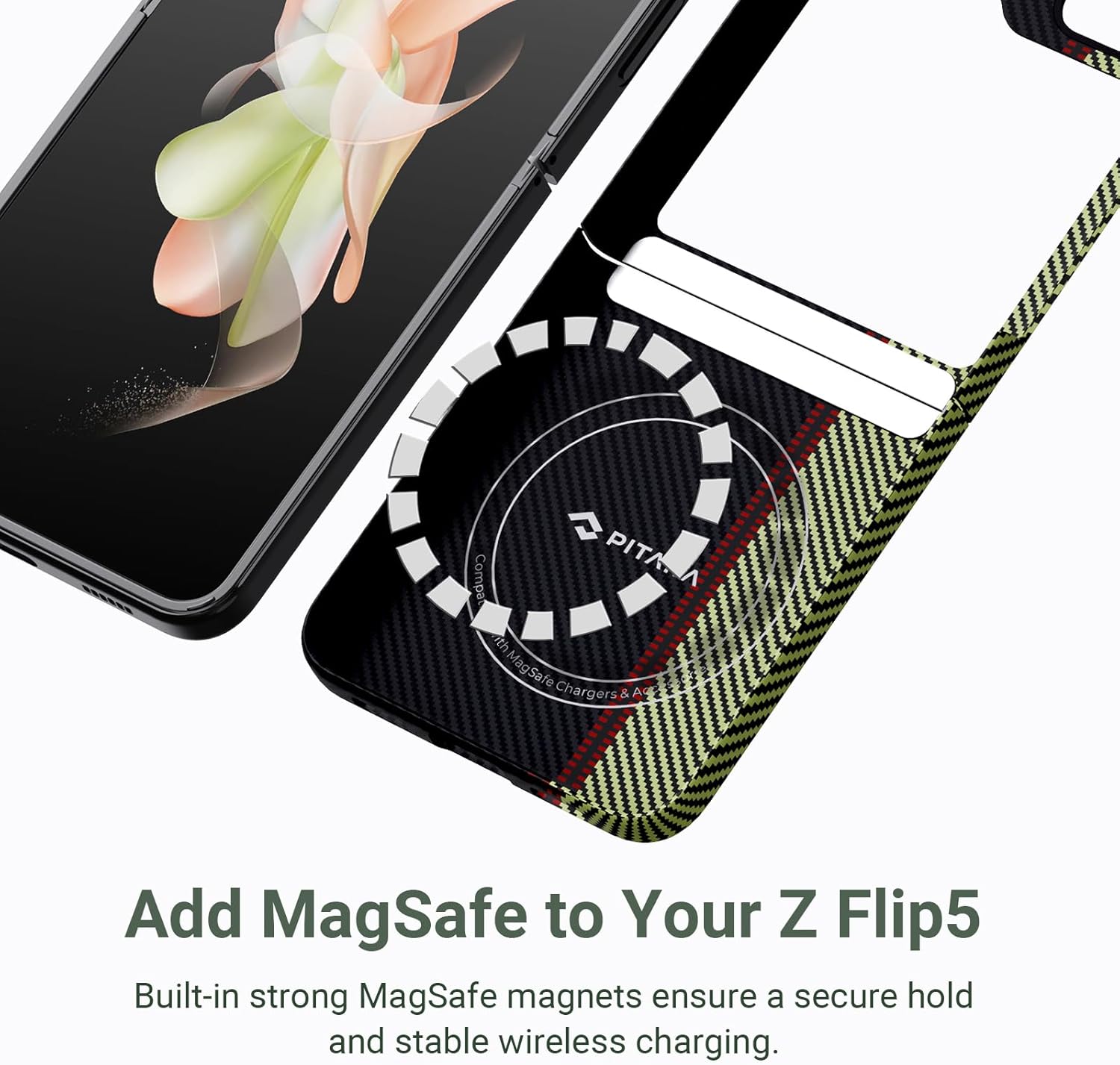
Image: An illustration showing the internal structure of the case with its built-in MagSafe compatible magnetic ring, designed for secure attachment and stable wireless charging.
Ngecas nirkabel
The case is designed to be fully compatible with standard Qi wireless charging pads and the PowerShare feature of your Samsung Galaxy Z Flip 5. Place your cased phone on a compatible wireless charger to initiate charging.

Image: The Samsung Galaxy Z Flip 5, protected by the PITAKA MagEZ Case 3, is shown wirelessly charging on a compatible charging pad, demonstrating its wireless charging friendly design.
Pangropéa
To ensure the longevity and appearance of your PITAKA MagEZ Case 3, follow these simple maintenance guidelines:
- beberesih: Lap wadahna sacara rutin nganggo kaén anu lemes,amp cloth to remove dust and fingerprints. Avoid using harsh chemicals, abrasive cleaners, or solvents, as these can damage the aramid fiber material and its coating.
- Hindarkeun Suhu Ekstrim: Do not expose the case to extreme heat or cold, as this may affect the material's integrity and fit.
- Panyimpenan: Upami teu dianggo, simpen wadahna di tempat anu tiis sareng garing, sareng jauh tina sinar panonpoé langsung.
- Mariksa sacara teratur: Periodically check the case for any signs of wear or damage. While highly durable, extreme impacts can cause damage.
Pamérésan masalah
This section addresses common questions and potential issues you might encounter with your MagEZ Case 3.
- Issue: Case does not fit properly or pops off.
- Solusi: Ensure both halves of the case are correctly aligned and firmly pressed onto the phone during installation. Some users have reported issues with certain screen protectors interfering with the case fit. If you are using a screen protector, ensure it is compatible with the case's precise cutouts. If the issue persists, try removing and re-installing the case carefully following the installation steps.
- Issue: Wireless charging is not working.
- Solusi:
- Ensure your wireless charger is Qi-compatible and properly powered.
- Verify that the phone is correctly centered on the charging pad.
- Confirm that you are not using an Apple MagSafe Charger, as the case is not compatible with it.
- Remove any foreign objects between the phone and the charging pad.
- Issue: MagSafe accessories do not attach securely.
- Solusi: Ensure you are using genuine PITAKA MagSafe-compatible accessories. Verify that the accessory is clean and free of debris that might hinder magnetic connection. Realign the phone on the accessory to ensure proper magnetic engagement.
- Issue: Case feels slippery.
- Solusi: The aramid fiber has a unique texture designed for grip. Over time, the texture may adapt to your hand. Ensure the case surface is clean, as oils or residues can reduce grip. If you prefer a different texture, consider other PITAKA case options.
spésifikasi
| Fitur | Rincian |
|---|---|
| merek | pitaka |
| Nomer modél | ZF5CM0US-ABDAABAA |
| Model Telepon cocog | Samsung Galaxy Z Flip5 |
| Bahan | 600D Aramid Fiber |
| Warna | Overture |
| Item Beurat | 0.97 oz (approx. 27.5g) |
| Kandelna | 0.04 inci (kira-kira 1mm) |
| Dimensi produk | 4.53 x 0.98 x 7.48 inci |
| Fitur husus | MagSafe Compatible, Slim Fit, Ultra thin, Stylish, Camera Protection |
| Rojongan ngecas nirkabel | Yes (Qi-compatible, PowerShare; Not compatible with Apple MagSafe Charger) |
Garansi sareng Rojongan
For detailed warranty information regarding your PITAKA MagEZ Case 3, please refer to the official PITAKA website or contact their customer support directly. PITAKA products are designed for durability and performance, and the manufacturer stands behind their quality.
For further assistance, technical support, or inquiries, please visit the official PITAKA Store on Amazon atawa merek resmi maranéhanana websitus.


