1. Bubuka
Thank you for choosing the De'Longhi Rivelia EXAM440.35.BG Automatic Coffee Machine. This appliance is designed to provide a premium coffee experience with ease of use and customizable options. Please read this manual carefully before using the appliance to ensure proper operation, maintenance, and safety.
2. Parentah Kasalametan penting
Salawasna turutan pancegahan kaamanan dasar nalika nganggo alat-alat listrik pikeun ngirangan résiko kahuruan, kejutan listrik, sareng tatu pikeun jalma.
- Baca sadaya parentah sateuacan dianggo.
- Ulah noél surfaces panas. Paké handles atanapi knobs.
- Pikeun nangtayungan tina seuneu, kejut listrik, jeung tatu pribadi, ulah neuleumkeun ari, colokan, atawa alat dina cai atawa cairan séjén.
- Pengawasan anu ketat diperyogikeun nalika alat naon waé dianggo ku atanapi caket barudak.
- Cabut colokan tina stop kontak nalika henteu dianggo sareng sateuacan beberesih. Ngidinan pikeun niiskeun sateuacan dipasang atanapi nyabut bagian, sareng sateuacan ngabersihkeun alat.
- Entong ngoperasikeun alat naon waé nganggo kabel atanapi colokan anu rusak atanapi saatos alatna teu tiasa dianggo, atanapi parantos ruksak dina cara naon waé. Balikkeun alat ka fasilitas layanan otorisasi anu pangcaketna pikeun pamariksaan, perbaikan, atanapi pangaturan.
- Pamakéan kantétan aksésori anu henteu disarankeun ku produsén alat tiasa nyababkeun kahuruan, kejut listrik, atanapi tatu pribadi.
- Ulah make di luar.
- Entong ngantepkeun kabel ngagantung dina ujung méja atanapi konter, atanapi nyabak permukaan anu panas.
- Ulah nempatkeun dina atawa deukeut gas panas atawa burner listrik, atawa dina oven dipanaskeun.
- Sok pasangkeun heula colokan kana alat, teras colokkeun kabel kana stop kontak témbok. Pikeun megatkeun sambungan, balikkeun sagala kadali kana "off", teras cabut colokan tina stop kontak témbok.
- Ulah make alat pikeun lian ti pamakéan dimaksudkeun.
- Anggo pisan ati-ati nalika miceun uap panas.
3. Produk Langkungview
The De'Longhi Rivelia EXAM440.35.BG is a compact automatic coffee machine featuring a 3.5-inch color touchscreen, a manual milk frother, and the innovative Bean Switch System for easily changing coffee bean varieties.

Gambar 3.1: Hareupeun view of the De'Longhi Rivelia EXAM440.35.BG coffee machine in Sand Beige.
Komponén konci:
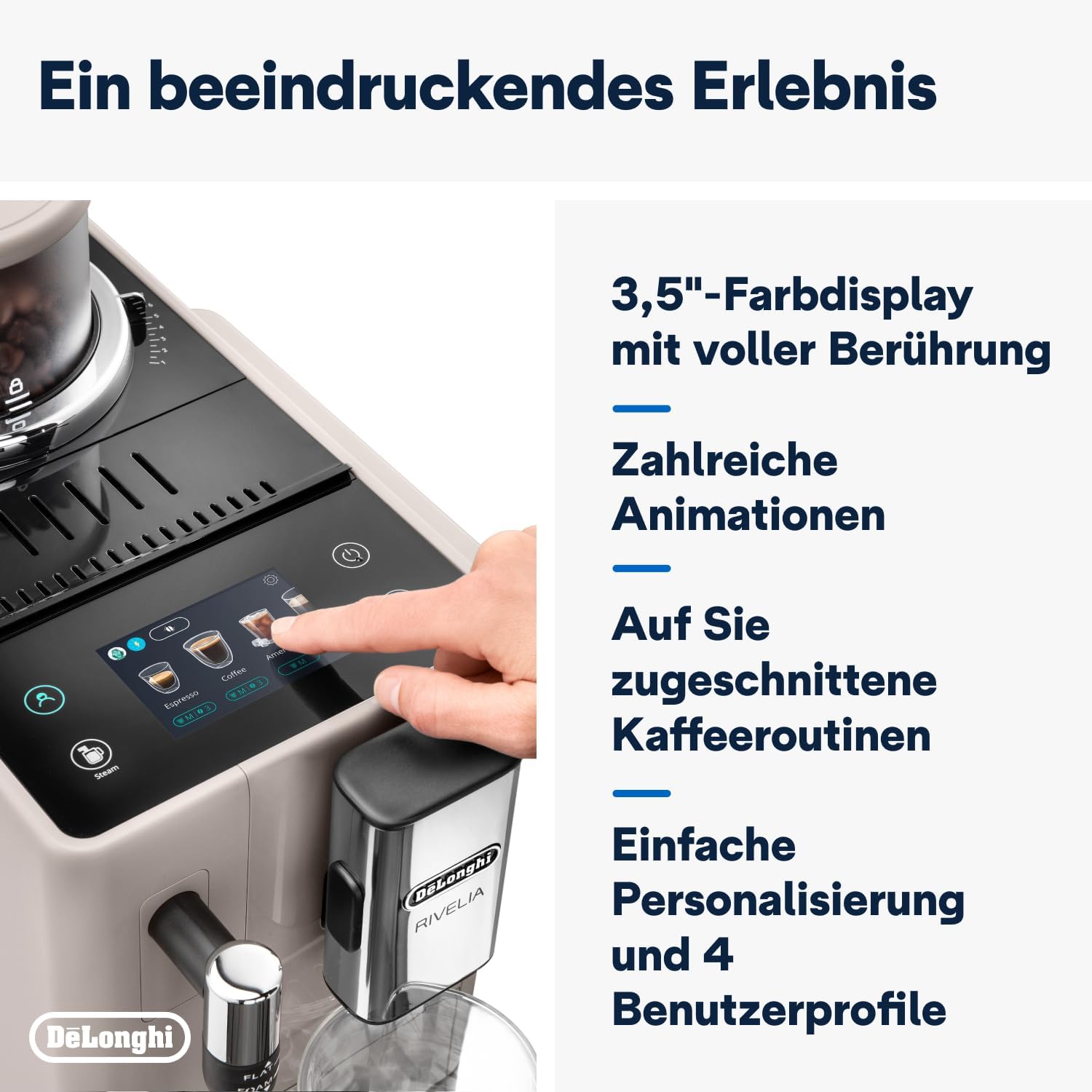
- 3.5" Full-Touch Color Display: For intuitive control and personalized coffee routines.
- Bean Switch System: Two interchangeable 250g bean containers for different coffee varieties.
- Pembuat Susu Manual: For preparing creamy milk foam for lattes and cappuccinos.
- Tangki cai: Removable, kapasitas 1.4 liter.
- Baki Tetes sareng Wadah Tanah: For collecting excess water and used coffee grounds.
- Seblak Kopi: Jangkungna anu tiasa disaluyukeun pikeun rupa-rupa ukuran cangkir.

Gambar 3.2: The De'Longhi Rivelia series, showcasing various color options including Sand Beige.
4. Setup Awal
4.1 Ngabongkar sareng Nempatkeun
- Taliti piceun mesin tina bungkusan na.
- Tempatkeun mesin dina permukaan anu stabil, datar, jauh tina cipratan cai sareng sumber panas.
- Mastikeun spasi nyukupan sabudeureun mesin pikeun ventilasi jeung aksés ka komponén.
4.2 Ngeusian Tangki Cai
- Leupaskeun tank cai ti sisi mesin.
- Eusian tangki ku cai ketok anu seger sareng tiis dugi ka indikator tingkat MAX.
- Pasang deui tangki cai pageuh kana mesin.
4.3 Filling the Bean Container (Bean Switch System)
The Rivelia features two interchangeable bean containers. You can switch between them to enjoy different coffee varieties.
- Lift the lid of a bean container.
- Tuang biji kopi seger kana wadahna. Ulah overfill.
- Place the filled bean container onto the machine's bean hopper. Ensure it is seated correctly.
- To switch beans, simply lift the current container, replace it with another filled container, and the machine will detect the change.

Gambar 4.1: The Bean Switch System with two interchangeable bean containers.

Gambar 4.2: Illustration of filling the bean container with fresh coffee beans.
4.4 Pamakéan munggaran tur siklus rinsing
Before making your first coffee, perform a rinsing cycle to clean the internal circuits.
- Colokkeun mesin kana stop kontak listrik.
- Hurungkeun mesin nganggo tombol daya.
- Follow the on-screen instructions for the initial setup, including language selection and water hardness.
- The machine will automatically perform a rinsing cycle. Place a container under the coffee spouts and hot water spout to collect the water.
- Sakali siklus rinsing geus réngsé, mesin geus siap dipaké.
5. Operasi
5.1 Using the 3.5" Full-Touch Color Display
The intuitive touchscreen allows you to select beverages, customize settings, and manage user profiles.

Gambar 5.1: The 3.5-inch full-touch color display in use, showing beverage selection.
- Beverage Selection: Swipe through the menu to choose from 8 pre-programmed coffee recipes.
- Kustomisasi: Adjust coffee strength, temperature, and volume for each drink.
- Pamaké Profiles: Create up to 4 personalized user profiles to save your favorite settings. The machine adapts its menu based on your routine.
- Téknologi adaptasi kacang: This technology automatically adjusts grinding parameters, dosage, and brewing temperature to optimize extraction for the selected coffee bean variety.
5.2 Nyiapkeun Inuman Kopi
- Ensure the water tank is filled and a bean container is in place.
- Teundeun cangkir handapeun spouts kopi.
- Select your desired beverage from the touchscreen menu.
- Adjust settings (strength, volume) if desired.
- Press the "Start" icon to begin brewing.

Gambar 5.2: A selection of coffee drinks, including espresso, americano, and milk-based beverages.
5.3 Using the Manual Milk Frother
The integrated steam wand allows you to manually froth milk for creamy cappuccinos and lattes.
- Eusian kendi susu sareng susu tiis (susu atanapi non-susu).
- Posisi wand uap kana susu, ngan handap beungeut cai.
- Activate the steam function via the touchscreen.
- Move the jug up and down to create desired foam texture.
- Once frothed, turn off the steam function and clean the wand immediately.

Gambar 5.3: Demonstrating the manual milk frother for creating creamy milk foam.
5.4 Dispensing Cai Panas
The machine can also dispense hot water for teas or other hot beverages.
- Place a cup under the hot water spout (usually the steam wand).
- Select the hot water function from the touchscreen.
- Press "Start" to dispense hot water.
6. beberesih sarta Pangropéa
Pembersih rutin mastikeun kinerja optimal sareng manjangkeun umur mesin kopi anjeun.
6.1 beberesih poean
- Baki Tetes sareng Wadah Tanah: Kosong sareng bilas unggal dinten. Mesin bakal nyarankeun anjeun nalika wadahna kedah dikosongkeun.
- Tangki cai: Bilas unggal dinten sareng ngeusian deui ku cai tawar.
- Seblak Kopi: Ngusap nganggo iklanamp lawon.
- Pamakéan susu: Sanggeus unggal pamakéan, usap wand uap jeung adamp cloth and purge steam briefly to clear any milk residue.
6.2 beberesih mingguan
- Unit Brew: Remove the brew unit (refer to the machine's internal instructions for removal) and rinse it thoroughly under running water. Allow it to air dry before reinserting.
- Bean Containers: Empty and clean the bean containers, especially when switching bean types, to prevent oil buildup.
6.3 Turun
The machine will indicate when descaling is required. Use only De'Longhi descaling solution and follow the on-screen instructions precisely. Descaling regularly prevents limescale buildup and maintains coffee quality.
7. Cara ngungkulan
This section addresses common issues you might encounter with your De'Longhi Rivelia EXAM440.35.BG.
| Masalah | Mungkin Cukang lantaranana | Solusi |
|---|---|---|
| Mesin henteu hurung. | Teu plugged di; stop kontak listrik lepat. | Pariksa sambungan kabel kakuatan; coba outlet béda. |
| Pesen "Eusian Tangki Cai" muncul, tapi tangki pinuh. | Water tank not inserted correctly; sensor issue. | Remove and reinsert the water tank firmly. Ensure the float in the tank moves freely. |
| Kopi lemah teuing atanapi caian. | Setélan grind teuing kasar; dosis kopi teu cukup; kacang heubeul. | Adjust grind setting finer; increase coffee strength via menu; use fresh beans. |
| Susu frother teu ngahasilkeun busa. | Uap wand diblokir; susu teu cukup tiis; jenis susu salah. | Clean steam wand thoroughly; use cold milk; ensure milk is suitable for frothing. |
| Touchscreen unresponsive or scratched. | Gangguan parangkat lunak samentawis; karusakan fisik. | Restart the machine. If scratched, contact customer support for service options. Avoid abrasive cleaners. |
8. Spésifikasi Téknis
| Fitur | Rincian |
|---|---|
| merek | De'Longhi |
| Nomer modél | EXAM440.35.BG |
| Warna | Pasir Beige |
| Ukuran (L x W x H) | 43 x 24.5 x 38.5 cm |
| Beurat | 9.8 kg |
| Kapasitas Tangki Cai | 1.4 liter |
| Kakuatan | 1450 Watt |
| Voltage | 240 volt |
| Bahan | logam |
| Fitur husus | 4 pangguna profiles, 8 coffee beverages, Bean Switch System, Integrated steam wand, Coffee routines, Bean Adapt Technology |
| Otomatis Pareum | Sumuhun |
Gambar 8.1: Product dimensions: 245mm (width) x 430mm (depth) x 385mm (height).
9. Garansi jeung Rojongan
9.1 Émbaran jaminan
Your De'Longhi Rivelia EXAM440.35.BG coffee machine comes with a standard manufacturer's warranty. Please refer to the warranty card included in your product packaging for specific terms and conditions, including the warranty period and coverage details. Keep your proof of purchase for warranty claims.
9.2 Rojongan Palanggan
For technical assistance, spare parts, or service, please contact De'Longhi customer support. You can find contact information on the official De'Longhi websitus atawa dina dokuméntasi disadiakeun kalawan alat Anjeun.
- Dukungan Online: Nganjang ka resmi De'Longhi websitus pikeun FAQ, pituduh ngungkulan, sareng pendaptaran produk.
- Rojongan Telepon: Contact numbers are typically listed in your warranty booklet or on the brand's websitus.


