1. Bubuka
This manual provides detailed instructions for the installation, operation, and maintenance of your COMMAX CDV-77M 7-inch Fine View Monitor. Please read this manual thoroughly before using the product to ensure proper function and safety. Keep this manual for future reference.
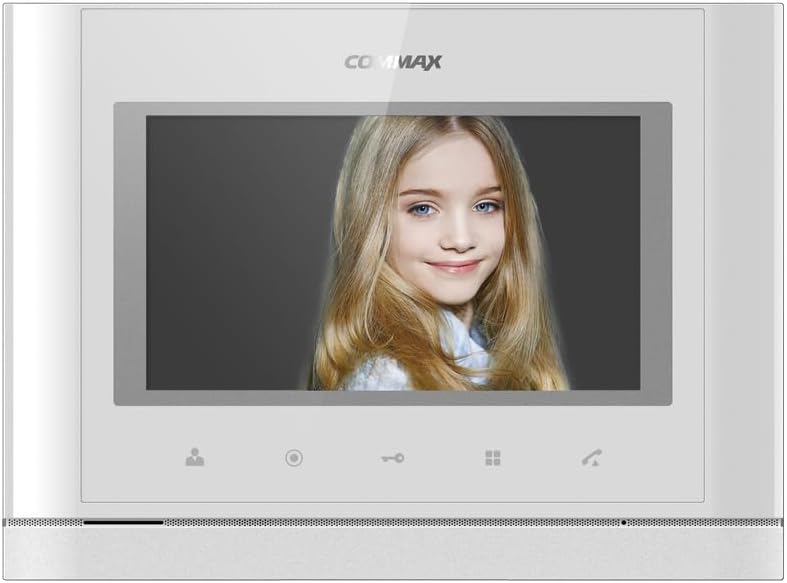
Hareupeun view of the COMMAX CDV-77M monitor, showcasing its 7-inch TFT LCD screen and sleek design. The screen is active, displaying an image.
2. Fitur Produk
- 7-inch TFT LCD screen for clear video display.
- Supports video communication and door lock release functions.
- Expandable system: Connects with up to 2 door cameras, 2 additional monitors, and 2 interphones.
- PAL/NTSC video format conversion capability.
- Hand-free operation for convenience.
- Wall-mounted design for easy installation.
3. Émbaran Kasalametan
Please observe the following safety precautions to prevent damage to the product and ensure user safety:
- Ulah ngantepkeun unit ieu ka cai atanapi kalembaban anu kaleuleuwihi.
- Hindarkeun nempatkeun unit dina sinar panonpoé langsung atanapi caket sumber panas.
- Ulah nyobian muka atawa ngalereskeun unit sorangan. Rujuk sadayana jasa ka tanaga anu mumpuni.
- Pastikeun sumber daya cocog sareng voltase anu ditangtukeuntage (AC 100-240V, 50/60Hz).
- Jauhkeun unit tina médan magnét anu kuat.
- Operate within the specified temperature range of 0℃ to 40℃.
4. Pamasangan
4.1 Eusi pakét
Pastikeun yén sadaya komponén aya:
- COMMAX CDV-77M Monitor Unit
- Témbok ningkatna bracket
- Pemasangan Screws sareng Jangkar
- Manual pangguna (dokumén ieu)
- Kabel Daya
4.2 Masang Monitor
The CDV-77M monitor is designed for wall-mounted installation. Choose a suitable location indoors, away from direct sunlight and moisture.
- Secure the wall mounting bracket to the desired location using the provided screws and anchors.
- Ensure the bracket is level and securely fastened.
- Refer to the dimensions diagram for proper spacing and fit:

Technical drawing showing the dimensions of the COMMAX CDV-77M monitor: 244 mm width and 180 mm height.
4.3 Sambungan Wiring
Sateuacan nyambungkeun naon waé, pastikeun catu daya parantos dicabut.
- Door Camera Connection: Connect the door camera using a 4-wire cable. The maximum recommended distance is 28 meters (using 0.5Ø wire).
- Interphone Connection: Connect the interphone unit using a 4-wire cable.
- Additional Monitor Connection: If connecting additional monitors, refer to the specific wiring diagram provided with your system.
- Sambungan Daya: Connect the AC 100-240V, 50/60Hz power cable to the monitor and a suitable power outlet.
After all connections are made, carefully attach the monitor unit to the wall mounting bracket.
5. Parentah Operasi
Familiarize yourself with the monitor's controls:

Detailed diagram illustrating the front panel of the COMMAX CDV-77M monitor, with labels for the TFT LCD, Speaker, Microphone, Power Switch, and control buttons: Monitoring, Interphone, Door Release, Menu, and Talk.
- Hurungkeun/Pareuman: Use the Power Switch located on the side/bottom of the unit.
- Narima Telepon: When a visitor calls from the door camera, the monitor will display their image and ring. Press the Tombol Obrolan to communicate.
- Ngawaskeun: Pencét éta Tombol pangimeutan ka view the feed from the connected door camera at any time.
- Leupaskeun panto: Salila nelepon atanapi nalika ngawaskeun, pencét Tombol Release Panto to unlock the connected door.
- Interphone Communication: Pencét éta Interphone Button to initiate communication with another connected interphone or monitor.
- Napigasi Menu: Ngagunakeun éta Tombol Menu to access settings and adjustments for the monitor.
6. Pangropéa
- beberesih: Anggo lawon anu lemes sareng garing pikeun ngabersihkeun layar monitor sarengasing. Ulah make cleaners abrasive atawa pangleyur.
- Ngaleungitkeun lebu: Regularly dust the unit to prevent accumulation, especially around ventilation areas.
- Hindarkeun Cairan: Ulah nyemprotkeun cairan langsung kana monitor.
7. Cara ngungkulan
| Masalah | Mungkin Cukang lantaranana | Solusi |
|---|---|---|
| Teu aya daya ka monitor. | Power cable disconnected; power outlet faulty; power switch off. | Check power cable connection; test outlet with another device; ensure power switch is on. |
| No video from door camera. | Camera cable loose or damaged; camera faulty. | Check camera wiring connections; ensure camera is powered and functioning. |
| Henteu aya audio nalika komunikasi. | Microphone/speaker faulty; wiring issue. | Check audio wiring; ensure volume settings are appropriate. |
| Door lock not releasing. | Door lock wiring issue; lock mechanism faulty. | Verify door lock wiring; test door lock mechanism independently. |
Lamun masalah persists sanggeus nyobian solusi ieu, mangga ngahubungan rojongan customer.
8. Spésifikasi
| Fitur | Rincian |
|---|---|
| Modél | CDV-77M |
| Ukuran layar | 7 inci TFT LCD |
| Sumber Daya | AC 100-240V, 50/60Hz |
| Tipe Gunung | Tipe dipasang témbok |
| Suhu Operasi | 0 ℃ ~ 40 ℃ |
| Wiring (Door Camera) | 4 wires (Distance: 28m with 0.5Ø wire) |
| Wiring (Interphone) | 4 kawat |
| Max. Sambungan | 2 Cameras, 2 Monitors, 2 Interphones |
| Konsumsi | Max. 15W / Standby 3W |
| Ukuran (W × H × D) | 244mm × 180mm × 18mm |
| Format pidéo | PAL/NTSC convertible |
9. Garansi jeung Rojongan
For warranty information, please refer to the warranty card included with your product or contact your local COMMAX distributor. For technical support or service inquiries, please visit the official COMMAX websitus atanapi ngahubungan departemén layanan palanggan maranéhna.
Pabrikan: COMMAX
Titimangsa munggaran sadia: 7 Agustus 2023


