Bubuka
Hatur nuhun pikeun meuliasing the Panasonic TX-55MZ1500E 55-inch 4K OLED TV. This television combines advanced OLED display technology with smart features and high-performance processing to deliver an exceptional viewing and gaming experience. This manual provides essential information for setting up, operating, and maintaining your new television. Please read it thoroughly before use and retain it for future reference.

Gambar 1: Hareupeun view of the Panasonic TX-55MZ1500E 55-inch 4K OLED TV, showcasing its display quality with a night city scene.
Émbaran Kasalametan penting
Pikeun mastikeun operasi anu aman sareng nyegah karusakan, punten perhatikeun pancegahan kaamanan ieu:
- Sasayogian tanaga: Sambungkeun TV ngan ka sumber daya AC sakumaha anu dituduhkeun dina labél rating.
- Ventilasi: Ulah meungpeuk bukaan ventilasi. Pastikeun spasi nyukupan sabudeureun TV pikeun aliran hawa ditangtoskeun.
- Cai sareng Uap: Ulah ngalaan TV ka hujan atawa beueus. Ulah nempatkeun barang-barang anu dieusi cairan, sapertos vas, dina TV.
- beberesih: Cabut TV sateuacan beberesih. Paké lawon lemes, garing. Hindarkeun pembersih cair atanapi semprotan aerosol.
- panempatan: Teundeun TV dina permukaan datar anu stabil. Hindarkeun nempatkeunna dina sinar panonpoé langsung atanapi caket sumber panas.
- Barudak: Ngawaskeun barudak pikeun nyegah aranjeunna naek dina TV atawa nangtung.
- Palayanan: Entong nyobian ngalayanan produk ieu nyalira. Rujuk sadayana ngalayanan ka tanaga jasa anu mumpuni.
Eusi pakét
Sateuacan neraskeun setélan, mangga pariksa yén sadaya item anu didaptarkeun di handap kalebet kana pakét anjeun:
- Panasonic TX-55MZ1500E 55-inch 4K OLED TV
- Remote Control (requires 1 AA battery, not always included)
- Kabel listrik
- TV Stand (if applicable, assembly required)
- Gancang Mimitian Guide
- Safety Information Leaflet
Catetan: The remote control requires one AA battery. Ensure you have this battery available for initial setup.
Guide Setup
1. Unpacking na panempatan
- Carefully remove the TV from its packaging. It is recommended to have two people for this process due to the size and weight.
- Place the TV on a flat, stable surface or prepare for wall mounting (wall mount sold separately).
- Ensure there is adequate space around the TV for ventilation (at least 10 cm on all sides).
2. Stand Installation (if applicable)
If you are using the included TV stand, follow these steps:
- Teundeun layar TV dina lawon anu lembut tur bersih pikeun nyegah goresan.
- Attach the stand base to the TV using the provided screws, ensuring it is securely fastened. Refer to the Quick Start Guide for specific screw locations and types.
- Carefully lift the TV with the stand and place it in your desired viewlokasina.
3. Alat Sambungkeun
The TX-55MZ1500E offers various connectivity options. Refer to the side view gambar pikeun lokasi port.

Gambar 2: Sisi profile of the Panasonic TX-55MZ1500E, highlighting the slim design and accessible input ports.
- HDMI: Connect your Blu-ray player, game console, or set-top box to the HDMI ports. This model supports HDMI 2.1 for high-refresh-rate gaming and advanced features.
- USB: Connect USB storage devices for media playback or software updates. The TV has 1 USB port.
- Antena/Kabel: Sambungkeun anteneu atanapi saluran TV kabel anjeun pikeun saluran siaran.
- Ethernet (LAN): Pikeun sambungan internét kabel stabil.
- Optik Digital Audio Out: For connecting to an external sound system.
4. Power Connection jeung Setup Awal
- Sambungkeun kabel listrik ka TV teras ka stop kontak témbok.
- Insert the AA battery into the remote control.
- Pencét tombol Daya dina kadali jauh pikeun ngaktipkeun TV.
- Turutan pitunjuk dina layar pikeun ngalengkepan setelan awal, anu biasana ngawengku:
- Pilihan basa
- Country/Region selection
- Network connection (Wi-Fi or wired Ethernet)
- Panyeken saluran (pikeun anteneu/kabel)
- Setélan zona waktos
Ngoperasikeun TV Anjeun
Fungsi Dasar
- Hurungkeun/Pareuman: Pencét éta Kakuatan tombol dina kadali jauh.
- Kontrol volume: Ngagunakeun éta Volume Kaluhur/Turun kancing.
- Pilihan Saluran: Ngagunakeun éta Saluran luhur / handap tombol atanapi ngalebetkeun nomer saluran sacara langsung.
- Pilihan Input: Pencét éta Input button to switch between connected devices (HDMI 1, HDMI 2, etc.).
- Napigasi Menu: Paké kenop panah jeung OK tombol pikeun nganapigasi ménu dina layar.
Smart TV Features (Smart TV OS)
Your Panasonic TX-55MZ1500E runs on a Smart TV OS, providing access to a wide range of online content and applications.
- Ngaksés Aplikasi: From the home screen, select your desired application, such as Netflix or YouTube.
- Ngotektak Internét: Paké diwangun-di web browser pikeun aksés websitus.
- Streaming nirkabel: Utilize features like Mirroring, Swipe & Share, and DLNA to stream content from compatible devices.
Setélan Gambar jeung Sora
The TV features the HCX Pro AI processor for advanced image processing and supports various HDR formats.
- Modeu Gambar: Select from various preset picture modes (e.g., Standard, Cinema, Game, Custom) to optimize viewpikeun eusi anu béda.
- Rojongan HDR: The TV supports HDR10+, HDR10, HLG, and Dolby Vision, automatically adjusting for optimal contrast and color with compatible content.
- Modeu sora: Adjust audio settings for different content types (e.g., Standard, Music, Speech).
Fitur kaulinan
Designed for a high-level gaming experience, this TV includes:
- Lag Input Lemah: Ngaminimalkeun reureuh antara input controller sareng tindakan dina layar.
- HDMI2.1: Supports advanced gaming features like Variable Refresh Rate (VRR) and Auto Low Latency Mode (ALLM) on compatible devices.
- Game Control Board: Access specific gaming settings and information quickly.
Pangropéa sareng Perawatan
Proper care will extend the life of your television.
- Ngabersihan layar: Lembut usap layar nganggo kaen microfiber anu lemes sareng garing. Pikeun tanda nekad, rada dampen the cloth with water or a specialized screen cleaner (apply to cloth, not directly to screen). Do not use alcohol, benzene, or abrasive cleaners.
- beberesih Kabinet: Ngusap kabinét TV ku kaén anu lembut sareng garing.
- Debu: Sacara rutin lebu bukaan ventilasi pikeun nyegah overheating.
- Pareum listrik: Salawasna cabut TV tina stop kontak sateuacan beberesih.
Pamérésan masalah
Upami anjeun ngalaman masalah sareng TV anjeun, tingal masalah sareng solusi umum ieu:
| Masalah | Mungkin Cukang lantaranana / Solusi |
|---|---|
| Taya kakuatan |
|
| Henteu aya gambar, tapi aya sora |
|
| Henteu aya sora, tapi aya gambar |
|
| Teu bisa nyambung ka Wi-Fi |
|
| Kadali jauh teu jalan |
|
spésifikasi
Key technical specifications for the Panasonic TX-55MZ1500E:
| Fitur | Rincian |
|---|---|
| Ngaran modél | TX-55MZ1500E |
| merek | Panasonic |
| Ukuran layar | 55 inci (139 cm) |
| Téknologi tampilan | OLED |
| Resolusi | 4K Ultra HD (3840 x 2160) |
| Refresh Laju | 100 Hz |
| Prosesor | HCX Pro AI |
| Rojongan HDR | HDR10+, HDR10, HLG, Dolby Vision |
| Sistem operasi | Smart TV OS |
| Jasa Internét | Netflix, YouTube, and more |
| Konektipitas | HDMI (HDMI 2.1 compatible), Wi-Fi, USB (1 port) |
| Rasio Aspék | 16:9 |
| Komponén Kaasup | Kadali jauh |
| Konsumsi Daya (SDR) | 84 kWh / 1000h |
| Konsumsi Daya (HDR) | 120 kWh / 1000h |
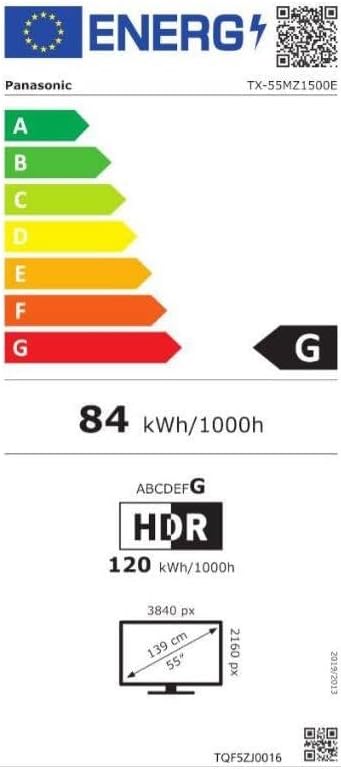
Image 3: Energy efficiency label for the Panasonic TX-55MZ1500E, detailing power consumption and display resolution.
Garansi sareng Rojongan
Panasonic products are manufactured to high-quality standards. For information regarding your product's warranty, please refer to the warranty card included in your package or visit the official Panasonic websitus pikeun wewengkon Anjeun.
For technical support, troubleshooting assistance beyond this manual, or service inquiries, please contact Panasonic customer support. Contact details can typically be found on the Panasonic websitus atanapi dina dokuméntasi produk Anjeun.


