Bubuka
The SUNOL T16 Wireless Earbuds are designed for an active lifestyle, offering high-quality audio and convenient features. These Bluetooth headphones provide up to 48 hours of total playtime with their wireless charging case, featuring an LED power display for easy monitoring. With earhooks for a secure fit and water resistance, they are ideal for workouts, running, and various sports activities. The built-in microphone with noise cancellation ensures clear calls.
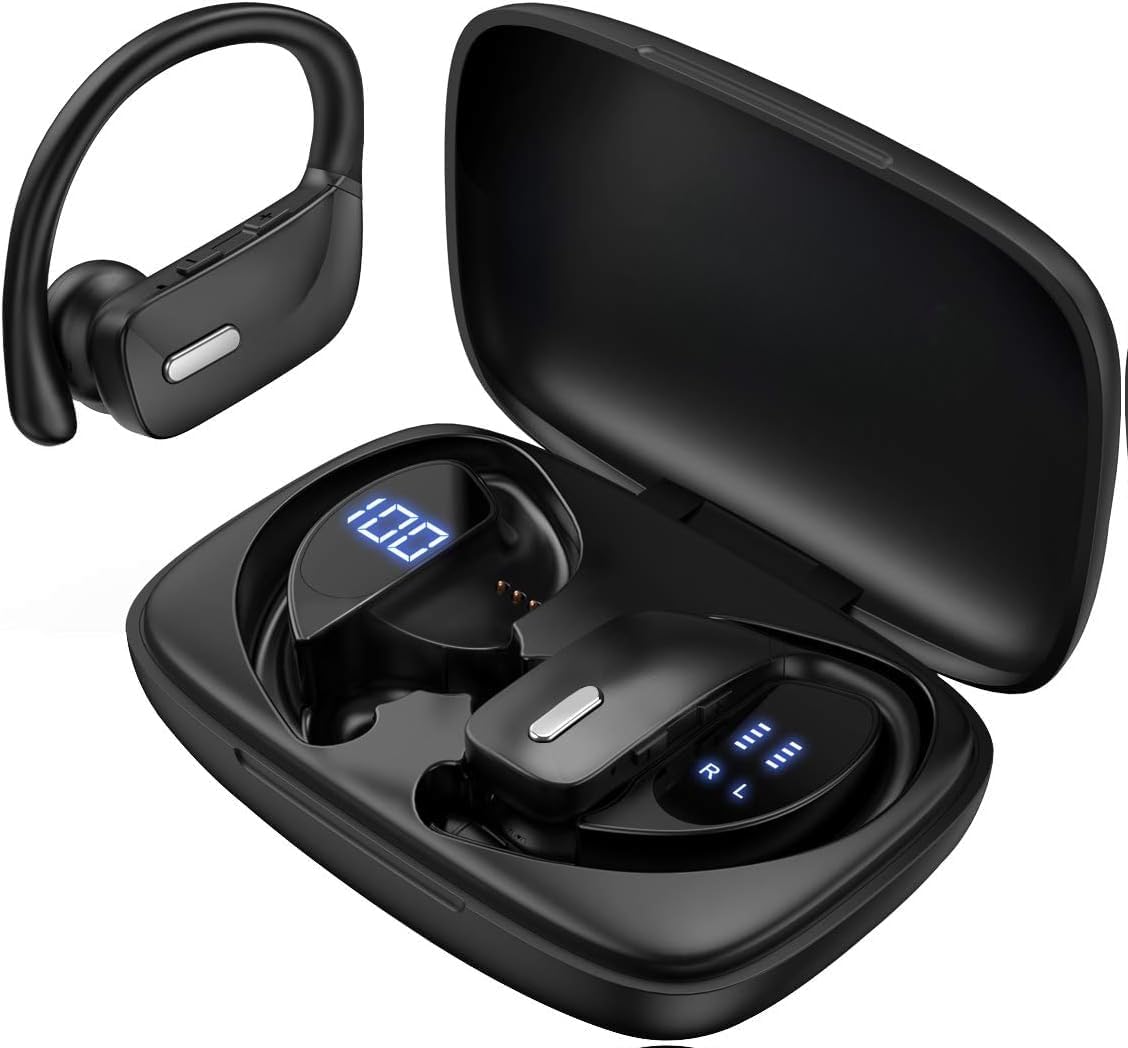
Image: The SUNOL T16 Wireless Earbuds with their charging case, showcasing the digital display.
Naon dina Box
- SUNOL T16 Wireless Earbuds (Left and Right)
- Kasus Ngecas Nirkabel
- Kabel Ngecas USB-C
- 3 Pairs of Ear Caps (S, M, L)
spésifikasi
| Fitur | Rincian |
|---|---|
| Ngaran modél | T16 |
| Téhnologi konektipitas | Nirkabel (Bluetooth 5.0) |
| Rentang Bluetooth | Nepi ka 10 méter |
| Kahirupan Batré Earbud | Nepi ka 9 jam (sakali muatan) |
| Total Playtime (kalawan kasus) | Nepi ka 48 jam |
| Pilihan ngecas | Wireless Charging, USB-C Charging |
| Ukuran Supir Audio | 10 mm Supir Dinamis |
| Rentang Frékuénsi | 20 Hz - 20,000 Hz |
| Impedansi | 40 ohm |
| Kontrol bising | Pembatalan Noise aktip |
| Mikropon | Built-in with Noise Cancellation |
| Tingkat Résistansi Cai | Tahan cai |
| Tipe Kontrol | Touch, Siri Voice Assistant |
| Panempatan Ceuli | Di luhureun ceuli (kalayan kait ceuli) |
| Bahan | Acrylonitrile Butadiene Styrene (ABS) |
| Item Beurat | 6.4 ons |

Image: Diagram illustrating the premium stereo sound quality and Bluetooth 5.0 connectivity.
Disetél
1. Ngecas Earbuds jeung Case
The charging case supports both wireless charging and USB-C charging. The impressive 9 hours of listening time on a single charge for the sports wireless headphones are extended to a remarkable 48 hours of play time with the included charging case.
- To charge the case, connect a USB-C cable to the charging port on the back of the case, or place it on a compatible wireless charging pad.
- Place the earbuds into their respective slots in the charging case. Ensure they are properly seated to initiate charging.
- The smart LED digital power display on the case will show the remaining battery level of the charging case and the individual earbuds. The percentage in the middle indicates the case battery, while the battery icons on both sides indicate the left and right earbud charge levels.

Image: The charging case with its LED display showing battery levels for the case and individual earbuds.

Image: Diagram illustrating the battery life: 15 min charge for 1 hour playtime, 8 hours on a single charge, and 48 hours with the charging case.
2. Nyapasangkeun sareng Alat Anjeun
The earbuds automatically enter pairing mode when removed from the charging case.
- Buka wadah pangisi daya teras cabut dua earbud. Éta bakal otomatis hurung teras lebet kana modeu pairing.
- Dina alat sélulér anjeun (smartphone, tablet, laptop), buka setélan Bluetooth.
- Milarian pikeun available devices. You should see "T16" or "S8" appear in the list.
- Select "T16" or "S8" to connect. Once connected, you will hear an audio prompt, and the earbuds will be ready for use.

Image: Diagram showing the earbuds automatically pairing with mobile phones.
Video: Official product video demonstrating the unboxing, charging, and Bluetooth pairing process of the SUNOL T16 Wireless Earbuds.
Parentah Operasi
Ngagem Earbuds
The T16 earbuds are designed with flexible earhooks to ensure a secure and comfortable fit, especially during physical activity. Gently place the earbud into your ear canal and adjust the earhook over the top of your ear until it feels stable and comfortable. Experiment with the included ear cap sizes to find the best fit for optimal sound and comfort.

Image: A woman wearing the SUNOL T16 earbuds, demonstrating their secure fit for an active lifestyle.
Toél Kontrol
The earbuds feature physical buttons for precise control of various functions:
- Puter / Reureuh: Ketok tunggal dina boh earbud.
- Ngajawab / Tutup Telepon: Ketok tunggal dina boh earbud nalika nelepon.
- Lagu saméméhna: Ketok dua kali dina earbud kénca.
- Lagu salajengna: Ketok dua kali dina earbud katuhu.
- Active Voice Assistant (Siri): Ketok tilu kali dina boh earbud.
- Nolak Telepon: Pencét lila dina salah sahiji earbud nalika aya telepon asup.
- Penyesuaian volume: Use the dedicated volume buttons on the earbuds.

Image: Diagram detailing the physical buttons and their functions, including volume adjustment, play/pause, call management, and voice assistant activation.
Pangropéa
To ensure the longevity and optimal performance of your SUNOL T16 Wireless Earbuds, follow these maintenance guidelines:
- beberesih: Regularly wipe the earbuds and charging case with a soft, dry, lint-free cloth. For ear caps, remove them and clean with mild soap and water, then dry thoroughly before reattaching.
- Tahan cai: While water-resistant, avoid submerging the earbuds in water. Dry them completely if they get wet from sweat or rain before placing them back in the charging case.
- Panyimpenan: Nalika henteu dianggo, simpen earbuds dina wadah ngecasna pikeun ngajagi sareng tetep dicas. Nyimpen dina tiis, tempat garing jauh ti suhu ekstrim.
- Port ngecas: Keep the USB-C charging port free of dust and debris.
Pamérésan masalah
If you encounter any issues with your SUNOL T16 Wireless Earbuds, try the following solutions:
- Earbuds teu dipasangkeun:
- Pastikeun kadua earbuds dicas pinuh.
- Place earbuds back in the case, close the lid, wait a few seconds, then open and remove them again.
- Turn off Bluetooth on your device, then turn it back on and try pairing again.
- Forget or remove the "T16" or "S8" device from your device's Bluetooth list and attempt to pair from scratch.
- Ngan hiji earbud jalan:
- Pastikeun kadua earbuds dicas.
- Place both earbuds back in the charging case, close the lid, and then take them out simultaneously.
- If the issue persists, try resetting the earbuds.
- Kualitas sora goréng:
- Ensure the earbuds are properly seated in your ears and the ear caps provide a good seal.
- Check the audio source device's volume and sound settings.
- Move closer to your connected device to avoid interference or exceeding the 10-meter Bluetooth range.
- Clean the earbud speakers and ear caps.
- Kasus ngecas teu ngecas:
- Pastikeun yén kabel USB-C disambungkeun sacara aman ka casing sareng sumber listrik.
- Coba kabel USB-C atanapi adaptor kakuatan anu sanés.
- Upami nganggo ngecas nirkabel, pastikeun wadahna dipasang kalayan leres dina bantalan ngecas.
Garansi sareng Rojongan
For warranty information and technical support, please refer to the documentation included with your product or contact the manufacturer, SUNOL, directly through their official website or customer service channels. Keep your purchase receipt as proof of purchase for any warranty claims.


