Bubuka
This manual provides detailed instructions for the operation and maintenance of your Sharp Alarm Clock. Please read this manual thoroughly before using the product to ensure proper function and longevity. This alarm clock is designed for ease of use and features convenient charging options for your devices.
Fitur konci
- Super Fast USB-C Charging: Equipped with a USB Type-C port for rapid charging of compatible smartphones, including the latest models.
- Gancang 2 Amp USB-A Charging: Includes a standard USB Type-A port delivering 2 Amps for efficient charging of various devices.
- Alarm ganda: Setel dua alarm mandiri pikeun waktos hudang anu béda.
- Tunda 9 Menit: Provides a convenient snooze function for extra rest.
- 3-Step Dimmer: Adjustable display brightness with three levels to suit your preference.
- Easy-to-Read Green LED Display: Clear 0.7-inch green LED numbers for visibility day or night.
- Cadangan Batré Pilihan: Nyimpen setélan waktos sareng alarm nalika mareuman dayatages (merlukeun 2 x batré AAA, teu kaasup).
Produk Leuwihview
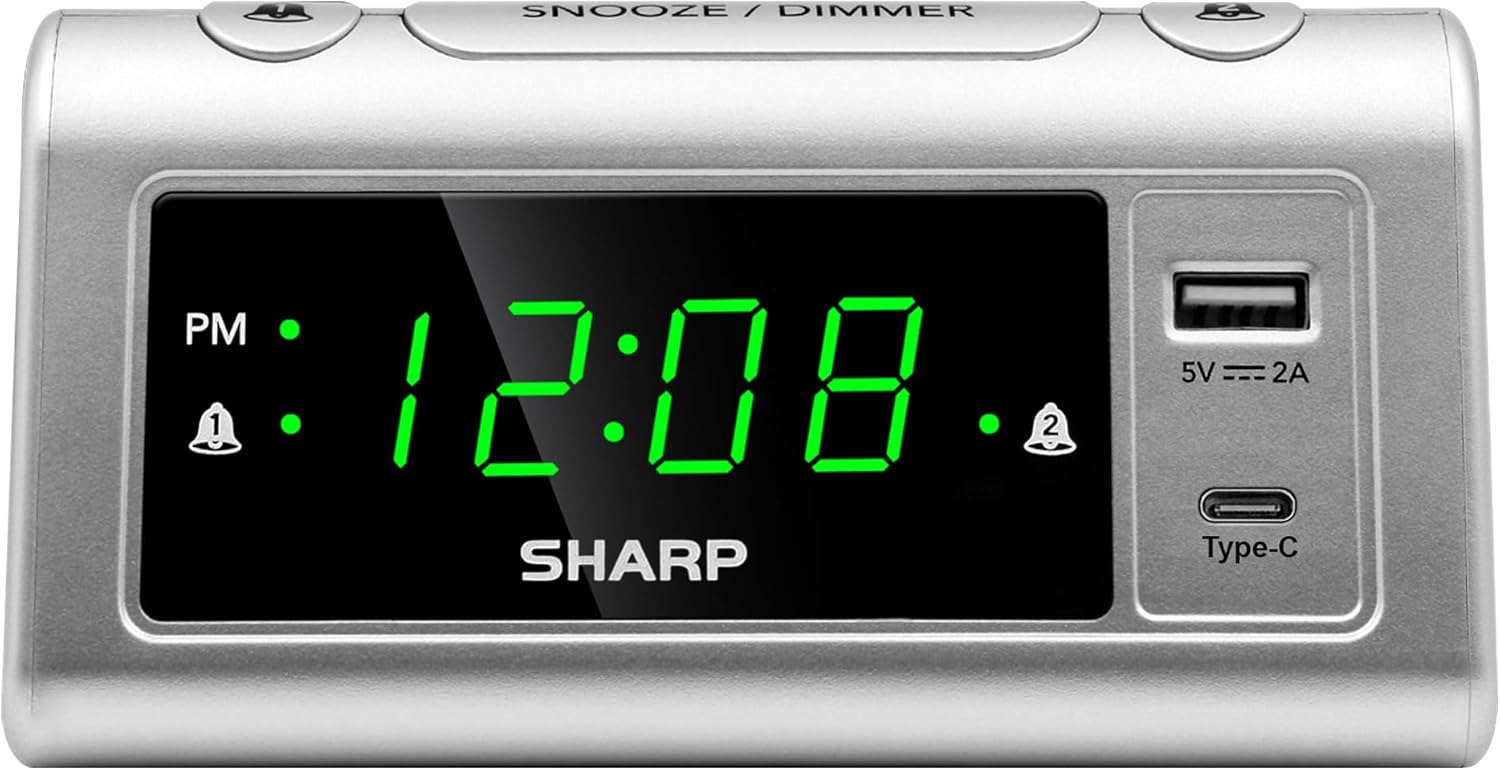
Hareupeun view of the Sharp Alarm Clock, showcasing the large green LED time display, PM indicator, alarm indicators, and the integrated USB-A and USB-C charging ports on the right side.

Ti luhur ka handap view of the alarm clock with labels indicating the 'Time Set', 'Time Advancing', 'Time Receding', 'Alarm 1 Set ON/OFF', 'Alarm 2 Set ON/OFF', 'Snooze/Dimmer Control (3-Levels of Brightness)', 'Super Fast Charging USB-C', and 'Fast Charging 2 Amp USB'. Dimensions are also shown as 5.65 inches wide and 2.95 inches high.
Disetél
1. Sambungan Daya
Plug the AC power cord into a standard 120V AC wall outlet. The clock display will illuminate, and the time will default to 12:00 AM.
2. Pamasangan Cadangan Batré
For optional battery backup, insert 2 x AAA batteries (not included) into the battery compartment located on the bottom of the unit. This feature ensures that time and alarm settings are retained during a power interruption. The display will not be lit during battery backup, but the alarm will still sound.

The bottom of the alarm clock, revealing the battery compartment for 2 AAA batteries (not included) to provide backup power for settings.
Parentah Operasi
1. Netepkeun Waktos
- Pencét jeung tahan tombol WAKTU WAKTU tombol. Angka jam bakal mimiti kedip-kedip.
- Bari nyekelan WAKTU WAKTU, pencét tombol JAM tombol sababaraha kali pikeun nyaluyukeun jam. Titénan indikator PM pikeun setelan AM / PM bener.
- Bari nyekelan WAKTU WAKTU, pencét tombol MENIT tombol sababaraha kali pikeun nyaluyukeun menit.
- Ngaleupaskeun WAKTU WAKTU tombol pikeun ngonfirmasi waktos.
2. Setting Alarms (Dual Alarms)
This clock features two independent alarms (Alarm 1 and Alarm 2).
- Pencét jeung tahan tombol ALARM 1 SET button. The hour digits for Alarm 1 will flash.
- Bari nyekelan ALARM 1 SET, pencét tombol JAM tombol pikeun ngeset jam alarm nu dipikahoyong.
- Bari nyekelan ALARM 1 SET, pencét tombol MENIT tombol pikeun nyetel menit alarm nu dipikahoyong.
- Ngaleupaskeun ALARM 1 SET tombol pikeun mastikeun.
- Pikeun ngaktipkeun Alarm 1, pencét ALARM 1 ON / OFF button until the alarm indicator (bell icon) appears next to 'AL1' on the display.
- Ulang léngkah 1-5 pikeun ALARM 2 SET jeung ALARM 2 ON / OFF to set and activate the second alarm.
3. Fungsi Snooze
Lamun alarm disada, pencét badag SNOOZE / DIMMER tombol di luhur jam. Alarm bakal eureun sakeudeung salami 9 menit teras disada deui.
4. Dimmer Tampilan
To adjust the brightness of the LED display, repeatedly press the SNOOZE / DIMMER button when the alarm is not sounding. Cycle through the three brightness levels (High, Medium, Low) and an Off setting.

The Sharp Alarm Clock displaying the time, with a hand adjusting the dimmer function on the top of the unit. This allows for comfortable viewdina sagala rupa kondisi pencahyaan.
5. USB ngecas palabuhan
The alarm clock features both a USB Type-C port and a standard USB Type-A port for charging your electronic devices. Simply connect your device's charging cable to the appropriate port on the right side of the clock.
- USB Tipe-C: Provides super-fast charging for compatible devices like the iPhone 15 or Galaxy smartphones.
- USB Tipe-A: Ngahaturkeun 2 Amps of fast charging power for other USB-powered devices.

The Sharp Alarm Clock with a smartphone connected to its USB-C port, indicating active charging. The clock also features a USB-A port for additional device charging.
Pangropéa
- beberesih: Lap jam ku lawon anu lemes sareng garing. Entong nganggo pembersih atanapi pelarut anu abrasif.
- Kabel listrik: Pariksa kabel listrik sacara rutin pikeun ningali karusakan naon waé. Upami ruksak, eureunkeun panggunaan sareng hubungi dukungan palanggan.
- Ngagantian batré: Replace AAA backup batteries annually or when the clock's settings are no longer retained during power outages.
Pamérésan masalah
| Masalah | Solusi |
|---|---|
| Pintonan jam kosong. | Ensure the AC power cord is securely plugged into a working outlet. Check if the dimmer is set to 'Off'. |
| Alarm teu disada. | Verify that the alarm is set and activated (bell icon visible). Check the alarm time is correct (AM/PM). |
| USB ports are not charging. | Ensure the clock is powered via AC. Check the charging cable and device compatibility. |
| Waktos / setélan leungit sanggeus kakuatan outage. | Install fresh AAA batteries for the backup function. |
spésifikasi
- merek: Seukeut
- model: B0CHXR25FJ
- warna: pérak
- Jenis tampilan: LED (Héjo)
- Ukuran produk: 5.56" W x 2.67" H
- Sumber Daya: Kabel Listrik
- Cadangan batré: 2 x batré AAA (teu kaasup)
- Kaluaran USB-C: Ngecas Super Gancang
- Kaluaran USB-A: 2 Amps Fast Charging
- Fitur husus: Charging Port, Corded, Dual Alarms, 3-Step Dimmer, Snooze
Video Produk Resmi
An official video from Sharp, titled 'Sharp Clocks - Keeps the Rhythm of Your Day', showcasing the features and design of Sharp alarm clocks, including this model.
Garansi sareng Rojongan
For warranty information or technical support, please refer to the documentation included with your product or visit the official Sharp websitus. Simpen resi pameseran anjeun salaku bukti pameseran pikeun klaim garansi.


