Bubuka
This manual provides detailed instructions for the installation, operation, maintenance, and troubleshooting of the Cisco Catalyst 1300-16P-2G Managed Switch. This device is designed to deliver reliable and secure connectivity for small business networks, offering full Layer 2/3 capabilities, an intuitive web dasbor, fitur jaringan canggih, sareng dukungan PoE +.
Setup sareng Instalasi
Eusi pakét
Pariksa yén pakét anjeun ngandung barang-barang ieu:
- Saklar Terkelola Cisco Catalyst 1300-16P-2G
- Kabel listrik atanapi adaptor
- Kabel USB Tipe C
- Mounting hardware (for 24 and 48 port models only, verify for 16-port model if included)
Note: Some users have reported missing mounting hardware. Please check your package contents upon arrival.
Pamasangan fisik
The switch can be placed on a desktop or mounted in a rack. Ensure adequate ventilation, especially for fanless models, to prevent overheating.
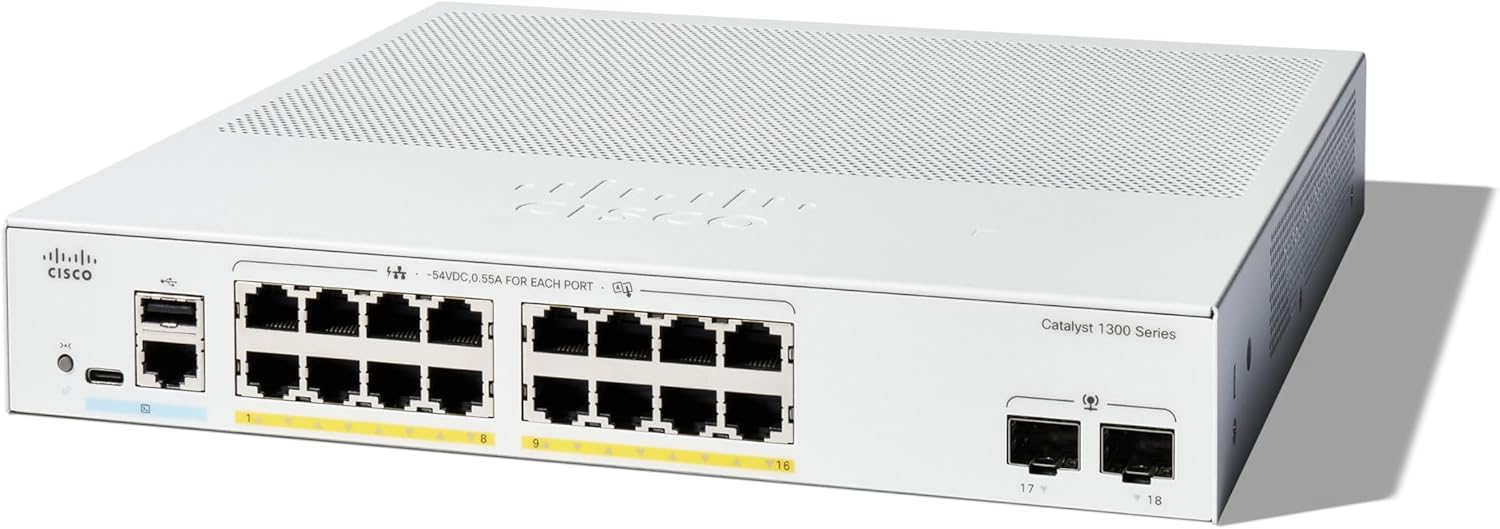
Gambar 1: Hareupeun view of the Cisco Catalyst 1300-16P-2G Managed Switch. This image displays the compact design and port layout, including 16 Gigabit Ethernet ports and 2 SFP uplink ports.

Gambar 2: Detailed front panel of the Cisco Catalyst 1300-16P-2G Switch. This close-up shows the 16 Gigabit Ethernet ports (labeled 1-16), 2 SFP uplink ports (labeled 17-18), a USB-C console port, and status LEDs.

Gambar 3: Various models within the Cisco Catalyst 1300 Series Managed Switches. This image illustrates the different port configurations and sizes available in the series.
Sambungan Daya
- Connect the provided power cord to the switch's power input.
- Colokkeun tungtung kabel listrik anu sanés kana stop kontak listrik anu dibumikeun.
- The switch will power on automatically. Observe the power LED for status.
Sambungan Jaringan
- Connect your network devices (computers, servers, access points) to the 16 Gigabit Ethernet ports using standard Ethernet cables.
- For uplink connections to other switches or routers, use the 2x1GE SFP ports with compatible SFP transceivers and fiber optic cables, or use standard Ethernet ports if SFP is not required.
Konfigurasi Awal
The Cisco Catalyst 1300 series switches can be configured via an intuitive web interface or the Cisco Business mobile app.
- Web panganteur: Connect a computer directly to any Ethernet port on the switch. The switch will typically obtain an IP address via DHCP or use a default IP. Refer to the Quick Start Guide for the default IP address and login credentials.
- Aplikasi Mobile Cisco Business: Download the Cisco Business mobile app from your device's app store. Follow the in-app instructions to discover and configure your switch.
Operasi
Basic Network Functionality
The switch provides 16 Gigabit Ethernet ports for high-speed data transfer. Once connected, devices will automatically establish network connectivity.
Power over Ethernet (PoE+)
The Cisco Catalyst 1300-16P-2G supports PoE+ on its 16 ports, with a total power budget of 120W. This allows you to power compatible devices such as IP phones, wireless access points, and IP cameras directly through the Ethernet cable, simplifying deployment and reducing cabling requirements.
- Ensure connected devices are PoE or PoE+ compatible.
- Monitor PoE power consumption via the web interface to stay within the 120W budget.
Manajemén jeung ngawaskeun
The switch offers comprehensive management options:
- Web Antarmuka pangguna (Web UI): Access the switch's full configuration and monitoring capabilities through a web browser. This interface allows for detailed setup of VLANs, QoS, security features, and port management.
- Aplikasi Mobile Cisco Business: Provides a simplified interface for common tasks and monitoring from your mobile device.
- Dasbor Bisnis Cisco: For managing multiple Cisco Business devices, the Dashboard offers centralized control and monitoring.
- Antarmuka Jalur Komando (CLI): Accessible via SSH or the USB-C console port for advanced configuration.
Fitur Kaamanan ditingkatkeun
The switch incorporates advanced security measures to protect your network:
- IP-MAC Port Binding: Detects and blocks unauthorized network access by binding specific IP and MAC addresses to individual switch ports.
- IPv6 First Hop Security: Provides protection against various IPv6-based attacks, including address spoofing and man-in-the-middle attacks.
- Daptar Kontrol Aksés (ACL): Configure rules to filter network traffic based on various criteria.
Énergi Énergi
The switch is compliant with IEEE 802.3az Energy Efficient Ethernet, optimizing power usage to reduce operational costs. This model is fanless, contributing to quiet operation and further energy savings.
Pangropéa
Pembaruan firmware
Rutin pariksa rojongan Cisco website for the latest firmware updates. Updating the firmware ensures optimal performance, security, and access to new features. It is recommended to update the firmware as the factory-installed version may have slower graphical interface performance.
- Download the latest firmware from the official Cisco support portal.
- Follow the instructions provided with the firmware update package for a safe upgrade process.
beberesih
Keep the switch clean and free from dust. Use a soft, dry cloth for cleaning the exterior. Do not use liquid or aerosol cleaners.
Pertimbangan Lingkungan
As a fanless device, proper airflow is crucial. Ensure that the switch is installed in an environment with adequate ventilation and that its vent ports are not blocked.
Pamérésan masalah
Isu umum jeung Solusi
- Henteu aya kakuatan:
- Pastikeun kabel daya parantos nyambung kalayan pageuh kana saklar sareng stop kontak listrik anu masih tiasa dianggo.
- Check the power LED on the switch.
- Henteu aya konektipitas jaringan:
- Ensure Ethernet cables are properly connected to both the switch and the end device.
- Check the link/activity LEDs on the switch ports.
- Verify IP configuration on connected devices.
- Restart the switch and the connected device.
- Lalaunan Web panganteur:
- Update the switch firmware to the latest version.
- Hapus anjeun web browser's cache.
- Coba béda web browser.
- Alat PoE Henteu Diaktipkeun:
- Confirm the device is PoE/PoE+ compatible.
- Pariksa LED status PoE pikeun port husus.
- Verify the total PoE power budget (120W) is not exceeded.
- Coba sambungkeun alat ka port PoE béda.
- Missing Mounting Hardware:
- While mounting hardware is typically included with 24 and 48 port models, it may not be standard for 16-port models. If you believe it should be included and is missing, contact Cisco support or your reseller.
For more detailed troubleshooting, consult the official Cisco support documentation or contact technical support.
spésifikasi
| Fitur | Rincian |
|---|---|
| Nomer modél | C1300-16P-2G |
| Ngalihkeun Palabuhan | 16 x 10/100/1000 Gigabit Ethernet ports |
| Palabuhan Uplink | 2 x 1GE SFP |
| Rojongan PoE | PoE, PoE+ (IEEE 802.3af/at) |
| Total Anggaran Daya PoE | 120W |
| Laju Mindahkeun Data | 36 Gigabit Per Detik (Kapasitas Switching) |
| Tipe panganteur | PoE, SFP |
| Ukuran (L x W x H) | 10.56 x 11.69 x 1.73 inci (26.82 x 29.69 x 4.39 cm) |
| Item Beurat | 6.89 pon (3.13 kg) |
| Énergi Énergi | IEEE 802.3az Énergi Cekap Ethernet |
| Niiskeun | Tanpa kipas |
| UPC | 889728521628 |
Garansi sareng Rojongan
Kawates Jaminan Hardware Hirupna
The Cisco Catalyst 1300-16P-2G Managed Switch comes with a limited lifetime hardware warranty. This warranty covers defects in materials and workmanship under normal use and service.
Bantosan Téknis
Complimentary 1-year technical support is included with your purchase. For technical assistance, product documentation, and software downloads, please visit the official Cisco support websitus:
You can also find additional resources and community forums on the Cisco websitus.