1. Bubuka
This manual provides essential instructions for the safe and efficient operation of your eKids Disney Wish Karaoke Machine, Model WH-555. Please read this manual thoroughly before using the device and retain it for future reference.

Gambar 1.1: Hareupeun view of the eKids Disney Wish Karaoke Machine with its wired microphone.
2. Émbaran Kasalametan
Pikeun mastikeun operasi aman, punten perhatikeun pancegahan ieu:
- Ulah kakeunaan unit kana suhu anu ekstrim, sinar panonpoé langsung, atanapi kalembaban.
- Entong neuleumkeun unit dina cai atanapi cairan sanés.
- Paké ngan kabel USB disadiakeun pikeun ngecas.
- Jauhkeun unit tina sumber panas sapertos radiator, register panas, kompor, atanapi aparat sanésna (kalebet ampLiifiers) anu ngahasilkeun panas.
- Ulah nyobian ngabongkar atanapi ngarobih unitna. Serahkan sadaya perawatan ka petugas layanan anu mumpuni.
- This product is intended for use by children under adult supervision.
3. Eusi Paket
Pastikeun yén sadaya item aya dina bungkusan:
- eKids Disney Wish Karaoke Machine (Model WH-555)
- Mikropon kabel
- Kabel Ngecas USB
4. Produk Langkungview
Familiarize yourself with the various parts and controls of your karaoke machine.
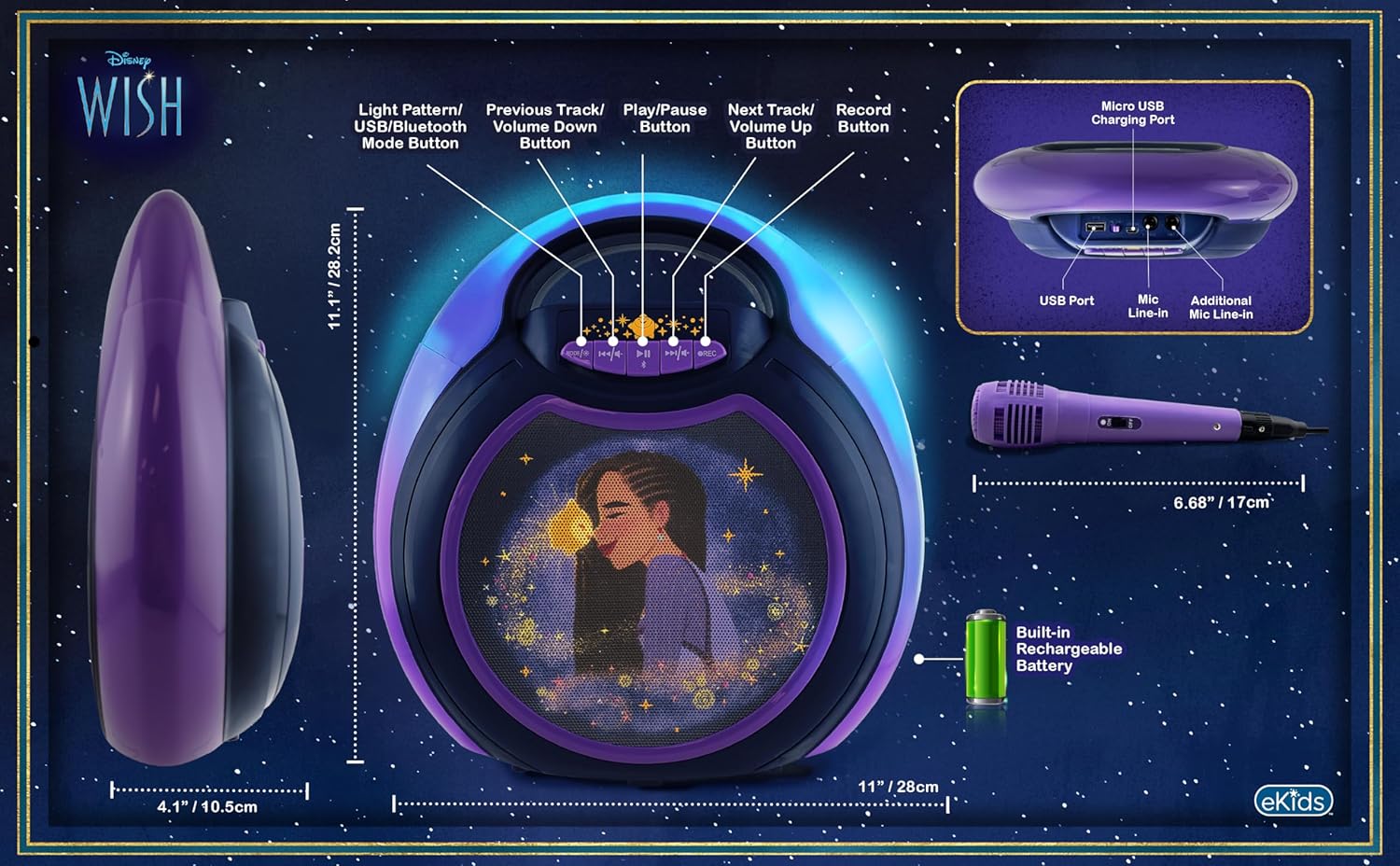
Image 4.1: Diagram of the eKids Disney Wish Karaoke Machine's controls, ports, and dimensions.
Kontrol sareng palabuhan:
- MODE / # Button: Switches between input modes (Bluetooth, USB) and adjusts light patterns.
- Previous Track / Volume Down Button: Navigates to the previous track or decreases volume.
- Tombol Puter / Reureuh: Muterkeun atanapi ngareureuhkeun audio.
- Next Track / Volume Up Button: Navigates to the next track or increases volume.
- Tombol REC: Initiates recording (requires USB flash drive).
- Port Mikro USB Ngecas: Pikeun ngecas batré internal.
- Port USB: For connecting a USB flash drive for recording or playback.
- Mic Line-in: Primary port for the included wired microphone.
- Additional Mic Line-in: For connecting a second microphone (not included) for duets.
5. Setélan
5.1 Ngecas Unit
Before first use, fully charge the karaoke machine. Connect the provided USB charging cable to the Micro USB Charging Port on the unit and to a standard USB power adapter (not included) or a computer's USB port. The charging indicator will illuminate during charging and turn off when fully charged.
5.2 Nyambungkeun Mikropon
Plug the wired microphone's connector into the 'Mic Line-in' port on the karaoke machine. For duet performances, an additional microphone (not included) can be connected to the 'Additional Mic Line-in' port.

Gambar 5.1: Sisi view of the karaoke machine with the wired microphone connected.
6. Parentah Operasi
6.1 Powering on / Pareum
Pencét jeung tahan tombol MODE / # button to power the unit on or off.
6.2 Nyapasangkeun Bluetooth
When the unit is powered on, it will automatically enter Bluetooth pairing mode. The indicator light will flash. On your compatible device (smartphone, tablet, etc.), enable Bluetooth and select "eKids Wish Karaoke" from the list of available devices. A confirmation tone will sound when pairing is successful.

Image 6.1: Bluetooth compatibility with various devices.
6.3 Maénkeun Musik
Once paired via Bluetooth, start playing music from your connected device. Use the Play / Reureuh, Lagu saméméhna / Volume Turun, jeung Lacak / Jilid salajengna buttons on the karaoke machine to control playback.
6.4 Ngagunakeun Mikropon
Ensure the microphone is connected to the 'Mic Line-in' port. Adjust the microphone's volume using the dedicated switch on the microphone itself. Sing into the microphone while music plays from the speaker.
6.5 Recording Performances
To record your singing, insert a USB flash drive (not included) into the USB Port. Press the REC button to start recording. Press it again to stop recording. Recordings will be saved to the USB flash drive. Refer to the Product Overview (Image 4.1) for the location of the USB port.
6.6 Modeu Tembongkeun Lampu
Pencét éta MODE / # button repeatedly to cycle through different color-changing LED light show patterns.
6.7 Volume Control
Adjust the main speaker volume using the Lagu saméméhna / Volume Turun jeung Lacak / Jilid salajengna buttons. The microphone has its own volume control switch.
7. Pangropéa
7.1 beberesih
Lap unitna ku lawon anu lemes sareng garing. Ulah nganggo pembersih cair atanapi bahan anu kasar.
7.2 Panyimpenan
Upami teu dianggo, simpen alat ieu di tempat anu tiis sareng garing, jauh tina sinar panonpoé langsung sareng suhu anu ekstrim.
8. Cara ngungkulan
- Henteu aya kakuatan: Ensure the unit is charged. Connect the USB charging cable and allow it to charge for a period.
- Henteu aya sora: Check that the volume on both the karaoke machine and the connected Bluetooth device is turned up. Ensure the microphone is properly connected and its switch is on.
- Bluetooth Teu Nyambung: Make sure Bluetooth is enabled on your device and the karaoke machine is in pairing mode. Try unpairing and re-pairing the device. Ensure no other devices are currently connected to the karaoke machine.
- Recording Not Working: Verify that a compatible USB flash drive is inserted into the USB port and has sufficient free space.
9. Spésifikasi
| Nomer modél | WH-555 |
| Diménsi | 11.07 x 4.14 x 11.11 inci |
| Beurat | 3.67 pon |
| Sumber Daya | Ditenagakeun Batré (Bisa dieusi deui) |
| Voltage | 3 volt |
| Konektipitas | Bluetooth, USB |
| Speaker Count | 1 |
| Fitur husus | Light Up Speaker, Recording Function |
10. Garansi jeung Rojongan
Kanggo inpormasi garansi sareng dukungan palanggan, mangga tingali dokuméntasi anu kalebet dina pameseran anjeun atanapi kunjungi eKids resmi. websitus. Simpen bukti pameseran anjeun pikeun klaim garansi.


