1. Produk Langkungview
The Baseus Qpow 2 Dual Cable Power Bank is a versatile and portable charging solution designed to keep your devices powered on the go. With a high capacity of 10,000 mAh and 22.5W fast charging capabilities, it can charge multiple devices simultaneously using its integrated Lightning and USB-C cables, as well as additional USB-A and USB-C ports.
This power bank features advanced multi-layer protection against overcurrent, overvoltage, overcharge, high temperatures, and electromagnetic interference, ensuring safe and reliable charging for your devices. Its compact and lightweight design, coupled with an easy-to-read battery status display, makes it an ideal companion for daily use and travel.
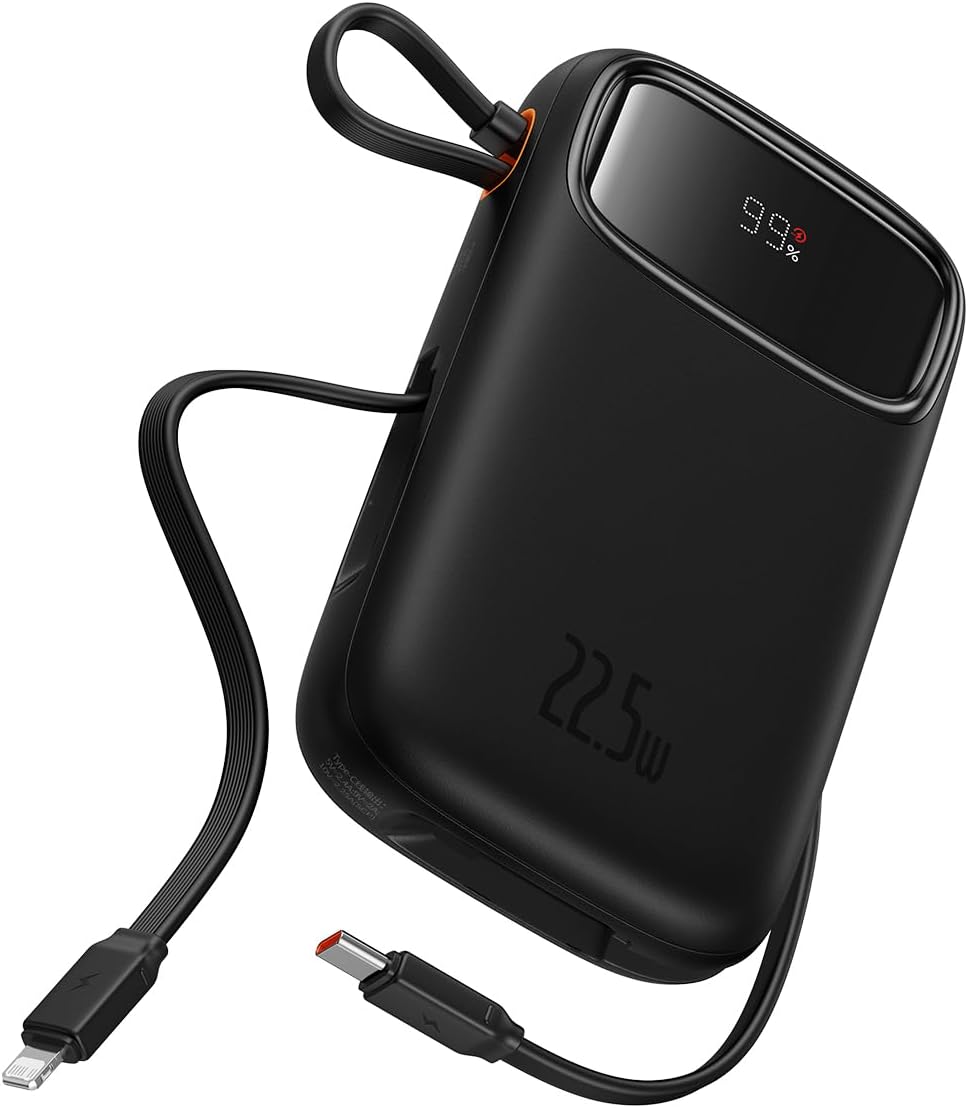
Figure 1: The Baseus Qpow 2 Dual Cable Power Bank, showcasing its compact design, integrated cables, and digital battery percentage tampilan.

Figure 2: The power bank's slim and pocket-friendly dimensions (4.52*2.83*0.78 inches, 8.5 oz) compared to a standard soda can.

Figure 3: The portable lanyard-cable design, allowing users to pull out the cable for charging and pull it back for easy carrying.
2. Setup Guide
2.1 Ngecas Awal Bank Daya
Before first use, it is recommended to fully charge your Baseus Qpow 2 Power Bank.
- Connect the integrated USB-C cable or an external USB-C cable to the power bank's USB-C input port.
- Sambungkeun tungtung kabel anu sanésna kana carjer témbok USB anu cocog (henteu kalebet).
- The digital display on the power bank will show the charging progress. Charge until the display shows "100%".

Figure 4: The power bank supports two-way USB-C charging, with 20W output and 18W input capabilities.
3. Parentah Operasi
3.1 Ngecas Alat Anjeun
The Baseus Qpow 2 Power Bank offers multiple ways to charge your devices:
- Using Integrated Cables:
- For Apple devices: Pull out the integrated Lightning cable and connect it to your iPhone, iPad, or AirPods.
- For USB-C devices: Pull out the integrated USB-C cable and connect it to your Android phone, tablet, or other USB-C compatible device.
- Using External Ports:
- Connect your device's charging cable to the USB-A output port or the USB-C output port on the power bank.
The power bank can charge up to four devices simultaneously. Charging will begin automatically once a device is connected.

Figure 5: The power bank's capability to charge four devices at once using its integrated USB-C and Lightning cables, and external USB-C and USB-A ports.
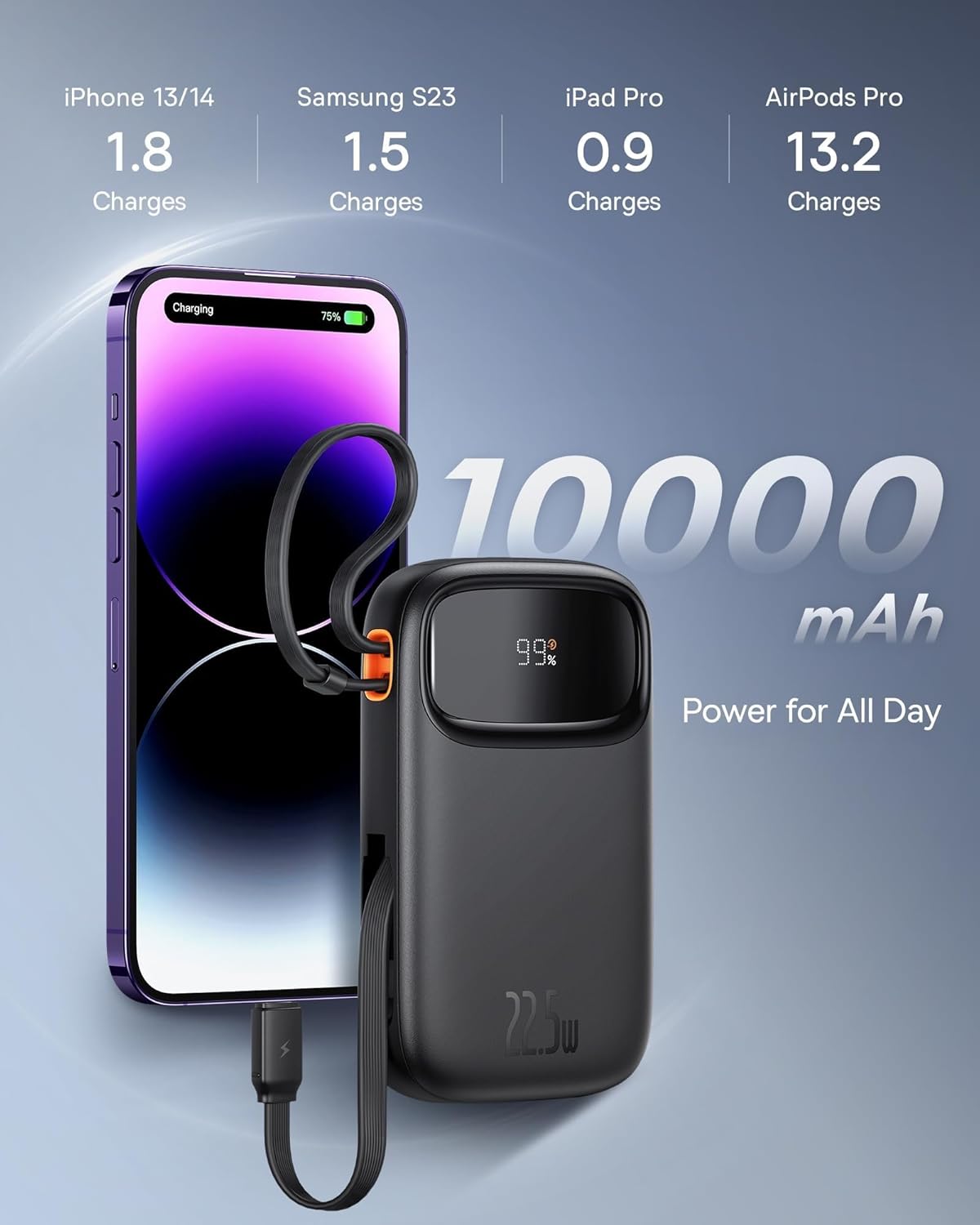
Figure 6: Illustrates the 10,000 mAh capacity, capable of charging an iPhone 13/14 approximately 1.8 times, Samsung S23 1.5 times, iPad Pro 0.9 times, and AirPods Pro 13.2 times.

Figure 7: The power bank features two built-in fast charging cables: one Lightning and one USB-C, supporting PD 22.5W fast charging.
3.2 Mariksa Status Batré
The digital display on the power bank shows the remaining battery percentage, allowing you to easily monitor its charge level.
4. Pangropéa
- Jauhkeun power bank tina suhu anu ekstrim, sinar panonpoé langsung, sareng lingkungan anu lembab.
- Hindarkeun ngaragragkeun atanapi matuhkeun bank daya kana dampak anu kuat.
- Ngabersihan beungeut ku lawon lemes, garing. Ulah make bahan kimia kasar atawa bahan abrasive.
- Store the power bank in a cool, dry place when not in use for extended periods. It is recommended to charge it to about 50% before long-term storage.
5. Cara ngungkulan
| Masalah | Mungkin Cukang lantaranana | Solusi |
|---|---|---|
| Power bank teu ngecas | Cable not properly connected; Wall charger not working; Power bank faulty. | Ensure cables are securely connected. Try a different wall charger or cable. If issue persists, contact support. |
| Alat teu ngecas tina bank daya | Power bank battery low; Device cable faulty; Device not compatible; Power bank in protection mode. | Check power bank battery level. Try a different charging cable. Ensure device is compatible. Disconnect and reconnect the device. |
| Ngecas lalaunan | Using a non-fast charging cable/port; Device not supporting fast charging; High ambient temperature. | Ensure you are using the integrated fast charging cables or a compatible fast charging port. Check device's charging specifications. Charge in a cooler environment. |
| tampilan digital teu jalan | Power bank is off; Display malfunction. | Press the power button (if any) to activate the display. If it remains off, contact support. |
6. Spésifikasi
| merek | Baseus |
| Modél | Qpow 2 |
| Kapasitas batré | 10,000 mAh |
| Daya Kaluaran | 22.5W (Maks) |
| Daya Input (USB-C) | 18W |
| Warna | Hideung |
| Fitur husus | Lightweight, Integrated Dual Cables (Lightning & USB-C) |
| Voltage | 5 volt |
| Komposisi batré | Litium-ion |
| Dianjurkeun Mangpaat | Charging mobile phones, tablets, and other portable electronic devices. |
| Sumber Daya | Batré Powered |
| Item Beurat | 320 gram |
| Ampumur | 3 A |
7. Garansi jeung Rojongan
7.1 Émbaran jaminan
Baseus products typically come with a limited warranty. Please refer to the warranty card included with your product or visit the official Baseus websitus kanggo syarat sareng katangtuan garansi anu lengkep khusus pikeun wilayah sareng tanggal pameseran anjeun. Simpen bukti pameseran anjeun kanggo klaim garansi.
7.2 Rojongan Palanggan
For technical assistance, troubleshooting, or any inquiries regarding your Baseus Qpow 2 Power Bank, please contact Baseus customer support through their official website or the contact information provided in your product packaging. When contacting support, please have your product model and purchase details ready.


