1. Bubuka
The GVDA GD128PLUS Smart Rechargeable Digital Multimeter is an advanced, versatile tool designed for accurate and reliable electrical measurements. Featuring a 10000-count display, auto-ranging capabilities, and True RMS functionality, it is suitable for professionals and electronics enthusiasts alike. This manual provides essential information for safe and effective operation, setup, maintenance, and troubleshooting of your multimeter.
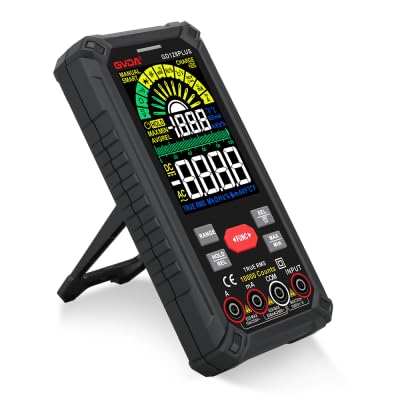
Figure 1.1: GVDA GD128PLUS Digital Multimeter with its integrated kickstand.
2. Émbaran Kasalametan
Salawasna patuh kana tindakan pencegahan kaamanan ieu pikeun nyegah tatu pribadi atanapi karusakan kana multimeter:
- Ulah ngaleuwihan wates input maksimum pikeun rentang pangukuran naon waé.
- Laksanakeun ati-ati pisan nalika damel sareng voltagnyaeta luhur 30V AC RMS, 42V puncak, atawa 60V DC. Ieu voltagÉta nyababkeun bahaya shock.
- Salawasna pegatkeun daya ka sirkuit sareng kaluarkeun sadaya voltase tinggitage capacitors before performing resistance, continuity, or diode tests.
- Pastikeun kabel tés aya dina kaayaan anu saé, tanpa aya insulasi anu ruksak.
- Ulah ngoperasikeun multimeter upami katingalina ruksak atanapi upami wadahna dibuka.
- Anggo fungsi sareng rentang anu leres pikeun unggal pangukuran.
- Simpen ramo-ramo di tukangeun pelindung ramo dina probe tés nalika ngukur.
- Do not use the multimeter in wet environments or in the presence of explosive gases or dust.
- The Non-Kontak Voltage (NCV) function is for indication only; always verify voltage presence with direct measurement.
3. Eusi Paket
Saatos ngabongkar bungkusan, pariksa yén sadaya barang anu didaptarkeun di handap aya sareng dina kaayaan anu saé:
- 1 x GVDA GD128PLUS Digital Multimeter
- 1 x Sapasang Test Lead (Beureum sareng Hideung)
- 1 x Kabel Ngecas USB
- 1 x K-type Thermocouple Probe
- 1 x Cloth Carrying Bag
- 1 x Manual Pamaké (dokumén ieu)
- 1 x Kotak Kado (bungkusan)
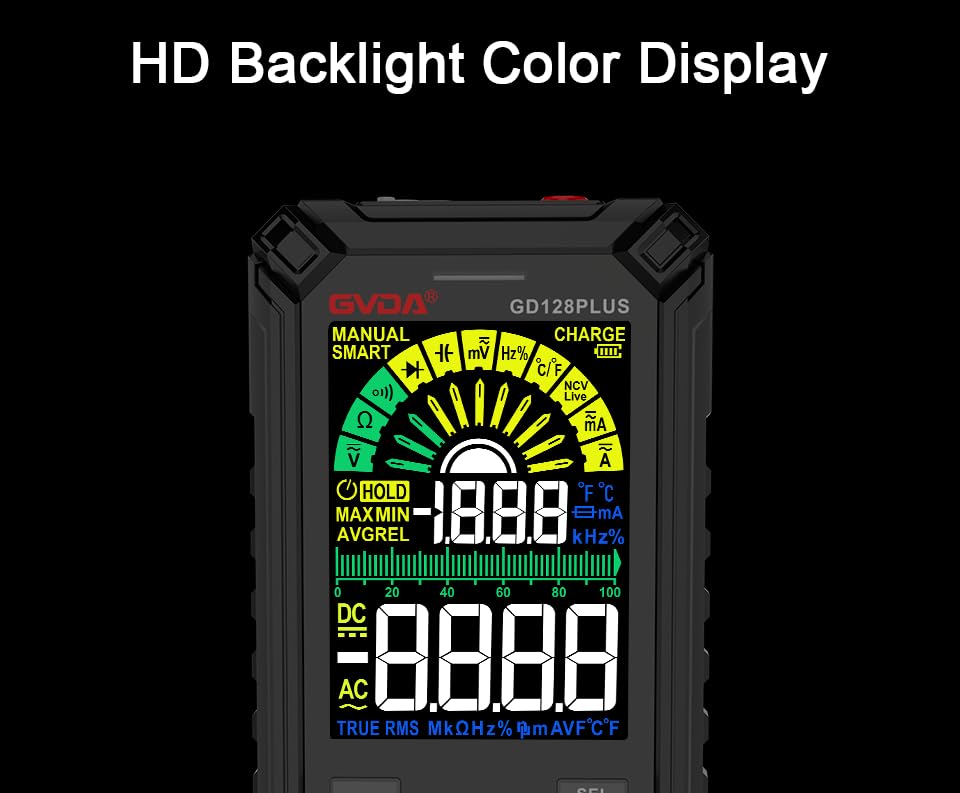
Figure 3.1: All components included in the GVDA GD128PLUS Multimeter package.
4. Fitur produk jeung komponén
The GD128PLUS multimeter is equipped with a range of features for comprehensive electrical testing:
- 10000 Jumlah Témbongkeun: Nyadiakeun résolusi anu luhur pikeun pangukuran anu tepat.
- rentang otomatis: Otomatis milih rentang pangukuran anu pas, ngagampangkeun operasi.
- RMS leres: Mastikeun bacaan akurat pikeun bentuk gelombang AC non-sinusoidal.
- Batré Litium anu tiasa dicas deui: Built-in 3.7V battery for convenience and portability.
- HD Backlight Color Display: Clear and easy-to-read display in various lighting conditions.
- Non-Kontak VoltagDeteksi e (NCV): Safely detects the presence of AC voltage tanpa kontak langsung.
- Senter LED: Integrated light for illuminating dark work areas.
- Tahan Data (HOLD): Freezes bacaan ayeuna dina tampilan.
- Pangukuran Relatif (REL): Displays the difference between a stored reference value and the current reading.
- MAX/MIN Measurement: Ngarékam nilai maksimum sareng minimum salami sési pangukuran.
- Input Jack LED Indication: Guides correct test lead connection for selected function.
- Perlindungan Overload: Protects the device from damage due to excessive input.
4.1. Multimeter Layout

Figure 4.1: Key components and input jacks of the GVDA GD128PLUS Multimeter.
Tingali Gambar 4.1 pikeun lokasi komponén-komponén ieu:
- tampilan: HD Backlight Color LCD for readings and indicators.
- Tombol Fungsi: RANGE, HOLD/REL, FUNC, SEL, MAX/MIN.
- Input Jacks:
- COM Jack: Input umum (négatip) pikeun sadaya pangukuran.
- VΩHzCap°C/°F Jack: Positive input for Voltage, Resistance, Frequency, Capacitance, and Temperature measurements.
- mAμA Jack: Input positif pikeun miliampere sareng mikroamppangukuran ayeuna.
- Soket 10A: Input positif pikeun 10 Amppangukuran ayeuna.
- Tombol Daya / Pareuman: Lokasina di tepi luhur.
- Ngecas Jack: Port USB-C pikeun ngecas batré internal.
- Konci Senter: Button to activate the integrated LED flashlight.
- Indikator Awas: LED light for safety alerts.
- kurung: Integrated kickstand on the back for hands-free viewing.
5. Setélan
5.1. Ngecas Awal
Before first use, it is recommended to fully charge the multimeter's internal lithium battery. Connect the provided USB charging cable to the multimeter's charge jack and to a standard USB power adapter (not included) or a computer USB port. The display will indicate charging status. A full charge typically takes a few hours.

Figure 5.1: The multimeter's rechargeable lithium battery can be charged directly using a USB cable.
5.2. Attaching Test Leads
For most measurements, connect the black test lead to the COM jack and the red test lead to the appropriate positive input jack (VΩHzCap°C/°F, mAμA, or 10A) depending on the desired measurement function. The input jack LED indicators will illuminate to guide correct connection.
6. Parentah Operasi
6.1. Daya Hurung / Pareum
Pencét jeung tahan tombol Daya Hurung/Pareuman button (located on the top edge) to turn the multimeter on or off. The device features an auto-power-off function to conserve battery life after a period of inactivity.
6.2. Modeu pangukuran
The GD128PLUS offers various measurement modes, accessible via the rotary dial and function buttons:
6.2.1. JilidtagPangukuran (AC/DC)
- Hurungkeun kenop rotary kana V position. The multimeter will automatically detect AC or DC voltage.
- Sambungkeun kalungguhan tés hideung kana COM jack sareng kabel tés beureum ka VΩHzCap°C/°F jack.
- Sambungkeun probe uji sacara sajajar jeung sirkuit atawa komponén anu diuji.
- Baca voltage nilai dina tampilan.
6.2.2. Current Measurement (AC/DC)
- Hurungkeun kenop rotary kana mA/μA or 10A posisi gumantung kana arus anu dipiharep.
- Sambungkeun kalungguhan tés hideung kana COM jack. Sambungkeun kabel uji beureum kana mAμA jack for small currents or the 10A jack for larger currents.
- Connect the multimeter in series with the circuit. Ensure the circuit is de-energized before connecting.
- Pasangkeun daya kana sirkuit sareng baca nilai ayeuna.
- Awas: Never connect the multimeter in parallel for current measurement, as this can damage the device and the circuit.
6.2.3. Ukur Résistansi (Ω)
- Hurungkeun kenop rotary kana Ω posisi.
- Sambungkeun kalungguhan tés hideung kana COM jack sareng kabel tés beureum ka VΩHzCap°C/°F jack.
- Pastikeun sirkuit geus de-energized sarta sakabeh kapasitor discharged saméméh ngukur lalawanan.
- Sambungkeun probe tés kana komponén anu badé diukur.
- Baca nilai résistansi.
6.2.4. Capacitance Measurement (F)
- Hurungkeun kenop rotary kana Cap posisi.
- Sambungkeun kalungguhan tés hideung kana COM jack sareng kabel tés beureum ka VΩHzCap°C/°F jack.
- Pastikeun kapasitor geus kosong sapinuhna sateuacan nyambungkeun probe.
- Sambungkeun panyilidikan test sakuliah kapasitor.
- Baca nilai kapasitansi.
6.2.5. Pangukuran Frékuénsi (Hz)
- Hurungkeun kenop rotary kana Hz posisi.
- Sambungkeun kalungguhan tés hideung kana COM jack sareng kabel tés beureum ka VΩHzCap°C/°F jack.
- Connect the test probes in parallel to the signal source.
- Baca nilai frékuénsina.
6.2.6. Diode Test and Continuity Test
- Hurungkeun kenop rotary kana Dioda / Kontinuitas posisi. Ngagunakeun éta SEL button to toggle between diode test and continuity test.
- Sambungkeun kalungguhan tés hideung kana COM jack sareng kabel tés beureum ka VΩHzCap°C/°F jack.
- Tés Diode: Sambungkeun probe beureum ka anoda sareng probe hideung ka katoda dioda. Voltase majutage serelek bakal dipidangkeun. Balikkeun probe; sirkuit kabuka (OL) kedah dipidangkeun.
- Uji kontinuitas: Connect the probes across the circuit or component. A continuous beep indicates a low resistance (continuity).
6.2.7. Non-Kontak Voltage (NCV) Deteksi
- Hurungkeun kenop rotary kana NCV posisi.
- Move the top end of the multimeter near the conductor suspected of having AC voltage.
- The multimeter will emit an audible beep and the warning indicator will flash, with the display showing signal strength, if AC voltage dideteksi.
- Catetan: This function is for preliminary detection only. Always use direct contact measurement for precise voltage verifikasi.
6.2.8. Temperature Measurement (°C/°F)
- Hurungkeun kenop rotary kana ° C / ° F posisi.
- Connect the K-type thermocouple probe to the COM jeung VΩHzCap°C/°F jacks, observasi polaritasna.
- Place the tip of the thermocouple on or near the object whose temperature is to be measured.
- Read the temperature on the display. Use the SEL tombol pikeun pindah antara Celsius jeung Fahrenheit.
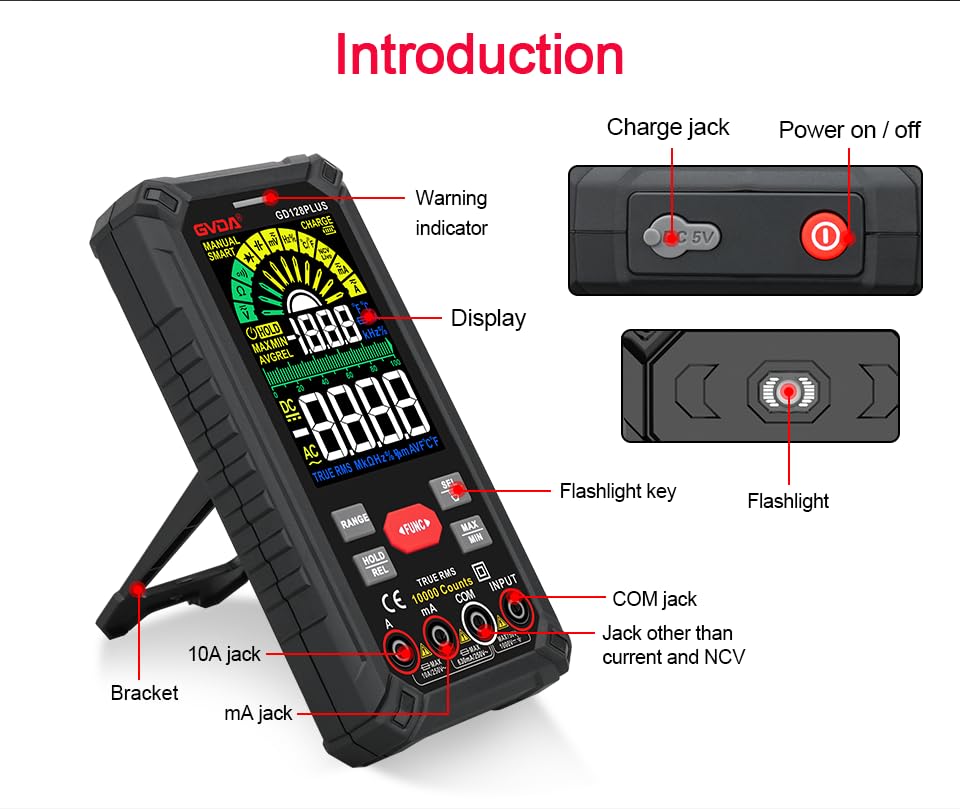
Figure 6.1: The multimeter can perform temperature tests using the included K-type thermocouple probe.
6.3. Fungsi Husus
- Tombol RANGE: In manual range mode, press to cycle through available ranges. In auto range mode, press to switch to manual range.
- HOLD/REL Button:
- Short press: Activates Data Hold, freezing the current reading. Press again to release.
- Long press: Activates Relative Measurement (REL). The current reading becomes the reference, and subsequent readings show the difference from this reference. Long press again to exit.
- Tombol MAX/MIN: Press to enter MAX/MIN recording mode. The display will show the maximum, minimum, and average values detected since activation. Press again to cycle through MAX, MIN, AVG. Long press to exit.
- Tombol FUNC: Used to switch between different functions within the same rotary dial position (e.g., AC/DC voltage, Dioda/Kontinuitas).
- Senter: Press the dedicated flashlight key on the side to turn the LED flashlight on or off.
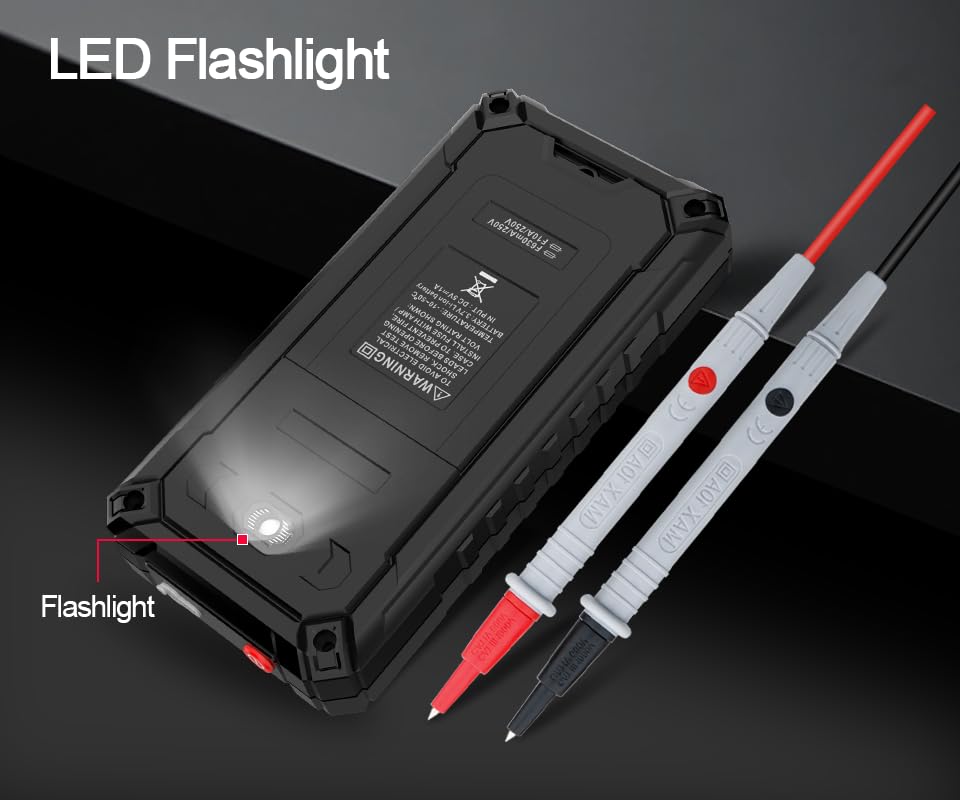
Figure 6.2: The multimeter features a convenient LED flashlight for illuminating work areas.
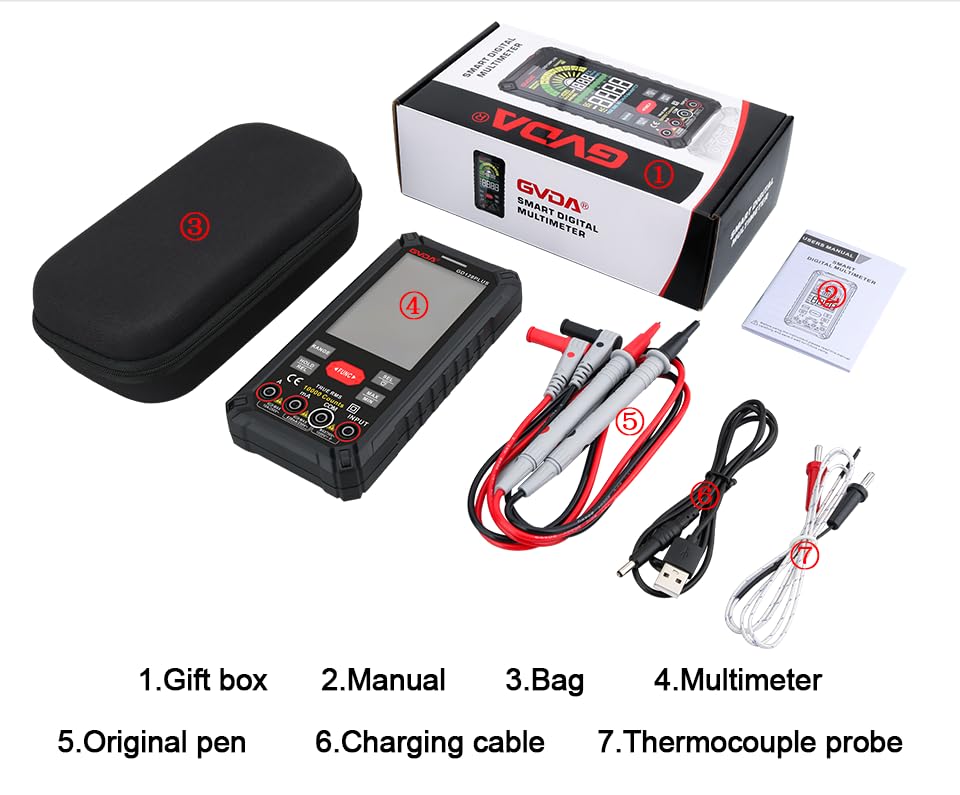
Figure 6.3: The HD Backlight Color Display provides clear and comprehensive measurement information.
7. Pangropéa
7.1. beberesih
Ngusap kasus kalayan iklanamp cloth and mild detergent. Do not use abrasives or solvents. Ensure the multimeter is off and disconnected from any circuits before cleaning.
7.2. Ngecas Batré
The multimeter is equipped with a rechargeable lithium battery. When the low battery indicator appears on the display, connect the multimeter to a USB power source using the provided charging cable. Avoid fully discharging the battery frequently to prolong its lifespan.
7.3. Panyimpenan
When not in use for extended periods, store the multimeter in a cool, dry place, away from direct sunlight and extreme temperatures. It is advisable to charge the battery periodically (e.g., every 3-6 months) to maintain its health.
8. Cara ngungkulan
| Masalah | Mungkin Cukang lantaranana | Solusi |
|---|---|---|
| Multimeter teu hurung. | Batré lemah atawa béak. | Charge the multimeter using the USB cable. |
| "OL" (Kaleuwihan beban) ditampilkeun. | Pangukuran ngaleuwihan rentang dipilih atawa kapasitas maksimum méter urang. | Switch to a higher range (if in manual range) or ensure the measurement is within the meter's specifications. |
| Bacaan teu akurat. | Fungsi/rentang anu dipilih salah; sambungan kabel tés goréng; gangguan éksternal. | Verify function and range; ensure test leads are securely connected; move away from strong electromagnetic fields. |
| Taya bip continuity. | Circuit is open; multimeter not in continuity mode. | Check the circuit for breaks; ensure the multimeter is set to continuity mode (use SEL button if necessary). |
9. Spésifikasi
| Parameter | Nilai |
|---|---|
| tampilan | 10000 Counts, HD Backlight Color LCD |
| Ngariung | Rentang Otomatis / Manual |
| RMS leres | Sumuhun |
| DC Voltage Rentang | Nepi ka 1000V |
| AC Voltage Rentang | Nepi ka 750V |
| DC Range Ayeuna | Nepi ka 10A |
| AC Range Ayeuna | Nepi ka 10A |
| Rentang lalawanan | Yes (Ohm) |
| Kisaran Kapasitas | Yes (Farad) |
| Rentang Frékuénsi | Yes (Hz) |
| Rentang Suhu | -40°C nepi ka 1000°C / -40°F nepi ka 1832°F |
| Diode Tés | Sumuhun |
| Uji Kontinuitas | Yes (with buzzer) |
| NCV (Non-Kontak Voltage) | Sumuhun |
| Sasayogian tanaga | Batré Litium 3.7V anu tiasa dicas deui |
| Sampling Laju | Kira-kira. 3 kali per detik |
| Diménsi | 166mm x 83mm x 29mm (kira-kira 6.5 x 3.3 x 1.1 inci) |
| Beurat | Kira-kira 1.26 Pon (0.57 kg) |
| Lingkungan Operasi | 0-40°C, relative humidity <80% |
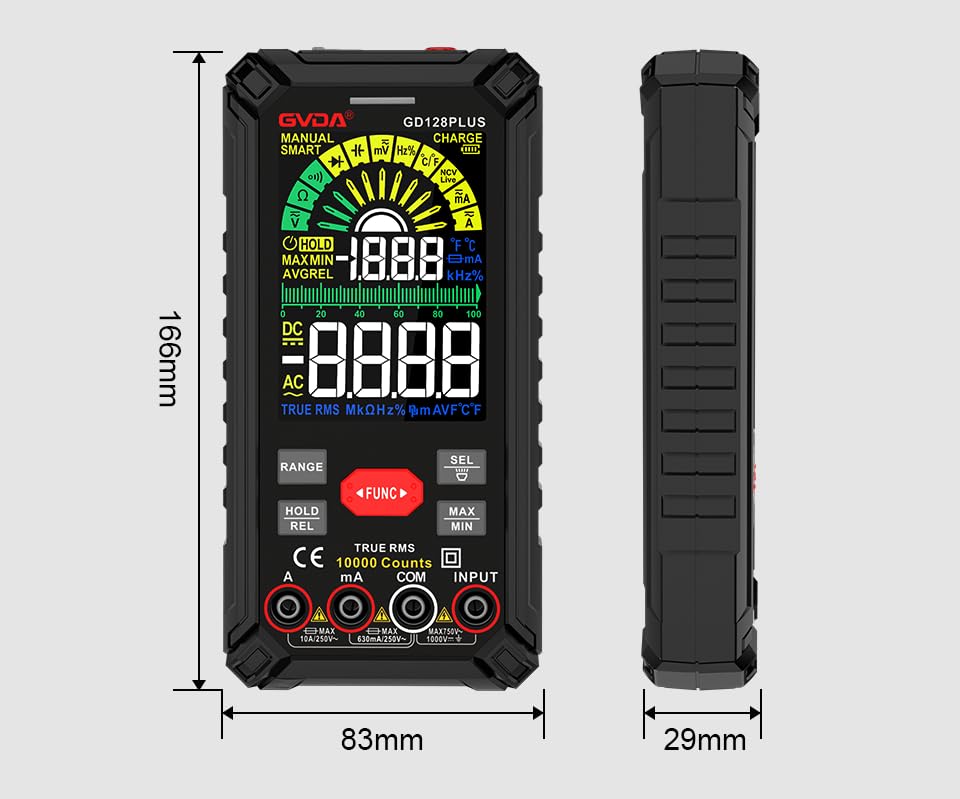
Figure 9.1: Physical dimensions of the GVDA GD128PLUS Multimeter.
10. Garansi jeung Rojongan
This GVDA GD128PLUS Digital Multimeter is designed for reliability and performance. For warranty information, technical support, or service inquiries, please refer to the contact details provided by your retailer or visit the official GVDA websitus. Punten tahan bukti pameseran anjeun pikeun klaim garansi.


