1. Émbaran Kasalametan
Please read this entire manual before assembling and using the exercise bike. Keep this manual for future reference.
- Taroskeun ka dokter anjeun sateuacan ngamimitian program latihan naon waé, khususna upami anjeun ngagaduhan kaayaan kaséhatan anu tos aya.
- This product is designed for home use only. Do not use it in a commercial or institutional setting.
- Kapasitas beurat pangguna maksimum pikeun sapédah latihan ieu nyaéta 100 kg (220 lbs). Ulah ngaleuwihan wates ieu.
- Keep children and pets away from the exercise bike during use.
- Place the exercise bike on a flat, stable surface. Ensure there is adequate clear space around the bike for safe operation.
- Maké pakean olahraga sareng sapatu anu pas. Hindarkeun pakean longgar anu tiasa katéwak dina bagian anu obah.
- Inspect the bike before each use for any loose or worn parts. Do not use if any damage is found.
- Eureun latihan langsung upami anjeun pingsan, lieur, atanapi nyeri.
2. Produk Langkungview
The tectake® Foldable Exercise Bike is a compact and efficient fitness solution designed for effective leg, waist, and glute training. Its robust steel tube construction ensures stability and durability, while its foldable design allows for space-saving storage.
Fitur konci:
- Quiet operation with a foldable design.
- Robust X-shaped frame made of powder-coated steel.
- Flywheel with belt system and wear-resistant magnetic brake.
- Eight adjustable resistance levels via a rotary knob.
- Seven-position height-adjustable saddle.
- Padded handlebars with integrated pulse measurement.
- Non-slip pedal surface with adjustable foot straps.
- Rubber end caps for secure footing.
- Training computer with clear LCD display.

3. Setup jeung Majelis
The tectake exercise bike is designed for quick and easy assembly. All necessary mounting materials are included.
3.1 Eusi Paket:
- Exercise Bike main frame and components
- Parentah Majelis
- Mounting Material (screws, nuts, tools)
3.2 Léngkah-léngkah Majelis:
- Carefully unpack all components and verify against the parts list in the included assembly instructions.
- Attach the front and rear stabilizers to the main frame using the provided bolts and nuts.
- Secure the pedals to the crank arms. Note that the left pedal is reverse-threaded.
- Install the seat post and saddle, ensuring it is securely fastened.
- Attach the handlebars to the main frame, connecting any necessary sensor cables for the computer.
- Insert 2 x AA 1.5V batteries into the training computer (batteries not included).
- Connect the pulse sensor cables from the handlebars to the computer.
- Ensure all connections are tight and secure before first use.
4. Parentah Operasi
4.1 Adjusting Seat Height:
The saddle can be adjusted to seven different height positions to accommodate users up to 180 cm (5'11").
- Loosen the adjustment knob located on the seat post.
- Raise or lower the saddle to your desired height. Ensure your leg has a slight bend at the knee when the pedal is at its lowest point.
- Tighten the adjustment knob securely to lock the saddle in place.
4.2 Adjusting Resistance:
The bike features eight levels of magnetic resistance, allowing you to customize your workout intensity.

- Locate the rotary knob on the main frame, typically below the handlebars.
- Turn the knob clockwise to increase resistance (higher numbers for more challenging workouts).
- Turn the knob counter-clockwise to decrease resistance (lower numbers for easier workouts).
4.3 Using the Training Computer:
The LCD training computer tracks important workout data.


- Fungsi Témbong: The computer typically displays Time, Speed, Distance, Calories, and Pulse (heart rate). Some models may have a 'Scan' mode that cycles through these metrics automatically.
- Pangukuran pulsa: Grip the padded handlebars firmly with both hands. Ensure your palms are in contact with the metal sensors. Your pulse will be displayed on the screen after a few seconds.
- Tombol Mode: Press the 'Mode' button to cycle through the different display functions or to select a specific function to view.
- Tombol Reset: Press and hold the 'Reset' button to clear all current workout data.


5. Pangropéa
5.1 beberesih:
- Ngusap handap sapédah kalawan iklanamp lawon sanggeus unggal pamakéan pikeun miceun kesang jeung lebu.
- Do not use abrasive cleaners or solvents, as these may damage the finish or electronic components.
- Keep the LCD display clean and dry.
5.2 Panyimpenan:
Thanks to its practical foldable function, the exercise bike can be stored compactly when not in use.
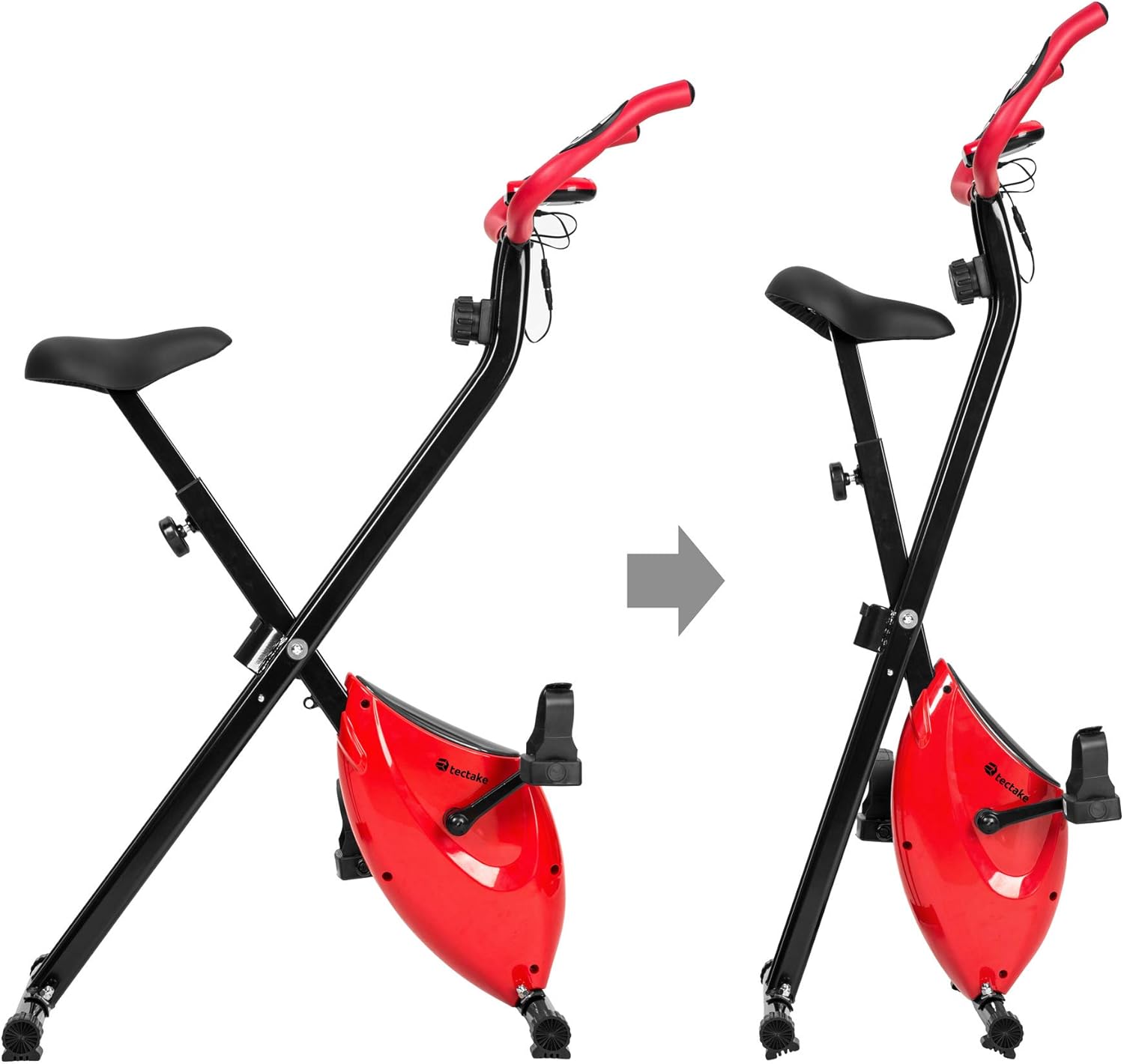
- To fold the bike, follow the instructions in the assembly manual or reverse the setup steps for folding.
- Simpen sapédah di tempat anu garing sareng tiis, jauh tina sinar panonpoé langsung sareng suhu anu ekstrim.
- Ensure the bike is stable and secure in its folded position to prevent accidental tipping.
6. Cara ngungkulan
If you encounter any issues with your tectake exercise bike, please refer to the following common troubleshooting tips:
- Computer Display Not Working:
- Check if the batteries (2 x AA 1.5V) are correctly installed and not depleted. Replace if necessary.
- Ensure all cable connections to the computer are secure.
- No Pulse Reading:
- Ensure your hands are firmly gripping both metal sensors on the handlebars.
- Make sure the pulse sensor cables are properly connected to the computer.
- Noises mahiwal salila operasi:
- Check all bolts and nuts, especially on the frame and pedals, to ensure they are tight.
- Ensure the bike is on a flat and stable surface.
- Résistansi Teu Robah:
- Verify that the resistance knob is turning freely and engaging with the internal mechanism.
- Upami masalahna tetep, hubungi dukungan palanggan.
For issues not covered here, please refer to the detailed assembly instructions or contact TecTake customer support.
7. Spésifikasi
| Fitur | Spésifikasi |
|---|---|
| Nomer modél | 404950 |
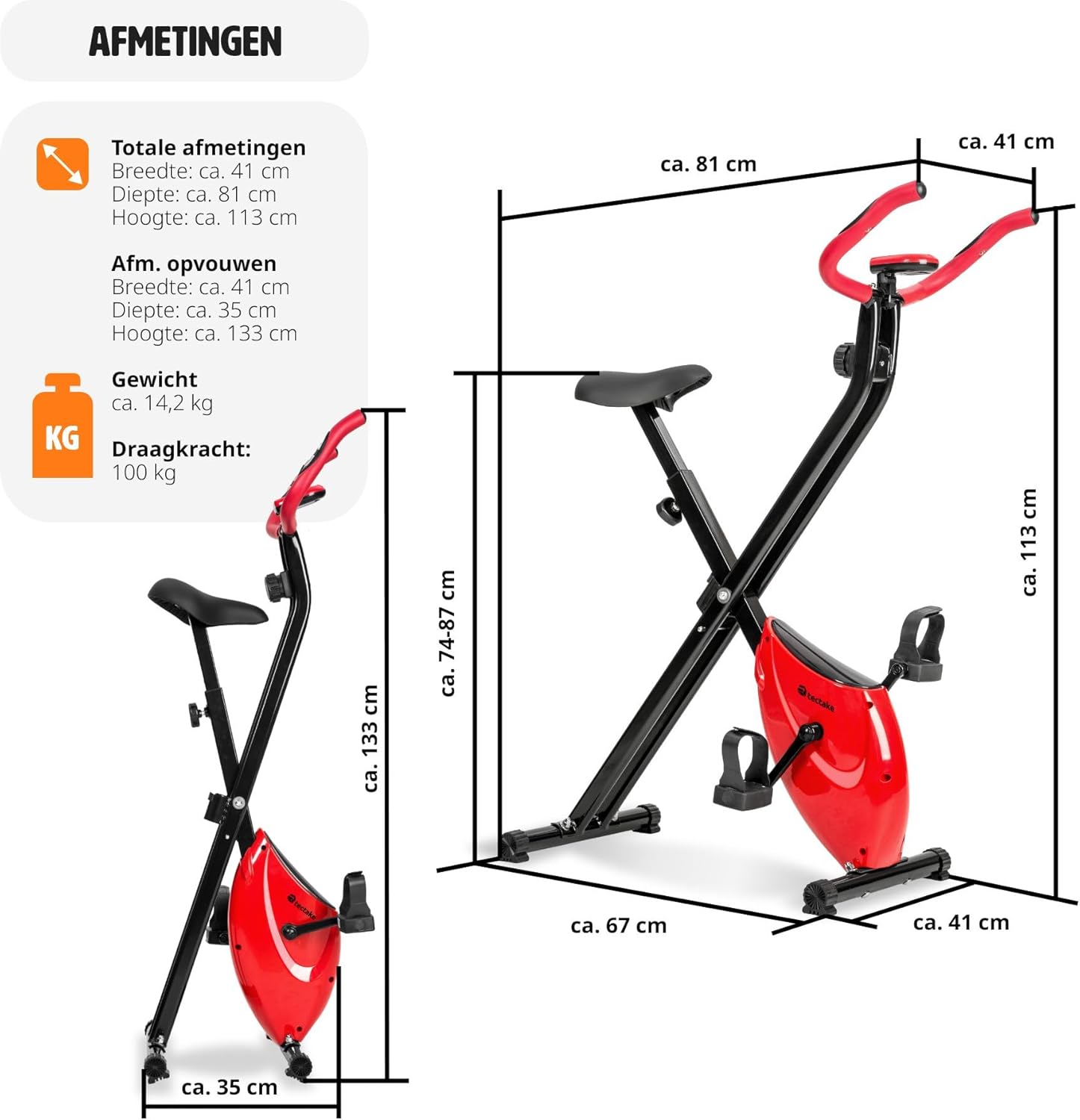
| Ukuran (L x W x H) | Kira-kira. 81 x 41 x 113 cm (31.9 x 16.1 x 44.5 inci) |
| Dilipat Ukuran (L x W x H) | Kira-kira. 41 x 35 x 133 cm (16.1 x 13.8 x 52.4 inci) |
| Beurat | Kira-kira. 14.2 kg (31.3 lbs) |
| Kapasitas Beurat Pamaké Maks. | 100 kg (220 lbs) |
| Recommended Max User Height | Up to 180 cm (5'11") |
| Sadel Jangkungna adjustment | 7 positions (approx. 68-81 cm / 26.8-31.9 inches) |
| Sistem Résistansi | Magnetic, 8 levels |
| Training Computer Power | Batré 2 x AA 1.5V (teu kalebet) |
| Bahan Utama | Powder-coated steel, ABS plastic, Polypropylene, NBR rubber, Polyurethane |
| Warna | Beureum / Hideung |
8. Garansi jeung Rojongan
For warranty information, technical support, or to order replacement parts, please contact TecTake customer service. Refer to the contact details provided with your purchase documentation or visit the official TecTake websitus.
Punten gaduh nomer modél anjeun (404950) sareng bukti pameseran siap nalika ngahubungi dukungan.


