1. Bubuka jeung Leuwihview
Thank you for choosing the TecTake Foldable Exercise Bike. This manual provides essential information for the safe and efficient use of your new fitness equipment. Designed for cardio training at home, this elliptical ergometer features a robust construction, an LCD computer, and a space-saving foldable design. Please read this manual thoroughly before assembly and use, and keep it for future reference.
Fitur konci:
- Desain Hemat Spasi: Easily foldable for convenient storage without cluttering your living space.
- Konstruksi awét: Features a robust X-shaped frame made of epoxy-lacquered steel and a magnetic brake system for long-lasting performance.
- Résistansi adjustable: 8 levels of resistance, adjustable via a knob, to customize your workout intensity.
- Comfortable and Secure: Adjustable seat with 7 height positions, padded handlebars with pulse sensors, and anti-slip pedals with adjustable foot straps.
- Integrated LCD Computer: Tracks time, speed, distance, calories burned, and pulse rate to monitor your progress.
2. Parentah Kasalametan
Sateuacan nganggo sapédah olahraga, mangga perhatoskeun tindakan pencegahan kaamanan ieu:
- Consult a physician before starting any new exercise program, especially if you have pre-existing health conditions.
- Ensure the exercise bike is placed on a flat, stable surface. Use a protective mat to prevent damage to your floor.
- Jauhkeun barudak sareng piaraan tina alat nalika dianggo.
- The maximum user weight capacity for this device is 100 kg (220 lbs). Ulah ngaleuwihan wates ieu.
- Wear appropriate athletic clothing and footwear. Avoid loose clothing that could get caught in moving parts.
- Check all bolts and connections regularly to ensure they are securely tightened.
- Eureun latihan langsung upami anjeun pingsan, lieur, atanapi nyeri.
- Do not attempt to modify the equipment. Use only original replacement parts if necessary.
3. Eusi Paket
Please verify that all components are present and undamaged before assembly. Refer to the packing list provided with your product for a detailed inventory. Typically, the package includes:
- Komponén pigura utama
- Korsi jeung korsi pos
- Handlebars with pulse sensors and LCD computer
- Pedals with foot straps
- Stabilizer bars
- Assembly hardware (screws, nuts, washers, tools)
- Manual pamaké
4. Majelis jeung Setup
The TecTake Foldable Exercise Bike is designed for quick and easy assembly. Follow the step-by-step instructions provided in the separate assembly guide included in your package. Ensure all parts are correctly aligned and securely fastened.

Gambar 1: Leuwihview of the TecTake Foldable Exercise Bike, illustrating its main components and features such as the training computer, adjustable resistance, 7-level adjustable seat, and foldable design.
4.1. Korsi Jangkungna adjustment
The seat can be adjusted to 7 different height positions to accommodate various user heights. To adjust:
- Loosen the adjustment knob located on the seat post.
- Raise or lower the seat to your desired height. Ensure your leg has a slight bend at the knee when the pedal is at its lowest point.
- Kencengkeun kenop pangaturan pageuh pikeun ngamankeun korsi dina tempatna.
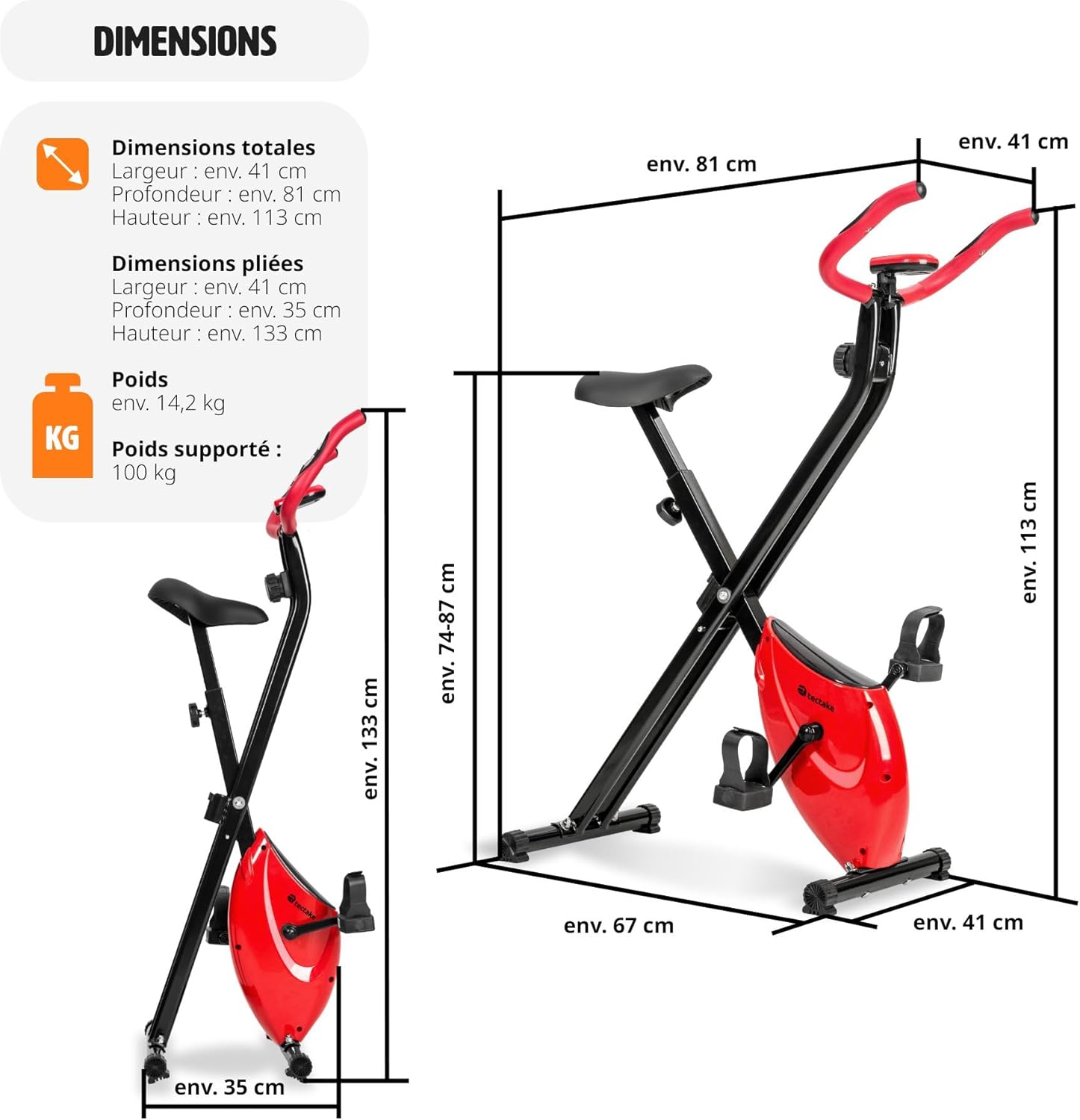
Image 2: Detailed dimensions of the exercise bike, showing both its unfolded state (approx. 81 x 41 x 113 cm) and folded state (approx. 35 x 41 x 133 cm), highlighting its compact storage capability.
4.2. tilepan jeung Panyimpenan
To fold the exercise bike for storage:
- Locate the folding pin or mechanism on the main frame.
- Pull the pin or release the mechanism to unlock the frame.
- Carefully fold the bike until it is in its compact position.
- Secure the folding mechanism to prevent accidental unfolding.
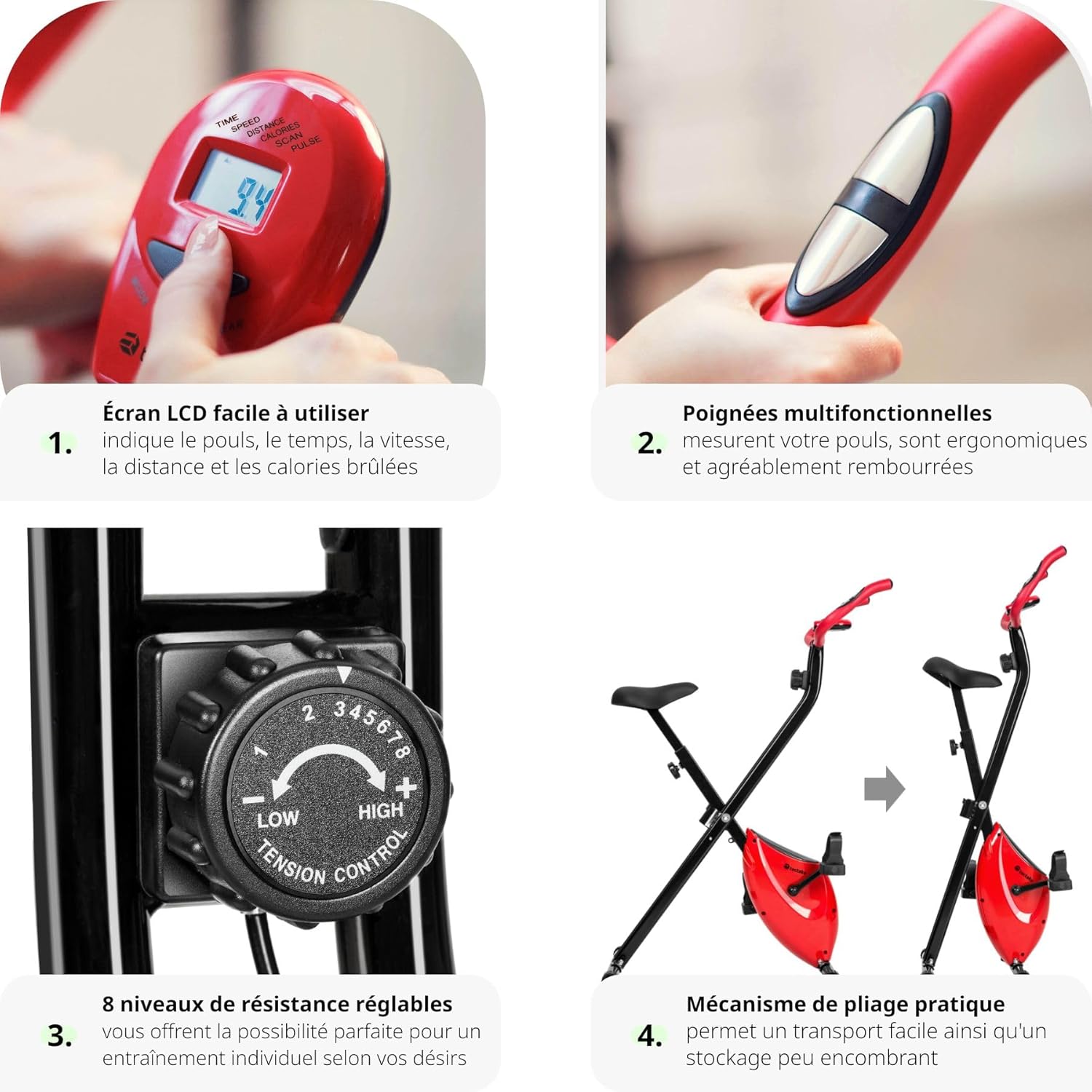
Gambar 3: Gambar komposit nu némbongkeunasing four key features: 1. Easy-to-use LCD screen displaying pulse, time, speed, distance, and calories. 2. Multifunctional padded handles with pulse sensors. 3. 8 levels of adjustable resistance. 4. Practical folding mechanism for space-saving storage.
5. Parentah Operasi
5.1. Using the LCD Computer
The integrated LCD computer helps you track your workout progress. It displays the following metrics:
- WAKTU: Durasi latihan anjeun.
- LAJU: speed Ngabuburit ayeuna.
- Jarak: Distance covered during your session.
- KALORI: Diperkirakeun kalori dibeuleum.
- PULSA: Your heart rate, measured via the handlebar sensors.
- SCAN: Otomatis ngaliwat sadaya metrik.
To operate the computer:
- Press the 'MODE' button to select the desired display function.
- To reset values, press and hold the 'MODE' button for a few seconds.
- The computer automatically turns on when you start pedaling or press any button. It will turn off automatically after a period of inactivity.
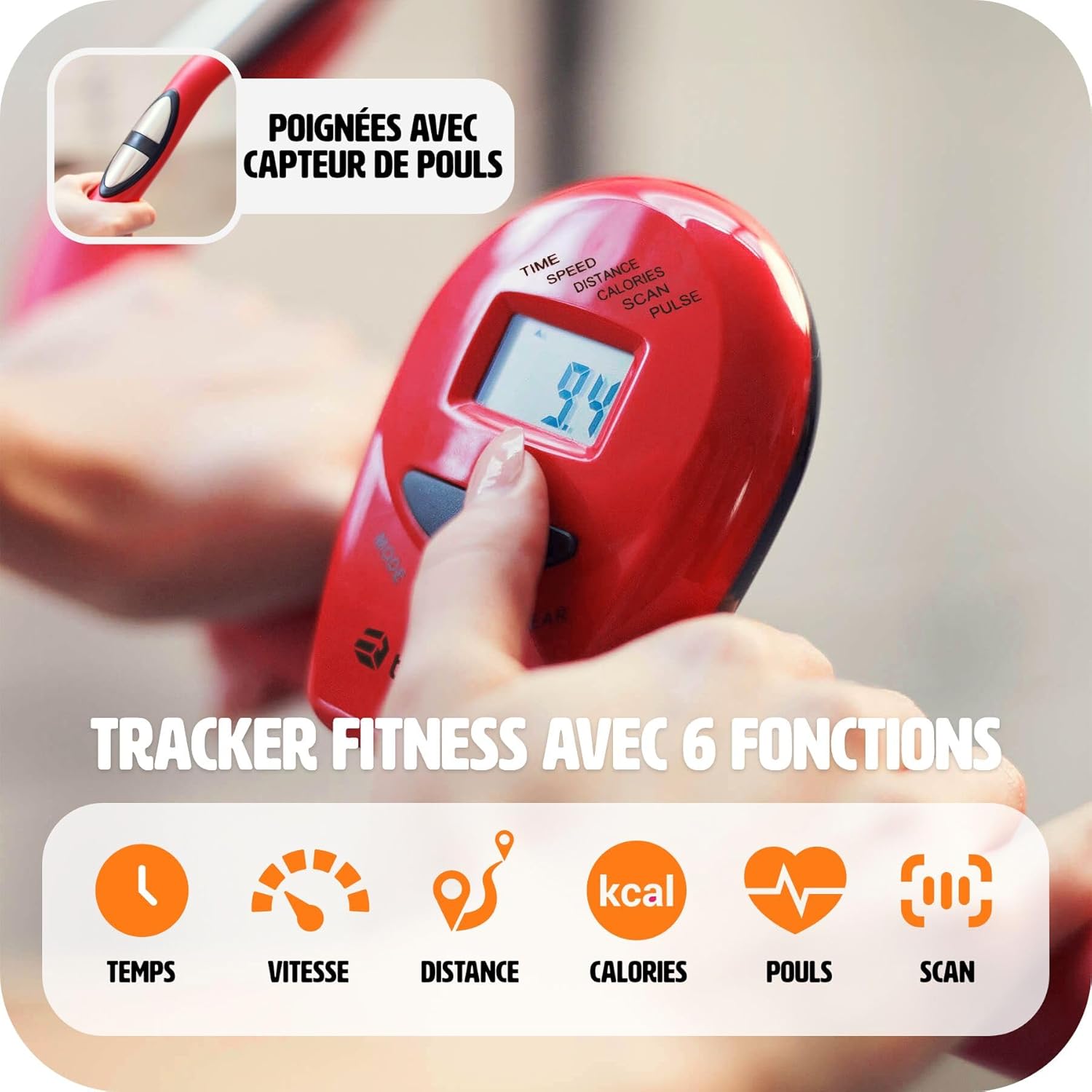
Gambar 4: A lengkep view of the LCD training computer, showing the display of time, speed, distance, calories, pulse, and scan functions. A hand is shown pressing the mode button.
5.2. Nyaluyukeun Résistansi
The exercise bike offers 8 levels of magnetic resistance. To adjust the intensity of your workout:
- Locate the tension control knob on the front post of the bike.
- Turn the knob clockwise to increase resistance (higher numbers for more intense workouts).
- Turn the knob counter-clockwise to decrease resistance (lower numbers for easier workouts).

Image 5: A close-up of the resistance knob, indicating 8 adjustable levels. Levels 1-3 are suggested for easy exercises, 4-6 for cardio training, and 7-8 for muscle strengthening.
5.3. Ngawaskeun Laju Jantung
The handlebars are equipped with pulse sensors. To measure your heart rate:
- Grip both pulse sensors firmly with your hands during your workout.
- Your heart rate will be displayed on the LCD computer after a few seconds.

Image 6: A close-up image showing a hand properly gripping the pulse sensor integrated into the handlebar, demonstrating how to measure heart rate during exercise.

Image 7: This image highlights the comfortable seat and the 100% anti-slip rubber feet, ensuring stability and floor protection during use.
6. Pangropéa
Pangropéa rutin ngajamin umur panjang sareng operasi anu aman tina sapédah latihan anjeun.
- beberesih: Ngusap handap sapédah kalawan iklanamp lawon sanggeus unggal pamakéan pikeun miceun kesang jeung lebu. Hindarkeun pembersih abrasive.
- Pamariksaan: Periodically check all moving parts, bolts, and connections for tightness and wear. Tighten any loose fasteners.
- Lubrication: The magnetic brake system is designed to be maintenance-free. No lubrication is required for the internal mechanism.
- Panyimpenan: Upami teu dianggo, tilepkeun sapédah teras simpen di tempat anu garing, tiis, sareng jauh tina sinar panonpoé langsung sareng suhu anu ekstrim.
7. Cara ngungkulan
If you encounter issues with your TecTake Exercise Bike, refer to the following common problems and solutions:
- Layar LCD Teu Gawé:
- Check if the batteries are correctly installed or need replacement. (The product specifications state 'Piles incluses ? Non', so batteries are not included and need to be purchased separately).
- Ensure all cable connections to the computer are secure. - No Resistance or Incorrect Resistance:
- Verify that the resistance knob is properly engaged and turning freely.
- Ensure the magnetic brake system is correctly assembled according to the instructions. - Noises mahiwal salila operasi:
- Check all bolts and nuts for tightness. Loose parts can cause rattling or squeaking.
- Inspect pedals and crank arms for any signs of damage or looseness. - Sapédah Teu Stabil:
- Ensure the bike is on a level surface. Adjust the leveling caps on the stabilizer bars if present.
- Confirm all frame connections are securely tightened.
If the problem persists, please contact TecTake customer support.
8. Spésifikasi
| Fitur | Rincian |
|---|---|
| merek | TecTake |
| Nomer modél | 404950 |
| Warna | Hideung |
| Bahan | Epoxy-lacquered Steel, Plastic |
| Sistim drive | Sabuk |
| Mékanisme Résistansi | Magnét |
| Tingkat Résistansi | 8 (Saluyukeun) |
| adjustment korsi | 7 Height Positions |
| Fitur | Foldable, Adjustable Seat, Pulse Sensors |
| Sumber Daya | Batré Powered (Aki teu kaasup) |
| Ukuran Dilipat (L x W x H) | Kira-kira. 81 x 41 x 113 cm |
| Dilipat Ukuran (L x W x H) | Kira-kira. 35 x 41 x 133 cm |
| Item Beurat | 14.2 kg |
| Kamampuh beurat maksimum | 100 kg |
| Dianjurkeun Paké | jero rohangan |
9. Video produk
9.1. Ffitness FLC201BN Exercise Bike Overview
Video 1: video ieu nyadiakeun leuwihview of the Ffitness FLC201BN exercise bike, demonstrating its features and use for home cardio and fitness workouts. (Note: This video is for a similar product, Ffitness FLC201BN, and is provided by a seller.)
9.2. F-Bike Foldable Exercise Bike Features
Video 2: This video showcases the features of an F-Bike foldable exercise bike, including its adjustable seat, multifunctional handles, LCD display, anti-slip pedals, magnetic resistance, and space-saving foldable design. (Note: This video is for a similar product, F-Bike, and is provided by a seller.)
10. Garansi jeung Rojongan
For warranty information, please refer to the documentation included with your purchase or contact the retailer. For technical support, spare parts, or any questions not covered in this manual, please contact TecTake customer service directly. Have your model number (404950) and purchase date ready when contacting support.


