Bubuka
The Sonim XP5 Plus is a rugged, purpose-built communication device designed for demanding environments. It combines cellular and radio-like capabilities, making it ideal for critical communications. This manual provides essential information for setting up, operating, maintaining, and troubleshooting your Sonim XP5 Plus.
Eusi pakét
Pastikeun yén sadaya item aya dina pakét produk anjeun:
- Sonim XP5 Plus XP5900 Rugged Phone
- Adaptor kakuatan
- Batré Litium Ion
- Kabel USB-C
- Dokuméntasi (Panduan Mimitian Gancang, Inpormasi Kasalametan)
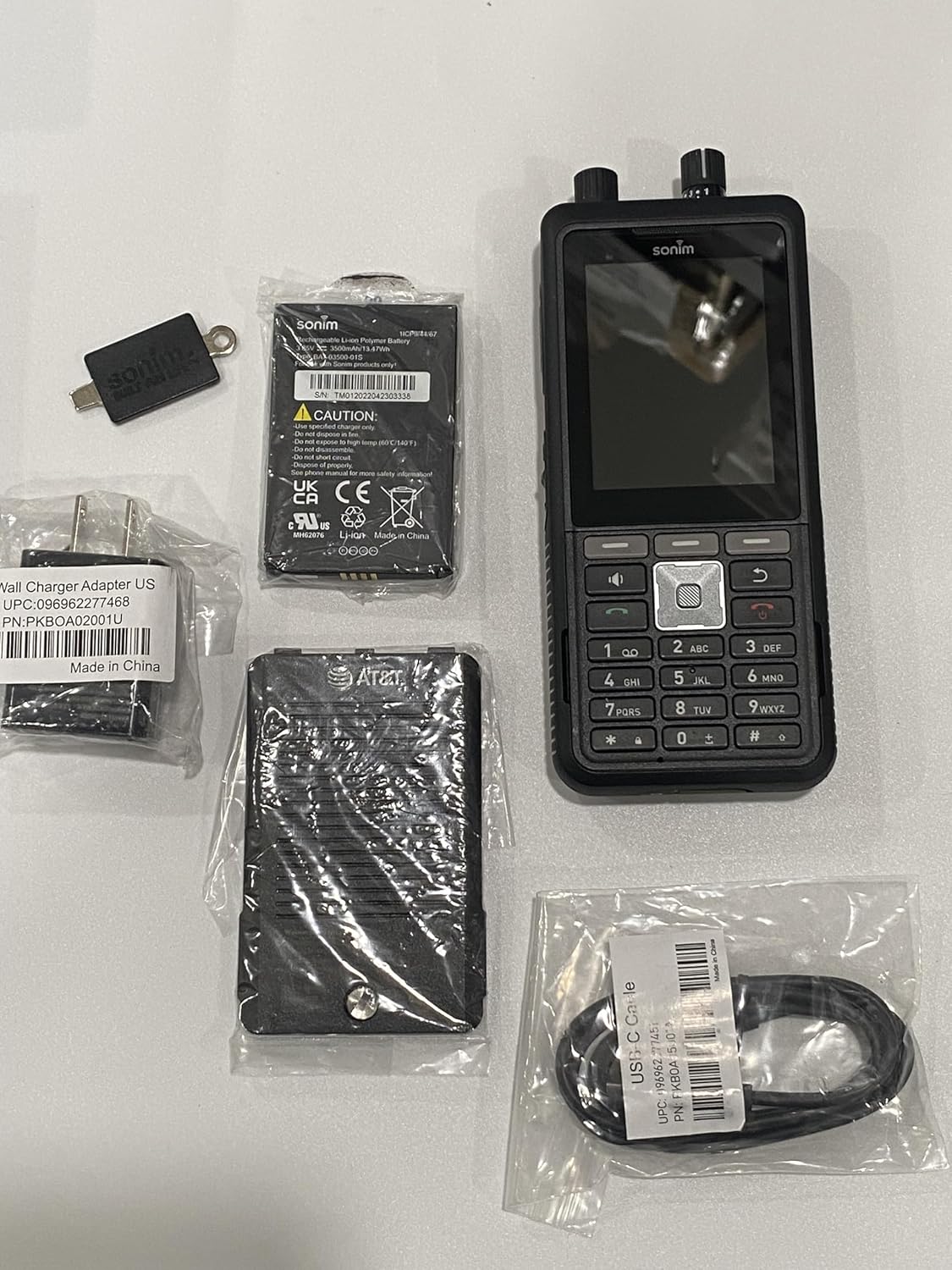
Image: The Sonim XP5 Plus phone, along with its included accessories: a battery, a wall charger adapter, and a USB-C cable. All components are individually packaged.
Produk Leuwihview
Familiarize yourself with the physical features and components of your Sonim XP5 Plus.

Gambar: sababaraha views of the Sonim XP5 Plus phone. The front view shows the display and keypad, the back view shows the camera and speaker, and side views highlight the rugged design and side buttons.
Komponén konci:
- tampilan: 2.8-inch screen for clear visibility.
- Papan tombol: Physical buttons for dialing and navigation.
- Tombol Push-to-Talk (PTT): Large, dedicated button for instant communication.
- Volume Control Knobs: Top-mounted for easy adjustment.
- Kaméra: Rear-facing camera for capturing images.
- Panyatur: Dual 100db+ speakers with noise cancellation for clear audio.
- Sonim SecureAudio Connector: For secure accessory connections.
- Palabuhan USB-C: Pikeun ngecas sareng mindahkeun data.
Disetél
1. Pamasangan batré
- Panggihan panutup wadah batré di tukang telepon.
- Taliti nyabut panutup.
- Insert the Lithium Ion battery, aligning the gold contacts with the terminals in the phone.
- Replace the battery compartment cover, ensuring it is securely latched to maintain waterproofing.
2. Pamasangan Kartu SIM sareng Kartu MicroSD
- With the battery removed, locate the SIM card slot(s) and microSD card slot. The phone supports Dual 4FF Nano SIM cards and up to 512GB microSD.
- Insert your Nano SIM card(s) into the designated slot(s) with the gold contacts facing down.
- If using, insert a microSD card into its slot until it clicks into place.
- Pasang deui batré sareng panutup batré.
3. Ngecas Awal
- Sambungkeun kabel USB-C kana port ngecas telepon.
- Connect the other end of the USB-C cable to the provided Power Adapter.
- Colokkeun Adaptor Daya kana stop kontak témbok.
- Allow the phone to charge completely before first use. A full charge takes approximately 2 hours.
Parentah Operasi
Daya Hurung/Pareuman
- Pikeun Ngahurungkeun: Pencét jeung tahan tombol Daya nepi ka logo Sonim nembongan.
- Pikeun mareuman: Pencét terus tahan tombol Daya, teras pilih "Pareuman" tina pilihan dina layar.
Nelepon
- From the home screen, use the keypad to dial the desired number.
- Press the green Call button to initiate the call.
- To end a call, press the red End Call button.
Push-to-Talk (PTT) Functionality
The Sonim XP5 Plus features enhanced PTT capabilities for instant communication.
- Dedicated PTT Button: Press and hold the large PTT button on the side of the device to transmit your voice. Release to listen.
- Channel Select Knob: Use the top-mounted knob to quickly switch between communication channels without looking at the screen.
- Tombol Kontrol Volume: Adjust the speaker volume using the other top-mounted knob.

Gambar: A hareup deukeut view of the Sonim XP5 Plus, highlighting the screen interface, the physical keypad, and the two rotary knobs located at the top of the device for channel and volume control.
Olahtalatah
Pikeun ngirim sareng nampi pesen téks:
- Navigate to the Messaging application from the main menu.
- Select "New Message" and enter the recipient's number or select from contacts.
- Ketik pesen anjeun nganggo keypad.
- Press the Send button.
Pangropéa
Ngabersihan Alat Anjeun
- Ngagunakeun lemes, damp cloth to wipe down the exterior of the phone.
- Hindarkeun ngagunakeun bahan kimia anu kasar atanapi pembersih abrasive.
- Ensure all ports and covers are securely closed before cleaning with moisture.
Perawatan Waterproofing
The Sonim XP5 Plus is designed to be waterproof. To maintain its integrity:
- Always ensure the battery cover and all port covers (e.g., USB-C port) are firmly sealed before exposing the phone to water or dust.
- Do not submerge the phone in water deeper or for longer than specified in the product specifications.
- If the phone has been exposed to saltwater, rinse it thoroughly with fresh water and dry it completely before charging or opening any covers.
Perawatan batré
- Use only Sonim-approved chargers and batteries.
- Ulah ngalaan batré ka suhu ekstrim.
- Ulah tusuk, ngabongkar, atawa pondok-circuit batréna.
Pamérésan masalah
| Masalah | Mungkin Cukang lantaranana / Solusi |
|---|---|
| Telepon teu hurung. | Battery may be depleted. Charge the phone for at least 30 minutes. Ensure battery is correctly installed. |
| Teu tiasa nelepon atanapi nampi telepon. | Check network signal strength. Ensure SIM card is properly inserted and activated. Contact your service provider. |
| Kualitas audio goréng nalika nelepon. | Check volume settings. Ensure speakers/microphone are not obstructed. Move to an area with better network coverage. |
| Phone is unresponsive. | Perform a soft reset by removing and reinserting the battery. If issue persists, contact support. |
| Batré gancang boros. | Ngurangan kacaangan layar. Tutup aplikasi anu henteu dianggo. Ngawatesan pamakean data latar. |
spésifikasi
| Fitur | Rincian |
|---|---|
| Ngaran modél | XP5plus (XP5900) |
| merek | Sonim |
| Sistem operasi | Proprietary (optimized for rugged use) |
| Ukuran tampilan | 2.8 inci |
| Resolusi | 240 x 320 |
| Mémori RAM | 2 GB |
| Kapasitas Panyimpenan Mémori | 512 GB (bisa dilegakeun ku microSD) |
| Kapasitas batré | 3500 Miliamp Jam-jaman |
| Waktu Ngobrol | 30 Jam |
| Waktu Ngecas | 2 Jam |
| Téknologi nirkabel | Cellular (5G), Wireless |
| Tipe SIM | Dual 4FF Nano SIM |
| Fitur husus | Push to Talk, Military Grade Ruggedness (MIL-STD-810H), Non-Incendive Class I, II and III Div 2 ratings, 100db+ speakers with Goodix Echo and Noise Cancellation Technology, Sonim SecureAudio Connector |
| Dimensi (Pakét) | 7.5 x 3.5 x 2 inci |
| Item Beurat | 10 ons |
| Warna | Hideung |
Garansi sareng Rojongan
For detailed warranty information, please refer to the warranty card included with your product or visit the official Sonim website. For technical support, product registration, or service inquiries, please contact Sonim customer service through their official channels.
Dukungan Online: www.sonimtech.com/support


