Bubuka
Hatur nuhun pikeun meuliasing the Baseus S-09 Pro Series Car FM Transmitter. This device allows you to stream audio from your smartphone or other devices to your car's FM radio, and also provides fast charging capabilities. Please read this manual carefully before use to ensure proper operation and to maximize the product's lifespan.
Produk Leuwihview
The Baseus S-09 Pro Series Car FM Transmitter is designed to enhance your in-car audio experience and provide convenient charging. Key features include:
- FM Transmitter Functionality: Nyiarkeun audio ka radio FM mobil anjeun.
- Konektipitas Bluetooth 5.3: For stable wireless audio streaming from compatible devices.
- Flash Drive Playback: Supports audio playback directly from a flash drive (up to 512GB).
- Ngecas gancang: Equipped with a USB-C port supporting PD 18W (Max) fast charging.
- Dual-Mic System: Provides premium sound quality and clear calls.
- Large LED Screen with Dual Display: Shows frequency band and battery voltage alternately.
- Tilu Port Ngecas: Offers multiple charging options.
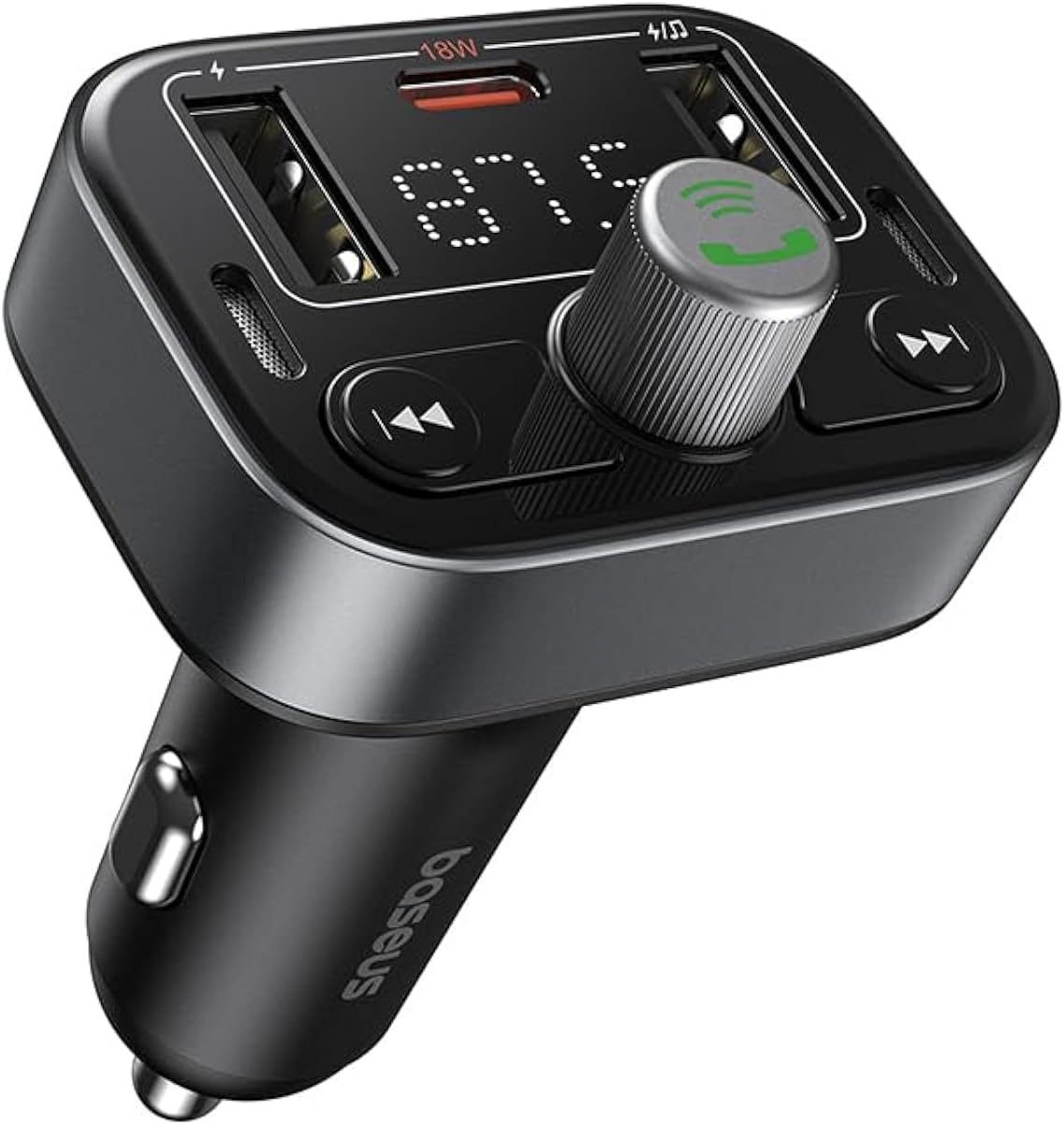
Gambar 1: Hareupeun view of the Baseus S-09 Pro Series Car FM Transmitter, showing the display, control knob, and USB ports.
Eusi pakét
Mangga parios pakét kanggo barang-barang ieu:
- Baseus S-09 Pro Series Car FM Transmitter
- Manual Pitunjuk (dokumén ieu)

Figure 2: The Baseus S-09 Pro Series Car FM Transmitter shown in its retail packaging.
Disetél
- Insert into Car Cigarette Lighter Socket: Plug the Baseus S-09 Pro Series Car FM Transmitter firmly into your car's 12V/24V cigarette lighter socket. The device will power on automatically, and the LED display will light up.
- Frékuénsi FM Tune:
- On the FM Transmitter, press and hold the multi-function knob (the large central knob) until the FM frequency on the LED display starts flashing.
- Rotate the multi-function knob left or right to adjust the frequency. Choose an empty FM frequency (one with no radio station broadcasting) to minimize interference.
- On your car's FM radio, tune to the exact same empty frequency you selected on the transmitter.
- Once matched, the transmitter is ready to broadcast audio to your car stereo.
- Masangkeun Bluetooth:
- After the device powers on, it will automatically enter Bluetooth pairing mode. The Bluetooth icon on the display may flash.
- On your smartphone or Bluetooth-enabled device, open the Bluetooth settings and search for available devices.
- Select "Baseus S-09 Pro" (or similar name) from the list to connect. Once connected, the Bluetooth icon on the transmitter's display will stop flashing and remain solid.

Figure 3: Illustration showing connection options: via flash drive and Bluetooth 5.3 pairing with a smartphone.
Parentah Operasi
Playback Audio
- Bluetooth Audio: Once paired, play music or audio from your smartphone. The audio will be transmitted to your car's FM radio.
- Flash Drive Audio: Insert a USB flash drive (up to 512GB, formatted to FAT32) containing MP3 audio files into the designated USB port on the transmitter. The device will automatically detect and play the audio files.
- Tombol kontrol:
- Knob multi-fungsi: Rotate to adjust volume. Press once to play/pause.
- Previous Track Button (◀◀): Pencét pikeun pindah kana lagu anu sateuacanna.
- Next Track Button (▶▶): Pencét pikeun pindah kana lagu salajengna.
Leungeun-Free Telepon
- Ngajawab / mungkas Telepon: Press the multi-function knob once to answer an incoming call or end an ongoing call.
- Nolak Telepon: Pencét terus tahan kenop multi-fungsi salami 2 detik pikeun nolak telepon asup.
- Telepon deui Nomer Panungtungan: Pencét dua kali kenop multi-fungsi pikeun mencet deui nomer anu terakhir diputer.
- Ganti Telepon ka Telepon: During a call, press and hold the multi-function knob for 2 seconds to switch the call between the transmitter and your phone.

Figure 4: The device highlighting its dual-mic system for premium sound quality during calls and music playback.
Alat ngecas
- The transmitter features multiple USB ports for charging your devices.
- Palabuhan USB-C: Supports Power Delivery (PD) 18W (Max) fast charging. Use a compatible USB-C to USB-C or USB-C to Lightning cable for fast charging supported devices.
- Port USB-A: Provide standard charging for various devices.

Figure 5: The transmitter connected via its USB-C port to an iPhone for fast charging.
Témbongkeun Émbaran
- The large LED screen alternately displays the current FM frequency and the car battery voltage.
- Frékuénsi FM: Indicates the frequency the transmitter is broadcasting on.
- Batré Voltage: Némbongkeun vol real-timetage of your car's battery, allowing you to monitor its health.

Figure 6: The LED screen displaying both the FM frequency (87.5) and the car battery voltage (12.5V).
Pangropéa
- Jaga alat tetep garing. Ulah kakeunaan ka lembab atanapi suhu anu ekstrim.
- Bersihkeun alat ku kaen anu lemes sareng garing. Ulah make bahan kimia kasar atawa cleaners abrasive.
- Hindarkeun ragrag atanapi ngagentoskeun alat kana tabrakan anu kuat.
- Nyimpen dina tiis, tempat garing lamun teu dipaké.
Pamérésan masalah
| Masalah | Mungkin Cukang lantaranana | Solusi |
|---|---|---|
| Henteu aya kakuatan / tampilan pareum | Not properly inserted into cigarette lighter; Car socket fuse blown. | Ensure firm connection. Check car's fuse box. |
| Kualitas audio statis/goréng | FM frequency interference; Volume too low. | Change to a different, empty FM frequency. Increase volume on both transmitter and car stereo. |
| Teu tiasa nyapasangkeun Bluetooth | Device not in pairing mode; Bluetooth disabled on phone. | Ensure transmitter is in pairing mode. Enable Bluetooth on your phone and search again. |
| Ngecas gancang teu jalan | Cable not compatible; Device does not support fast charging. | Use a certified fast-charging cable. Ensure your device supports PD 18W. |
spésifikasi
- Ngaran modél: S-09 Pro Series
- Jumlah modél: C10762200113-00
- Antarmuka Hardware: Bluetooth
- Alat anu cocog: Car Stereo System, Smartphone, Tablet
- Fitur husus: Pamancar FM
- Input Audio: 3.5mm AUX
- Mode Kaluaran Audio: Stereo
- Jenis Kaluaran Audio: Radio FM, Bluetooth
- Voltage: 12 Volt (DC)
- Sumber Daya: Kabel Listrik
- Jenis Wireless: Bluetooth
- Vérsi Bluetooth: 5.3
- Jenis Média anu Dirojong: MP3 (from flash drive)
- Ukuran Paket: 17 x 11.6 x 3.9 cm
- Beurat barang: 80 gram
- warna: Hideung
Garansi sareng Rojongan
Baseus products typically come with a standard manufacturer's warranty. Please refer to the warranty card included in your product packaging or visit the official Baseus websitus pikeun istilah jeung kaayaan jaminan lengkep.
For technical support, troubleshooting assistance, or warranty claims, please contact Baseus customer service through their official channels or the retailer from whom you purchased the product.
Anjeun tiasa mendakan langkung seueur inpormasi sareng dukungan dina Toko Baseus di Amazon.


