Bubuka
Thank you for choosing the FREDEES Entryway Table. This manual provides essential information for the safe assembly, operation, and maintenance of your new console table. Please read these instructions thoroughly before use and retain them for future reference.
Parentah Kasalametan penting
- Salawasna turutan parentah assembly taliti.
- Do not exceed the maximum weight recommendation of 22.68 kg (50 lbs) for the tabletop and shelves.
- Ensure all connections for the power outlets and USB ports are secure before use.
- Jauhkeun cairan tina stop kontak sareng port USB pikeun nyegah bahaya listrik.
- Place the table on a flat, stable surface. Use the adjustable footpads to ensure stability and prevent tilting.
- Do not allow children to climb on or play with the table.
- Unplug the power cord from the wall outlet when not in use or during cleaning.
Eusi pakét
Punten parios yén sadaya komponén aya sateuacan ngamimitian assembly:
- Console Table *1
- Assembly Guide *1
- Installation Tool *1
- Hardware Package (screws, bolts, etc.)
Setup sareng Majelis
Assembly of the FREDEES Entryway Table is designed to be straightforward. Please follow the included Assembly Guide for detailed, step-by-step instructions. Ensure you have adequate space and the necessary tools (provided) before starting.
- Ngabongkar komponén: Sacara saksama piceun sadaya bagian tina bungkusan sareng teundeun dina permukaan anu bersih sareng lemes pikeun nyegah goresan.
- Kumpulkeun pigura: Attach the metal frame components according to the diagrams in the Assembly Guide. Ensure all screws are tightened securely.
- Pasang Rak: Secure the wooden shelves to the frame.
- Lebetkeun laci: Slide the rattan drawers into their designated slots.
- Sambungkeun Unit Daya: Secure the power outlet and USB port unit to the side of the table as indicated in the guide.
- Saluyukeun Footpads: Once assembled, place the table in its desired location. Adjust the footpads at the bottom of the legs to ensure the table is level and stable on uneven floors.

This image illustrates the overall dimensions of the entryway table, including height, width, and depth, along with shelf spacing. It also highlights key features such as the metal frame construction, 50 lbs weight capacity, high-quality material, and integrated smart power sensor.

This image highlights four main features of the entryway table: the three rattan-front drawers for storage, the unique rattan design detail, the two open storage shelves, and the adjustable footpads designed to ensure stability on uneven floors.
Parentah Operasi
1. Integrated Charging Station
The entryway table features a built-in charging station for your convenience. It includes:
- 2 AC Power Outlets (120V/12A)
- 1 Port USB (5V/2A)
- 1 Port Tipe-C (5V/2A)
To use, simply plug the table's main power cord into a wall outlet. You can then connect your electronic devices directly to the available ports.

gambar ieu nyadiakeun rinci view of the integrated charging station located on the side of the entryway table. It shows the two AC power outlets, one USB port, and one Type-C port, demonstrating how devices can be connected for charging.
2. Three-Color Ambient LED Lighting
The table is equipped with LED lights offering three color options and adjustable brightness.
- Pilihan Warna: The lights can display Cold light, White light, or Warm light. Refer to the Assembly Guide for the specific control button location.
- Penyesuaian Caang: To adjust brightness (0-100%), press and hold the light control button. Release when the desired brightness is achieved.

This image showcases the entryway table's LED lighting system, illustrating the three available light colors: cold light, white light, and warm light. It also indicates the 0-100% brightness adjustment feature, controlled by a long-press function.
3. Smart Motion Sensing Design
The table features a human motion sensor that automatically activates the LED lights when movement is detected within its range (approximately 2-3 meters) and dims them when no presence is detected, conserving energy.
- Aktipkeun: The lights will automatically brighten when a person approaches the table.
- Nonaktipkeun: The lights will dim or turn off after a period of inactivity.
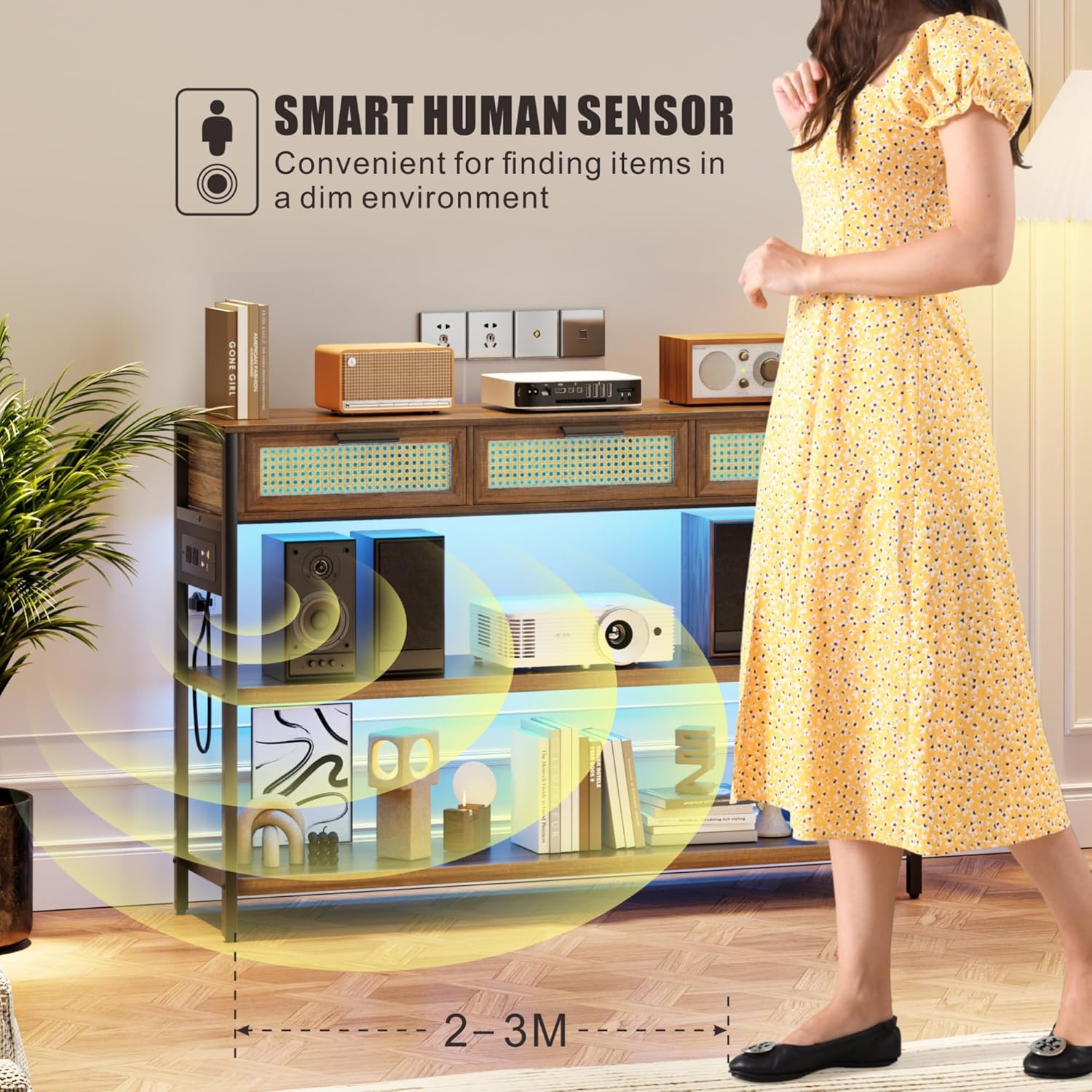
This image depicts a person approaching the entryway table, triggering the smart human sensor. The LED lights beneath the shelves illuminate, demonstrating the automatic lighting feature for convenience in dim environments.
Pangropéa
- beberesih: Lap permukaan kai ku kaén nu lemes,amp cloth. Avoid harsh chemicals or abrasive cleaners that may damage the finish. For rattan drawers, use a soft brush or cloth to remove dust.
- Debu: Rutin lebu sadaya permukaan pikeun nyegah akumulasi.
- Tumpahan: Clean spills immediately to prevent staining, especially on the wooden surfaces.
- Unit kakuatan: Ensure the power unit and cables are free from dust and debris. Do not attempt to disassemble the power unit.
- Pamariksaan: Périodik pariksa sagala screws sareng sambungan pikeun mastikeun aranjeunna tetep kedap. Retighten lamun perlu.
Pamérésan masalah
| Masalah | Mungkin Cukang lantaranana | Solusi |
|---|---|---|
| Lampu teu hurung | 1. Table not plugged in. 2. Power outlet not working. 3. Light control button not pressed. | 1. Ensure the table's power cord is securely plugged into a functional wall outlet. 2. Test the wall outlet with another device. 3. Press the light control button to activate. |
| Ngecas palabuhan teu jalan | 1. Table not plugged in. 2. Device cable faulty. 3. Power unit connection loose. | 1. Verify the table is plugged into a live outlet. 2. Try a different charging cable or device. 3. Check the connection of the power unit to the table frame. |
| Sénsor gerak henteu ngaréspon | 1. Obstruction blocking sensor. 2. Insufficient movement. 3. Sénsor gangguan. | 1. Ensure the sensor area is clear of obstructions. 2. Ensure movement is within the sensor's range (2-3 meters). 3. Kontak rojongan customer lamun masalah persists. |
| Table is wobbly/unstable | 1. Lantai henteu rata. 2. Loose assembly screws. 3. Footpads not adjusted. | 1. Move the table to a level surface. 2. Check and tighten all assembly screws. 3. Adjust the adjustable footpads at the bottom of the legs until stable. |
spésifikasi
| Fitur | Rincian |
|---|---|
| merek | FREDEES |
| Ngaran modél | ku 84011 |
| Ukuran (L x W x H) | 116 x 30 x 80 Centimeters (45.67"D x 11.81"W x 31.5"H) |
| Item Beurat | 21 kg |
| Rekomendasi beurat maksimum | 22.68 kg (50 lbs) |
| Bahan | Wood (MDF), Metal frame, Rattan drawers |
| Warna | Coklat Rustic |
| Jumlah laci | 3 |
| Tempat ngecas | 2 Stop Kontak AC (120V/12A), 1 Port USB (5V/2A), 1 Port Tipe-C (5V/2A) |
| cahayaan | 3 LED Light Colors (Warm/White/Blue), 0-100% Brightness Adjustable |
| Sénsor | Smart Human Motion Sensor |
| Komponén Kaasup | Console Table, Assembly Guide, Installation Tool |
Garansi sareng Rojongan
For warranty information or technical support, please refer to the documentation provided with your purchase or contact FREDEES customer service directly. Keep your purchase receipt for warranty claims.


