1. Bubuka
The LAUNCH Creader Elite V2.0 is an advanced OBD2 diagnostic scanner specifically designed for BMW, Mini, and Rolls-Royce vehicles. This tool provides comprehensive system diagnostics, bi-directional control, ECU coding, and a wide range of special service functions. This manual will guide you through the setup, operation, and maintenance of your device to ensure optimal performance and accurate vehicle diagnostics.

Image 1.1: The LAUNCH Creader Elite V2.0 OBD2 Scanner displaying its main interface with options for Diagnose, OBD II, Upgrade, Mall, and Settings.
2. Produk Langkungview
The Creader Elite V2.0 features a 4-inch touchscreen, runs on Android 8.1 OS, and includes a 3000mAh battery. It is equipped with 2GB RAM and 16GB internal memory for efficient operation and data storage. The device supports 11 languages, making it accessible to a broad user base.
Fitur konci:
- Diagnostik Sistim lengkep: Access all available vehicle modules to read/clear fault codes, view data hirup, sarta meunangkeun informasi ECU.
- Kontrol Dua Arah (Tés Aktif): Perform active tests on various components to verify their functionality.
- Coding ECU canggih: Customize OE-settings, match components, and activate hidden features.
- All Service Functions: Includes Battery Registration, Oil Reset, EPB Service, SAS Calibration, ABS Bleeding, Injector Coding, and more.
- Lifetime Free WiFi Updates: Ensures the software is always up-to-date with the latest vehicle models and functions.
- 4-in-1 Live Data Graphing: Visualize multiple data streams simultaneously for in-depth analysis.
- Auto VIN & DTC Lookup: Quickly identify vehicle information and understand diagnostic trouble codes.

Image 2.1: High-level specifications of the LAUNCH Creader Elite V2.0, including its 4-inch touchscreen, Android 8.1 operating system, 3000mAh battery, HD display, WiFi connectivity, and 16GB internal memory.
3. Setélan
3.1. Naon dina Box
Saatos unboxing, pariksa yén sadaya komponén aya:
- 1 x LAUNCH Creader Elite V2.0 OBD2 Scanner for BMW
- 1 x OBD2 Diagnostic Cable
- 1 x Gancang Mimitian Guide
- 1 x Manual Pamaké

Image 3.1: The standard contents included with the LAUNCH Creader Elite V2.0 package.
3.2. Initial Power-On and Connection
- Connect the OBD2 diagnostic cable to the scanner's port.
- Tangtukeun lokasi port OBD2 wahana, ilaharna di handapeun dasbor di sisi supir urang.
- Plug the other end of the diagnostic cable into the vehicle's OBD2 port. The scanner will power on automatically.
- Follow the on-screen prompts to select your preferred language and set up Wi-Fi connectivity.
3.3. Pembaruan Parangkat Lunak
It is recommended to update the software immediately after initial setup to ensure you have the latest features and vehicle coverage.
- Pastikeun alat disambungkeun ka jaringan Wi-Fi stabil.
- From the main menu, tap on the "Upgrade" icon.
- The system will check for available updates. Select and download all necessary updates.
- Allow the device to install the updates. This process may take some time and the device may restart.

Image 3.2: The device's interface highlighting the 'Upgrade' function for lifetime free WiFi updates.
4. Parentah Operasi
4.1. Basic OBD2 Functions
The device supports standard OBD2 functions for all OBD2 compliant vehicles.
- Baca/Hapus Kodeu: Access the "OBD II" menu to read Diagnostic Trouble Codes (DTCs) and clear them after repairs.
- Aliran Data Langsung: View data sensor real-time dina format téks atanapi grafik.
- Frame Frame: Candak snapshot kaayaan kandaraan nalika kode gangguan dipicu.
- Kesiapan I / M: Pariksa status monitor anu aya patalina sareng émisi.
- Pilarian DTC: Use the built-in DTC library to understand code definitions.

Image 4.1: The 'Code Search' feature allows users to look up definitions for Diagnostic Trouble Codes.
4.2. Full System Diagnostics (BMW, Mini, Rolls-Royce)
For BMW, Mini, and Rolls-Royce vehicles, the device offers in-depth diagnostics across all available modules.
- From the main menu, tap on "Diagnose".
- Select the vehicle brand (BMW/Mini/Rolls-Royce).
- Choose "Automatically Search" or manually select the vehicle model. The Auto VIN feature can quickly identify the vehicle.
- Perform a full system scan to identify issues across engine, transmission, ABS, SRS, and other control units.

Gambar 4.2: Leuwihview of OE-level all system diagnostic functions, including Auto VIN, code reading, live data, freeze frame, and ECU information retrieval.
4.3. Kontrol Dua Arah (Tés Aktif)
This function allows you to send commands to vehicle systems to test component functionality.
- After selecting the vehicle and system, navigate to the "Active Test" or "Bi-Directional Control" option.
- Select the specific component or system you wish to test (e.g., radiator fan, fuel pump, windows).
- Execute the test and observe the component's response to diagnose issues.
4.4. Kodeu ECU Lanjutan
ECU Coding allows for customization and adaptation of vehicle settings.
- Cocog komponén: Match new components after replacement (e.g., steering angle calibration, transmission adaptation).
- Personalisasi: Activate or deactivate specific vehicle features (e.g., auto mirror folding, changing dashboard brightness, disabling auto start-stop).
- Modification & Retrofit: Adapt settings for newly installed modules or upgrades (e.g., adaptive cruise control, retrofitting headlamps).
Note: Coding functions vary by vehicle model and chassis. Always verify compatibility before performing coding operations.

Image 4.3: Advanced ECU Coding features for customizing vehicle settings and adapting components.
4.5. Special Service Functions
The device provides numerous maintenance and reset functions:
- Battery Registration/Replacement: Register a new battery with the vehicle's power management system. Supports both same-type and different-type/capacity batteries.
- Minyak Lamp Reset: Reset the oil service light and maintenance interval.
- Parking Brake Reset (EPB): Deactivate and activate the electronic parking brake system for pad replacement.
- Kalibrasi SAS: Kalibrasi sensor sudut setir.
- Perdarahan ABS: Perform bleeding procedures for the ABS system.
- Injector Coding: Code new injector numbers after replacement.
- Throttle Body Adaptation: Initialize throttle actuators to default settings.
- Jasa lianna: Includes Suspension Reset, Seat Calibration, Idle Speed Relearn, Transmission Adaptation, Sunroof Initialization, and more.
To access these functions: Navigate to "Diagnose" > "Car Brand" > "System Selection" > "Special Function".

Image 4.4: A selection of the available service functions for BMW, Mini, and Rolls-Royce vehicles.
4.6. Manajemén Data
The device offers robust data management features for analysis and reporting.
- 4-in-1 Live Data Graphing: Display up to four live data streams simultaneously for comparative analysis.
- Data Record & Playback: Record live data sessions for later review jeung analisis.
- Laporan diagnostik: Generate and share detailed diagnostic reports in PDF format. These reports can be printed for client records or shared with technicians.
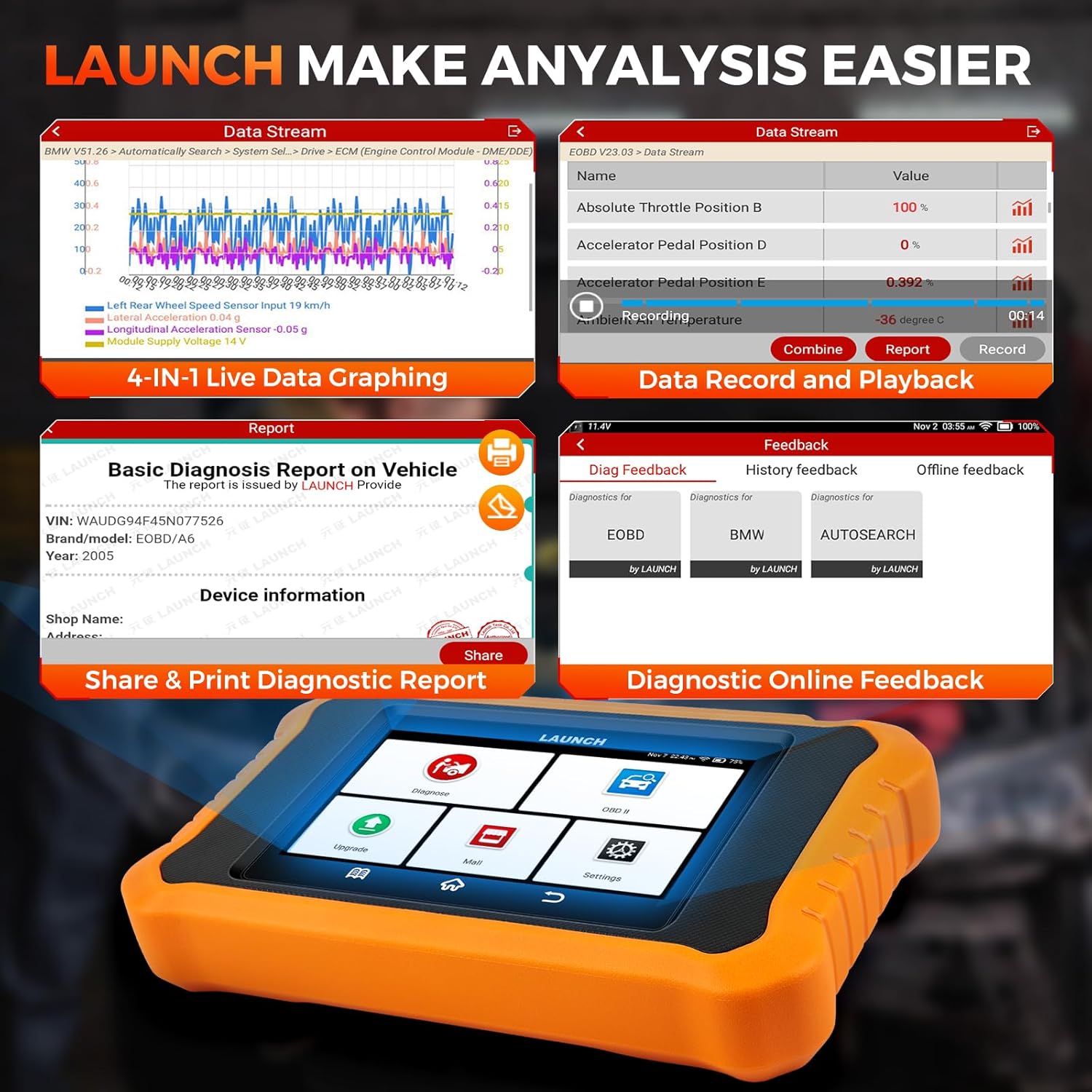
Image 4.5: Features for data analysis, including multi-graph display, recording, and report generation.
5. Pangropéa
5.1. Apdet parangkat lunak
Regular software updates are crucial for maintaining compatibility with new vehicle models and ensuring access to the latest diagnostic functions. The LAUNCH Creader Elite V2.0 offers lifetime free WiFi updates. Connect the device to a stable internet connection and navigate to the "Upgrade" section to check for and install updates.
5.2. Beberesih Alat
To ensure the longevity of your device, clean it regularly with a soft, damp cloth. Avoid using abrasive cleaners or solvents. Keep the screen free of dust and fingerprints for optimal touch response.
5.3. Panyimpenan
Store the device in a cool, dry place away from direct sunlight and extreme temperatures. Disconnect the OBD2 cable when not in use.
6. Cara ngungkulan
This section addresses common issues you might encounter with your LAUNCH Creader Elite V2.0.
6.1. Alat Teu Dihurungkeun
- Pastikeun kabel OBD2 disambungkeun pageuh kana pamindai sareng port OBD2 kendaraan.
- Verify that the vehicle's ignition is turned on (at least to the accessory position).
- Pariksa vol batré kendaraantage. The scanner draws power from the vehicle.
6.2. Communication Errors
- Confirm the OBD2 cable is not damaged.
- Pastikeun ignition kendaraan dihurungkeun.
- Coba sambungkeun ka kendaraan anu béda pikeun nyingkirkeun masalah khusus kendaraan.
- Verify that the software is up-to-date.
6.3. Software Freezes or Slow Performance
- Balikan deui alat.
- Ensure there is sufficient storage space.
- Laksanakeun apdet parangkat lunak.
6.4. Issues with Specific Functions (e.g., Coding, Special Services)
- Functionality can vary by vehicle model, year, and specific configuration. Always check compatibility before attempting advanced functions.
- Ensure the vehicle's battery is adequately charged before performing critical operations like ECU coding.
- If a function fails, try restarting the process or contacting technical support with detailed information.

Image 6.1: The 'Diag Feedback' feature allows users to submit issues directly to technical support for troubleshooting.
7. Spésifikasi
| Fitur | Spésifikasi |
|---|---|
| Modél | LAUNCH Creader Elite V2.0 for BMW |
| Sistem operasi | Android 8.1 |
| tampilan | Layar sentuh 4 inci |
| Prosesor | CPU 1.3GHz quad-core |
| Mémori | 2GB RAM + 16GB ROM |
| Batré | Logam Litium 3000mAh (kalebet) |
| Konektipitas | Wifi |
| Item Beurat | 1.5 pon |
| Ukuran Paket | 8 x 7.5 x 1.63 inci |
| Basa anu Dirojong | 11 Languages (including English, German, Japanese, etc.) |
| Produsén Bagian Jumlah | LAUNCH X431 Elite 2.0 PRO BMW Scanner |
| UPC | 884508000034 |
8. Garansi jeung Rojongan
8.1. Émbaran jaminan
The LAUNCH Creader Elite V2.0 comes with a 5-Year Quality Backup. For specific warranty terms and conditions, please refer to the documentation included with your product or contact customer support.
8.2. Bantuan Téknis
LAUNCH offers 24/7/365 technical assistance. If you encounter any issues or have questions regarding the operation of your device, please contact support directly via email at obdbox21@163.com. When contacting support, please provide your device's serial number and a detailed description of the issue for faster resolution.
Note: For Amazon customers, it is recommended to contact the provided email address for support rather than LAUNCH Tech USA, as they may not offer direct assistance for Amazon purchases.


