Bubuka
The Optoma ML1080 is an ultra-portable, standard throw RGB laser projector designed for versatile use. It features Time of Flight (ToF) technology for advanced auto-focus and auto keystone correction, ensuring clear images on various surfaces. The RGB Triple Laser delivers 100% REC.709 and 98% DCI-P3 color accuracy for cinematic visuals. Enjoy seamless gaming with an ultra-low 23ms input lag. This projector supports 1080p HD resolution with 4K input, offers multiple connectivity ports, Bluetooth, and a built-in speaker. It can be powered via the included AC cable or a USB-C 60W PD 3.0 portable battery.
Naon dina Box
- Adaptor kakuatan
- Kadali jauh
- Batré
- Mawa Kantong
- Manual pamaké
Fitur produk
- Desain Ultra-Portable: Compact and lightweight for use on any surface with Time of Flight (ToF) technology for advanced auto-focus.
- RGB Triple Laser: Delivers cinematic color with 100% REC.709 and 98% DCI-P3 (WCG) color accuracy.
- Lag Input Ultra-Rendah: 23ms at 1080p60 and 23ms at 4K60 with Enhanced Game Mode and Auto Low Latency Mode (ALLM).
- Streaming Siap: Optional EZC-USB Wireless adapter (not included) allows for streaming apps.
- Resolusi luhur: 1080p resolution with 4K input support.
- Sababaraha palabuhan: HDMI 2.1 input, two USB Type-C display inputs, USB-A input.
- Pamuter Média Terpadu: Play content directly from storage devices.
- Speaker Diwangun-di: Pikeun kaluaran audio.
- Modeu tampilan serbaguna: 9 different display modes.
- Konektipitas Bluetooth: For input devices and audio devices.
- Casting & Screen Mirroring: Share content from compatible devices.
- File Manajer: For easy content access.
- Signage Mode: For commercial applications.
- Tas Jinjing Premium: Included for portability and protection.
Disetél
Panempatan Awal
Place the projector on a stable, flat surface. Ensure adequate ventilation around the unit. The compact size allows for flexible placement.

Hareupeun view of the Optoma ML1080 projector, highlighting its compact design and lens.
Sambungan Daya
Connect the included power adapter to the "Power In" port on the projector and then to a power outlet. Alternatively, the projector can be powered by a compatible USB-C 60W PD 3.0 portable battery.
Pangaturan gambar
The ML1080 features Time of Flight (ToF) technology for advanced auto-focus and auto keystone correction. Upon powering on or moving the projector, it will automatically adjust the image for optimal clarity and geometry. For best results, ensure the projection surface is flat and free of obstructions.

Diagram illustrating the throw distance for the Optoma ML1080 projector to achieve a 100-inch image.
Ngoperasikeun
Daya Hurung/Pareuman
Press the power button located on the projector or the remote control to turn the unit on or off.
Pilihan Sumber
Use the remote control or the projector's control panel to select the desired input source (e.g., HDMI, USB-C, USB-A).
Modeu tampilan
The projector offers 9 display modes to optimize image quality for different content types (e.g., movie, game, presentation). Refer to the on-screen menu for selection.
Modeu kaulinan
For an enhanced gaming experience, activate the Enhanced Game Mode and Auto Low Latency Mode (ALLM) through the projector settings. This reduces input lag to 23ms at 1080p60 and 4K60.
Official video demonstrating the portability, RGB Triple Laser technology, instant setup with Time-of-Flight, built-in speaker, and multiple input options of the Optoma ML1080 projector.
Konektipitas
palabuhan sadia
- HDMI2.1: Connect to Blu-ray players, gaming consoles, or other HDMI-enabled devices.
- USB Type-C (Image Display): Connect compatible devices for video and audio transmission.
- USB Type-C (Power Input): For powering the projector with a compatible portable battery.
- USB-A: For media playback from USB drives or connecting an optional EZC-USB Wireless adapter for streaming.
- 3.5mm Audio kaluar: Sambungkeun speaker éksternal atawa headphone.
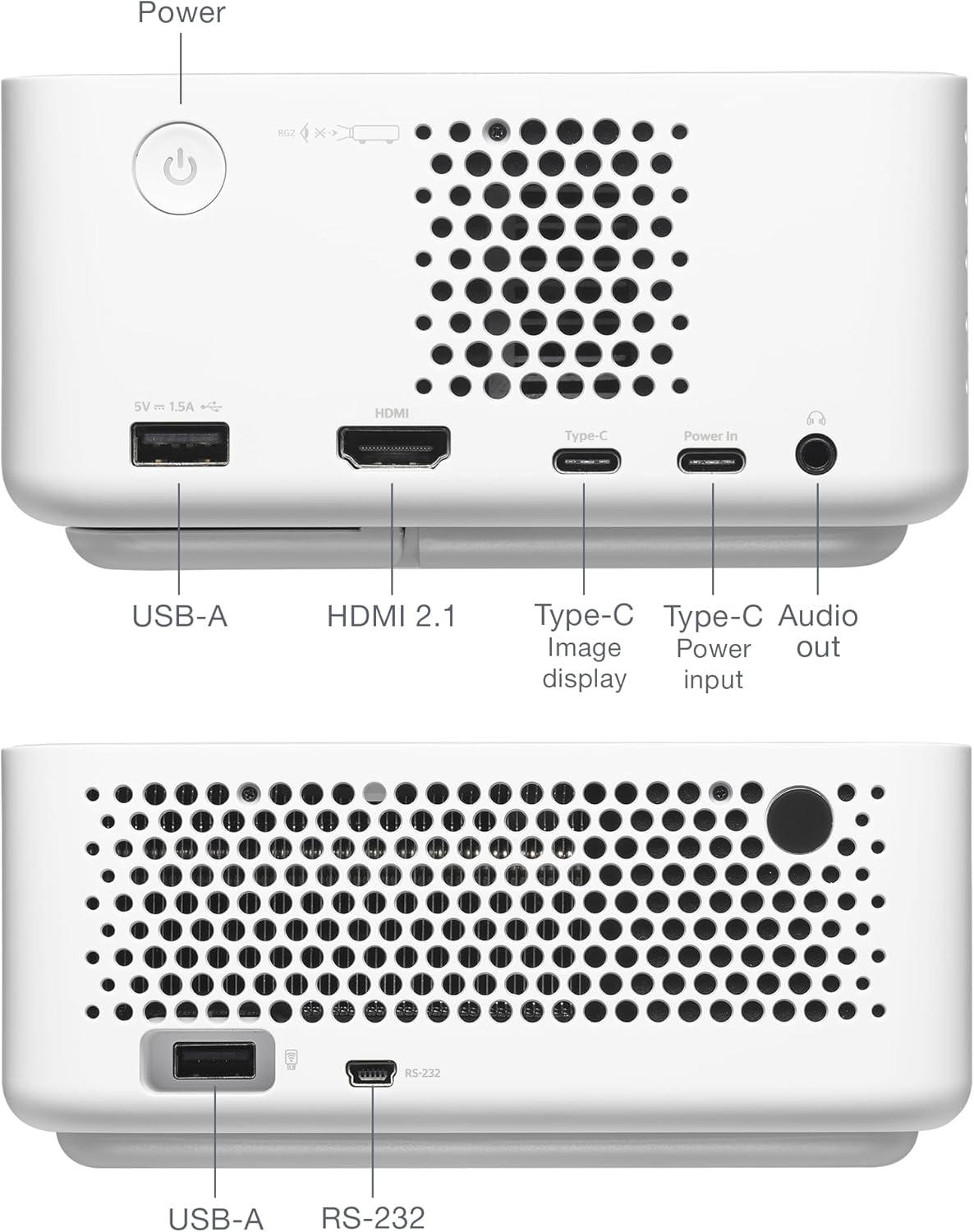
Tukangeun view of the Optoma ML1080 projector, showing the various input and output ports including USB-A, HDMI 2.1, USB-C (Image display), USB-C (Power input), and Audio out.
Pangropéa
Ngabersihan Lensa
Anggo lawon anu lemes sareng henteu lint anu dirancang khusus pikeun lénsa optik. Lembut usap lénsa pikeun miceun lebu atawa smudges. Hindarkeun bahan abrasive atanapi bahan kimia kasar.
beberesih umum
Lap bagian luar proyéktor ku lawon anu lemes sareng garing. Ulah nganggo pembersih cair langsung kana unitna.
Ventilasi
Ensure the projector's ventilation openings are clear and unobstructed to prevent overheating.
Pamérésan masalah
Taya Gambar Pintonan
- Check power connections and ensure the projector is turned on.
- Pariksa deui naha sumber input parantos dipilih kalayan leres.
- Pastikeun alat sumber dihurungkeun sareng ngaluarkeun sinyal.
Gambar Kabur
- Allow the projector to complete its automatic focus adjustment.
- Ensure the projection surface is flat and free of obstructions.
Henteu aya Audio
- Pariksa tingkat polumeu dina projector jeung alat sumber.
- If using external speakers, ensure they are properly connected and powered.
spésifikasi
- Ukuran produk: 12.5 x 10 x 4.75 inci
- Beurat barang: 2.2 pon
- Jumlah modél: ML1080
- Batré: 1 batré Litium Metal diperlukeun (kaasup)
- Pabrikan: Optoma Technology Inc
- Pamakéan anu disarankeun: Gaming, Home Cinema, Road Warrior, SMB and Work From Home
- Fitur husus: 100% REC.709 | 98% DCI-P3, Enhanced Game Mode w/ ALLM, RGB Laser Technology, Time-of-Flight (ToF) Technology, Ultra-Portable
- Téknologi konektipitas: Audio 3.5mm, HDMI, USB
- Resolusi tampilan: 1920 x 1080

Diagram illustrating the dimensions and connectivity ports of the Optoma ML1080 projector.
Garansi sareng Rojongan
For warranty information and technical support, please refer to the official Optoma website or contact Optoma customer service. Keep your purchase receipt for warranty claims. Online resources may include FAQs, driver downloads, and service center locations.


