1. Bubuka
The TYLT Folio Trio is a versatile 3-in-1 magnetic foldable wireless charging station designed to power your iPhone (12 series and newer), AirPods, and Apple Watch simultaneously. Its compact, foldable design makes it ideal for travel and everyday use. This manual provides essential instructions for setup, operation, maintenance, and troubleshooting to ensure optimal performance of your device.
2. Eusi Paket
- TYLT Folio Trio 3-in-1 Wireless Charger
- USB-C kana Kabel Ngecas USB-C
- Manual pangguna (dokumén ieu)
Note: An Apple Watch charging cable is required for Apple Watch charging and is not included in the package.
3. Produk Langkungview
The TYLT Folio Trio features a unique foldable design with three distinct charging pads for your devices.

Figure 3.1: TYLT Folio Trio charger in its compact, folded state.

Figure 3.2: TYLT Folio Trio charger fully unfolded, showing the three charging pads.
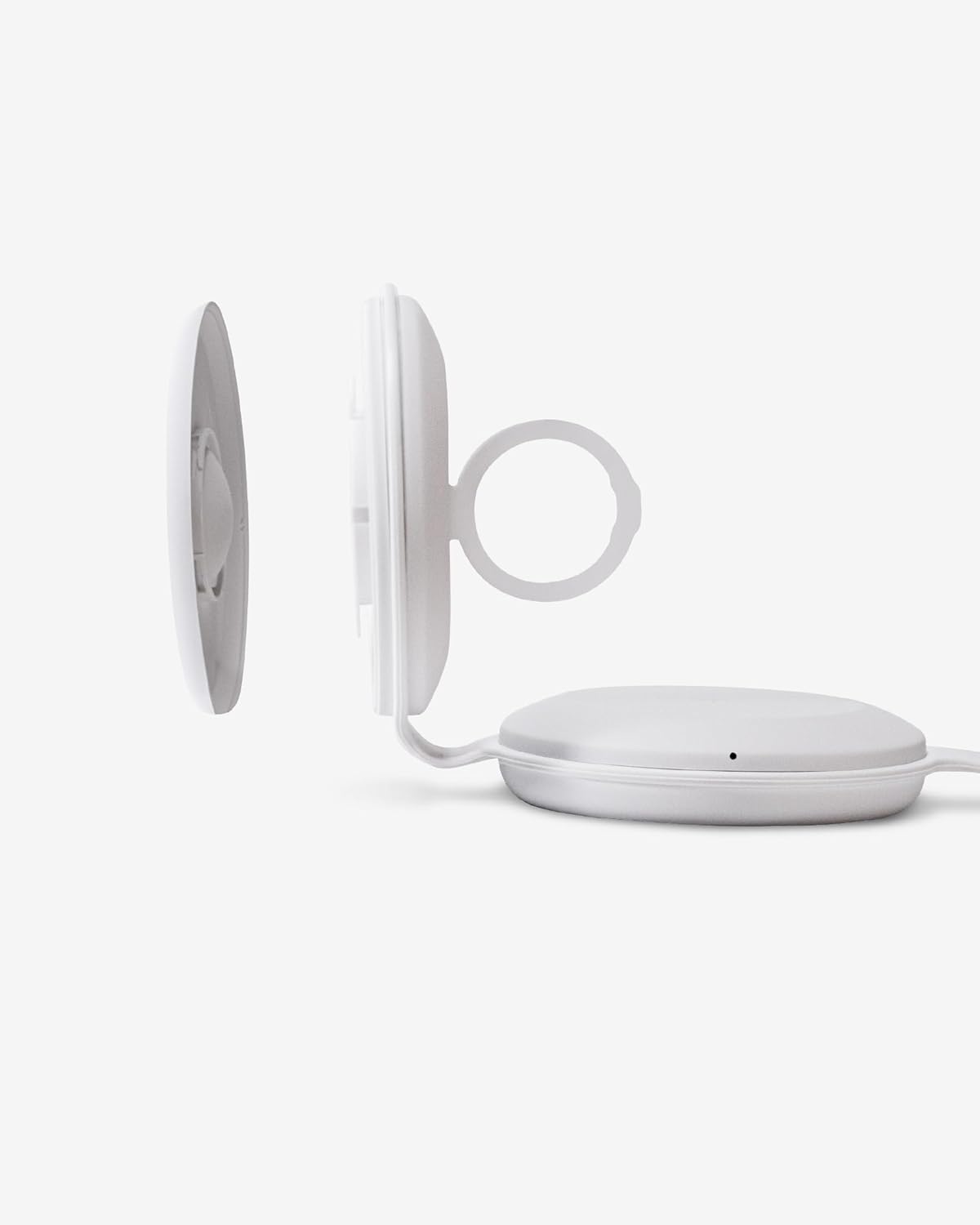
angka 3.3: Tutup-up view of the Apple Watch charging module, detached to show the internal cable routing.

Figure 3.4: TYLT Folio Trio charger in use, simultaneously charging an iPhone, AirPods, and an Apple Watch.
4. Parentah Setup
- Sambungan Daya: Connect the provided USB-C to USB-C cable to the charging port on the TYLT Folio Trio. Connect the other end of the cable to a compatible USB-C power adapter (not included) with a minimum output of 15W for optimal performance.
- Apple Watch Cable Installation:
- Gently detach the Apple Watch charging module from the main unit.
- Carefully route your own Apple Watch charging cable (not included) into the designated channel within the module.
- Ensure the charging puck is securely seated in the module and the cable is properly aligned to avoid damage.
- Reattach the Apple Watch charging module to the main unit.
This step is crucial for Apple Watch charging functionality as the necessary cable is user-supplied.
- Buka carjer: Unfold the TYLT Folio Trio to its desired configuration. It can be laid flat or used in a stand mode.
5. Parentah Operasi
Once the charger is powered on and unfolded, you can begin charging your devices.
- Ngecas iPhone: Place your MagSafe-compatible iPhone (iPhone 12 series or newer) onto the magnetic charging pad. The phone will snap into place, and charging will begin automatically. The LED indicator on the charger will illuminate to confirm charging.
- Ngecas AirPods: Place your AirPods (with wireless charging case) onto the designated wireless charging pad. Ensure the AirPods case is centered on the pad for effective charging. The LED indicator will confirm charging.
- Ngecas Apple Watch: Place your Apple Watch onto the installed Apple Watch charging puck. Ensure it is properly aligned. The LED indicator will confirm charging.
Indikator LED: The charger features LED indicators that provide status updates:
- Bodas Padet: Paranti ngeusi batre.
- Bodas Bodas: Foreign object detected or device is not properly aligned. Remove the object or reposition the device.
- Pareum: No device detected or charging is complete.
6. Pangropéa
- beberesih: Disconnect the charger from power before cleaning. Use a soft, dry cloth to wipe the surface. Avoid using abrasive cleaners, solvents, or harsh chemicals.
- Panyimpenan: Upami teu dianggo, lipet carjer kana bentukna anu ringkes teras simpen di tempat anu tiis, garing, sareng jauh tina sinar panonpoé langsung sareng suhu anu ekstrim.
- Penanganan: Avoid dropping the charger or subjecting it to strong impacts. Do not attempt to disassemble or modify the device.
7. Cara ngungkulan
- Alat teu ngecas:
- Pastikeun carjer disambungkeun leres ka sumber kakuatan.
- Verify that your device is compatible with wireless charging and is correctly aligned on the charging pad.
- Remove any thick phone cases or metallic objects that may interfere with charging.
- Check the LED indicator for flashing white light, indicating a foreign object or misalignment.
- Apple Watch not charging:
- Confirm that your own Apple Watch charging cable is correctly installed within the Apple Watch module as per Section 4.2.
- Ensure the Apple Watch is properly seated on its charging puck.
- Verify the Apple Watch cable itself is functional when used independently.
- Ngecas lalaunan:
- Ensure you are using a power adapter with sufficient wattage (at least 15W recommended).
- Avoid using your device while it is charging, as this can slow down the process.
8. Spésifikasi
| Fitur | Spésifikasi |
|---|---|
| Nomer modél | QITRIOMSW-T |
| Dimensi produk | 4 x 1.5 x 5 inci |
| Item Beurat | 10.6 ons |
| Wattage | 15 watt |
| Ampumur | 5 Amps |
| Spesifikasi Met | Qi |
| Alat nu cocog | iPhone 12 series and newer (MagSafe), AirPods with wireless charging case, Apple Watch (with user-supplied cable) |
9. Garansi jeung Rojongan
TYLT products are designed for reliability and performance. This product is covered by a limited manufacturer's warranty against defects in materials and workmanship. Please refer to the warranty card included with your purchase or visit the official TYLT websitus pikeun istilah jeung kaayaan jaminan lengkep.
For technical support, troubleshooting assistance, or warranty claims, please contact TYLT customer service through their official websitus atanapi inpormasi kontak anu disayogikeun sareng dokuméntasi produk anjeun.


