1. Bubuka
The syitren R300 is a portable desktop retro CD player designed for home use. It features Bluetooth connectivity and fiber optic output, allowing users to connect to various external audio systems. This manual provides detailed instructions for setting up, operating, maintaining, and troubleshooting your R300 CD player.

Figure 1: syitren R300 CD Player - Front View
2. Naon dina Box
Mangga parios eusi pakét pikeun mastikeun yén sadaya barang aya:
- syitren R300 CD Player
- Kabel Daya Tipe-C
- 1 batré AAA (kaasup)
3. Setélan
3.1 Ngahurungkeun sareng Ngecas
The R300 CD player is powered via a Type-C cable. It includes a built-in 2000mAh battery, providing over 6 hours of playback on a full charge. Connect the provided Type-C power cable to the DC IN 5V port on the back of the unit and plug the other end into a compatible USB power adapter (not included).

Figure 2: Rear Ports (DC IN 5V and SPDIF)
3.2 Nyambungkeun ka Alat Audio
The R300 CD player does not have a built-in speaker. It requires connection to external audio devices for sound output. This design helps reduce the impact of audio vibration on the CD player, allowing users to choose their preferred speakers and power ampparabot liifier.
3.2.1 Sambungan Bluetooth
The R300 CD player can connect wirelessly to Bluetooth headphones or speakers.
- Ensure your external Bluetooth audio device is in discovery mode.
- On the R300, activate Bluetooth pairing mode by holding the designated Bluetooth button (refer to controls section for button identification).
- Once connected, a solid Bluetooth icon will appear on the R300's display.
Video 1: Demonstrates how to connect the R300 CD Player to an external stereo system using Bluetooth. The video shows activating Bluetooth on the R300 and pairing it with a separate speaker, confirming connection via the display icon.
3.2.2 Fiber Optic (SPDIF) Output
For high-quality digital audio output, connect the R300 to an audio receiver or amplifier using a fiber optic cable (not included) via the SPDIF port on the back of the unit.
3.2.3 AUX Output
The R300 also features an AUX output for analog audio connection to compatible devices using a 3.5mm audio cable (not included).
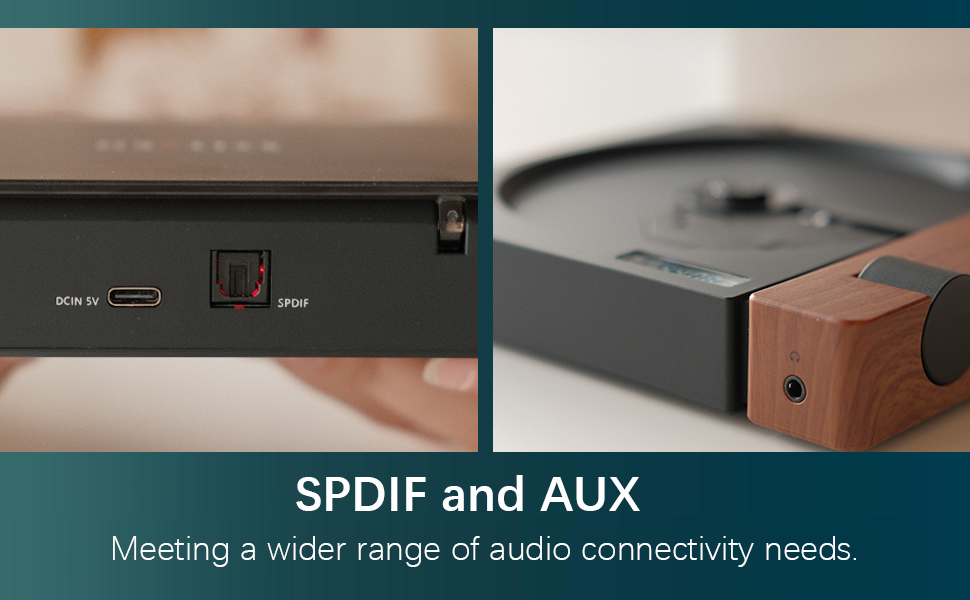
Figure 3: SPDIF and AUX Connectivity Options
4. Parentah Operasi
4.1 Puter CD
- Buka panutup cakram lalaunan.
- Place a CD onto the spindle, ensuring it is seated correctly.
- Tutup panutup piringan.
- Press the Play/Pause button (orange button) to begin playback.
- Use the Skip Forward and Skip Backward buttons to navigate between tracks.
- Saluyukeun polumeu nganggo kenop polumeu.

Figure 4: Opening the Disc Cover

Figure 5: Control Panel and Display
4.2 Kontrol Leuwihview
The R300 features a minimalist control panel on the right side of the unit:
- Saklar kakuatan: Located on the back/side of the unit (refer to Figure 2).
- Jilid Kenop: Rotates to adjust audio output level.
- Tombol Puter/Reureuh: Orange button to start or pause CD playback.
- Tombol Luncat: Black buttons for skipping tracks forward or backward.
- Bluetooth Activation Button: (Likely one of the black buttons, or the top one, as shown in video) Used to initiate Bluetooth pairing.
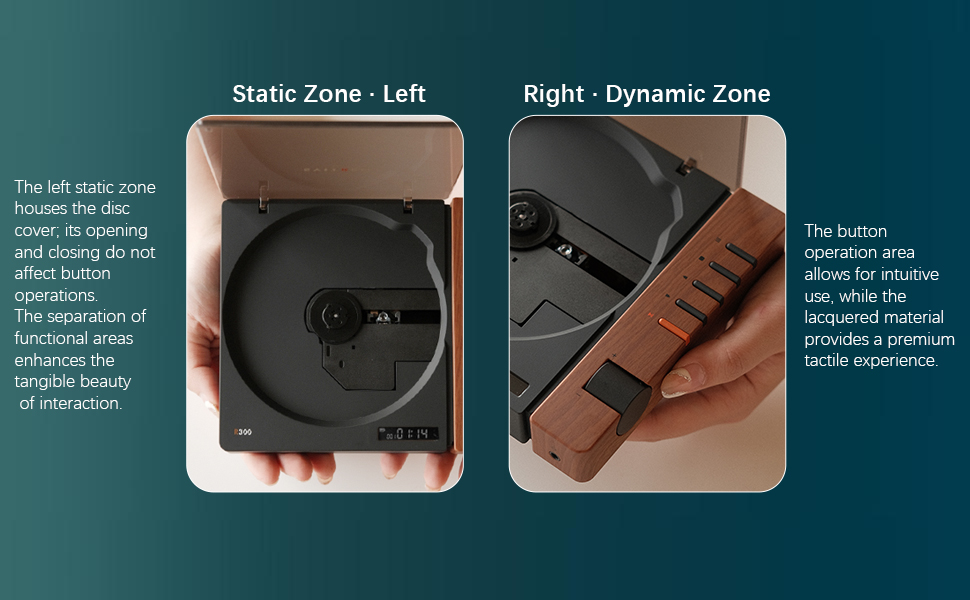
Figure 6: Functional Zones of the R300
5. Pangropéa
- Jaga kabersihan unit ku cara ngusap nganggo lawon anu lemes sareng garing. Hindarkeun pembersih atanapi pelarut anu abrasif.
- Ensure the disc tray is free of dust and debris to prevent playback issues.
- When not in use, store the CD player in a cool, dry place away from direct sunlight and extreme temperatures.
- Anggo CD dina sisi-sisina pikeun nyingkahan sidik jari sareng goresan.
6. Cara ngungkulan
| Masalah | Mungkin Cukang lantaranana | Solusi |
|---|---|---|
| Pamuter teu daya on. | Batré béak atawa kabel daya teu nyambung. | Charge the unit using the Type-C power cable. Ensure the power cable is securely connected. |
| "NO CD" message displayed. | No CD inserted, CD is dirty/scratched, or CD is not properly seated. | Insert a CD. Clean the CD with a soft cloth. Ensure the CD is placed correctly on the spindle. |
| Taya kaluaran sora. | No external speaker connected, volume too low, or incorrect output mode selected. | Connect an external speaker via Bluetooth, SPDIF, or AUX. Increase the volume. Ensure the external device is properly configured for input. |
| Masalah sambungan Bluetooth. | Device not in pairing mode, out of range, or interference. | Ensure both devices are in pairing mode. Move devices closer. Reduce interference from other wireless devices. |
| Player randomly shuts off. | Low battery or internal malfunction. | Pastikeun batre tos dicas pinuh. Upami masalahna tetep, hubungi dukungan palanggan. |
7. Spésifikasi
- Ngaran modél: R300
- merek: syitren
- Ukuran produk: 6.38 x 5.79 x 1.28 inci
- Beurat barang: 14.1 ons
- Batré: 1 batré AAA diperlukeun (kaasup)
- Téknologi konektipitas: Bluetooth, SPDIF, AUX
- Fitur husus: Portabel
- Pabrikan: syitren/Guangdong Kaiping Electronics Co., Ltd
- Kapasitas batré: Built-in 2000mAh (more than 6 hours playback)
8. Garansi jeung Rojongan
For warranty information and customer support, please refer to the product's official Amazon listing page or visit the syitren official websitus. Simpen resi pameseran anjeun pikeun klaim garansi.
Pabrikan: syitren/Guangdong Kaiping Electronics Co., Ltd
Toko merek: Visit the syitren Store on Amazon


