MAXCOM SMARTWATCH FW56 Carbon Pro Gold User Manual
Model: FW56 Carbon Pro Gold
Bubuka
Thank you for choosing the MAXCOM SMARTWATCH FW56 Carbon Pro Gold. This manual provides essential information for setting up, operating, and maintaining your new smartwatch. Please read it carefully to ensure optimal performance and longevity of your device.
Guide Setup
1. Eusi Paket
Sateuacan anjeun ngawitan, pastikeun sadaya item aya dina pakét:
- MAXCOM SMARTWATCH FW56 Carbon Pro Gold
- Kabel Ngecas
- Manual pangguna (dokumén ieu)
2. Ngecas Alat
For first-time use, fully charge your smartwatch. Connect the charging cable to the charging port on the back of the watch and plug the USB end into a compatible power adapter (not included) or a computer's USB port.
- Ngeusi batre pinuh biasana nyandak kirang langkung 2 jam.
- Ikon batré dina layar bakal nunjukkeun status ngecas.
3. Ngapasangkeun sareng Smartphone
Pikeun muka konci poténsi pinuh tina jam tangan pinter anjeun, pasangkeun kana smartphone anjeun via Bluetooth.
- Download the official MAXCOM smartwatch application from your smartphone's app store (e.g., Google Play Store or Apple App Store). Milarian pikeun "MAXCOM Smartwatch App".
- Pastikeun Bluetooth diaktipkeun dina smartphone Anjeun.
- Open the MAXCOM app and follow the on-screen instructions to add a new device.
- Select "FW56 Carbon Pro Gold" from the list of available devices.
- Konfirmasi pamundut papasangan dina smartphone Anjeun sareng smartwatch.
Ngoperasikeun Smartwatch Anjeun
Napigasi Dasar
The FW56 Carbon Pro Gold features a responsive touchscreen and a side button for navigation.
- Gesek ka luhur/handap: Gulung ka ménu sareng béwara.
- Gesek Kénca/Katuhu: Access different widgets and quick functions.
- Ketok: Pilih hiji item atawa mastikeun hiji aksi.
- Pencét Tombol Sisi: Return to the home screen or wake/sleep the display.
Pintonan jeung Interface
The smartwatch features a 5.96-inch display, providing clear visuals for all functions.
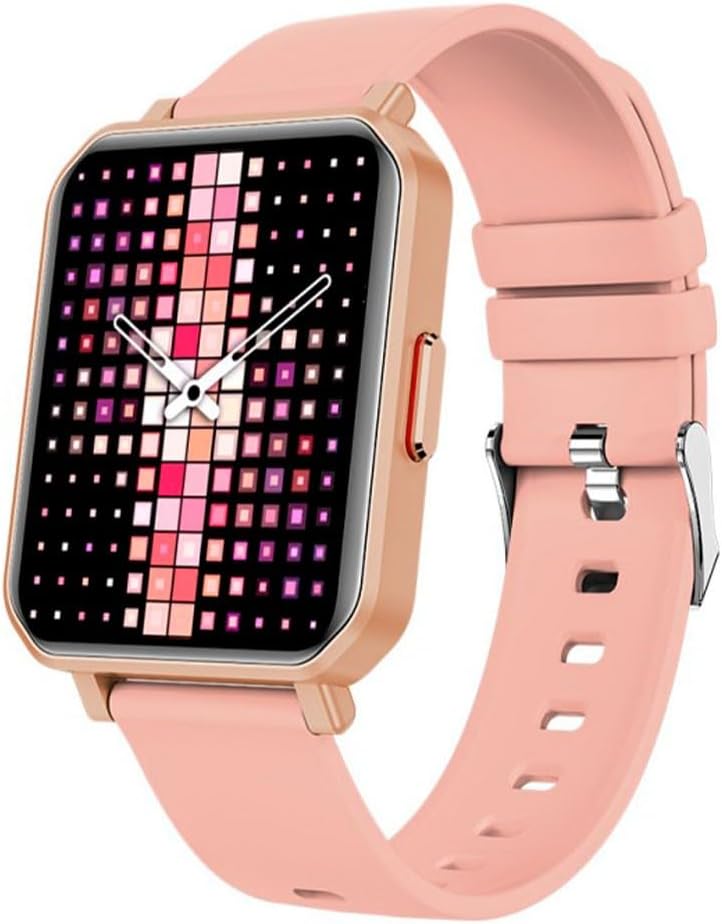
Image: The MAXCOM SMARTWATCH FW56 Carbon Pro Gold, featuring a rectangular gold-colored watch case and a soft pink silicone strap. The display shows a vibrant, pixelated watch face with shades of pink, purple, and white, indicating the time with analog hands.
Fungsi Inti
- Bewara: Nampi panggeuing kanggo telepon, pesen, sareng bewara aplikasi langsung dina pigeulang anjeun.
- Nyukcruk Kaséhatan: Monitor your steps, distance, calories burned, and heart rate. The integrated GPS allows for accurate tracking of outdoor activities.
- Pangimeutan Saré: Track your sleep patterns and quality.
- Kontrol Musik: Kontrol puter musik dina telepon pinter anjeun anu dipasangkeun.
- Cuaca: Kéngingkeun apdet cuaca sacara real-time.
Pangropéa sareng Perawatan
Ngabersihan Smartwatch Anjeun
Pikeun ngajaga jam tangan pinter anjeun dina kaayaan optimal:
- Ngusap layar sareng awak nganggo lawon anu lemes sareng teu aya serat.
- Pikeun tanda nekad, rada dampen lawon jeung cai. Ulah make bahan kimia kasar atawa bahan abrasive.
- Pastikeun kontak ngecas beresih jeung garing saméméh ngecas.
Perawatan batré
- Hindari suhu anu ekstrim, anu tiasa mangaruhan umur batré.
- Ulah ninggalkeun arloji pinuh discharged pikeun période nambahan.
- Paké ngan kabel ngecas disadiakeun.
Pamérésan masalah
| Masalah | Solusi anu mungkin |
|---|---|
| Lalajo teu hurung | Pastikeun arloji dicas pinuh. Pencét jeung tahan tombol samping sababaraha detik. |
| Teu tiasa dipasangkeun sareng smartphone | Check if Bluetooth is enabled on both devices. Restart both the watch and the smartphone. Ensure the MAXCOM app is updated. |
| Data kaséhatan teu akurat | Pastikeun yén arloji dipaké pas dina pigeulang anjeun. Ngabersihan sénsor dina tonggong arloji. |
| hirup batré pondok | Reduce screen brightness. Turn off unnecessary notifications. Limit continuous heart rate monitoring. |
Spésifikasi produk
- merek: Maxcom
- Ngaran modél: Smartwatch Fit FW56 Carbon Pro Złoty
- Jumlah modél: MAXCOMFW56CARBONGOLD
- warna: Multicolored
- Ukuran layar: 5.96 inci
- Téknologi konektipitas: Bluetooth
- Standar Komunikasi Nirkabel: Bluetooth
- Alat anu cocog: Smartphone, Tablet
- GPS: GPS terpadu
- Wangun: Buleud
- Sasaran Audiens: Unisex-Dewasa
- Pabrikan: Maxcom
- Negara asal: Portugal
Garansi sareng Rojongan
For warranty information and technical support, please refer to the warranty card included with your product or visit the official Maxcom website. You may also contact Maxcom customer service for assistance with product inquiries, troubleshooting, and service requests.
Simpen resi pameseran anjeun salaku bukti pameseran pikeun klaim garansi.


