1. Bubuka
Welcome to the user manual for your MAXCOM FW67 Titan Pro Smartwatch. This device is designed to enhance your daily life by providing convenient access to notifications, health monitoring, and fitness tracking features directly from your wrist. Please read this manual carefully to ensure proper use and to fully understand the capabilities of your new smartwatch.
2. Émbaran Kasalametan
- Do not attempt to disassemble, repair, or modify the device. This may void the warranty and cause damage.
- Jauhkeun alat tina suhu ekstrim, sinar panonpoé langsung, sareng seuneu kabuka.
- Hindarkeun alat ka tabrakan atanapi geter anu kuat.
- This device is water-resistant (IP69K rating), suitable for splashes and swimming. However, avoid hot water, steam, or prolonged submersion in deep water.
- Consult a medical professional before starting any new exercise regimen or if you have any health concerns. The health data provided by the smartwatch is for reference only and should not be used for medical diagnosis or treatment.
- Paké ngan kabel ngecas disadiakeun jeung adaptor kakuatan cocog.
3. Eusi Paket
Mangga parios pakét kanggo barang-barang ieu:
- MAXCOM FW67 Titan Pro Smartwatch (Orange)
- Kabel Ngecas
- Manual pamaké
4. Alat Leuwihview
Familiarize yourself with the main components of your smartwatch.

Gambar 4.1: Hareupeun view of the MAXCOM FW67 Titan Pro Smartwatch, displaying the main watch face with time, date, weather, battery level, and activity metrics like calories burned and step count.

Gambar 4.2: Samping view of the smartwatch, highlighting the 'POWER' button at the top and the 'BACK' button below it, both located on the right side of the watch casing.
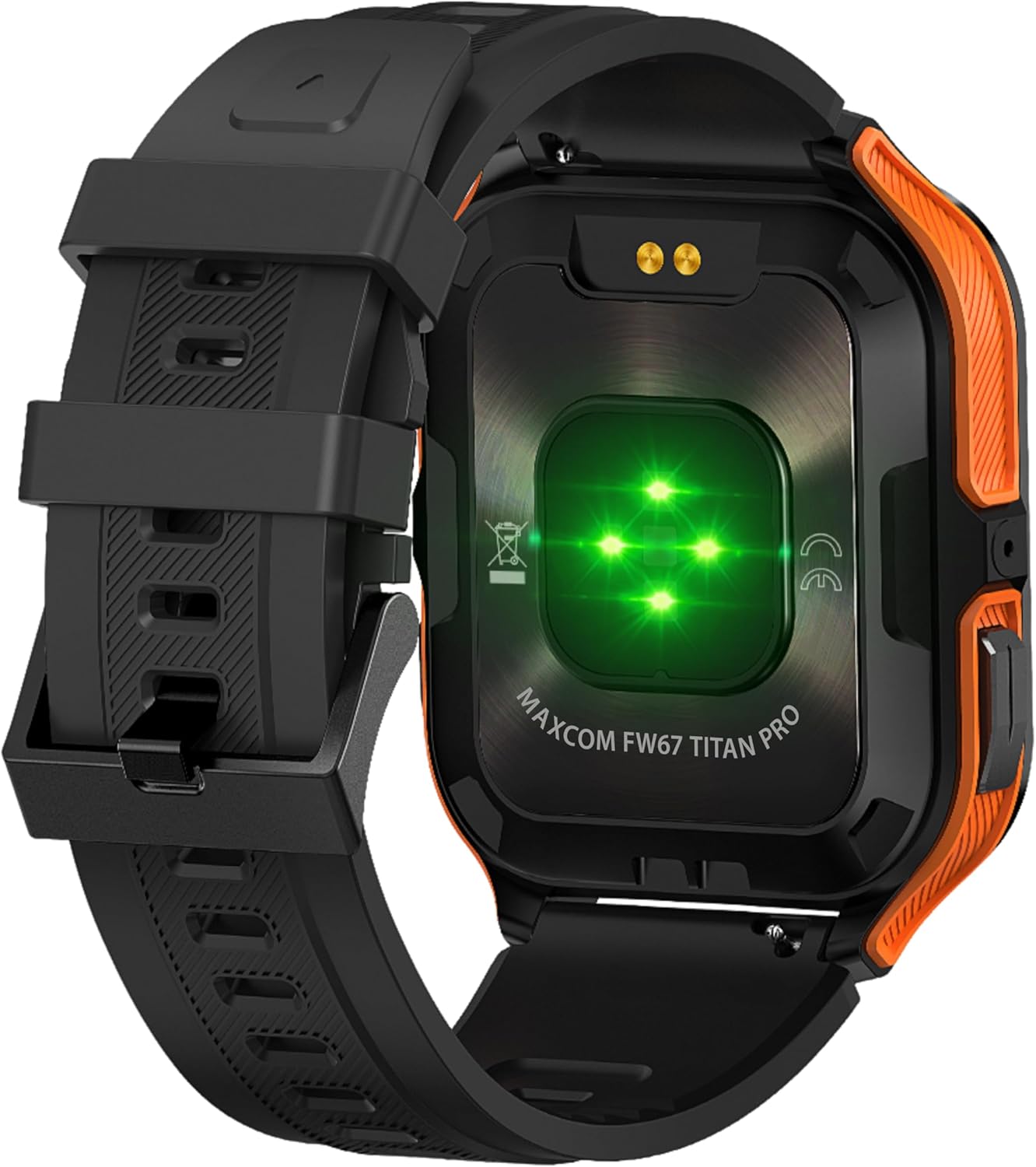
Gambar 4.3: Tukangeun view of the smartwatch, showing the optical heart rate sensors (glowing green) and the magnetic charging pins. The model name 'MAXCOM FW67 TITAN PRO' is also visible.
5. Setélan
5.1. Ngecas Awal
Sateuacan dianggo anu munggaran, cas heula jam tangan pinter anjeun sapinuhna.
- Connect the charging cable to the magnetic charging pins on the back of the smartwatch. Ensure the pins align correctly.
- Plug the USB end of the charging cable into a compatible USB power adapter (e.g., 5V/1A) or a computer's USB port.
- Layar jam tangan bakal nunjukkeun status ngecas. Ngecas pinuh biasana peryogi waktos sakitar 2-3 jam.
5.2. Instalasi App sarta Papasangan
To unlock the full potential of your smartwatch, you need to pair it with your smartphone via the dedicated companion application.
- Unduh Aplikasi: Milarian pikeun the official MAXCOM smartwatch application (e.g., 'GloryFit' or similar, refer to packaging for exact app name) on the Google Play Store (for Android) or Apple App Store (for iOS). Install the app on your smartphone.
- Aktipkeun Bluetooth: Pastikeun Bluetooth diaktipkeun dina smartphone Anjeun.
- Buka Aplikasi: Jalankeun aplikasi anu dipasang sareng turutan pitunjuk dina layar pikeun nyieun akun atanapi log in.
- Tambahkeun Alat: Within the app, navigate to the 'Device' or 'Add Device' section. The app will search for available smartwatches.
- Pilih Smartwatch Anjeun: Select 'FW67 Titan Pro' from the list of discovered devices.
- Konfirmasi pasangan: A pairing request may appear on both your phone and the smartwatch. Confirm the pairing on both devices.
- Setup lengkep: Follow any remaining prompts in the app to set up your profile, permissions, and preferences.
6. Ngoperasikeun Smartwatch Anjeun
6.1. Napigasi Dasar
- Tombol Daya: Press and hold to power on/off. Short press to wake the screen or return to the main watch face.
- Tombol Balik: Short press to go back to the previous screen or exit a function.
- Gerak layar rampa:
- Gesek ka luhur: Access quick settings/control center.
- Gesek ka handap: View bewara.
- Gesek Kénca/Katuhu: Navigate through widgets (e.g., activity, heart rate, weather).
- Ketok: Pilih hiji barang atanapi lebet kana menu.
6.2. Fitur konci

Gambar 6.1: The smartwatch display showcasing various health metrics including steps taken, calories burned, heart rate, blood oxygen saturation (SpO2), and blood pressure, along with battery status.
- Ngawaskeun Laju haté: The watch continuously monitors your heart rate. Access this feature from the main menu or by swiping to the heart rate widget.
- Nyukcruk kagiatan: Tracks steps, distance, and calories burned throughout the day. Set daily goals in the companion app.
- Pangimeutan Saré: Automatically tracks your sleep patterns, including deep sleep, light sleep, and wake times. View analisis lengkep dina aplikasi.
- Modeu Olahraga: Select from various sports modes (e.g., running, walking, cycling) to track specific workout data. Start a workout from the 'Sport' menu.
- Bewara: Receive call, message, and app notifications directly on your wrist. Ensure notification permissions are granted in the companion app.
- Oksigén Getih (SpO2) & Tekanan Darah: The watch can measure SpO2 and blood pressure. These measurements are for reference only and not for medical use.
- Cuaca: View current weather conditions after syncing with the app and granting location permissions.
- Kontrol Musik: Kontrol playback musik dina smartphone anjeun langsung tina jam tangan.
7. Pangropéa
- beberesih: Regularly clean your smartwatch and strap with a soft, dry, lint-free cloth. If necessary, use a slightly damp lawon ku sabun hampang, teras bilas jeung garing tuntas.
- Hindarkeun Bahan Kimia: Ulah make bahan kimia kasar, pangleyur beberesih, atawa detergents kuat, sabab ieu bisa ngaruksak finish jeung segel arloji urang.
- Port ngecas: Keep the charging pins clean and dry to ensure proper charging.
- Panyimpenan: Upami teu dianggo salami lami, simpen jam tangan pinter di tempat anu tiis sareng garing.
- Tahan cai: While the watch is IP69K water-resistant, it is not recommended for diving or high-pressure water activities. Always dry the watch thoroughly after exposure to water.
8. Cara ngungkulan
If you encounter issues with your smartwatch, refer to the following common problems and solutions:
| Masalah | Solusi |
|---|---|
| Smartwatch moal hurung | Pastikeun arloji dicas pinuh. Sambungkeun ka carjer sahenteuna 30 menit. |
| Teu tiasa dipasangkeun sareng smartphone | 1. Ensure Bluetooth is enabled on your phone. 2. Make sure the smartwatch is within range. 3. Restart both the smartwatch and your phone. 4. Clear Bluetooth cache on your phone. 5. Try pairing through the app, not directly via phone's Bluetooth settings. |
| Notifications are not received | 1. Check if the smartwatch is connected to the app. 2. Ensure notification permissions are granted for the app on your phone. 3. Verify that app notifications are enabled within the smartwatch app settings. 4. Disable 'Do Not Disturb' mode on both the watch and phone. |
| Data kaséhatan teu akurat | 1. Ensure the watch is worn snugly on your wrist, not too loose or too tight. 2. Clean the sensors on the back of the watch. 3. Avoid excessive movement during measurements. 4. Remember that data is for reference and not medical diagnosis. |
| hirup batré pondok | 1. Reduce screen brightness. 2. Limit continuous heart rate monitoring if not needed. 3. Turn off unnecessary notifications. 4. Ensure the watch is fully charged each time. |
9. Spésifikasi
Key technical specifications for the MAXCOM FW67 Titan Pro Smartwatch:
| Fitur | Spésifikasi |
|---|---|
| merek | MAXCOM |
| Modél | FW67 Titan Pro |
| Warna | oranyeu |
| Sistem operasi | Proprietary OS (compatible with Android/iOS) |
| Ukuran layar | 1.85 inci |
| Konektipitas | Bluetooth |
| Fitur husus | Heart Rate Monitor, Notifications, SpO2, Blood Pressure, Activity Tracking |
| Alat nu cocog | Smartphone |
| Komposisi batré | Litium-ion |
| Kapasitas batré | 380 mAh |
| GPS | GPS via smartphone |
| Wangun | Sagi opat |
10. Garansi jeung Rojongan
Your MAXCOM FW67 Titan Pro Smartwatch comes with a standard manufacturer's warranty. Please refer to the warranty card included in your package for specific terms and conditions, including warranty duration and coverage details. For technical support, troubleshooting assistance beyond this manual, or warranty claims, please contact MAXCOM customer service through their official websitus atanapi inpormasi kontak anu disayogikeun sareng dokuméntasi produk anjeun.


