1. Bubuka
This manual provides essential instructions for the proper setup, operation, and maintenance of your Motorola Solutions T803 Two-Way Radio. Please read this manual thoroughly before using your device to ensure optimal performance and safety.
The Motorola Solutions T803 is a robust two-way radio designed for reliable communication in various environments. It features IP54 weatherproofing, Bluetooth connectivity for smartphone integration, and a range of up to 35 miles under optimal conditions. The device supports the TALKABOUT app, allowing users to share locations, send messages, and control radio settings off-grid.

Image: Two Motorola Solutions T803 two-way radios.
2. Eusi Paket
Pariksa yén pakét anjeun ngandung barang-barang ieu:
- 2 x Motorola Solutions T803 Radios
- 1 x USB-C kana Kabel USB-A
- 1 x Dual Bay Charging Dock
- 2 x 1300 mAh NiMH Rechargeable Batteries
- 2 x Sabuk Klip
- 16 x Personalization Stickers

Image: All components included in the Motorola T803 package.
3. Setélan
3.1 Pamasangan batré
- Pastikeun radiona pareum.
- Teangan tempat panutup kompartemen batré dina tonggong radio.
- Press down on the latch and slide the cover off.
- Insert the 1300 mAh NiMH rechargeable battery pack into the compartment, ensuring the contacts align correctly.
- Replace the battery compartment cover and slide it until it clicks into place.

Image: Motorola T803 radio with open battery compartment.
3.2 Ngeusi batre
Before initial use, fully charge the batteries. The T803 radios come with a dual bay charging dock.
- Connect the USB-C to USB-A cable to the charging dock and a compatible USB power source (not included).
- Place the radios into the charging bays. Ensure the charging contacts on the radio align with those on the dock.
- The battery indicator on the radio display will show charging status. A full charge typically takes several hours.
3.3 Ngalampirkeun Klip Beubeur
- Sejajarkeun klip sabuk sareng alur di tukang radio.
- Geser klip ka handap dugi ka konci na pageuh kana tempatna.
- To remove, push the release tab on the clip and slide it upwards.

Image: Motorola T803 radio with belt clip attached.
4. Parentah Operasi
4.1 Hurung/Pareum sareng Volume
- Pikeun ngahurungkeun, pencét jeung tahan kenop Kakuatan / Menu tombol nepi ka layar hurung.
- Pikeun pareum, pencét jeung tahan Kakuatan / Menu tombol nepi ka tampilan pareum.
- Rotate the volume knob located at the top of the radio to adjust the listening volume.
4.2 Channel and Privacy Code Selection
The T803 operates on 22 FRS channels and supports 121 privacy codes to minimize interference.
- Pencét éta ménu tombol nepi ka nomer saluran kedip-kedip.
- Ngagunakeun éta + or - tombol pikeun milih saluran anu dipikahoyong (1-22).
- Pencét ménu again, and the privacy code will flash.
- Ngagunakeun éta + or - buttons to select a privacy code (1-121).
- Pencét ménu atawa nu PTT tombol pikeun mastikeun pilihan Anjeun.
4.3 Nepikeun jeung Narima
- Ensure all radios are set to the same channel and privacy code.
- Pikeun ngirimkeun, pencét jeung tahan tombol Push-to-Talk (PTT) tombol anu aya di sisi radio. Nyarios kalawan jelas kana mikropon.
- Ngaleupaskeun PTT tombol pikeun ngadéngékeun respon.
4.4 TALKABOUT App Integration (Bluetooth)
The T803 can connect to your smartphone via Bluetooth to utilize the TALKABOUT app for enhanced features, especially in areas without cellular service.
- Download the TALKABOUT app from your smartphone's app store.
- Enable Bluetooth on your smartphone and radio.
- Open the TALKABOUT app and follow the on-screen instructions to pair your radio.
- Ngaliwatan aplikasi, anjeun tiasa:
- Share and track locations with other app users.
- Send text messages off-grid.
- Control various radio settings remotely.
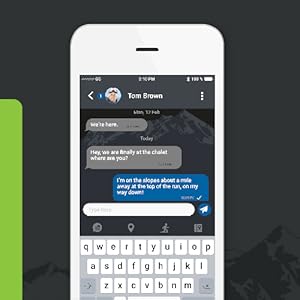
Image: TALKABOUT app messaging.
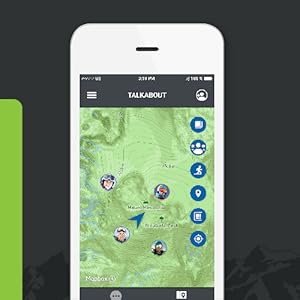
Image: TALKABOUT app location tracking.
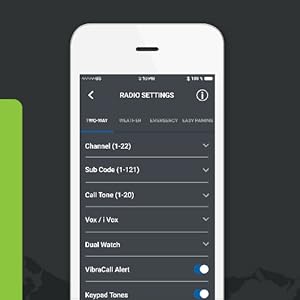
Image: TALKABOUT app radio settings.
4.5 Fitur husus
- Siaga Telepon: Send an audible alert to other radios in your group.
- Senter terpadu: Activate the built-in flashlight for illumination.
- NOAA Weather Radio & Alerts: Receive real-time weather updates and alerts.
- what3words: Communicate precise locations using unique three-word addresses, even without the app.

Image: Top of the Motorola T803 radio with flashlight active.
5. Pangropéa
5.1 Perawatan Batré
- To maximize battery life, fully charge the NiMH batteries before first use and after extended periods of non-use.
- Avoid overcharging or completely draining the batteries frequently.
- If storing the radios for a long time, remove the batteries.
5.2 beberesih
The T803 has an IP54 weather-resistant rating, meaning it is protected against dust and splashing water. To clean your radio:
- Ngusap luar ku hipu, damp lawon.
- Ulah make cleaners abrasive atawa pangleyur.
- Ensure the battery compartment cover is securely closed before exposing the radio to moisture.
5.3 Panyimpenan
Store your radios in a cool, dry place away from direct sunlight and extreme temperatures when not in use.
6. Cara ngungkulan
If you encounter issues with your Motorola Solutions T803 radio, refer to the following common problems and solutions:
| Masalah | Solusi anu mungkin |
|---|---|
| Radio teu hurung. | Check battery installation. Ensure batteries are charged. |
| Teu tiasa ngirim atanapi nampi. | Verify radios are on the same channel and privacy code. Check volume level. Ensure PTT button is fully pressed when transmitting. |
| Poor audio quality or limited range. | Ensure batteries are fully charged. Reduce obstacles between radios. Adjust privacy codes to avoid interference. Range is highly dependent on terrain and conditions. |
| Masalah papasangan Bluetooth. | Ensure Bluetooth is enabled on both devices. Restart both devices. Clear previous pairings on your smartphone. |
For further assistance, consult the Motorola Solutions support websitus atanapi ngahubungan layanan palanggan.
7. Spésifikasi
- Jumlah modél: T803
- ukuran: 1.28 x 2.2 x 7.52 inci
- beurat: 4.8 ons
- Batré: 2 x 1300 mAh NiMH Rechargeable (included), compatible with 2 x AA batteries
- Saluran: 22 Saluran FRS
- Kodeu Privasi: 121
- Maximum Talking Range: Up to 35 miles (terrain and conditions dependent)
- Tahan cai: IP54 (Tahan Cuaca)
- Fitur husus: Call Alert, Integrated Flashlight, NOAA Weather Radio & Alerts, Bluetooth Connectivity
- Pabrikan: Motorola Leyuran
8. Garansi jeung Rojongan
8.1 Émbaran jaminan
For detailed warranty information regarding your Motorola Solutions T803 Two-Way Radio, please refer to the warranty card included in your product packaging or visit the official Motorola Solutions websitus. Sarat jeung kaayaan jaminan bisa rupa-rupa dumasar wewengkon jeung tanggal meuli.
8.2 Rojongan Palanggan
If you require technical assistance, have questions about your product, or need to report an issue, please contact Motorola Solutions customer support. You can find contact information and additional resources on the official Motorola Solutions websitus: motorolasolutions.com/talkabout


