1. Bubuka
Thank you for choosing the Geek Smart L7 Robot Vacuum and Mop. This device is designed to provide efficient and thorough cleaning for your home, combining powerful vacuuming with intelligent mopping capabilities. Featuring advanced LDS navigation, Wi-Fi connectivity, and smart app control, the L7 ensures a customized cleaning experience for various floor types, including carpets and hard floors.
This manual provides essential information for the safe operation, setup, maintenance, and troubleshooting of your robot vacuum. Please read it carefully before use and retain it for future reference.
2. Parentah Kasalametan
To reduce the risk of injury or damage, read and follow all safety precautions when setting up, using, and maintaining your robot vacuum.
- Alat ieu tiasa dianggo ku murangkalih umur 8 taun ka luhur sareng jalma anu kakurangan kamampuan fisik, indrawi atanapi mental atanapi kurang pangalaman sareng pangaweruh upami aranjeunna dipasihan pangawasan atanapi petunjuk ngeunaan panggunaan alat dina cara anu aman sareng ngartos bahaya anu aya. .
- Barudak kedah diawaskeun pikeun mastikeun yén aranjeunna henteu maén sareng alatna.
- Beberesih sareng pangropéa pangguna henteu kedah dilakukeun ku murangkalih tanpa pangawasan.
- Anggo ngan ukur adaptor daya asli anu disayogikeun ku produsén.
- Ulah dianggo robot dina lingkungan anu aya seuneu muka atanapi bahan anu gampang kaduruk.
- Jauhkeun rambut, pakean longgar, ramo, sareng sadaya bagian awak tina bukaan sareng bagian anu obah.
- Do not operate the robot in rooms where an infant or child is sleeping.
- Ulah dianggo robot pikeun ngajemput runtah ageung, cairan, atanapi barang anu kaduruk.
- Ensure the robot is placed on a stable surface and cannot fall from high places.
- Turn off the robot and unplug the charging dock before cleaning or maintenance.
3. Eusi Paket
Pastikeun yén sadaya komponén aya sareng dina kaayaan anu saé nalika dibongkar.
- Geek Smart L7 Robot Vacuum and Mop
- Ngecas Dock
- Adaptor kakuatan
- Sikat samping (2 pasang)
- Sikat Utama
- Dust Bin (680ML)
- 2-in-1 Water Tank & Dust Bin (350ML water tank & 260ML dust bin)
- Kain pel (2)
- High-Efficiency Filter (pre-installed in dust bin)
- Alat beberesih
- Manual pamaké
4. Produk Langkungview
Komponen Vakum Robot

Image: The Geek Smart L7 Robot Vacuum, showcasing luhurna view with control buttons, LDS sensor, and accompanying accessories like the charging dock and replacement filters.
- LDS Navigation Sensor: Located on top, for precise mapping and navigation.
- Tombol kontrol: Power/Clean, Home/Recharge.
- Bemper hareup: Ngadeteksi halangan.
- Sikat samping: Sapuan uing kana jalur sikat utama.
- Sikat utama: Ngumpulkeun kokotor jeung lebu.
- Roda nyetir: Ngidinan gerakan dina rupa-rupa permukaan.
- Ngecas Kontak: Sambungkeun ka dok ngecas.
- Dust Bin / Water Tank: Removable compartments for dust collection and water for mopping.
Ngecas Dock
The charging dock provides power to recharge the robot's battery. It should be placed in an open area with sufficient clearance.
5. Setélan
5.1 Ngecas Dock Nempatkeun
- Simpen dok ngecas kana témbok di tempat anu kabuka.
- Ensure there is at least 0.5 meters (1.6 feet) of clear space on both sides of the dock and 1.5 meters (4.9 feet) in front.
- Sambungkeun adaptor daya kana dok ngecas teras colokkeun kana stop kontak témbok.
- Pastikeun indikator daya dina dok ngecas hurung.
5.2 Ngecas Awal
- Tempatkeun robot kana dok ngecas, pastikeun kontak ngecasna sajajar.
- The robot will automatically begin charging. Allow it to fully charge before its first use (approximately 4-5 hours).
5.3 Koneksi sareng Pemetaan Aplikasi

Image: The Geek Smart L7 Robot Vacuum actively scanning its environment using LDS navigation to create a detailed map, with digital map representations floating above it.
- Download the Geek Smart app from your mobile device's app store (available for iOS and Android).
- Ngadaptar akun tur asup.
- Follow the in-app instructions to add your L7 robot vacuum. This typically involves connecting to the robot's Wi-Fi hotspot and then connecting the robot to your home Wi-Fi network.
- Once connected, initiate a full cleaning cycle. The robot will use its LDS navigation to create an accurate map of your home. This map will be saved in the app for future use, allowing for features like selective room cleaning and setting no-go zones. The robot can save up to 5 different maps.
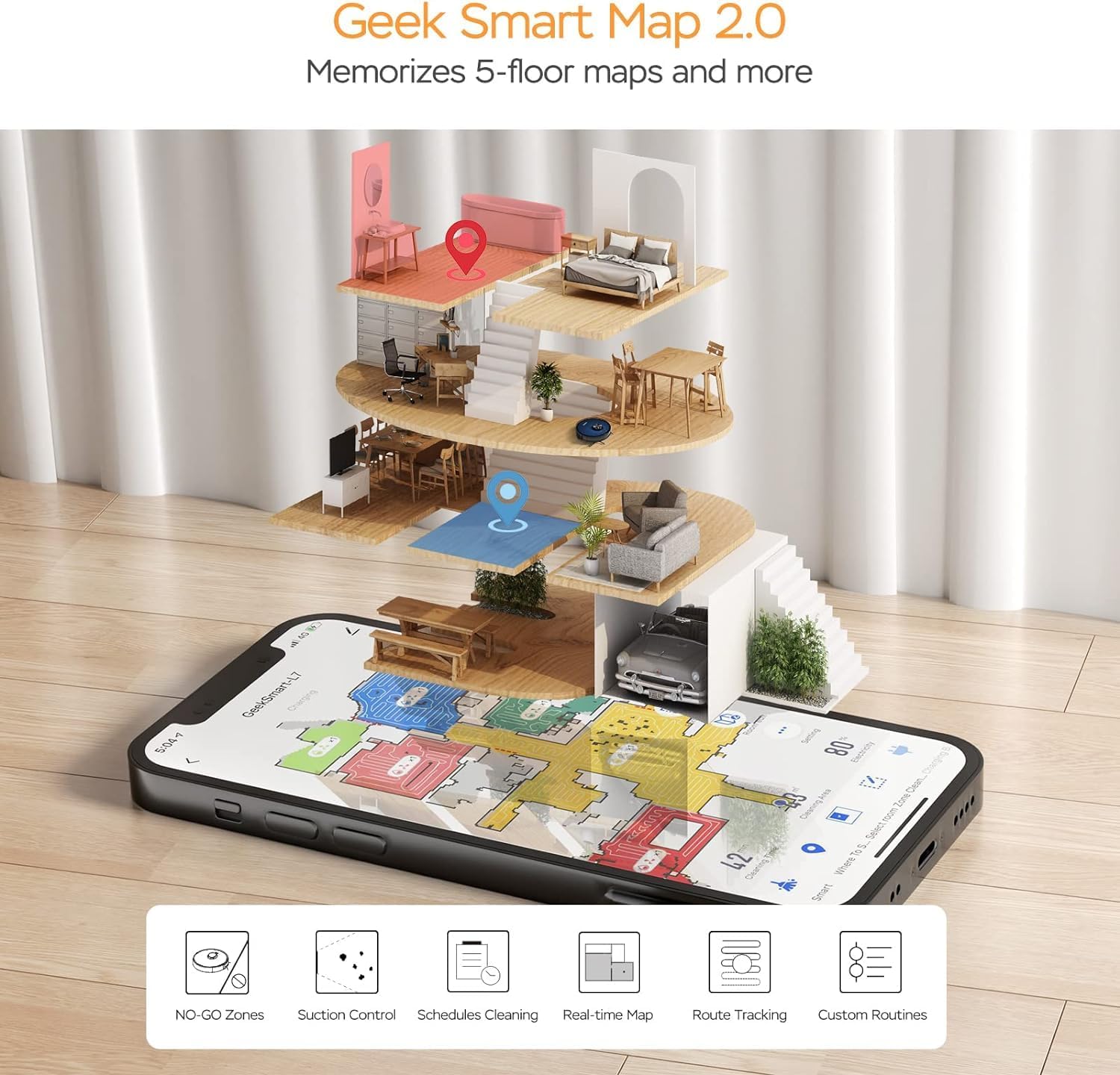
Image: A smartphone screen displaying the Geek Smart app interface, showing a color-coded floor plan map with various cleaning zones and controls.
6. Parentah Operasi
6.1 Mimitian jeung Ngeureunkeun beberesih
- Mimitian beberesih: Press the Power/Clean button on the robot or tap "Start Cleaning" in the app. The robot will begin a full cleaning cycle.
- Reureuh beberesih: Press the Power/Clean button during operation or tap "Pause" in the app.
- Beberesih Résumé: Press the Power/Clean button again or tap "Resume" in the app.
- Balik deui ka Dok: Press the Home/Recharge button on the robot or tap "Recharge" in the app. The robot will return to its charging dock.
6.2 Modeu beberesih
The L7 offers various cleaning modes to suit different needs.

Image: The Geek Smart L7 Robot Vacuum demonstrating its 2-in-1 sweeping and mopping capabilities on a hard floor, with debris being swept and a damp mop trail visible.
- beberesih otomatis: The robot intelligently plans its cleaning path using LDS navigation.
- Vacuuming: Utilizes up to 2700Pa suction power to clean dirt and debris from various surfaces.
- Ngepel: Attach the mop cloth and fill the 2-in-1 water tank. The electronic water tank allows for adjustable water output.
- Vakum & Pel (Sakaligus): The robot can vacuum and mop simultaneously when the 2-in-1 tank is installed.
- Modeu Naekeun Karpét: The robot automatically increases suction power when it detects carpeted areas for deeper cleaning.

Image: The Geek Smart L7 Robot Vacuum actively cleaning a hard floor, with a visual representation of its powerful 2700Pa suction lifting debris.

Image: The Geek Smart L7 Robot Vacuum transitioning from a hard floor to a carpet, illustrating its Carpet Boost Mode with enhanced suction indicated by glowing lines.

Image: The Geek Smart L7 Robot Vacuum positioned on a floor split between marble and wood, illustrating its integrated mopping system and adjustable water output for different surfaces.
6.3 Fitur Kontrol Aplikasi
The Geek Smart app unlocks advanced cleaning customization.
- Selective Room Cleaning: Choose specific rooms or areas on the map for cleaning.
- No-Go Zones / No-Mop Zones: Draw virtual boundaries on the map to prevent the robot from entering certain areas or mopping carpets.
- Invisible Walls: Create virtual walls to restrict the robot's movement.
- Jadwal: Set cleaning schedules for automatic operation at desired times.
- Penyesuaian Daya Nyeuseup: Manually adjust the suction level.
- Water Output Adjustment: Control the water flow for mopping.

Image: The Geek Smart L7 Robot Vacuum operating quietly (65dB) in a living room, demonstrating its low noise level suitable for homes with sleeping individuals or pets.
7. Pangropéa
Pangropéa rutin mastikeun kinerja anu optimal sareng manjangkeun umur robot vakum anjeun. Pareuman robot sareng cabut colokan dok ngecas sateuacan ngalakukeun pangropéa naon waé.
7.1 Ngosongkeun Lebu Bin
- Pencét tombol sékrési tong lebu sareng tarik kaluar tong lebu.
- Open the dust bin cover and empty the contents into a trash can.
- Bersihkeun saringan sareng tong lebu ku alat beberesih anu disayogikeun atanapi sikat lemes.
- Pasang deui tong lebu.
7.2 Cleaning the 2-in-1 Water Tank & Dust Bin
- Remove the 2-in-1 tank from the robot.
- Empty any remaining water from the water tank compartment.
- Kosongkeun kompartemen lebu sareng bersihkeun saringna.
- Rinse the water tank compartment with clean water. Do not immerse the entire tank in water, especially the electronic components.
- Allow all parts to air dry completely before reassembling and reinstalling.
7.3 Ngabersihan Sikat Utama
- Balikkeun robot teras pencét tab pelepas pikeun nyabut panutup sikat utama.
- Angkat sikat utama.
- Anggo alat beberesih pikeun miceun bulu sareng kokotor anu nyangkut di sabudeureun sikat sareng bantalanana.
- Pasang deui sikat sareng panutup utama.
7.4 Ngabersihan Sikat Sisi
- Tarik sikat samping ka luhur lalaunan pikeun nyabutna.
- Cabut bulu atanapi kokotor. Upami sikatna bengkok, rendem dina cai haneut salami sababaraha menit pikeun ngabentukna deui.
- Press the brushes back into place until they click.
7.5 Ngabersihan Sénsor sareng Ngecas Kontak
- Use a clean, dry cloth to wipe the cliff sensors (located on the bottom of the robot), wall sensors (on the side), and the charging contacts on both the robot and the charging dock.
- Ensure the LDS sensor on top is also clean and free of obstructions.
8. Cara ngungkulan
If you encounter issues with your robot vacuum, refer to the following table for common problems and solutions.
| Masalah | Mungkin Cukang lantaranana | Solusi |
|---|---|---|
| Robot teu hurung | batré lemah; Pareum listrik | Place robot on charging dock; Ensure power switch is on. |
| Robot teu tiasa ngecas | Kontak ngecas kotor; Dok ngecas teu dialiri daya | Bersihkeun kontak pangecas dina robot sareng dok; Pastikeun dok parantos dicolokkeun. |
| Robot sering macét | Obstacles on floor; Cliff sensors dirty | Clear cables and small objects; Clean cliff sensors. |
| Kinerja beberesih goréng | Dust bin full; Brushes tangled; Filter clogged | Kosongkeun tempat sampah; Bersihkeun sikat utama sareng sikat samping; Bersihkeun atanapi ganti saringan. |
| Fungsi ngepel teu jalan | Water tank empty; Mop cloth dry; Water outlet clogged | Fill water tank; Moisten mop cloth; Clean water outlet. |
| Masalah sambungan aplikasi | Sandi Wi-Fi salah; Router jauh teuing; Robot offline | Verify Wi-Fi credentials; Move robot closer to router; Restart robot and router. |
9. Spésifikasi
| Fitur | Spésifikasi |
|---|---|
| merek | Geek Pinter |
| Ngaran modél | L7 |
| Jinis Napigasi | 360 ° LiDAR |
| Daya Nyeuseup Max | 2700 Pa |
| Kapasitas batré | 2600 mAh |
| Max Runtime | 130 menit |
| Kapasitas Tong Lebu | 680 ML |
| Water Tank Capacity (2-in-1) | 350 ML |
| Tingkat Noise | Sub-65 dB |
| Dimensi produk | 12.59 "L x 12.59" W x 3.74" H |
| Item Beurat | 13.39 pon |
| Alat nu cocog | Amazon Echo |
| UPC | 764773837187 |
10. Garansi jeung Rojongan
Geek Smart products are manufactured to the highest quality standards. For warranty information, technical support, or customer service inquiries, please refer to the contact information provided on the product packaging or visit the official Geek Smart websitus.
Punten tahan bukti pameseran anjeun pikeun klaim garansi.


