1. Bubuka
This manual provides detailed instructions for the installation, operation, and maintenance of your ASUS Prime B850M-K Gaming Motherboard. Please read this manual thoroughly before proceeding with installation to ensure proper setup and to maximize the performance and longevity of your system.

Image 1.1: The ASUS Prime B850M-K Motherboard alongside its retail packaging.
2. Fitur konci
The ASUS Prime B850M-K motherboard is engineered with advanced technologies to support high-performance computing. Key features include:
- Ready for advanced AI PCs: Dirancang pikeun masa depan komputasi AI, kalayan kakuatan sareng konéktivitas anu diperyogikeun pikeun aplikasi AI anu nungtut.
- Socket AMD AM5: Compatible with AMD Socket AM5 for AMD Ryzen 9000, 8000, and 7000 Series Desktop Processors.
- Upgraded Power Solution: Features an 8+2+1 phase power supply design, 6-layer PCB, alloy chokes, and durable capacitors for stable power delivery.
- Ultra-fast connectivity: Includes a PCIe 5.0 x16 slot, PCIe 5.0 M.2 slot, Realtek 2.5Gb Ethernet, USB 10Gbps Type-A on the back, and USB 5Gbps Type-C support on the front.
- Pendinginan komprehensif: Equipped with VRM and M.2 heatsinks, a PCH heatsink, hybrid fan headers, and Fan Xpert 2+ for efficient thermal management.
3. Produk Langkungview
Familiarize yourself with the layout and components of the ASUS Prime B850M-K motherboard.
3.1 Tata Letak Motherboard
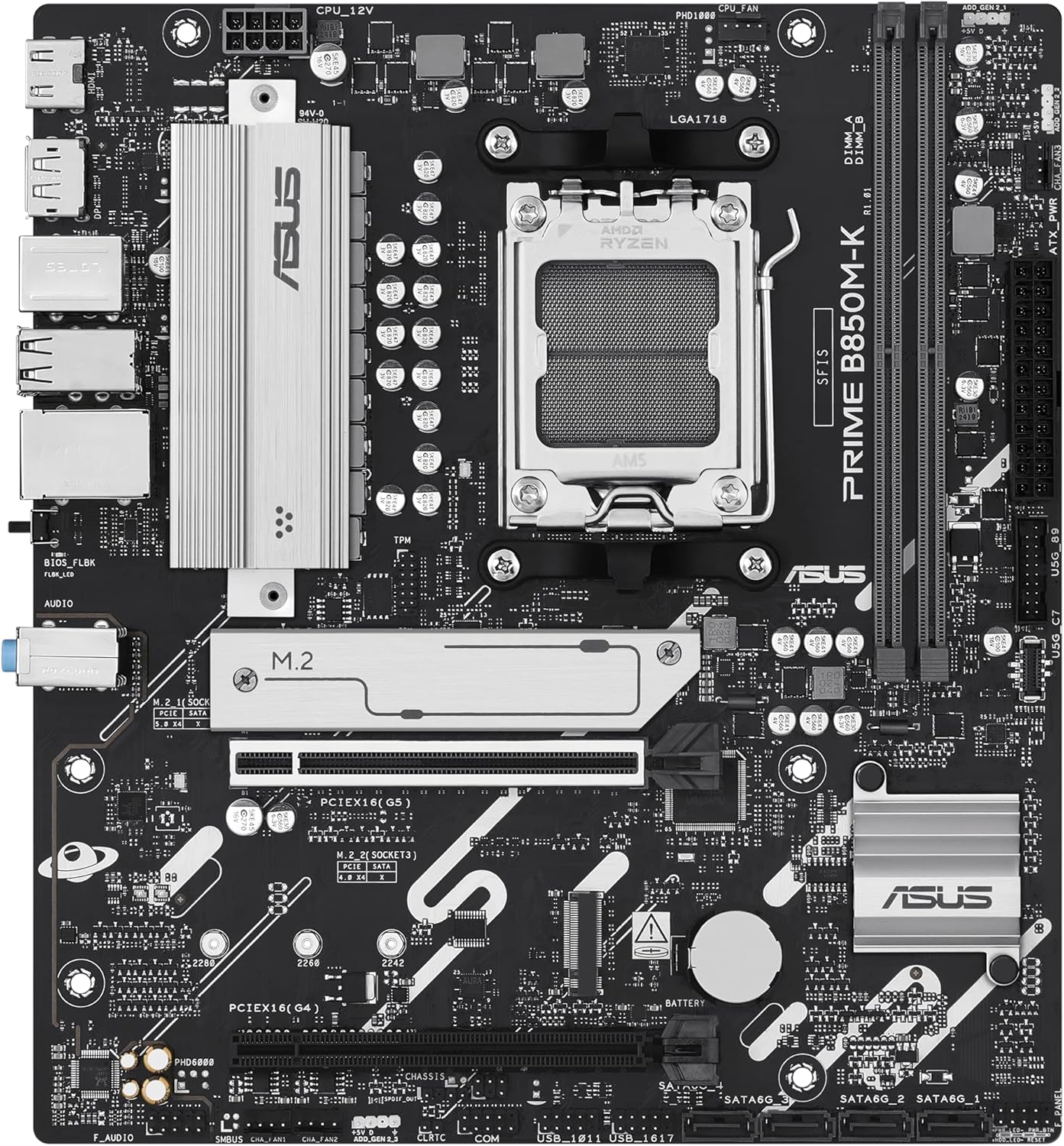
Gambar 3.1: A luhur-handap view of the motherboard, highlighting the CPU socket, DIMM slots, PCIe slots, and M.2 slots.
gambar ieu nyadiakeun komprehensif view of the motherboard's key areas, including the AMD AM5 CPU socket, DDR5 DIMM slots, PCIe 5.0 x16 slot, and M.2 slots for storage devices. Understanding these locations is crucial for component installation.
3.2 Panel I/O pungkur

Image 3.2: The rear input/output panel of the motherboard, showing various ports for external devices.
The rear I/O panel offers a range of connectivity options for your peripherals. It includes USB ports, Ethernet, audio jacks, and video outputs. Refer to the diagram below for specific port identification.

Image 3.3: A labeled diagram of the rear I/O panel, indicating the function of each port.
4. Setup jeung Instalasi
This section guides you through the process of installing your motherboard and its components.
4.1 Eusi pakét
Pariksa yén sadaya item aya dina pakét motherboard anjeun:
- Motherboard ASUS Perdana B850M-K
- pungkur I / O Panel Shield
- SATA Data Cables (2x)
- M.2 pakét screw
- M.2 Rubber Stand-off
- Gancang Mimitian Guide

Image 4.1: The complete contents of the ASUS Prime B850M-K motherboard package.
4.2 Daptar pariksa Pra-Pamasangan
- Pastikeun unit catu daya (PSU) anjeun cocog sareng nyayogikeun daya anu cekaptage.
- Gather necessary tools: Phillips-head screwdriver, anti-static wrist strap.
- Prepare your computer case for motherboard installation.
4.3 Pamasangan motherboard
- Pasang tameng I/O kana bukaan pungkur wadah komputer anjeun.
- Sacara saksama sajajarkeun motherboard sareng standoffs dina casing anjeun.
- Ngamankeun motherboard kalawan screws, mastikeun eta pageuh seated.
4.4 Pamasangan komponén
- CPU: Buka tuas soket CPU, sajajarkeun CPU sareng spidol segitiga, lebetkeun lalaunan kana soket, teras tutup tuasna.
- CPU cooler: Pasang cooler CPU nurutkeun parentah produsén na.
- RAM (DDR5): Open the DIMM slot clips, align the memory modules, and press down firmly until the clips lock into place.
- M.2 Storage: Insert the M.2 drive into the M.2 slot, secure it with the provided screw or rubber stand-off.
- Kartu Grafis (GPU): Insert the graphics card into the PCIe 5.0 x16 slot and secure it with the case latch and screw.
- Alat SATA: Connect SATA data cables from the motherboard to your storage drives (HDDs/SSDs) and power cables from the PSU.
4.5 Nyambungkeun Power jeung périferal
- Sambungkeun konektor daya ATX 24-pin sareng konektor daya CPU 8-pin tina PSU anjeun ka motherboard.
- Connect front panel headers (power button, reset button, USB, audio) to their respective pins on the motherboard. Refer to the motherboard manual for exact pin layouts.
- Connect external peripherals (monitor, keyboard, mouse) to the rear I/O panel.
5. Parentah Operasi
After successful installation, follow these steps for initial operation.
5.1 Boot munggaran
- Ensure all connections are secure and the power supply is switched on.
- Pencét tombol daya dina wadah komputer anjeun.
- The system should power on and display the ASUS logo or BIOS/UEFI screen.
5.2 Konfigurasi mios / UEFI
Pikeun ngasupkeun utilitas setelan BIOS/UEFI, pencét tombol Hapus or F2 key during the Power-On Self-Test (POST). Here you can configure system settings, boot order, and enable features like XMP/EXPO for memory.
5.3 Pamasangan Supir
After installing your operating system, install the latest drivers for your motherboard chipset, audio, LAN, and other integrated components. These can typically be found on the ASUS support websitus pikeun model motherboard husus Anjeun.
6. Pangropéa
Regular maintenance helps ensure the stability and longevity of your motherboard.
6.1 beberesih
- Périodik ngabersihan lebu tina motherboard sareng komponenana nganggo hawa anu dikomprés.
- Pastikeun sistem dipareuman sareng dicabut colokan sateuacan beberesih.
6.2 Update mios
Pariksa dukungan ASUS website for BIOS/UEFI updates. Updates can improve system stability, add support for new hardware, or fix bugs. Follow the instructions provided by ASUS carefully when performing a BIOS update.
7. Cara ngungkulan
Bagian ieu ngabahas masalah umum anu anjeun tingali.
- Henteu aya kakuatan: Check all power connections (24-pin ATX, 8-pin CPU, GPU power). Ensure PSU is switched on.
- Henteu aya tampilan: Verify monitor connection, ensure graphics card is properly seated and powered. Try reseating RAM modules.
- Instabilitas Sistem / Kacilakaan: Check CPU and GPU temperatures. Ensure RAM is correctly installed and compatible. Update drivers and BIOS.
- Alat Boot Teu Kapendak: Check SATA/M.2 connections. Verify boot order in BIOS/UEFI.
- Masalah Flashback BIOS: Ensure the USB drive is formatted correctly (FAT32) and the BIOS file is renamed as specified by ASUS.
8. Spésifikasi Téknis
Detailed specifications for the ASUS Prime B850M-K Motherboard.
| Fitur | Spésifikasi |
|---|---|
| merek | ASUS |
| Ngaran modél | 90MB1LV0-M0EAY0 |
| CPU Socket | Socket AM5 |
| Prosesor cocog | AMD Ryzen 9000, AMD Ryzen 8000, AMD Ryzen Séri 7000 |
| Téhnologi Mémori RAM | DDR5 |
| Laju mémori | Nepi ka 8000 MHz (OC) |
| Tipe Chipset | AMD B850 |
| PCIe liang | 1x PCIe 5.0 x16, additional PCIe slots |
| M.2 liang | 2x M.2 slots (PCIe 5.0 support) |
| Ethernet | Ethernet Realtek 2.5Gb |
| Konektipitas USB | USB 10Gbps Type-A (rear), USB 5Gbps Type-C (front header) |
| Platform | Windows 10, Windows 11 |
| Item Beurat | 1.52 pon |
9. Garansi jeung Rojongan
ASUS products are manufactured to the highest quality standards. For specific warranty terms and conditions, please refer to the warranty card included with your product or visit the official ASUS websitus.
9.1 Rojongan kontak
For technical assistance, driver downloads, or further information, please visit the official ASUS support websitus:


