1. Produk Langkungview
This manual provides essential information for the operation and maintenance of your GHUST MR23GA Replacement Magic Voice Remote Control. This remote is designed as a replacement for various LG Smart TV models, offering convenient control without complex setup.

Image 1.1: The GHUST MR23GA Replacement Magic Voice Remote Control.
Fitur konci:
- Ngaganti langsung: Functions as a direct replacement for original LG Magic Remote models.
- Henteu Dibutuhkeun Pemrograman: Ready to use out of the box after battery insertion.
- Konstruksi awét: Made of high-quality ABS material for enhanced durability.
- Desain kompak: Small and ergonomic for comfortable grip.
- Voice Search Capability: Supports voice commands for easier navigation (functionality may vary based on TV model and original remote features).
- Tombol Pintasan Khusus: Aksés gancang kana jasa streaming populér sapertos Netflix sareng Prime Video.
2. Setup jeung Instalasi
The MR23GA remote control is designed for immediate use with compatible LG Smart TVs. No complex programming or pairing procedures are required.
2.1. Pamasangan batré
- Teangan tempat panutup kompartemen batré dina tonggong kadali jauh.
- Geser panutupna ka handap atanapi pencét kancingna pikeun muka kompartemenna.
- Lebetkeun dua (2) batré AAA (teu kaasup) kana kompartemenna, pastikeun terminal positif (+) sareng négatif (-) saluyu sareng indikator di jerona.
- Tutup panutup kompartemen batré ku cara ngageser deui kana tempatna nepi ka klik aman.

Image 2.1: The remote control is designed for ease of use with no setup or programming required after battery installation.
Once batteries are installed, the remote is ready to operate your compatible LG Smart TV.
3. Parentah Operasi
This section details the basic functions and operation of your MR23GA remote control.
3.1. Fungsi Dasar
- Tombol Daya (●): Pencét pikeun ngahurungkeun atanapi mareuman TV.
- Tombol Jumlah (0-9): Use to directly input channel numbers.
- Volume Kaluhur/Turun (+/-): Adjust the TV's volume level.
- Saluran Luhur/Handap (▲/▼): Ganti saluran TV.
- Mute Button (🔇): Mute or unmute the TV's audio.
- Pad Navigasi (Kaluhur, Turun, Kénca, Katuhu, OK): Napigasi ngaliwatan ménu tur pilih pilihan.
- Back Button (↶): Balik deui ka layar atawa ménu saméméhna.
- Tombol Imah (🏠): Access the TV's Smart Home dashboard.

Image 3.1: The compact size and ergonomic design make the remote easy to hold and operate.
3.2. Kontrol sora
Pencét jeung tahan tombol Tombol Mikropon to activate voice control. Speak clearly into the remote to issue commands or search for content. Release the button when finished speaking. Note that voice control functionality may depend on your specific LG TV model and its original features.
3.3. Tombol Pintasan Khusus
The remote features dedicated buttons for quick access to popular streaming applications:
- Tombol Netflix: Langsung luncurkeun aplikasi Netflix.
- Tombol Prime Video: Langsung luncurkeun aplikasi Amazon Prime Video.
- Tombol Disney +: Directly launch the Disney+ application.
- LG Channels Button: Directly launch the LG Channels application.
- Sling Button: Directly launch the Sling TV application.
- Tombol Alexa: Activate Alexa voice assistant (functionality depends on TV model).

Image 3.2: Dedicated shortcut buttons provide quick access to your favorite applications.
3.4. Kasaluyuan
This replacement remote control is compatible with a wide range of LG Smart TV models, including but not limited to:
- LG OLED Series: OLED42C3AUA, OLED42C3PUA, OLED48C3PUA, OLED55C3PUA, OLED65C3AUA, OLED77C3PUA, OLED83C3PUA, OLED55G3PUA, OLED65G3PUA, OLED77G3PUA, OLED83G3PUA, OLED55B3PUA, OLED65B3PUA, OLED77B3PUA
- LG QNED Series: 43QNED75URA, 50QNED75URA, 55QNED75URA, 65QNED75URA, 75QNED75URA, 50QNED80URA, 55QNED80URA, 65QNED80URA, 75QNED80URA, 86QNED80URA
- LG UR9000 Series: 43UR9000PUA, 50UR9000PUA, 55UR9000PUA, 65UR9000PUA, 75UR9000PUA
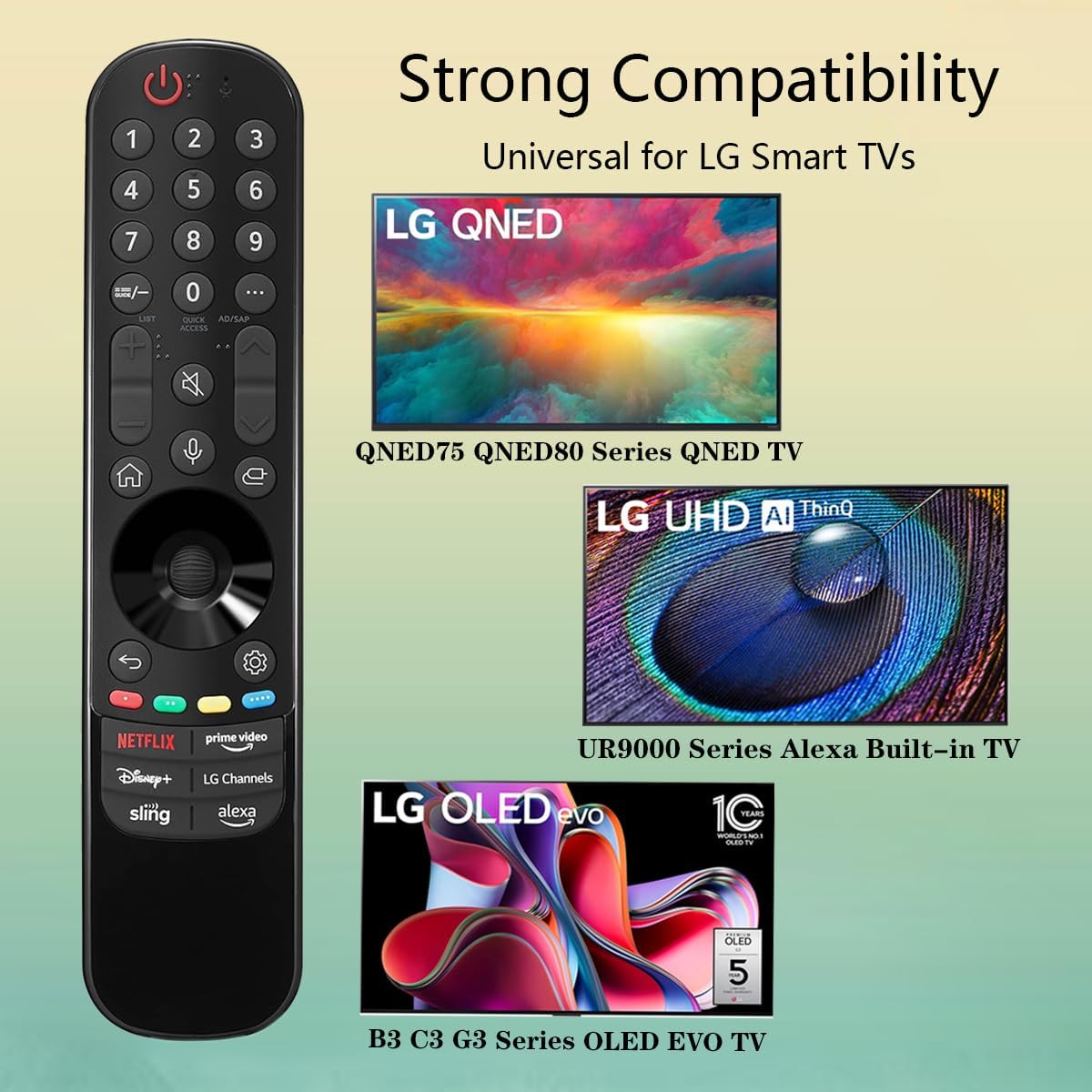
Image 3.3: The remote offers strong compatibility with various LG Smart TV series.
4. Pangropéa
Proper care and maintenance will extend the lifespan of your remote control.
4.1. beberesih
- Use a soft, dry cloth to wipe the surface of the remote control.
- Keur kokotor bandel, rada dampen lawon ku cai atawa hampang, cleaner non-abrasive. Ulah menyemprot cleaner langsung kana remote.
- Ulah nganggo bahan kimia, pangleyur, atanapi bahan beberesih anu kasar, sabab ieu tiasa ngaruksak lapisan luar atanapi komponén internal remote.
4.2. Kaperawatan batré
- Replace batteries when the remote's responsiveness decreases or it stops functioning.
- Salawasna gentos kadua batré sakaligus ku anu énggal anu jinisna sami (AAA).
- If the remote will not be used for an extended period (e.g., one month or more), remove the batteries to prevent leakage and potential damage to the remote.
- Buang batré anu dipaké nurutkeun peraturan lokal.
5. Cara ngungkulan
Upami anjeun mendakan masalah sareng kadali jauh anjeun, tingal masalah sareng solusi umum ieu:
| Masalah | Mungkin Cukang lantaranana | Solusi |
|---|---|---|
| Jauh teu ngabales. | Batré paéh atanapi teu leres diselapkeun. | Replace batteries with new AAA batteries, ensuring correct polarity (+/-). |
| Jauh dianggo intermittently. | Low battery power; obstruction between remote and TV; infrared sensor blocked on TV. | Replace batteries. Ensure a clear line of sight to the TV's infrared sensor. Remove any obstructions. |
| Voice control or pointer not working. | This replacement remote may not support all advanced features of the original LG Magic Remote, or your TV model does not fully support these features with a replacement remote. | Verify your TV model's compatibility with replacement remotes for advanced features. Basic functions should still operate. |
| Dedicated app buttons (e.g., Alexa, LG Channels) not working. | Functionality depends on TV model and specific app integration. | Some app buttons may not be universally compatible or require specific TV software versions. Verify if other buttons work. |
Lamun masalah persists sanggeus nyobian solusi ieu, mangga ngahubungan rojongan customer.
6. Spésifikasi
- Jumlah modél: MR23GA
- merek: GUSTI
- Ukuran produk: 7.3 x 1.6 x 1.2 inci
- Beurat barang: 2.29 ons
- Sumber Daya: 2 x batré AAA (teu kaasup)
- warna: Hideung
- Bahan: ABS kualitas luhur
- Alat anu cocog: LG Smart Televisions (specific models listed in Section 3.4)
- Fitur husus: Voice Search (functionality may vary)
7. Garansi jeung Rojongan
GHUST is committed to providing high-quality products and excellent customer service.
7.1. Saatos-Penjualan Service
If you have any questions regarding the quality or functionality of your GHUST MR23GA remote control, please do not hesitate to contact our customer support team. We are dedicated to resolving any issues promptly and ensuring your satisfaction.
For support, please refer to the contact information provided with your purchase or on the official GHUST product page.


