Bubuka
This manual provides detailed instructions for the installation, operation, and maintenance of your ARES WING Desk Monitor Mount (Model GDT1003LWH). Please read this manual thoroughly before installation and use to ensure proper function and safety. This monitor mount is designed to support a single monitor, compatible with screens ranging from 17 to 49 inches and weighing between 4.4 to 44 lbs.
Émbaran Kasalametan
- Pastikeun sadaya komponén aya sareng henteu ruksak sateuacan dirakit. Entong dianggo upami aya bagian anu leungit atanapi cacad.
- Verify that your monitor's weight and size are within the specified limits (4.4-44 lbs, 17-49 inches). Exceeding these limits can result in instability and damage.
- Confirm your monitor has compatible VESA mounting holes (75x75mm or 100x100mm). If not, a separate VESA adapter is required.
- Ensure your desk thickness is compatible with the chosen mounting method (C-clamp: 0.39-3.34 inches; Grommet: 0.39-1.8 inches).
- Adjust the gas spring tension according to your monitor's weight sateuacan attaching the monitor to prevent sudden drops or difficulty in adjustment.
- Jauhkeun barudak sareng piaraan salami instalasi.
- Ulah overighten screws, sabab ieu bisa ngabalukarkeun karuksakan.
- For any issues or concerns, contact ARES WING customer support.
Eusi pakét
Please check the package to ensure all the following components are included:
- Rakitan Panangan Monitor
- Méja Clamp (C-clamp)
- Dasar Pemasangan Grommet
- Lempeng VESA
- Pakakas Keras (sekrup, ring, spacer)
- Allen Wrenches
- Manual pangguna (dokumén ieu)
Setup sareng Instalasi
1. Check Monitor Compatibility
Before proceeding, ensure your monitor meets the following criteria:
- Pola VESA: 75x75mm or 100x100mm.
- Ukuran layar: 17" to 49".
- Kapasitas beurat: 4.4 lbs to 44 lbs.

Figure 1: Monitor and Desktop Compatibility Check
For monitors without VESA holes, a separate VESA adapter is required. Some Samsung G9 monitors may come with a VESA adapter; please check your monitor's documentation.

Figure 2: VESA Hole Check and Adapter Preparation
2. Choose Mounting Method
The ARES WING monitor mount supports two installation methods: C-clamp sareng dudukan Grommet.
- C-Clamp: Suitable for desk thickness between 0.39 inches (10mm) and 3.34 inches (85mm).
- Pemasangan Grommet: Suitable for desk thickness between 0.39 inches (10mm) and 1.8 inches (45mm). Requires an existing hole in your desk.
3. Install the Desk Mount
Follow the instructions provided with your mount to securely attach the base to your desk using either the C-clamp or grommet method. Ensure the mount is stable before proceeding.
4. Saluyukeun Tegangan Spring Gas
It is crucial to adjust the gas spring tension to match your monitor's weight sateuacan attaching the monitor. This prevents the arm from springing up or sagging.
- Use the provided Allen wrench to adjust the tension screw on the arm.
- Giliran counter-jarum jam for heavier monitors (to increase tension).
- Giliran saarah jarum jam for lighter monitors (to decrease tension).
- Adjust until the arm can hold its position freely when moved without a monitor attached.

Gambar 3: Pangaluyuan Tegangan Pegas Gas
5. Attach Monitor to VESA Plate
Secure the VESA plate to the back of your monitor using the appropriate screws and spacers from the hardware kit. Ensure the screws are tightened securely but do not overtighten.
6. Mount Monitor to Arm
Carefully slide the VESA plate with the attached monitor onto the monitor arm's VESA head. Ensure it clicks into place or is secured with any locking mechanism provided.
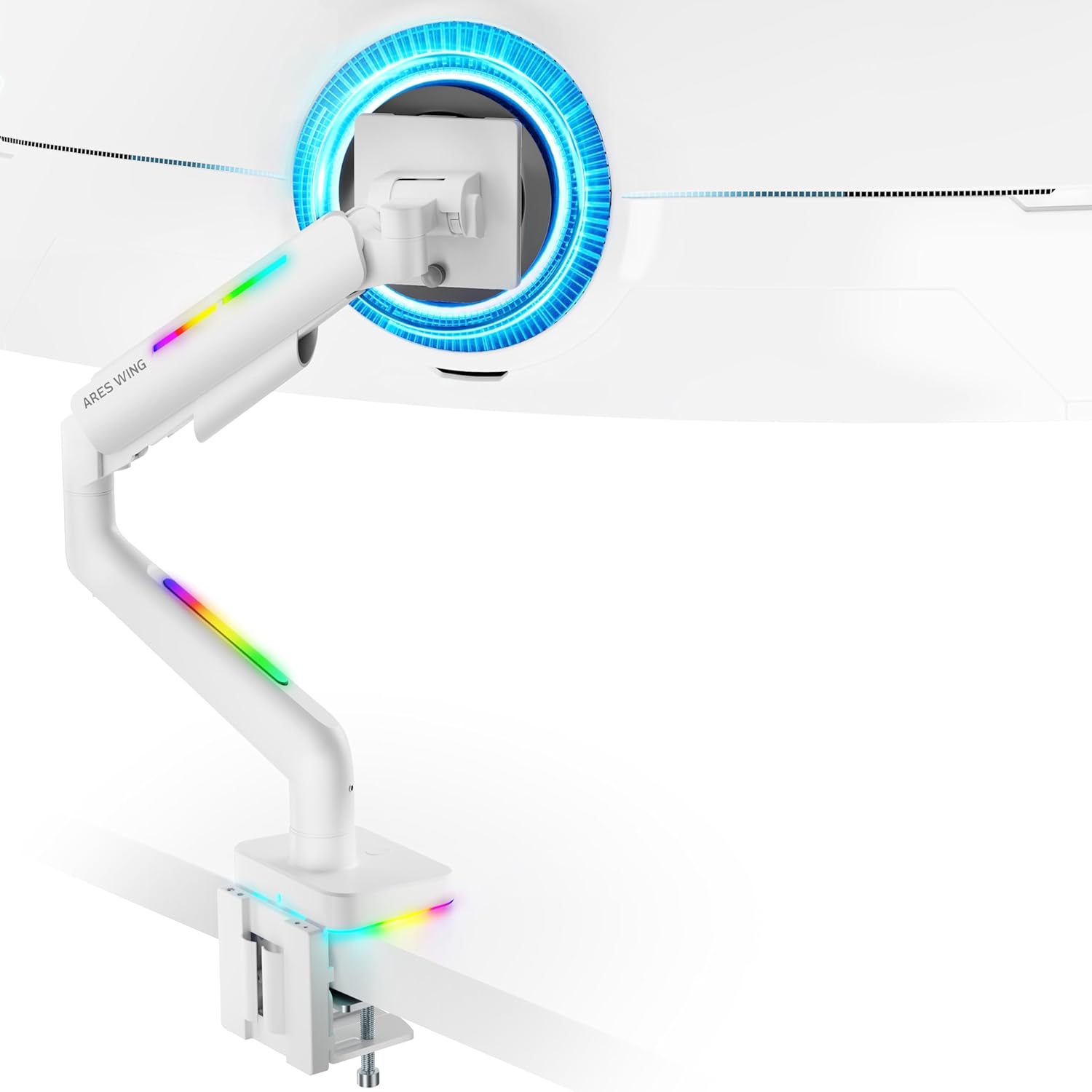
Figure 4: Monitor Mounted on ARES WING Arm
Parentah Operasi
1. Nyaluyukeun Posisi Monitor
The ARES WING monitor arm offers full motion capabilities for optimal ergonomic positioning:
- Penyesuaian Jangkungna: The arm allows vertical movement to raise or lower your monitor to the desired eye level. The height can be adjusted from 8.5 inches to 19.7 inches.
- Dengdekkeun: Tilt your monitor +50° upwards or -20° downwards to reduce glare and find the perfect viewsudut ing.
- Putar: Swivel the monitor ±90° left or right to share your screen or adjust for different tasks.
- Rotasi: Puterkeun monitor 360° pikeun ngaganti orientasi lanskap sareng potret.

Figure 5: Full Motion Adjustment Capabilities
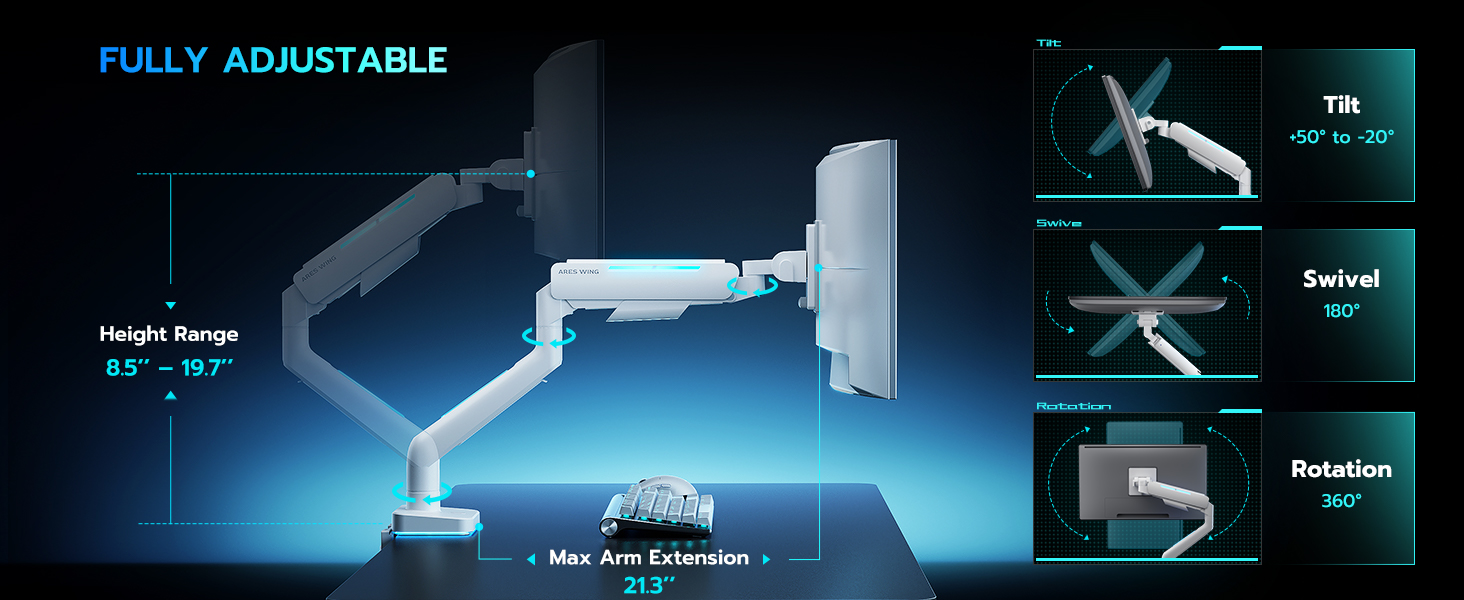
Figure 6: Tilting Ultrawide Monitors
2. RGB Lighting Control
The monitor arm features integrated RGB lighting with 20 dynamic lighting effects. To control the lighting:
- Connect the USB cable from the monitor arm to a USB port on your computer or a USB power adapter.
- Locate the light control button on the base of the monitor arm.
- Pencét jeung tahan the button for approximately 2-3 seconds to turn the RGB lighting ON or OFF.
- Pencét sakedap to cycle through the 20 different lighting modes (Color Cycle, Chasing, Static, Wave, etc.).
- The lighting will remember the last mode used when turned back on.

Figure 7: RGB Lighting Control
3. Manajemén kabel
Utilize the integrated cable management channels on the arm to route your monitor and power cables. This helps maintain a clean and organized workspace.
Pangropéa
- beberesih: Usap leungeun monitor ku kaén nu lemes,amp lawon. Hindarkeun pembersih abrasive atanapi pangleyur anu tiasa ngaruksak finish.
- Cék périodik: Pariksa sadaya sekrup sareng sambungan sacara berkala pikeun mastikeun éta tetep pageuh sareng aman. Kencengkeun deui upami diperyogikeun.
- Percikan Gas: The internal gas spring is designed for long-term durability (fatigue tested 20,000+ times). No specific maintenance is required for the gas spring itself, but ensure its tension is correctly set for your monitor's weight.
Pamérésan masalah
| Masalah | Mungkin Cukang lantaranana | Solusi |
|---|---|---|
| Panangan monitor ngagantung atawa teu bisa tetep hudang. | Tegangan pegas gas handap teuing pikeun beurat monitor. | Increase gas spring tension by turning the adjustment screw counter-clockwise. Refer to "Adjust Gas Spring Tension" section. |
| Monitor arm is too stiff or won't move down. | Tegangan pegas gas teuing luhur pikeun beurat monitor. | Decrease gas spring tension by turning the adjustment screw clockwise. Refer to "Adjust Gas Spring Tension" section. |
| Lampu RGB teu hurung. | USB cable not connected or button not pressed correctly. | Ensure USB cable is securely connected. Press and tahan the light control button for 2-3 seconds to activate. |
| Monitor wobbles or is unstable. | Mount not securely fastened to desk or VESA plate not tight. | Check desk clamp/grommet mount for tightness. Ensure VESA plate screws are securely fastened to the monitor and the plate is properly seated on the arm. |
| Monitor cannot tilt smoothly. | Tilt mechanism screw is too tight. | Loosen the tilt adjustment screw slightly until smooth tilting is achieved. Refer to Figure 6. |
spésifikasi
| Nomer modél | GDT1003LWH |
| Bahan | Aluminium, Beusi |
| Kasaluyuan VESA | 75x75mm, 100x100mm |
| Kasaluyuan Ukuran layar | 17 - 49 inches (flat and curved monitors) |
| Kapasitas beurat | 4.4 - 44 lbs (2 - 20 kg) |
| Jangkungna adjustment Range | 8.5 - 19.7 inci |
| Sudut Dengdekkeun | +50 ° / -20 ° |
| Sudut Putar | ± 90° |
| Rotasi | 360° |
| Desktop Thickness (C-Clamp) | 0.39 - 3.34 inci (10 - 85 mm) |
| Desktop Thickness (Grommet) | 0.39 - 1.8 inci (10 - 45 mm) |
| Lampu RGB | 20 dynamic lighting effects |
Garansi sareng Rojongan
ARES WING provides a 3-taun Garansi Produsén for this product. For any questions, technical assistance, or warranty claims, please contact ARES WING customer support through the retailer where you purchased the product or visit the official ARES WING websitus pikeun inpo kontak.
Kanggo inpormasi sareng dukungan anu langkung lengkep, anjeun tiasa nganjang ka ARES WING Store on Amazon.


