Bubuka
Kiloview N6 is a versatile bi-directional NDI converter designed to support both HDMI input (for encoding) and loop output (for decoding). It is compatible with both NDI high bandwidth and NDI HX2/3 protocols, allowing it to process NDI sources from various cameras, software, or devices. This manual provides essential information for setting up, operating, maintaining, and troubleshooting your N6 converter, ensuring you can leverage its full capabilities for low-latency, high-quality video transmission.
Naon dina Box
Mangga parios eusi pakét anjeun pikeun mastikeun yén sadaya barang aya:
- 1 x Kiloview N6 HD HDMI/NDI Bi-Directional Converter
- 1 x Power Supply
- 1 x Gunung Sapatu Tiis
- 1 x Gancang Mimitian Guide
Produk Leuwihview
Kiloview N6 features a compact design with powerful functionalities. Below are key aspects of the device's physical layout and core features.

Gambar 1: Hareupeun view tina Kiloview N6, showing the integrated 1.14-inch LCD screen which displays real-time status information such as CPU usage, memory, temperature, firmware version, and tally status. Navigation buttons are located on either side of the screen.

Gambar 2: Tukangeun view tina Kiloview N6, illustrating the various connectivity ports. From left to right, these include the NDI/PoE Ethernet port, HDMI IN, HDMI OUT, 3.5mm audio LINE IN/OUT, DC 12V power input, and Tally light indicator.
Fitur konci:
- Bi-Directional NDI Conversion: Supports both NDI High Bandwidth and NDI HX 2/3 for encoding HDMI signals into NDI streams and decoding NDI streams to HDMI output.
- Integrated LCD Display: A 1.14-inch LCD screen with touch buttons provides real-time monitoring of connectivity, IP address, CPU, memory, resolution, temperature, and tally status.
- Pilihan Daya Fleksibel: Supports Power over Ethernet (PoE) for single-cable power and data, as well as wide DC input (5V to 18V) for power via USB or camera battery.
- Audio and Intercom Support: Features 3.5mm analog audio line in/out and embedded audio. Supports up to 4-channel audio encoding and voice intercom with Kiloview server panganteur.
- Kontrol PTZ: Enables control of PTZ cameras over the network.
- Desain anu Kompak sareng Kuat: Durable construction suitable for various production environments.
Disetél
Follow these steps to set up your Kiloview N6 converter:
- Sambungkeun Kakuatan:
- If using PoE, connect an Ethernet cable from a PoE-enabled switch or injector to the NDI/PoE port on the N6.
- Alternatively, connect the provided power supply to the DC 12V input port. The N6 supports a wide DC input range from 5V to 18V.
- Connect Video Source (for Encoding):
- Connect an HDMI cable from your video source (e.g., camera, computer) to the HDMI-IN port on the N6.
- Connect Video Display (for Decoding/Loop Output):
- Sambungkeun kabel HDMI tina HDMI OUT port on the N6 to your display monitor or recording device.
- Nyambung kana Jaringan:
- Connect an Ethernet cable from the NDI/PoE port on the N6 to your network switch or router. This is essential for NDI transmission and control.
- Sambungkeun Audio (Opsional):
- If using external audio, connect a 3.5mm audio cable to the LINE IN / OUT port as needed.
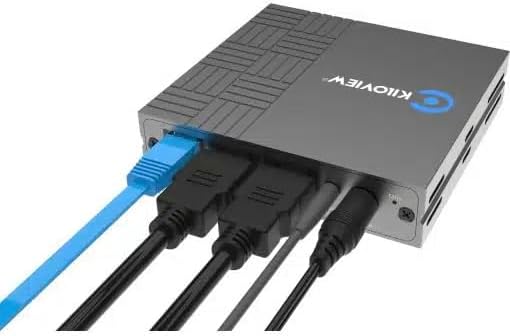
Gambar 3: Example of the Kiloview N6 with power, HDMI input, HDMI output, and Ethernet cables connected, demonstrating a typical setup configuration.
Parentah Operasi
Kiloview N6 can operate in two primary modes: Encoding and Decoding. The working mode can be switched via the device's web UI.
1. Ngaksés ka Web UI:
- Ensure the N6 is connected to the same network as your computer.
- Use the LCD screen to find the device's IP address.
- Buka a web browser on your computer and enter the IP address of the N6.
- Log in using the default credentials (refer to the Quick Start Guide for details).
2. Encoding Mode:
In encoding mode, the N6 converts an HDMI video signal into an NDI stream.
- Ti web UI, select "Encoder" as the working mode.
- Ensure your HDMI video source is connected to the HDMI-IN palabuhan.
- Configure NDI stream settings such as resolution, frame rate, and bitrate as required.
- The NDI stream will now be discoverable by NDI-compatible software and hardware on your network.
3. Decoding Mode:
In decoding mode, the N6 receives an NDI stream from the network and outputs it via HDMI.
- Ti web UI, select "Decoder" as the working mode.
- The N6 will automatically detect available NDI sources on the network. Select the desired NDI source from the list.
- The decoded video will be output through the HDMI OUT port to your connected display.
4. LCD Screen and Touch Buttons:
The front LCD screen provides quick access to device status and basic settings. Use the touch buttons (left and right arrows) to navigate through menus and the 'O' button to confirm selections.
- Pintonan Status: View CPU, memory, temperature, IP address, and firmware version.
- Tally Status: The LCD screen also acts as a large tally light, indicating program (red) or preview (green) status in an NDI workflow.
5. Audio and Intercom:
- The N6 supports embedded audio from the HDMI source/output.
- For external audio, connect devices to the 3.5mm LINE IN/OUT port.
- For intercom functionality, connect to a Kiloview Intercom server and configure settings via the web UI.
6. PTZ Control:
The N6 supports PTZ control over the network. Refer to the detailed online manual or web UI for specific PTZ camera integration and control protocols.
Pangropéa
Proper maintenance ensures the longevity and optimal performance of your Kiloview N6 converter.
- beberesih: Anggo kaén anu garing sareng lemes pikeun ngabersihan bagian luar alat. Ulah make cleaners cair atawa aerosol.
- Ventilasi: Pastikeun alat ieu disimpen di tempat anu ventilasina saé pikeun nyegah panas teuing. Ulah ngahalangan liang ventilasi.
- Pembaruan firmware: Regularly check the Kiloview resmi website for firmware updates. Keeping the firmware updated can improve performance, add new features, and fix bugs.
- Panyimpenan: Lamun teu dipaké pikeun période nambahan, nyimpen alat dina tiis, tempat garing jauh ti sinar panonpoé langsung jeung hawa ekstrim.
- Manajemén Kabel: Ensure all cables are securely connected and not under strain to prevent damage to ports or cables.
Pamérésan masalah
If you encounter issues with your Kiloview N6, refer to the table below for common problems and their solutions.
| Masalah | Mungkin Cukang lantaranana | Solusi |
|---|---|---|
| No power indication on LCD. | Taya catu daya atawa sambungan faulty. | Check power adapter connection or PoE connection. Ensure power source is active. |
| No NDI stream detected (Encoding mode). | Incorrect network configuration; HDMI input issue; NDI settings. | Verify network cable connection. Check if HDMI source is active and connected to HDMI IN. Confirm NDI settings in web UI. Ensure firewall is not blocking NDI traffic. |
| No video output (Decoding mode). | No NDI source selected; HDMI output issue; display problem. | Ensure an NDI source is selected in the web UI. Check HDMI cable connection to display. Verify display input. |
| Paranti overheating. | Ventilasi goréng; suhu lingkungan luhur. | Ensure adequate airflow around the device. Move to a cooler environment if necessary. |
| Teu bisa ngakses web UI. | Incorrect IP address; network connectivity issue; firewall. | Verify IP address from LCD. Check network cable. Ensure computer is on the same subnet. Temporarily disable firewall. |
spésifikasi
Technical specifications for the Kiloview N6 HD HDMI/NDI Bi-Directional Converter:
| Fitur | Rincian |
|---|---|
| Nomer modél | N6 |
| merek | Kiloview |
| Input Video | 1 x HDMI |
| Kaluaran Video | 1x HDMI (Loop Out / Decoding Output) |
| Panganteur Jaringan | 1x RJ45 Ethernet (NDI/PoE) |
| Panganteur Audio | 3.5mm Line In/Out |
| Supported NDI Protocols | NDI High Bandwidth, NDI HX2/3 |
| Input kakuatan | DC 5V-18V, PoE (Power over Ethernet) |
| tampilan | 1.14-inch LCD screen with touch buttons |
| Diménsi | 7.44 x 6.18 x 3.27 inci (Pakét Dimensi) |
| Beurat | 1.41 pon |
| Alat nu cocog | Monitors, Projectors, Cameras |
| Mangpaat husus | Video conferences, PTZ control, IP-based post production |
Garansi sareng Rojongan
Kiloview products are designed for reliability and performance. For specific warranty terms and conditions, please refer to the warranty card included with your product or visit the official Kiloview website. For technical support, firmware updates, or additional resources, please visit the Kiloview support portal or contact their customer service team.
Pabrikan: Kiloview
Titimangsa munggaran sadia: 12 Nopémber 2024


