1. Bubuka
Thank you for choosing the Symcode USB 1D Barcode Scanner. This handheld wired CCD laser barcode reader is designed for efficient and accurate scanning of 1D barcodes from both printed materials and digital screens. It is an ideal solution for various applications including warehouses, libraries, supermarkets, and point-of-sale (POS) systems.
This manual provides comprehensive instructions on setting up, operating, and maintaining your scanner to ensure optimal performance and longevity.

Gemblengna view of the Symcode 1D Barcode Scanner with its USB cable.
2. Fitur konci
- 1D CCD Image Scanning Technology: Equipped with an advanced CCD sensor for quick and accurate capture of 1D codes from paper and screens, including deformed, smudged, damaged, fuzzy, or reflective barcodes.
- Modeu scanning serbaguna: Features Key Trigger mode, Auto-induction mode, and Continuous Mode for flexible operation.
- Konstruksi awét: Ergonomic design with high-quality ABS material ensures resistance to drops from 2m high, providing long service life.
- Extensive 1D Barcode Support: Compatible with UPC/EAN, UCC/EAN 128, Code 39, Code 93, Code 128, Codabar, Interleaved 2 of 5, Discrete 2 of 5, MSI, Code 11, RSS variants, Chinese 2 of 5, and more.
- Kaluaran anu tiasa disaluyukeun: Offers 180 configurable options for prefix, suffix, and termination strings.
- Wide Aplikasi: Suitable for use in supermarkets, convenience stores, warehouses, libraries, bookstores, drugstores, and retail shops for various management tasks.
3. Eusi Paket
Punten parios yén sadaya barang aya dina pakét anjeun:
- 1 x Symcode CCD Barcode Scanner
- 1 x Manual Pamaké (dokumén ieu)
- 1 x Kabel USB
4. Setélan
4.1 Nyambungkeun scanner
The Symcode 1D Barcode Scanner is a plug-and-play device. No drivers are typically required for most operating systems.
- Locate an available USB port on your computer (Desktop, Laptop) or compatible device.
- Insert the USB connector of the scanner's cable into the USB port.
- The scanner will typically emit a short beep and/or a light indicator will turn on, signifying successful connection and readiness for use.

The scanner connects to a laptop via its 1.6m (5.2ft) USB cable, compatible with Linux, Windows, iOS, and Android operating systems.
5. Ngoperasikeun Scanner
5.1 Nyeken Dasar
To scan a barcode, point the scanner's laser beam at the barcode you wish to read and press the trigger button (if in Key Trigger mode). The scanner will emit a successful scan beep and the data will be transmitted to your connected device as if typed by a keyboard.

The scanner can read 1D barcodes from both printed labels and digital screens, such as a smartphone display.
5.2 Modeu nyeken
Pamindai ieu ngadukung tilu modeu pamindaian utama:
- Modeu pemicu konci: Press the trigger to activate the scan. Release to stop.
- Modeu induksi otomatis: Pamindai sacara otomatis ngadeteksi barkod dina widangna view and scans it without needing to press the trigger.
- Mode Kontinyu: The scanner continuously emits the laser beam, scanning any barcode that passes through its field.
Refer to the included configuration guide (often a set of barcodes) to switch between these modes. If auto-sensing is inactive, scan the appropriate configuration barcode to enable it.
5.3 Setélan Sora
The scanner provides audible feedback for successful scans. You can turn this sound on or off according to your preference by scanning specific configuration barcodes.
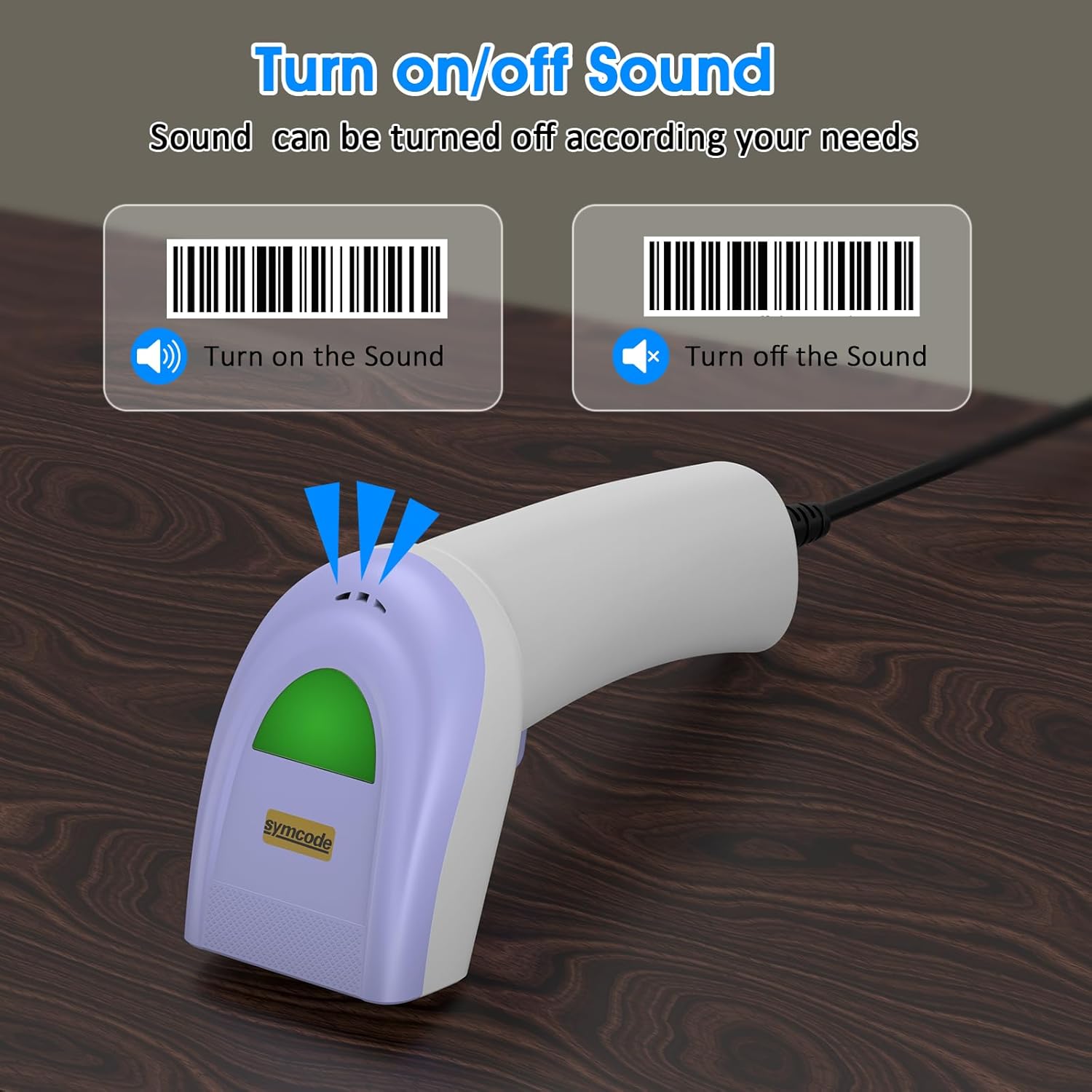
Scan specific barcodes to enable or disable the scanner's sound feedback.
5.4 Customizing Data Output (Prefix/Suffix)
The scanner allows you to add custom prefixes or suffixes to the scanned barcode data. This feature is useful for integrating scanned data into specific software or databases that require additional identifiers.

The scanner can customize scanned data by adding prefixes or suffixes. Examples: RL123456789 (with prefix), 12345RL6789 (with middle text), 123456789RL (with suffix).
5.5 Tipe Barcode Dirojong
The Symcode 1D Barcode Scanner has excellent decoding ability for a wide range of common 1D barcodes.

The scanner supports various 1D barcode types, including CODE 128 (1234567890), UPC A (123456789012), Frauded Barcode (1234567890135), Profiled Barcode (4603146002134), Industrial 2 of 5 (987612), ITF, Folded Barcode, and Color Barcode.
6. Pangropéa
To ensure the longevity and optimal performance of your barcode scanner, follow these simple maintenance guidelines:
- beberesih: Anggo lawon anu lemes sareng garing pikeun ngabersihkeun bagian luar scanner. Pikeun jandela scanning, anggo lawon pembersih lénsa atanapi lawon anu lemes anu diusap enteng.ampdibersihkeun ku pembersih anu hampang sareng henteu abrasif. Hindarkeun bahan kimia anu keras atanapi bahan abrasif.
- Panyimpenan: Simpen alat panyeken di tempat anu tiis sareng garing jauh tina sinar panonpoé langsung sareng suhu anu ekstrim.
- Penanganan: While the scanner is designed to be durable, avoid unnecessary drops or impacts. Do not pull the cable excessively or bend it sharply.
7. Cara ngungkulan
If you encounter issues with your Symcode barcode scanner, please refer to the following common problems and solutions:
| Masalah | Mungkin Cukang lantaranana | Solusi |
|---|---|---|
| Scanner teu hurung atawa teu ngaréspon. | kabel USB teu bener disambungkeun atawa faulty port USB. | Ensure the USB cable is securely plugged into both the scanner and the computer. Try a different USB port. |
| Scanner ngageprét sora bip tapi teu aya data anu dikirimkeun. | Incorrect output mode or software not ready to receive input. | Ensure your cursor is in a text field or application ready to receive input. Check scanner configuration for output mode (e.g., HID Keyboard Emulation). |
| Scanner does not read certain barcodes. | Barcode type not enabled, damaged barcode, or insufficient lighting. | Refer to the configuration guide to enable all necessary barcode types. Ensure the barcode is clear and well-lit. Try scanning from a different angle or distance. |
| Scanner reads slowly or intermittently. | Dirty scanning window or interference. | Clean the scanning window as described in the Maintenance section. Ensure no obstructions are blocking the laser. |
If the problem persists after trying these solutions, please contact Symcode customer support for further assistance.
8. Spésifikasi
| Fitur | Spésifikasi |
|---|---|
| Diménsi | 165 x 63 x 87 mm (6.5 x 2.48 x 3.43 inci) |
| Beurat | 156g (5.5 oz) |
| Sumber Cahaya | 650nm~670nm visible laser |
| Laju Scan | 100 scan / detik |
| Read Preciseness | 0.1 mm (4 mil) |
| Nyitak Kontras | 30% minimum |
| Jero Widang | 0~600mm (0.33mm, PCS 90%) |
| Scan Scope | 10mm ~ 250mm |
| Jarak Bacaan | 2.5~600mm (100% UPC/EAN) |
| Kamampuhan Déode | EAN-8/13, UPC-A/E, Code 39/93/128, EAN-128, Codabar, Industrial 2 of 5, Interleave 2 of 5, Matrix 2 of 5, MSI etc. |
| Laju Kasalahan Bit | 1/5 juta |
| Konsumsi Ayeuna | 85mA (working), 36mA (storage) |
| Panganteur | USB |
| Suhu Operasi | 0℃~45℃ (32°F~113°F) |
| Suhu Panyimpenan | -20 ℃ ~ 60 ℃ (-4 ° F ~ 140 ° F) |
| Kalembaban | 5% ~ 95% non-condensing |
| Bahan | ABS + PC |
| Alat nu cocog | Desktop, Laptop |
| Sumber Daya | Kabel Listrik |

The scanner is compact, with dimensions of 1.97in/5cm width, 2.76in/7cm depth, and 5.5in/14cm height, and weighs only 181g (excluding cable).

The compact and streamlined design of the Symcode scanner (left) offers a more comfortable and practical user experience compared to larger, heavier alternatives (right).
9. Garansi jeung Rojongan
Symcode products are manufactured to high-quality standards. This product comes with a standard manufacturer's warranty against defects in materials and workmanship. Please refer to the warranty card included in your package or visit the official Symcode websitus pikeun istilah jeung kaayaan jaminan lengkep.
For technical support, troubleshooting assistance, or any inquiries regarding your Symcode 1D Barcode Scanner, please contact Symcode customer service through the contact information provided on the product packaging or the official Symcode websitus. Mangga siapkeun modél produk sareng rincian pameseran anjeun nalika ngahubungi dukungan.


