1. Bubuka
The GIMA Mission Cholesterol Meter 23932 is a portable device designed for the quantitative measurement of various lipid parameters in whole blood, serum, or plasma. This manual provides essential information for the safe and effective operation of your device, including setup, testing procedures, maintenance, and troubleshooting.
The meter reliably measures Total Cholesterol (CHOL), High-Density Lipoprotein (HDL) Cholesterol, and Triglycerides (TRIG). It also calculates Low-Density Lipoprotein (LDL) Cholesterol and the CHOL/HDL ratio, providing a comprehensive lipid panel for health monitoring.

Gambar 1.1: GIMA Mission Cholesterol Meter 23932 (Two-Pack). This image displays two complete kits, each containing the meter, test strips, and user manual, as they appear in their retail packaging.
2. Émbaran Kasalametan penting
Please read all instructions carefully before using the GIMA Mission Cholesterol Meter. Failure to follow instructions may result in inaccurate readings or device malfunction.
- alat ieu dimaksudkeun pikeun dina vitro pamakéan diagnostik wungkul.
- Do not use the meter for purposes other than lipid panel testing.
- Always use fresh, unexpired test strips specifically designed for the GIMA Mission Cholesterol Meter.
- Handle blood samples with care, following universal precautions for biohazardous materials.
- Keep the device and test strips out of reach of children.
- Consult a healthcare professional for interpretation of test results and medical advice.
3. Eusi Paket
Upon opening the package, verify that all components are present and undamaged. The standard package for the GIMA Mission Cholesterol Meter 23932 typically includes:
- GIMA Mission Cholesterol Meter
- Manual pamaké
- Batteries (often included)
- Carrying Case (may vary by package)
- Note: Test strips and control solutions are sold separately.
4. Setup Alat
4.1. Nyelapkeun Batré
- Teangan tempat panutup kompartemen batré dina tonggong méter.
- Geser panutupna muka.
- Insert the specified batteries (e.g., AAA batteries) according to the polarity indicators (+/-).
- Tutup panutup kompartemen batré aman.
4.2. Setélan Awal
Upon first power-on or after battery replacement, you may need to set the date and time. Refer to the on-screen prompts and use the navigation buttons to adjust these settings.

Gambar 4.1: GIMA Mission Cholesterol Meter Display. This image shows the meter's LCD screen, indicating a cholesterol reading, date, and time, along with navigation buttons.
5. Operating Instructions: Performing a Test
Before starting, ensure you have the GIMA Mission Cholesterol Meter, appropriate test strips (e.g., Total Cholesterol, HDL, Triglycerides), a lancing device, and lancets. Ensure your hands are clean and dry.
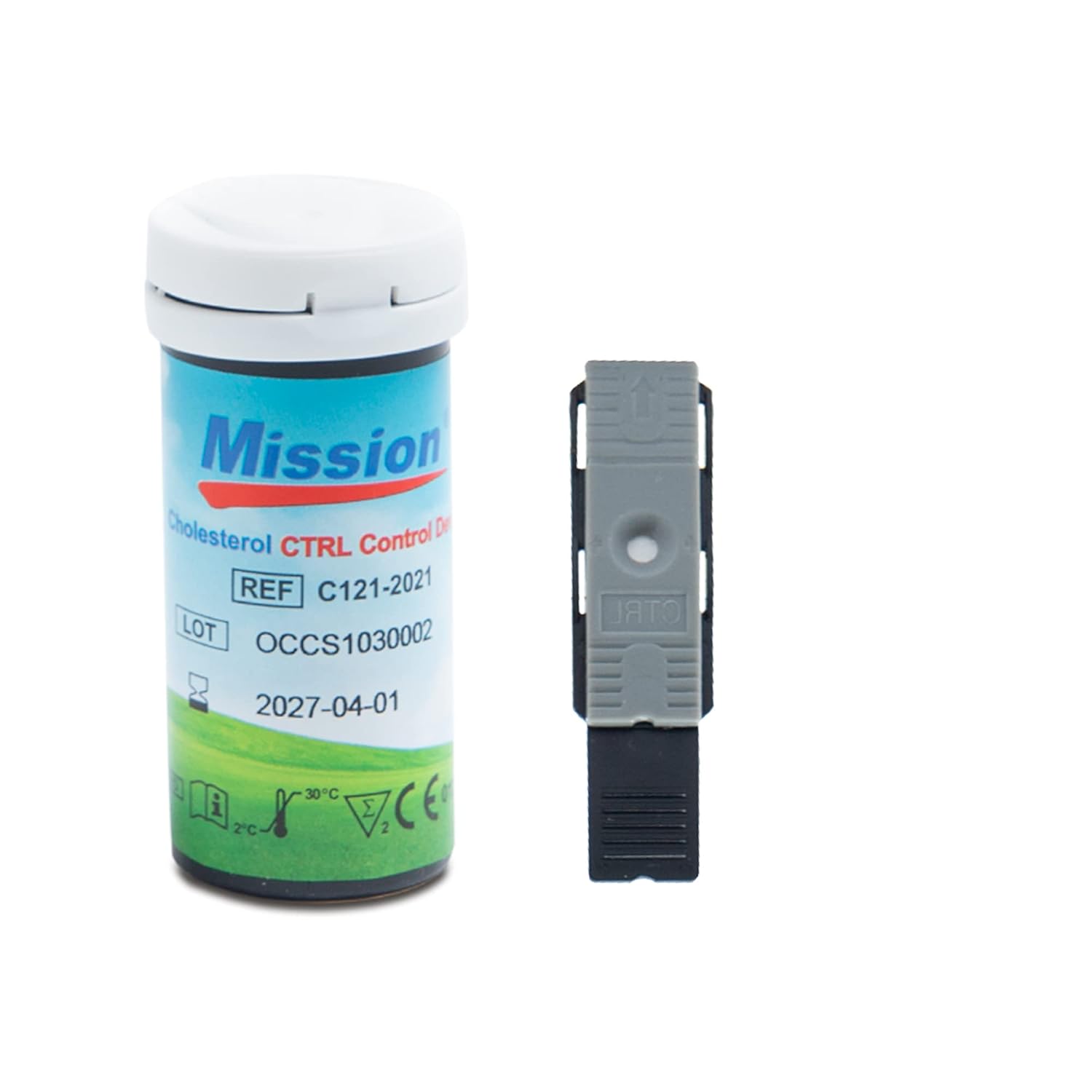
Gambar 5.1: Test Strip and Control Solution. This image shows a bottle of Mission Cholesterol control solution and a single test strip, essential components for accurate testing.
- Prepare the Meter: Hurungkeun méter ku mencét tombol daya.
- Selapkeun Test Strip: Carefully insert a new test strip into the meter's test strip port. The meter will typically display a code or a symbol indicating it's ready for a blood sample.
- Kéngingkeun Darah Sample: Use a lancing device to obtain a small drop of blood from your fingertip.
- Larapkeun Darah Sample: Toél ujung strip tés kana s getihample. The strip will draw the blood into the reaction area. Ensure the sample completely fills the designated area on the strip.
- Baca Hasil: The meter will begin a countdown. After the specified time (typically 2 minutes), the results will be displayed on the screen.
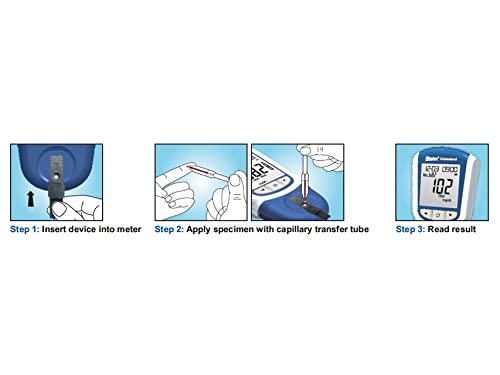
Gambar 5.2: Step-by-Step Testing Process. This diagram illustrates the three key steps for performing a test: inserting the test strip, applying the blood sample using a capillary tube, and reading the final result on the meter's display.
5.1. Key Features for Reliability and Ease of Use

Gambar 5.3: Meter Features. This image highlights the key features of the GIMA Mission Cholesterol Meter, emphasizing its reliability, versatility in sample types, wide hematocrit range, optional printer, ease of use, clear LCD screen, and included batteries.
- Versatile SampJenis Le: Can test whole blood, serum, or plasma.
- Wide Hematocrit Range: Supports a hematocrit range of 0-50%, ensuring accuracy across various blood conditions.
- Optional Printer: A small printer is available for immediate result printouts (sold separately).
- Desain anu ramah-pamaké: Dirancang pikeun gampang dianggo.
- Jelas tampilan: Features a large LCD screen for easy reading of results.
- Batré Kaasup: Ready for use upon purchase.

Gambar 5.4: Ease of Use. This image visually reinforces the user-friendly nature of the GIMA Mission Cholesterol Meter, showing it in a relatable context.
6. Ngartos Hasil Anjeun
The GIMA Mission Cholesterol Meter provides readings for several lipid parameters:
- CHOL (Total Cholesterol): The total amount of cholesterol in your blood.
- HDL (High-Density Lipoprotein): Often called "good" cholesterol, it helps remove excess cholesterol from the body.
- TRIG (Triglycerides): A type of fat found in your blood. High levels can increase the risk of heart disease.
- LDL (Low-Density Lipoprotein): Often called "bad" cholesterol, high levels can lead to plaque buildup in arteries. This value is calculated by the meter.
- CHOL/HDL Ratio: A calculated ratio that can provide additional insight into cardiovascular risk.
penting: Reference ranges for lipid levels can vary based on age, gender, and individual health conditions. Always discuss your results with a healthcare professional for proper interpretation and guidance.
7. Perawatan sareng Pangropéa
7.1. Ngabersihan Méter
- Ngusap bagian luar meteran ku hipu, damp lawon.
- Do not use abrasive cleaners or immerse the meter in water.
- Pastikeun teu aya cairan anu asup kana port strip tés atanapi kompartemen batré.
7.2. Panyimpenan
- Store the meter and test strips in a cool, dry place, away from direct sunlight and extreme temperatures.
- Keep test strips in their original sealed container until ready for use.
- If the meter will not be used for an extended period, remove the batteries to prevent leakage.
8. Cara ngungkulan
If you encounter issues with your GIMA Mission Cholesterol Meter, refer to the following common problems and solutions:
| Masalah | Mungkin Cukang lantaranana | Solusi |
|---|---|---|
| Méter teu hurung. | Batré paéh atanapi teu leres diselapkeun. | Ganti batréna atanapi pastikeun dipasang kalayan polaritas anu leres. |
| Talatah kasalahan dina tampilan. | Expired test strip, insufficient blood sample, or strip inserted incorrectly. | Check test strip expiration date, re-test with a new strip and sufficient sample, ensure strip is fully inserted. |
| Bacaan teu akurat. | Improper storage of strips, contamination, or incorrect testing procedure. | Review storage conditions, ensure clean hands and meter, follow testing steps precisely. Perform a control solution test if available. |
If the problem persists, contact GIMA customer support for assistance.
9. Spésifikasi
- Jumlah modél: 23932
- ukuran: 14 x 8 x 25 cm
- beurat: 600 gram
- Parameter pangukuran: Total Cholesterol (CHOL), HDL Cholesterol, Triglycerides (TRIG), calculated LDL Cholesterol, CHOL/HDL ratio.
- SampLe Jenis: Whole blood, serum, or plasma
- Kisaran Hematokrit: 0-50%
- Waktu Uji: Kurang leuwih 2 menit
- Sumber Daya: Batteries (type typically specified on device or packaging)
- Pabrikan: ACON BIOTECH (HANGZHOU) CO. LTD.
10. Garansi sarta Rojongan Palanggan
For warranty information, please refer to the documentation included with your purchase or visit the official GIMA website. For technical support, questions regarding device operation, or to order replacement parts and test strips, please contact GIMA customer service.
GIMA Contact Information: (Please refer to your product packaging or GIMA's official websitus kanggo inpormasi kontak pangénggalna.)


