Bubuka
Welcome to the Kuephom Portable CD Player Boombox. This versatile device offers multiple audio playback options including CD, MP3, FM radio, Bluetooth, USB, and TF card support. Designed for both home and portable use, it features stereo speakers and a rechargeable battery for extended listening enjoyment. Please read this manual thoroughly to ensure proper operation and care of your new device.
Émbaran Kasalametan penting
- Awas: Ulah ngalaan alat ieu ka hujan atawa beueus.
- Awas: Pikeun nyegah sengatan listrik, ulah muka tutupnaasing. Rujuk sadayana jasa ka tanaga anu mumpuni.
- Ulah nempatkeun unit deukeut sumber panas kayaning radiators, registers panas, kompor, atawa alat sejenna nu ngahasilkeun panas.
- Paké ngan kantétan / asesoris dieusian ku produsén.
- Ngajaga kabel listrik tina leumpang atanapi diciwit, khususna dina colokan, wadah genah, sareng titik dimana aranjeunna kaluar tina alat.
- Cabut colokan alat ieu nalika badai kilat atanapi nalika henteu dianggo kanggo waktos anu lami.
- Ulah meungpeuk sagala bukaan ventilasi. Pasang saluyu sareng parentah produsén.
- Pastikeun ventilasi anu cekap nalika ngoperasikeun unit.
- Ulah nyelapkeun objék asing kana unit.
- Jauhkeun unit tina médan magnét anu kuat.
- Buang batré anu leres nurutkeun peraturan lokal.
Eusi pakét
Punten parios yén sadaya barang aya:
- Kuephom Portable CD Player Boombox (Model W15)
- Kabel Ngecas USB
- Adaptor kakuatan
- Manual pamaké
Produk Leuwihview
Familiarize yourself with the main components and controls of your CD player boombox.

Gambar 1: Hareupeun View - This image displays the main unit with its top-loading CD compartment open, revealing a CD. The front panel features control buttons for playback (play/pause, skip), a mode button, an LCD screen showing track time, and a large rotary volume knob. Two speaker grilles are visible at the bottom.

Gambar 2: Tukangeun View - The rear of the boombox is shown, highlighting the extendable FM antenna. Below the antenna, from left to right, are the USB port, TF (Micro SD) card slot, DC 5V IN power input, and a headphone jack. The speaker grilles are also visible from this angle.
Kontrol sareng palabuhan:
- Tombol Puter/Pareum (►▮▮): Pencét pikeun muterkeun atanapi ngareureuhkeun pamuteran audio.
- Previous/Rewind Button (◀◀): Press to go to the previous track or rewind the current track.
- Next/Fast Forward Button (►►): Press to go to the next track or fast forward the current track.
- Tombol Mode (M): Press to switch between CD, FM Radio, Bluetooth, USB, and TF card modes.
- Repeat/Random Button (↺): Press to cycle through repeat modes (repeat one, repeat all) or enable random playback (shuffle).
- Volume Knob (MIN-MAX): Rotate to adjust the volume level. Also serves as the power on/off switch.
- Layar LCD: Némbongkeun modeu ayeuna, nomer trek, waktos, sareng frékuénsi FM.
- Kompartemen CD: Top-loading tray for inserting audio CDs.
- Anteneu FM: Extendable antenna for improved FM radio reception.
- Port USB: For playing MP3/WMA files from a USB flash drive (up to 32GB).
- Slot Kartu TF: For playing MP3/WMA files from a TF (Micro SD) card (up to 32GB).
- DC 5V IN Port: Power input for charging the internal battery or operating the unit via the included power adapter.
- Headphone Jack (🎧): Pikeun ngadangukeun pribadi nganggo headphone kabel.
Disetél
1. Ngayakeun Satuan
Your Kuephom CD player boombox comes with a built-in rechargeable Lithium Ion battery. Before first use, it is recommended to fully charge the battery.
- Connect the provided USB charging cable to the DC 5V IN port on the back of the unit.
- Connect the other end of the USB cable to the power adapter, and plug the adapter into a standard wall outlet.
- The LCD display will indicate charging status. Charging typically takes 3-4 hours for a full charge.
- Alternatively, the unit can be powered directly from the wall adapter without battery charge.

Figure 3: Charging Options - This image illustrates the versatility of charging the boombox. It can be charged using a standard wall charger, a car charger (via a USB car adapter, not included), or a portable power bank, making it convenient for both indoor and outdoor use.
2. Hurungkeun / Pareum
To turn the unit on, rotate the Volume Knob clockwise from the MIN position. To turn off, rotate the Volume Knob counter-clockwise to the MIN position until it clicks.
Modeu Operasi
Pencét éta Modeu (M) button repeatedly to cycle through the available playback modes: CD, FM Radio, Bluetooth, USB, and TF Card.

Figure 4: 5 Play Modes - This graphic highlights the five primary playback modes of the Kuephom boombox: CD Player, Bluetooth, FM Radio, TF Card, and USB Input, emphasizing its multi-functional capabilities.
1. CD Playback
- Buka panutup kompartemen CD ku cara ngangkat eta gently.
- Place an audio CD or MP3 CD onto the spindle, label side up.
- Tutupkeun tutup kompartemen CD pageuh-pageuh.
- Pencét éta Modeu (M) button until "CD" appears on the LCD display.
- CD bakal mimiti diputer sacara otomatis. Upami henteu, pencét tombol Maénkeun/Pareuman (►▮▮) kancing.
- Ngagunakeun éta Previous (◀◀) jeung Next (►►) tombol pikeun skip lagu.
- Pencét jeung tahan tombol Previous (◀◀) or Next (►►) buttons to fast forward or rewind.
- Pencét éta Repeat/Random (↺) button to cycle through repeat modes (Repeat One, Repeat All) or enable random (shuffle) playback.
2. Bluetooth Playback
- Pencét éta Modeu (M) button until "BT" appears on the LCD display. The unit will enter Bluetooth pairing mode, indicated by a flashing "BT".
- Dina alat anjeun anu nganggo Bluetooth (contona, smartphone, tablet), hurungkeun Bluetooth teras milarian alat anu sayogi.
- Select "Kuephom W15" from the list of devices.
- Once paired, "BT" will stop flashing and remain solid. You can now play audio from your device through the boombox.
- Use the playback controls on your connected device or the boombox's Maénkeun/Pareuman (►▮▮), Previous (◀◀), jeung Next (►►) tombol pikeun ngadalikeun playback.

Figure 5: CD Player & Bluetooth Speaker Functionality - This image demonstrates the dual functionality of the device, showing it first as a standalone CD player and then as a Bluetooth speaker, with a smartphone successfully paired to it. This highlights its versatility for different audio sources.
3. Operasi Radio FM
- Extend the FM antenna on the back of the unit for optimal reception.
- Pencét éta Modeu (M) button until "FM" appears on the LCD display.
- Pikeun nyeken sareng nyimpen stasiun sacara otomatis: Pencét teras tahan tombol Maénkeun/Pareuman (►▮▮) button. The unit will automatically scan for available FM stations and save them as presets (up to 30 stations).
- To tune to a saved preset station: Use the Previous (◀◀) jeung Next (►►) buttons to navigate through the saved presets.
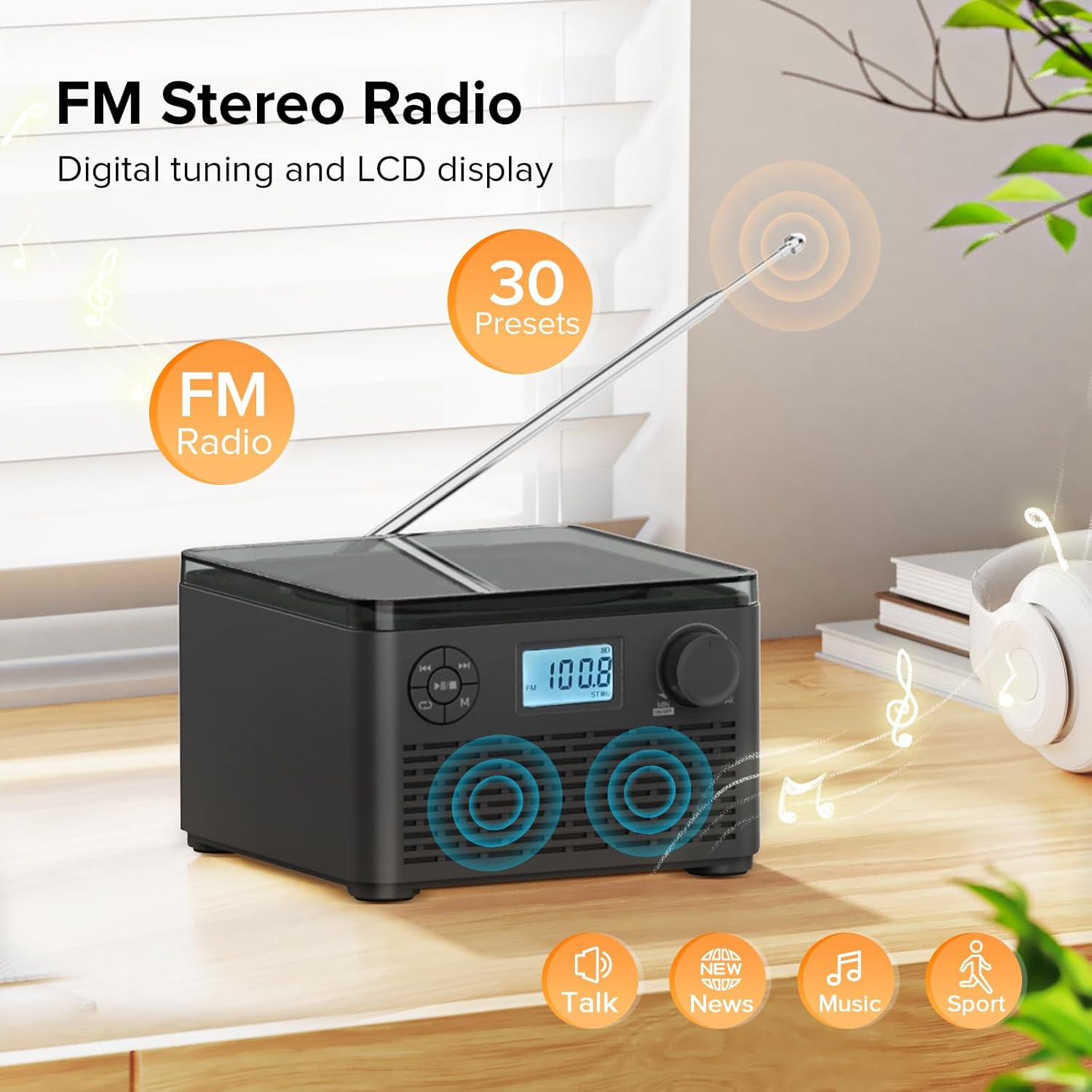
Figure 6: FM Stereo Radio - This image focuses on the FM radio feature, showing the digital display tuned to a frequency and indicating the availability of 30 presets. The extendable antenna is also visible, emphasizing its radio capabilities.
4. Putereun Kartu USB/TF
The unit supports MP3 and WMA audio formats from USB flash drives and TF (Micro SD) cards up to 32GB.
- Insert a USB flash drive into the USB port or a TF card into the TF card slot on the back of the unit. Ensure the antenna is moved out of the way if necessary.
- Pencét éta Modeu (M) button until "USB" or "TF" appears on the LCD display.
- The unit will automatically detect and begin playing audio files tina alat panyimpen anu dipasang.
- Ngagunakeun éta Maénkeun/Pareuman (►▮▮), Previous (◀◀), jeung Next (►►) tombol pikeun ngadalikeun playback.
- Pencét éta Repeat/Random (↺) button to cycle through repeat modes or enable random playback.
5. Paké Headphone
For private listening, connect standard 3.5mm headphones to the headphone jack on the back of the unit. The internal speakers will automatically mute when headphones are connected.
Pangropéa sareng Perawatan
- beberesih: Anggo kaén anu garing sareng lemes pikeun ngabersihan bagian luar unit. Ulah make cleaners abrasive atawa pangleyur.
- Perawatan CD: Anggo CD ti sisi-sisina. Jaga supaya tetep bersih sareng bébas tina goresan. Anggo lawon anu lemes sareng henteu ngaganggu pikeun ngusap CD ti tengah ka luar.
- Panyimpenan: Lamun teu dipaké pikeun période nambahan, nyimpen unit dina tiis, tempat garing jauh ti sinar panonpoé langsung jeung hawa ekstrim.
- Perawatan batré: To prolong battery life, avoid fully discharging the battery frequently. Recharge the unit regularly, even if not in constant use.
Pamérésan masalah
| Masalah | Mungkin Cukang lantaranana | Solusi |
|---|---|---|
| Unit teu hurung. | Batré béak atawa adaptor daya teu nyambung kalayan bener. | Ensure the volume knob is rotated clockwise to turn on. Connect the power adapter and charge the unit. |
| CD is skipping or not playing. | CD kotor, calar, atanapi teu leres dipasangna. | Clean the CD with a soft cloth. Ensure the CD is placed correctly in the compartment. Try a different CD. |
| panarimaan radio FM goréng. | Antena teu manjang atanapi sinyalna lemah. | Fully extend the FM antenna. Try repositioning the unit for better signal. |
| Alat Bluetooth teu tiasa dipasangkeun. | Unit is not in pairing mode or device is too far. | Ensure the unit is in "BT" mode and flashing. Move your Bluetooth device closer to the boombox. Disconnect other Bluetooth devices. |
| Kartu USB/TF teu dikenal. | Teu dirojong file format or card capacity. | Mastikeun files are MP3 or WMA format. Check that the card capacity is 32GB or less. Reinsert the card/drive. |
spésifikasi
- model: W15
- merek: Kuephom
- Ukuran produk (L x W x H): 6.3 x 6.3 x 4.2 inci
- Beurat barang: 1.9 pon
- Input kakuatan: DC 5V
- Batré: 1 batré Litium Ion (kaasup)
- Waktu maén batré: 6-10 hours (approx., varies with usage)
- Format Cakram anu Dirojong: CD, CD-R, CD-RW, CD MP3
- Supported USB/TF Card Formats: MP3, WMA (up to 32GB)
- FM Radio Frequency Range: 87.5 - 108 MHz
- Tipe Speaker: Diwangun-Dina Speaker stereo
- Jack headphone: 3.5 mm
Garansi sareng Rojongan
Kuephom products are designed and manufactured to the highest quality standards. For any questions, technical support, or warranty claims, please contact Kuephom customer service through the retailer where you purchased the product or visit the official Kuephom websitus kanggo inpormasi lengkep.
Punten mertahankeun bukti pameseran anjeun pikeun tujuan garansi.


