1. Produk Langkungview
The ViaBecs CAN005-X 16-PIN Car Stereo Wiring Harness with Canbus Box is designed to facilitate the installation of an aftermarket Android car stereo system in compatible Toyota vehicles. This harness ensures seamless integration with existing factory features such as the JBL amplifier, backup camera, steering wheel controls (SWC), and original USB port, without requiring wire cutting.
Catetan: This Canbus adapter equipped radio wiring harness is exclusively designed for use with 16-PIN Android car stereo systems.

Gambar 1.1: Leuwihview of the ViaBecs 16-PIN Car Stereo Wiring Harness components.
2. Kasaluyuan
2.1 Kasaluyuan Kandaraan
This wiring harness is compatible with the following Toyota vehicle models and years:
- Toyota Camry: 2007-2011
- Toyota RAV4: 2007-2011
- Toyota Corolla: 2007-2011
- Toyota Tundra: 2007-2011
- Toyota Highlander: 2007-2011
- Toyota Sequoia: 2008-2011
- Toyota Tacoma: 2005-2011
- Toyota FJ Cruiser: 2007-2018
- Toyota Land Cruiser LC100: 2003-2007
- Toyota Land Cruiser: 2008-2014
- Toyota Prado: 2004-2012
It is recommended to compare the back picture of your original car radio with the provided diagrams to ensure compatibility before purchase.

Image 2.1: Visual guide for compatible and incompatible original car radios.
2.2 Stereo System Compatibility
This harness is designed for 16-PIN Android car stereo systems. It supports the retention of factory JBL amplifiers, backup cameras, and steering wheel controls. The harness connects behind the radio and is set up for low-level inputs using RCA outputs from the aftermarket radio.
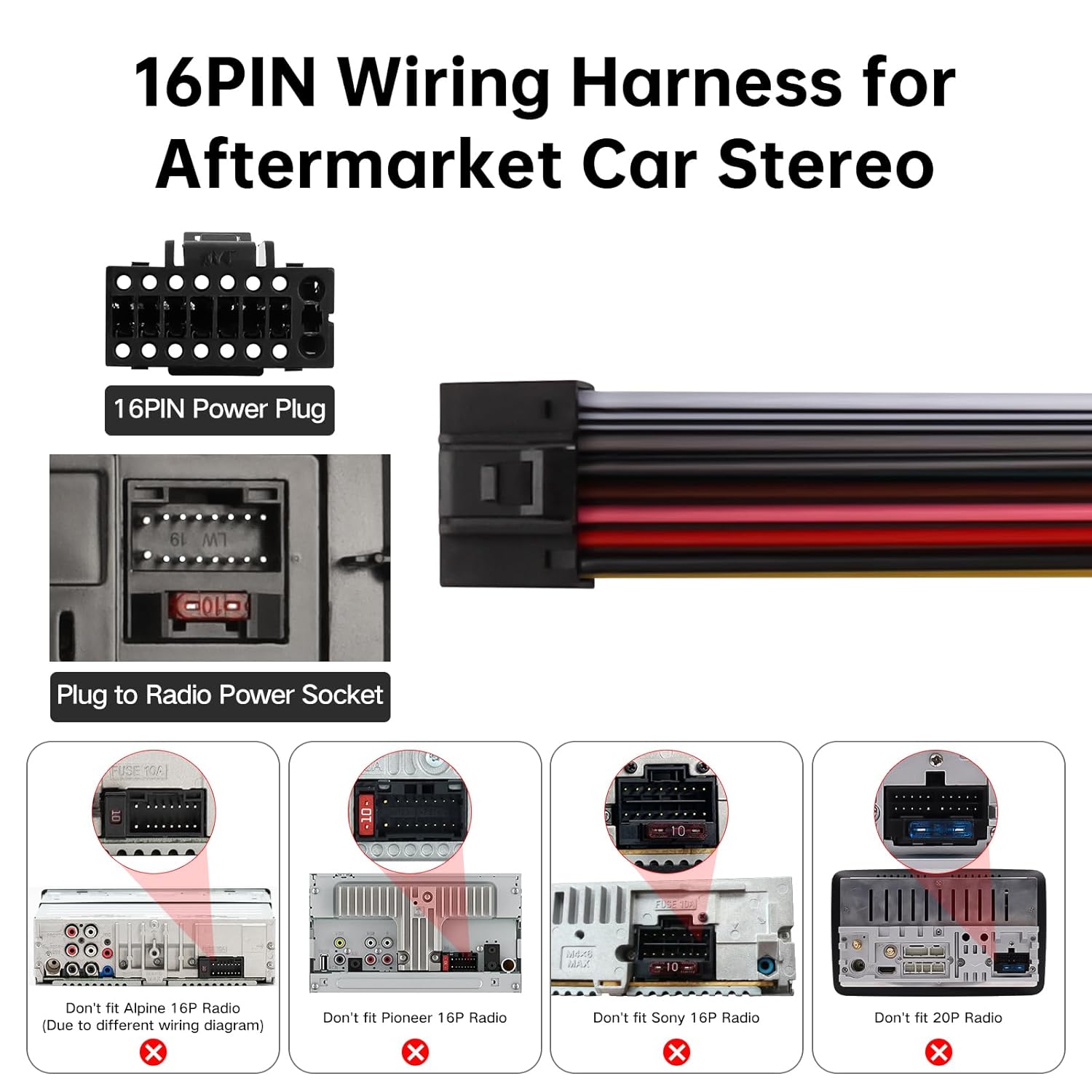
Image 2.2: Illustration of the 16-PIN power plug and examples of incompatible radio interfaces.
3. Eusi Paket
The ViaBecs CAN005-X package includes:
- 1x 16-PIN Wiring Harness with Canbus Box
- 1 x adaptor USB
4. Setup jeung Instalasi
The ViaBecs Plug and Play Harness offers a straightforward installation process. No wire cutting is required for basic functionality.
4.1 Identifying Connections
Refer to the following image for a detailed view of the harness connectors and their functions:

Image 4.1: Detailed connection guide for the CAN005-X harness.
- 4PIN USB adapter: Connects to the vehicle's original USB port.
- Canbus box: Integrates vehicle data for steering wheel controls and other functions.
- White: Male AUX L OUT to Female AUX L IN: Audio Left channel connection.
- Red: Male AUX R OUT to Female AUX R IN: Audio Right channel connection.
- Male rear camera: Connects to the factory backup camera.
- 10PIN CAM VIN & Wifi Line: Camera video input and Wi-Fi antenna connection.
- FM/AM Antenna: Nyambungkeun kana anteneu FM/AM kendaraan.
4.2 Diagram Wiring
Ensure your aftermarket head unit has a 16-pin port for compatibility. The following diagram illustrates the pinout for the 16-PIN connector:

Image 4.2: Pinout details for the 16-PIN connector.
Fungsi Pin:
- G1: GND (Ground)
- G2: B+ (Battery Positive)
- G3: ACC POWER (Accessory Power)
- G4: ILL (Illumination)
- G5: Deteksi sabalikna
- G6: KEY2 (Steering Wheel Control 2)
- G7: KEY1 (Steering Wheel Control 1)
- G8: Kakuatan anteneu radio pabrik
- G9: FR- (Front Right Speaker Negative)
- G10: RL- (Rear Left Speaker Negative)
- G11: FR+ (Front Right Speaker Positive)
- G12: RL+ (Rear Left Speaker Positive)
- G13: FL- (Front Left Speaker Negative)
- G14: RR+ (Rear Right Speaker Positive)
- G15: FL+ (Front Left Speaker Positive)
- G16: RR- (Rear Right Speaker Negative)
4.3 Retaining Factory Features
The harness is designed to retain the functionality of your factory JBL amplifier, backup camera, and steering wheel controls. It also supports connection to the Toyota OEM USB port.
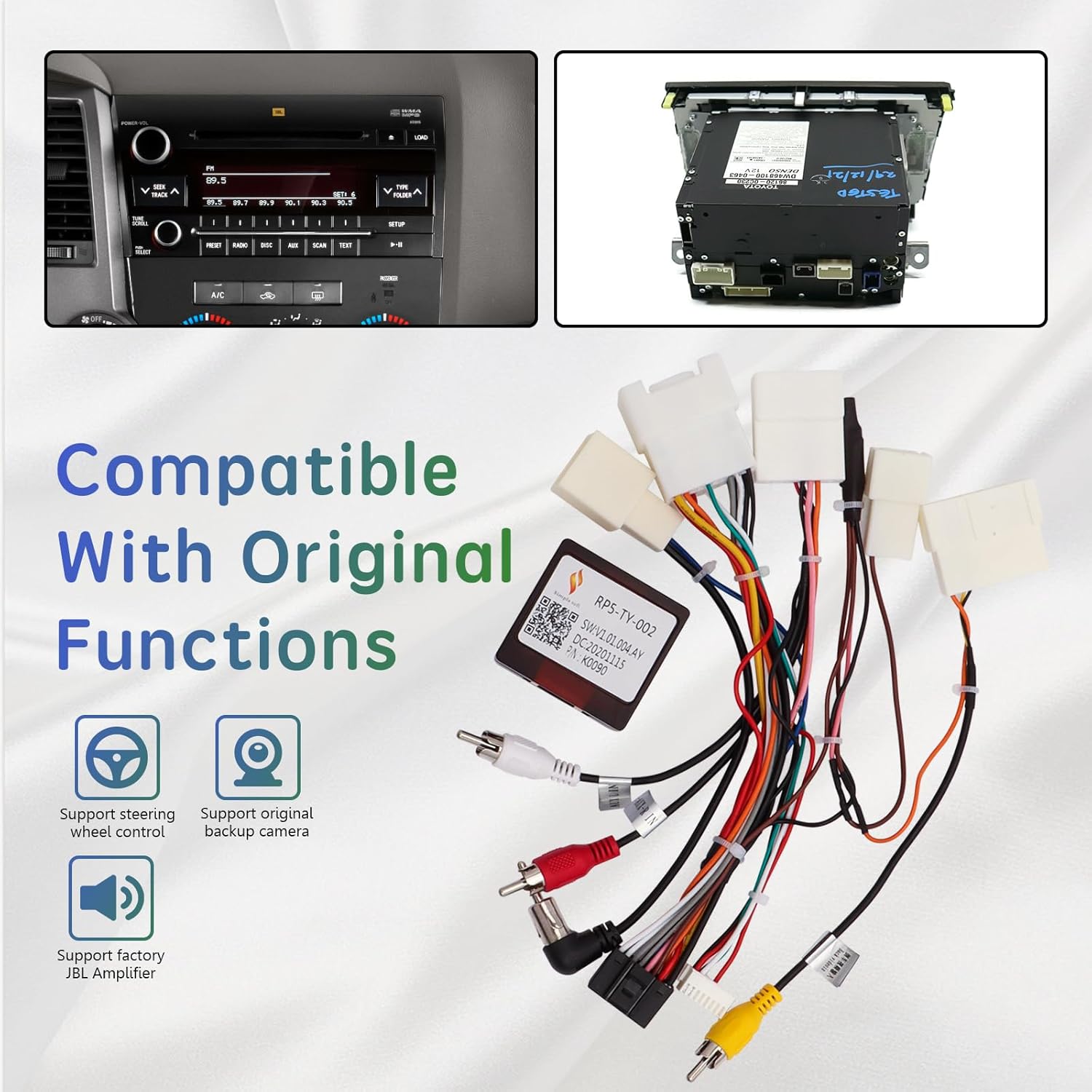
Image 4.3: Visual representation of the harness supporting steering wheel control, original backup camera, and factory JBL amppangagung.

Image 4.4: Diagram showing connection to the Toyota OEM USB port.
5. Parentah Operasi
5.1 Steering Wheel Control (SWC) Programming
After installing the harness, you may need to program your aftermarket head unit to recognize the steering wheel controls. This process typically involves accessing the steering wheel control settings on your Android stereo.
penting: To get the CAN005-X wiring harness working correctly, you only need to set the 'no protocol' or 'no canbus' option in your head unit's settings if prompted.
Watch the following video for a demonstration on remapping steering wheel audio controls:
Video 5.1: Demonstration of programming steering wheel audio controls on an Android head unit.
6. Pangropéa
The ViaBecs wiring harness is designed for durability and requires minimal maintenance. Ensure all connections remain secure and free from moisture or excessive heat. Avoid pulling on the wires directly to prevent damage to the connectors or internal wiring.
7. Cara ngungkulan
- Teu aya Daya ka Unit Hulu:
- Verify all 16-PIN connections are secure.
- Check vehicle's fuse box for blown fuses related to the stereo system.
- Ensure the ACC (Accessory) and B+ (Battery) wires are correctly connected and receiving power. - Kadali Setir Teu Gawé:
- Confirm the Canbus box is properly connected.
- Access your Android head unit's settings and ensure the steering wheel control learning function is correctly configured. Refer to your head unit's manual for specific instructions.
- Ensure the 'no protocol' or 'no canbus' option is selected in your head unit's settings if applicable. - No Sound or Distorted Audio (with JBL Ampliifier):
- Ensure the RCA outputs from the aftermarket radio are correctly connected to the low-level inputs of the harness.
- Verify the factory JBL amplifier is receiving power and is functioning correctly.
- Check the audio settings on your aftermarket head unit. - Kaméra Cadangan Teu Nampilkeun:
- Confirm the male rear camera connector on the harness is securely plugged into the corresponding input on your head unit.
- Check the 10PIN CAM VIN connection.
- Ensure the reverse detection wire (G5) is correctly connected to the vehicle's reverse signal.
- Verify camera settings on your aftermarket head unit. - USB Port Not Functioning:
- Ensure the 4PIN USB adapter is correctly connected to both the harness and the vehicle's OEM USB port.
8. Spésifikasi
| Fitur | Rincian |
|---|---|
| Nomer modél | CAN005-X |
| Tipe Panyambung | 16-pin Jst Xh |
| Bahan | Acrylonitrile Butadiena Styrene |
| Item Beurat | 0.13 Kilogram (4.66 ons) |
| Ukuran Paket | 7.48 x 5.51 x 1.54 inci |
9. Garansi jeung Rojongan
The ViaBecs CAN005-X Car Stereo Wiring Harness is backed by a 1-year warranty. ViaBecs provides professional technical support for setup, connectivity issues, troubleshooting, and more.
For technical assistance or warranty claims, please contact ViaBecs customer support through their official channels or the platform where the product was purchased.


