Bubuka
Welcome to the magical world of music with your new eKids Disney Princess Karaoke Microphone! This Bluetooth-enabled microphone is designed for young performers, allowing them to sing along to their favorite tunes with built-in music or by streaming audio wirelessly. Featuring vibrant Disney Princess graphics, exciting light shows, and fun echo effects, this microphone provides hours of entertainment. Please read this manual carefully to ensure proper setup and operation.

Figure 1: eKids Disney Princess Karaoke Microphone
Fitur
- Mikropon Karaoke: Connect any compatible Bluetooth device (including smartphones, tablets, and laptops) and wirelessly stream your favorite music, then ampAngkat sora anjeun bari nyanyi!
- Disney Princess Design: Featuring cool and colorful graphics inspired by your favorite Disney Princess characters. Designed for kids aged 5 and up.
- Diwangun-di Musik: This toy microphone includes an extended clip of the song ‘Starting Now’. Press the Echo Button to add cool vocal effects, too!
- Tembongkeun cahaya: Lights flash along with the music, so you can put on an amazing karaoke performance for friends and family.

Gambar 2: Fitur konci Leuwihview
Disetél
1. Pamasangan batré
The microphone requires 3 AA batteries (included).
- Locate the battery compartment on the back of the microphone.
- Using a Phillips screwdriver, open the battery compartment cover.
- Insert 3 "AA" (LR6) batteries with the correct polarity (+ and -) as indicated inside the compartment.
- Replace the compartment door and tighten the screw with a Phillips screwdriver.
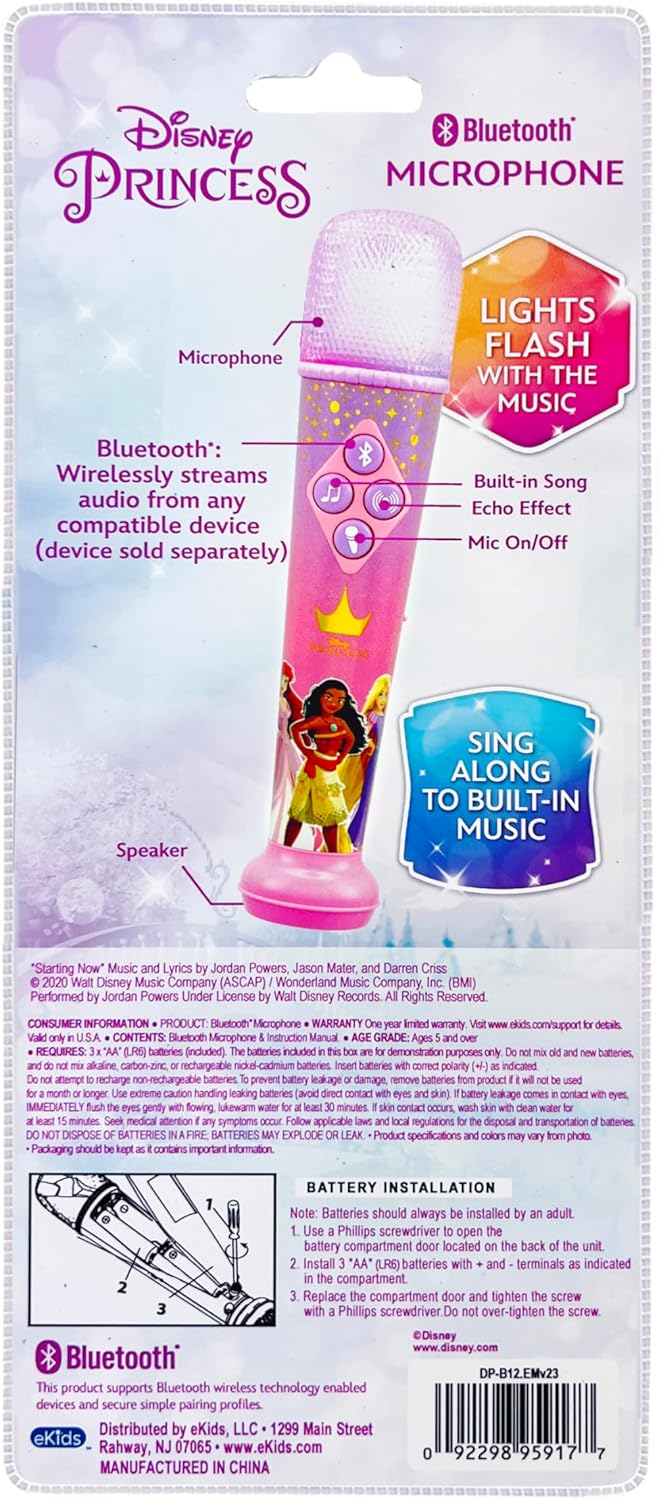
Figure 3: Battery Installation Diagram (from packaging)
2. Powering on / Pareum
Locate the ON/OFF switch on the side of the microphone. Slide the switch to the "ON" position to power on the device. Slide it to "OFF" to power it down.
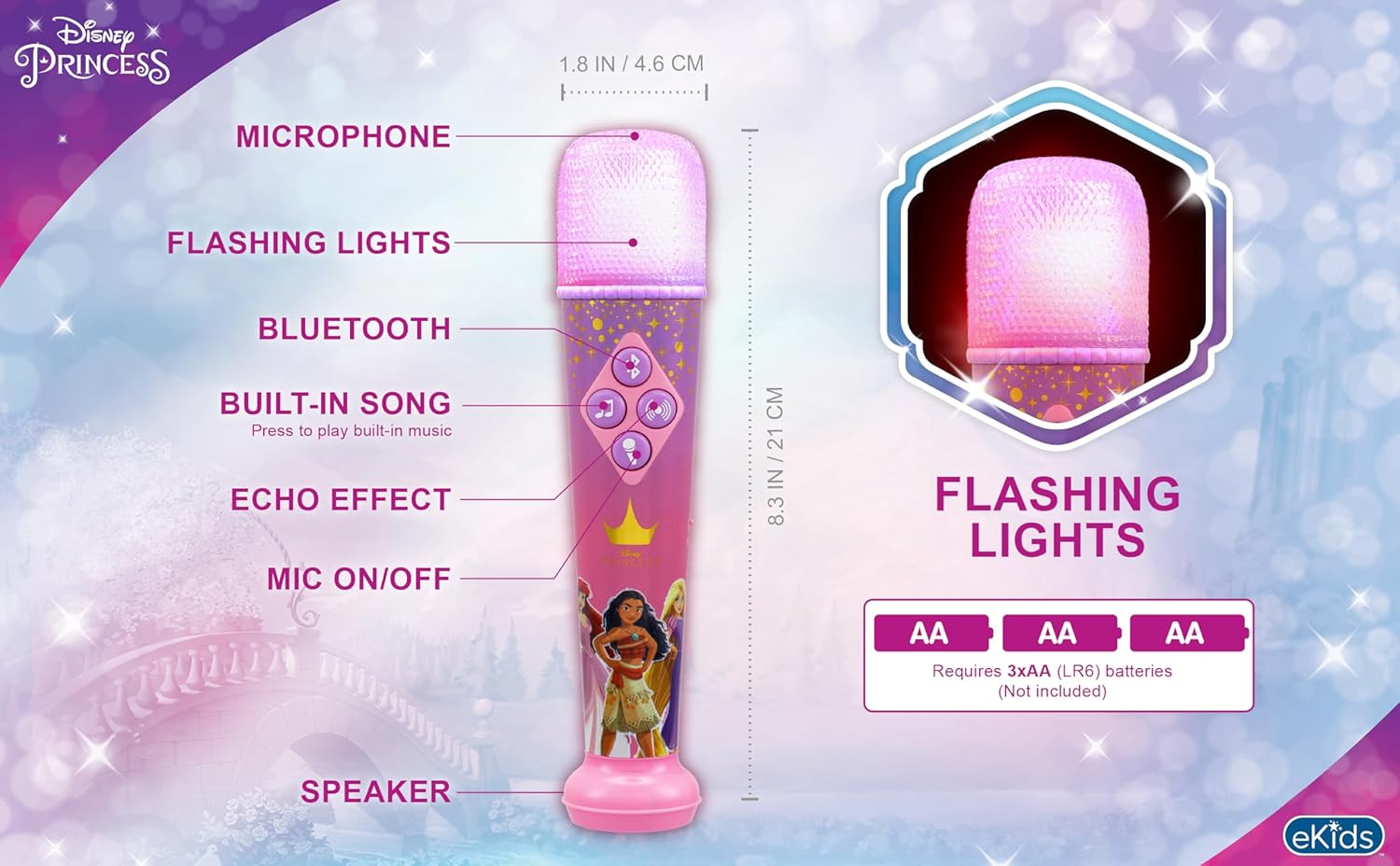
Figure 4: Microphone Controls and Features
Parentah Operasi
1. Papasangan Bluetooth
To stream audio wirelessly from your smartphone, tablet, or laptop:
- Pastikeun mikropon diaktipkeun.
- Aktipkeun Bluetooth dina alat éksternal anjeun.
- Milarian pikeun "eKids DP-B12" or a similar name in your device's Bluetooth settings.
- Select the microphone to pair. A confirmation sound will indicate successful pairing.
- Once paired, you can play music from your device, and it will stream through the microphone's speaker.
Video 1: Official eKids Disney Princess Bluetooth Karaoke Microphone overview, demonstrating Bluetooth streaming, built-in music, echo effects, and light show features.
2. Using Built-in Music
The microphone comes with a built-in song. To play it, press the music note button (♫) dina panel kontrol.
3. Microphone Usage and Echo Effect
Ka amplify your voice, press and hold the microphone button (🎤) while speaking or singing. To add an echo effect to your vocals, press the echo button (concentric circles icon) on the control panel.

Figure 5: Child enjoying the microphone
4. Lampu Tembongkeun
The microphone features a dynamic light show that flashes along with the music, enhancing your performance. The lights are integrated into the microphone head and activate automatically when music is playing.

Figure 6: Microphone light show in action
Pangropéa
- Jaga mikropon bersih ku cara ngusap ku kaén anu lembut sareng garing.
- Ulah make cleaners abrasive atawa pangleyur.
- Avoid exposing the microphone to extreme temperatures, direct sunlight, or moisture.
- Cabut batré upami alat moal dianggo kanggo waktos anu panjang pikeun nyegah bocor.
Pamérésan masalah
| Masalah | Solusi |
|---|---|
| Teu aya daya / Alat teu hurung |
|
| Bluetooth teu nyambung |
|
| No sound from microphone (when speaking/singing) |
|
| Built-in music not playing |
|
spésifikasi
| Atribut | Rincian |
|---|---|
| Nomer modél | DP-B12 |
| merek | eKids |
| Item Beurat | 8.5 ons |
| Dimensi produk | 1.8 x 1.79 x 8.28 inci |
| Batré | 3 batré AA diperlukeun (kaasup) |
| Jenis Bahan | palastik |
| Speaker Count | 1 |
| Sumber Daya | Batré Powered |
| Voltage | 1.5 Volt (DC) |
| Fitur husus | Volume Control |
| Komponén Kaasup | Mikropon |
| Dianjurkeun Mangpaat | Nyanyi, Karaoke |
Garansi sareng Rojongan
For product support, warranty information, or to explore more eKids products, please visit the official eKids brand store or contact their customer service.
eKids Brand Store: https://www.amazon.com/stores/eKids/page/314B1B40-5DF3-4830-97AC-E7BF609BCCA1
Punten tahan bukti pameseran anjeun pikeun klaim garansi.


