1. Bubuka
This manual provides essential information for setting up, operating, and maintaining your ACEMAGIC F2A Mini PC. Please read this guide thoroughly before using the device to ensure optimal performance and safety.

Gambar: Leuwihview of the Intel Core Ultra 7 155H processor, highlighting its 16 cores, 22 threads, 4.8GHz Turbo Boost, 24MB Cache, and 65W TDP, indicating its advanced Intel 4 process technology.
2. Émbaran Kasalametan
Titénan pancegahan kaamanan di handap ieu pikeun nyegah karuksakan alat atawa tatu ka diri anjeun:
- Ulah ngalaan alat ka cai, beueus, atawa suhu ekstrim.
- Hindarkeun nempatkeun alat caket sumber panas atanapi dina sinar panonpoé langsung.
- Paké ngan adaptor kakuatan disadiakeun kalawan alat.
- Ulah nyobian muka atawa ngalereskeun alat sorangan. Rujuk ka tanaga jasa anu mumpuni.
- Pastikeun ventilasi ditangtoskeun sabudeureun alat pikeun nyegah overheating.
3. Eusi Paket
Pastikeun yén sadaya item aya dina bungkusan:
- ACEMAGIC F2A Mini PC
- Adaptor kakuatan
- Kabel HDMI
- Manual pangguna (dokumén ieu)
- Bracket Mounting (opsional, bisa rupa-rupa dumasar pakét)
4. Setélan
4.1 Nyambungkeun périferal
Sateuacan ngahurungkeun Mini PC anjeun, sambungkeun periferal penting anjeun:
- Monitor: Connect your monitor(s) to the HDMI 2.0 ports or the multifunctional USB-C port using appropriate cables. The device supports triple display output (2x HDMI 2.0 + 1x USB-C DP1.4).
- Keyboard sareng Mouse: Connect your USB keyboard and mouse to the available USB 3.2 Gen2 ports.
- Audio: Connect speakers or headphones to the audio jack if needed.
- Jaringan: Pikeun sambungan kabel, sambungkeun kabel Ethernet kana port LAN 2.5Gbps. Pikeun nirkabel, pastikeun jaringan Wi-Fi anjeun sayogi.
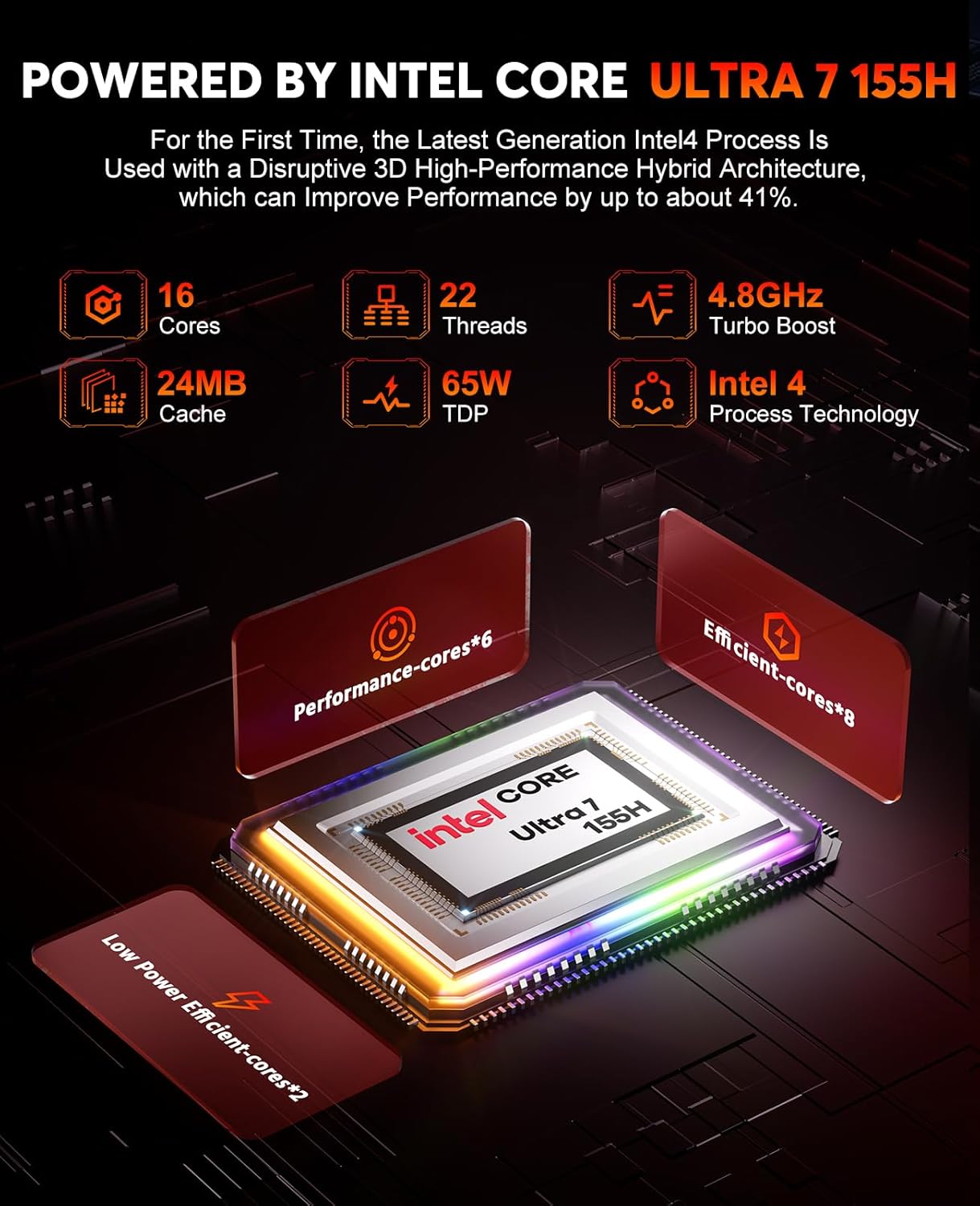
Image: The ACEMAGIC F2A Mini PC's front panel, displaying a Type-C port, two USB ports, and an audio jack, alongside the power button.
4.2 Powering On
Connect the power adapter to the DC-in port on the Mini PC and then plug it into a power outlet. Press the power button located on the front panel to turn on the device.
4.3 Setup Windows Awal
Upon first boot, you will be guided through the Windows operating system setup process. Follow the on-screen instructions to configure language, region, network, and user accounts.
4.4 Konektipitas jaringan
Your F2A Mini PC supports advanced wireless and wired connectivity:
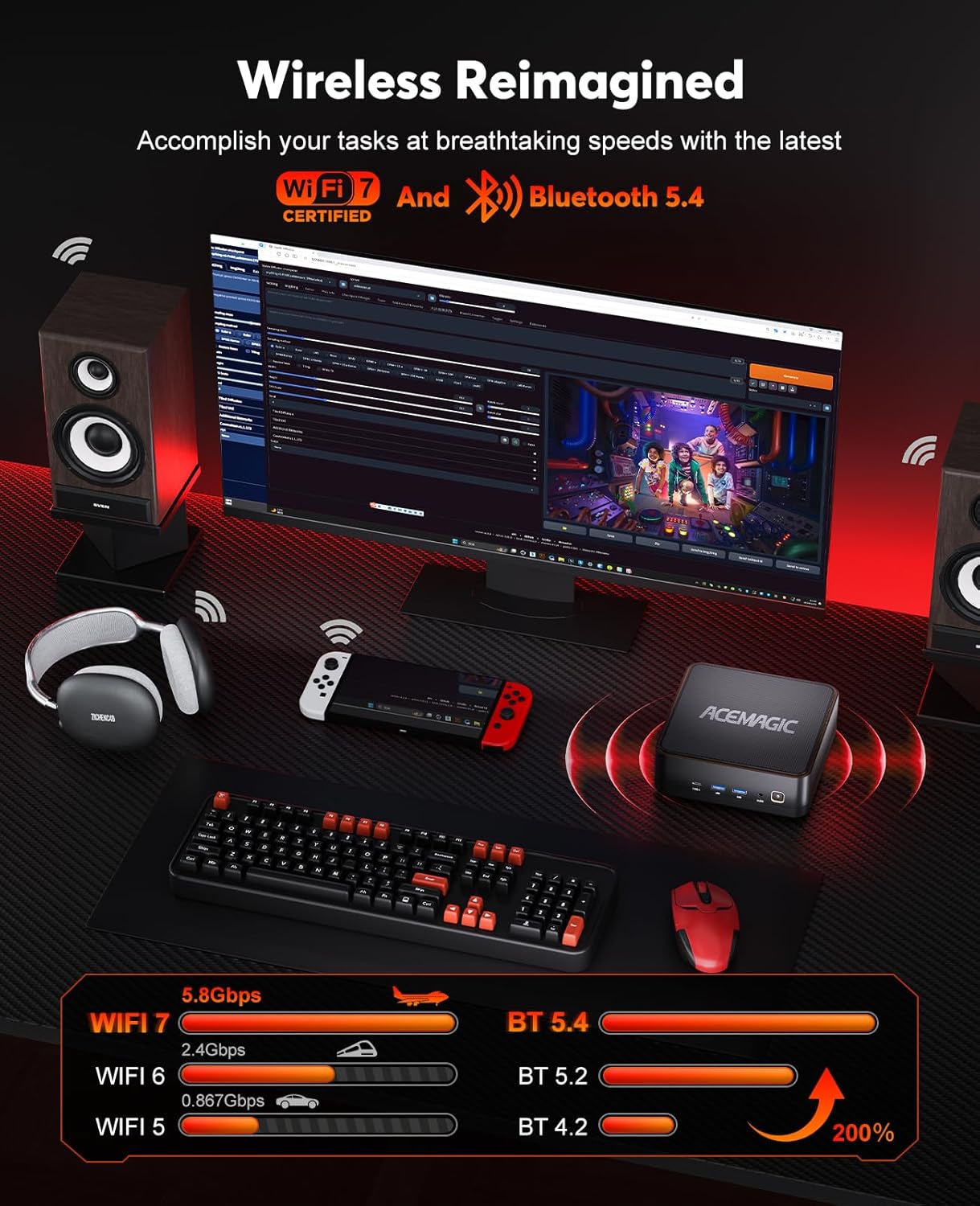
- Wi-Fi 7 (802.11be): Supports 2.4 GHz, 5 GHz, and 6 GHz frequency bands for speeds up to 5.8Gbps. To connect, select your Wi-Fi network from the Windows settings and enter the password.
- Bluetooth 5.4: For connecting wireless peripherals like keyboards, mice, and headphones. Pair devices through Windows Bluetooth settings.
- LAN 2.5Gbps: Pikeun sambungan jaringan kabel kecepatan tinggi.

Image: A visual representation of the ACEMAGIC F2A's wireless capabilities, highlighting Wi-Fi 7 and Bluetooth 5.4, with speed comparisons to older standards.
5. Parentah Operasi
5.1 Pamakéan Umum
The ACEMAGIC F2A Mini PC runs on Windows, providing a familiar desktop experience. Use it for office work, educational training, home theater, programming, and more.
5.2 AI Features with Intel AI Boost NPU
Leverage the integrated Intel AI Boost NPU for enhanced AI applications. This dedicated AI chip supports features such as background blur during video calls and other AI-driven tasks with optimized power consumption.

Image: Demonstrates the AI capabilities of the F2A Mini PC, featuring Intel AI Boost NPU for AI acceleration and intelligent blur in applications like video calls.
5.3 Graphics Performance with Intel Arc GPU
The integrated Intel Arc Graphics provides significant performance for gaming and content creation. It supports technologies like XeSS, Ray Tracing, and DirectX 12, offering a smooth visual experience.

Image: Highlights the Intel Arc GPU's performance, indicating it is up to 2.4 times faster than Intel Iris Xe graphics, suitable for immersive gaming and content creation.
5.4 Gaming and Content Creation
The F2A Mini PC is designed for modern gaming and demanding content creation tasks. Its Intel Ultra 7 155H processor and Intel Arc Graphics deliver strong performance for applications such as 3D games, 3D modeling, rendering, image editing, and video editing.

Image: The ACEMAGIC F2A Mini PC showcasing its gaming capabilities with estimated FPS for popular titles like CS2, Dota 2, Forza Horizon 5, and Dead by Daylight.
6. Pangropéa
6.1 Sistim cooling
The F2A Mini PC features a robust cooling system with dual fans (one centrifugal, one axial) and D8 copper heat pipes to ensure stable performance even under heavy loads. Keep the ventilation openings clear of obstructions.
Gambar: Hiji ngabeledug view illustrating the efficient dual-fan cooling system of the ACEMAGIC F2A, including a large CPU fan, copper heat pipes, and a mini fan for DDR5 and SSD.
6.2 Peningkatan Memori sareng Panyimpenan
The Mini PC supports memory and storage upgrades:
- Mémori: Features 2 SO-DDR5 DIMM slots, supporting up to 96GB DDR5 5600 MT/s in dual channel.
- Panyimpenan: Includes 2 M.2 slots (PCIe 4.0x4) for expanding SSD storage.
To access these components for upgrade, carefully remove the bottom panel by unscrewing the feet. Consult a professional if you are unsure about the upgrade process.

Image: Detailed information on the dual-channel 32GB DDR5 memory and 1TB M.2 NVMe PCIe 4.0x4 SSD, including a comparison table between DDR4 and DDR5 specifications.
7. Cara ngungkulan
If you encounter issues with your ACEMAGIC F2A Mini PC, refer to the following common problems and solutions:
- Henteu aya kakuatan: Pastikeun adaptor kakuatan disambungkeun sacara aman ka Mini PC sareng stopkontak listrik anu tiasa dianggo. Coba outlet béda.
- Henteu aya tampilan: Check all HDMI or USB-C display cable connections. Ensure your monitor is set to the correct input source.
- Henteu aya sambungan internét: For Wi-Fi, verify your network password and router status. For wired, check the Ethernet cable and router connection.
- Overheating Alat: Ensure the Mini PC's vents are not blocked. Operate the device in a well-ventilated area.
- Performance Lambat: Close unnecessary applications. Check for background updates. Ensure sufficient free storage space.
For persistent issues, contact ACEMAGIC customer support.
8. Spésifikasi
| Fitur | Spésifikasi |
|---|---|
| merek | ACEMAGIC |
| Nomer Modél Item | F2A |
| Dimensi produk | 14.7 x 14.7 x 5.2 cm; 2.08 kg |
| Produsén | ACEMAGIC |
| Runtuyan | f2a-155h |
| Resolusi layar | 2560 x 1440 |
| Resolusi | 3840x2160 |
| Prosésor Brand | Intel |
| Jenis prosésor | Intel Mobile CPU (Intel Core Ultra 7 155H) |
| Laju prosésor | 4.8 GHz (Max Turbo Frequency) |
| Socket prosésor | FCBGA2049 |
| Jumlah prosésor | 16 (Inti) |
| Ukuran RAM | 32 GB |
| Téhnologi mémori | DDR5 |
| Tipe Mémori Komputer | DDR5 SDRAM |
| Max Dirojong Mémori | 96 GB |
| Laju mémori | 5.6 GHz (5600 MT/s) |
| Ukuran Hard Drive | 1 TB |
| Hard Drive Description | SSD (NVMe PCIe 4.0x4) |
| Interface teuas drive | Nagara Padet |
| Grafik Coprocessor | Intel Arc Grafika |
| Pedaran Kartu grafik | Dedicated (Integrated Intel Arc) |
| Tipe RAM Grafika | DDR5 SDRAM (Shared with system memory) |
| Ukuran RAM Grafis | 32 GB (System Shared) |
| Panganteur Kartu grafik | terpadu |
| Jenis Konéktipitas | Wi-Fi 7, Bluetooth 5.4, 2.5Gbps LAN |
| Tipe Wireless | Bluetooth |
| Jumlah USB 3.0 palabuhan | 5 (USB 3.2 Gen2) |
| Jumlah palabuhan HDMI | 2 |
| Platform hardware | PC |
| Sistem operasi | Windows |
| Batré Kaasup | No |
| Mangpaat husus Pikeun Produk | Business, Gaming, Photo Editing |
| Tipe Desain Komputer Pribadi | Mini PC |
9. Garansi jeung Rojongan
Your ACEMAGIC F2A Mini PC comes with a standard manufacturer's warranty. Please refer to the warranty card included in your package for specific terms and conditions.
For technical support, troubleshooting assistance, or warranty claims, please contact ACEMAGIC customer service through their official websitus atanapi inpormasi kontak anu disayogikeun dina dokuméntasi produk anjeun.


