1. Bubuka sareng Kompatibilitas
This manual provides detailed instructions for the installation, operation, and maintenance of your ViaBecs XC004 Android 12 Car Stereo. Please read this manual thoroughly before installation and use to ensure proper functionality and to avoid damage.
1.1 Produk Leuwihview
The ViaBecs XC004 is a 10.2-inch touch screen car stereo system designed to upgrade your vehicle's infotainment experience. It features Android 12.0, wireless Apple CarPlay, wireless/wired Android Auto, and a range of multimedia and navigation capabilities.
1.2 Kasaluyuan Kandaraan
This unit is specifically designed for:
- Toyota Tundra: 2007-2013 modél
- Toyota Sequoia: 2008-2018 modél
Catetan penting: This model is for vehicles tanpa the JBL sound system. If your vehicle has a JBL sound system, a different harness (CAN005-X) may be required. Please verify your vehicle's factory radio model before installation.

Gambar 1.1: Kasaluyuan leuwihview, illustrating the difference between factory radios without JBL (Model A) and with JBL (Model D) to ensure correct harness selection.
2. Fitur konci
2.1 Android 12.0 Operating System
The stereo operates on Android 12.0, powered by a UIS7862 Octa-core processor with up to 2.0GHz frequency. It includes 6GB RAM and 128GB internal storage, allowing for smooth performance and ample space for applications and media. Access thousands of applications from the Google Play Store.
2.2 CarPlay Nirkabel sareng Android Auto
Connect your smartphone wirelessly or via USB to access navigation, music, calls, and other applications directly on the 10.2-inch touchscreen. Supports hands-free control and voice commands (Siri/Google Assistant) for enhanced safety and convenience. The Tlink5 app facilitates CarPlay, Android Auto, and Mirror Link functions.
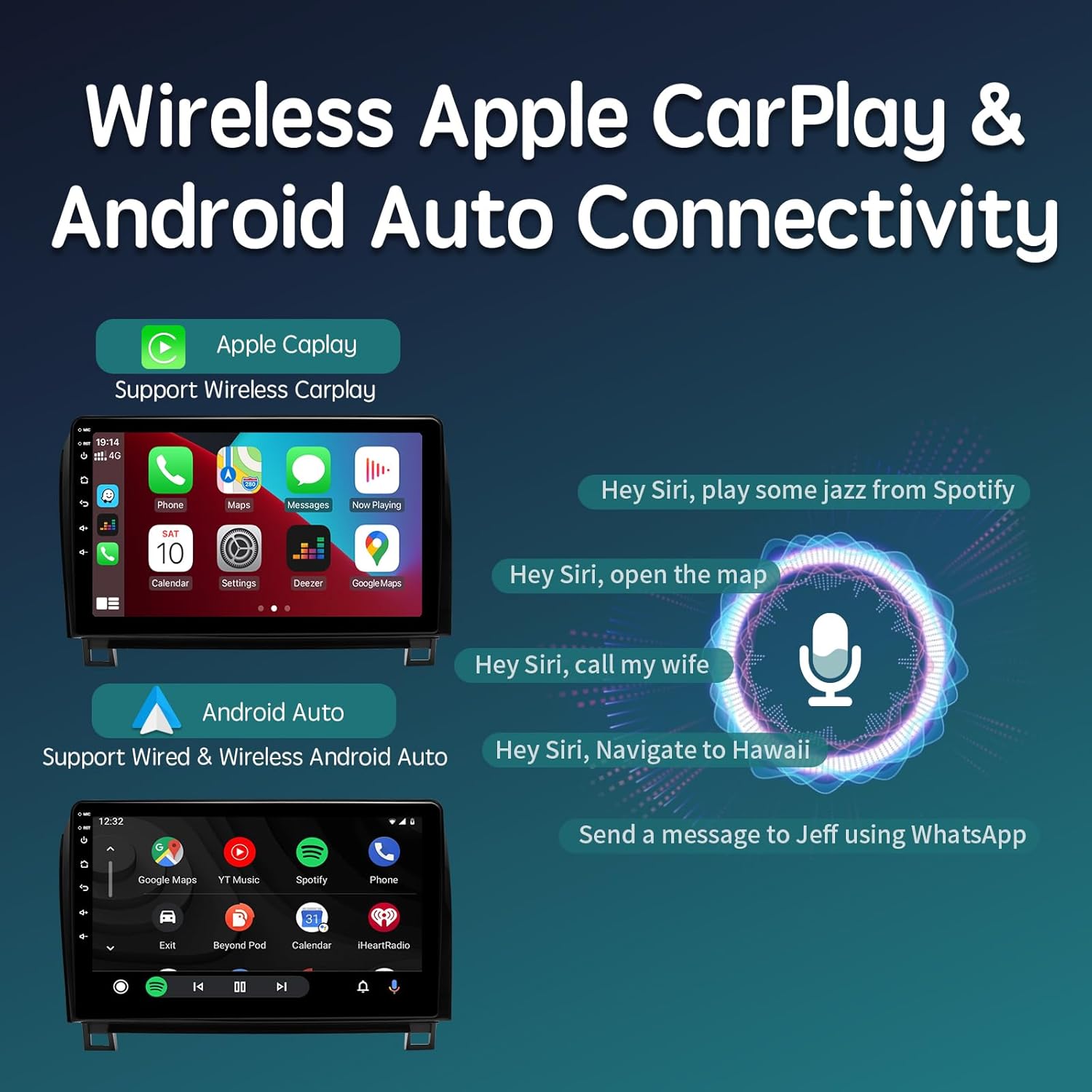
Gambar 2.1: Wireless Apple CarPlay and Android Auto connectivity, showing smartphone integration and voice command capabilities.
2.3 10.2-inch QLED Touchscreen
The unit features a large, clear 10.2-inch QLED IPS screen with 1280x720 resolution, supporting 1080P HD video and multi-touch gestures. The QLED technology provides a brighter and more vivid display compared to standard IPS screens, offering a 178° full view angle. Adjust brightness and night mode settings as needed.

Gambar 2.2: The 10.2-inch QLED touchscreen, emphasizing its high resolution and wide viewing angles for an enhanced visual experience.
2.4 Built-in DSP and 48-Band EQ
Experience superior audio quality with the integrated Digital Sound Processor (DSP) and a 48-band equalizer. This allows for precise tuning of audio frequencies from 20Hz to 20KHz, including subwoofer frequency, bass boost, and bass filter adjustments. The immersive surround sound feature enhances the listening experience.

Gambar 2.3: Audio customization options, including the 48-band EQ and DSP for fine-tuning sound output.
2.5 Navigasi sareng Konéktivitas
The system includes a built-in GPS module and WiFi antenna, providing accurate real-time navigation. Users can utilize Google Maps, Waze, or other navigation applications, and download offline maps. Connectivity options include 2.4GHz & 5GHz WiFi, Bluetooth 5.0 for hands-free calling and music streaming, and 4G network support via an external antenna.
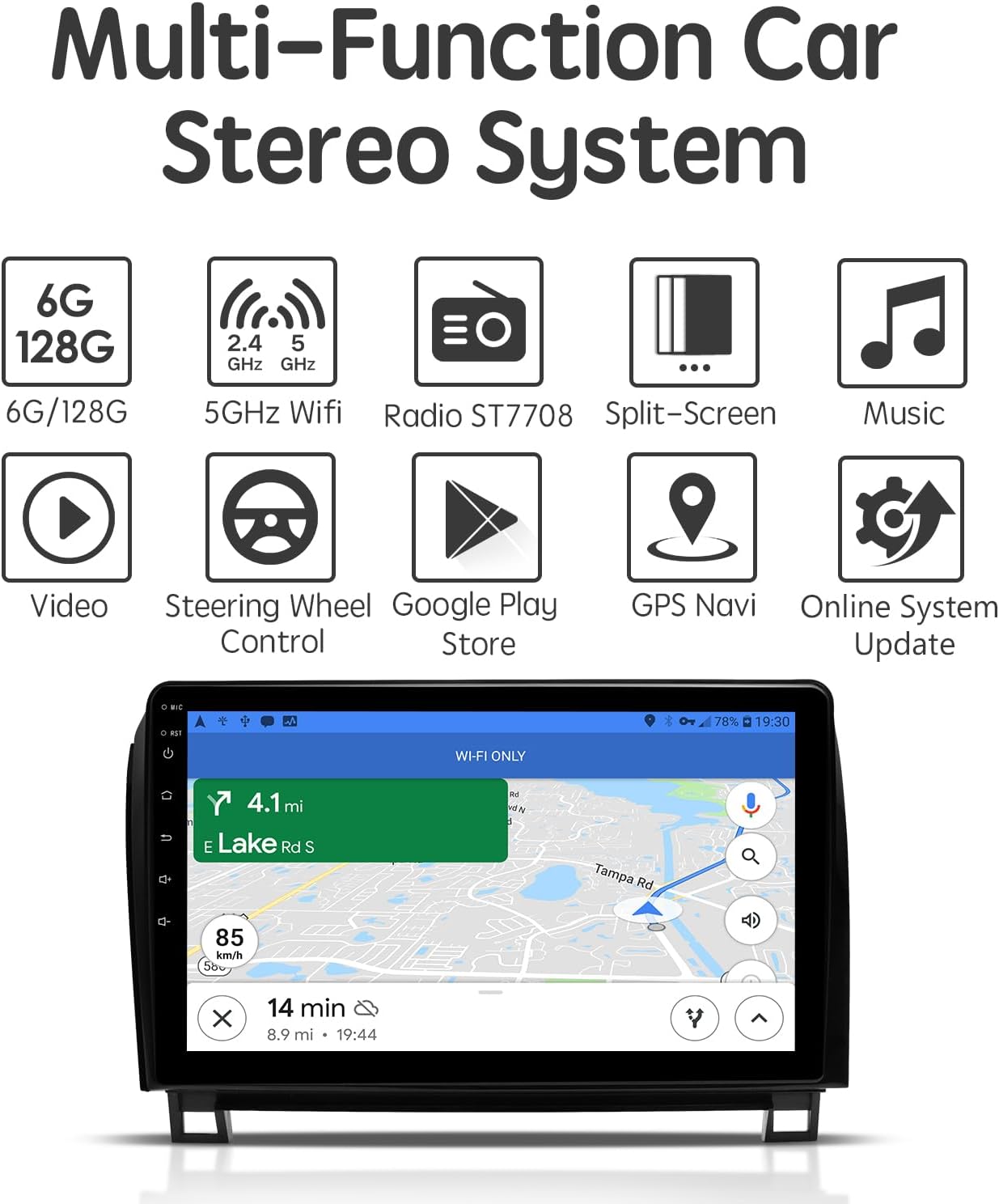
Gambar 2.4: Multi-function car stereo system, highlighting key features like navigation, WiFi, and various applications.
3. Setup jeung Instalasi
The ViaBecs XC004 is designed for a plug-and-play installation with the included harness and dash frame. Basic automotive electrical knowledge and tools are recommended. If you are unsure about any steps, professional installation is advised.
3.1 Eusi pakét
Sateuacan ngamimitian pamasangan, pastikeun sadaya komponén aya:
- 1x Car Play Stereo Unit
- 1x Plug and Play Harness (XC004)
- 1x 4P USB Cable
- 1x 6P USB Cable
- 1x 20P Audio Cable
- 1x 10P Camera Cable & Wi-Fi antenna
- 1 x Antena GPS
- 1x 4G Antenna
- 1x Mikropon Éksternal
- 2 x Manual Pamaké
- 1 x Kartu Garansi
3.2 Léngkah-léngkah Pamasangan (Umum)
- Persiapan: Cabut batré kendaraan pikeun nyegah korsleting listrik.
- Cabut Radio Pabrik: Carefully remove the existing factory radio and dash trim. Refer to your vehicle's service manual or online resources for specific instructions on removing the dash components for your Toyota Tundra or Sequoia.
- Sambungkeun Harness: Connect the provided plug-and-play harness to the vehicle's factory wiring and to the new ViaBecs XC004 unit. Ensure all connections are secure.
- Sambungkeun Periferal: Connect the GPS antenna, 4G antenna, external microphone, USB cables, and camera input cables to the corresponding ports on the stereo unit. Position antennas for optimal signal reception.
- Fungsi Uji: Before fully reassembling the dash, reconnect the vehicle's battery and power on the unit. Test all functions, including audio, touch screen, steering wheel controls, CarPlay/Android Auto, GPS, and backup camera (if applicable).
- Unit Aman: Mount the new stereo unit into the dash using the provided dash frame and secure it.
- Pasang deui Dash: Carefully reassemble the dash trim and other components.
3.3 Diagram Wiring
Refer to the following diagram for detailed wiring connections. Ensure each cable is connected to its correct port.
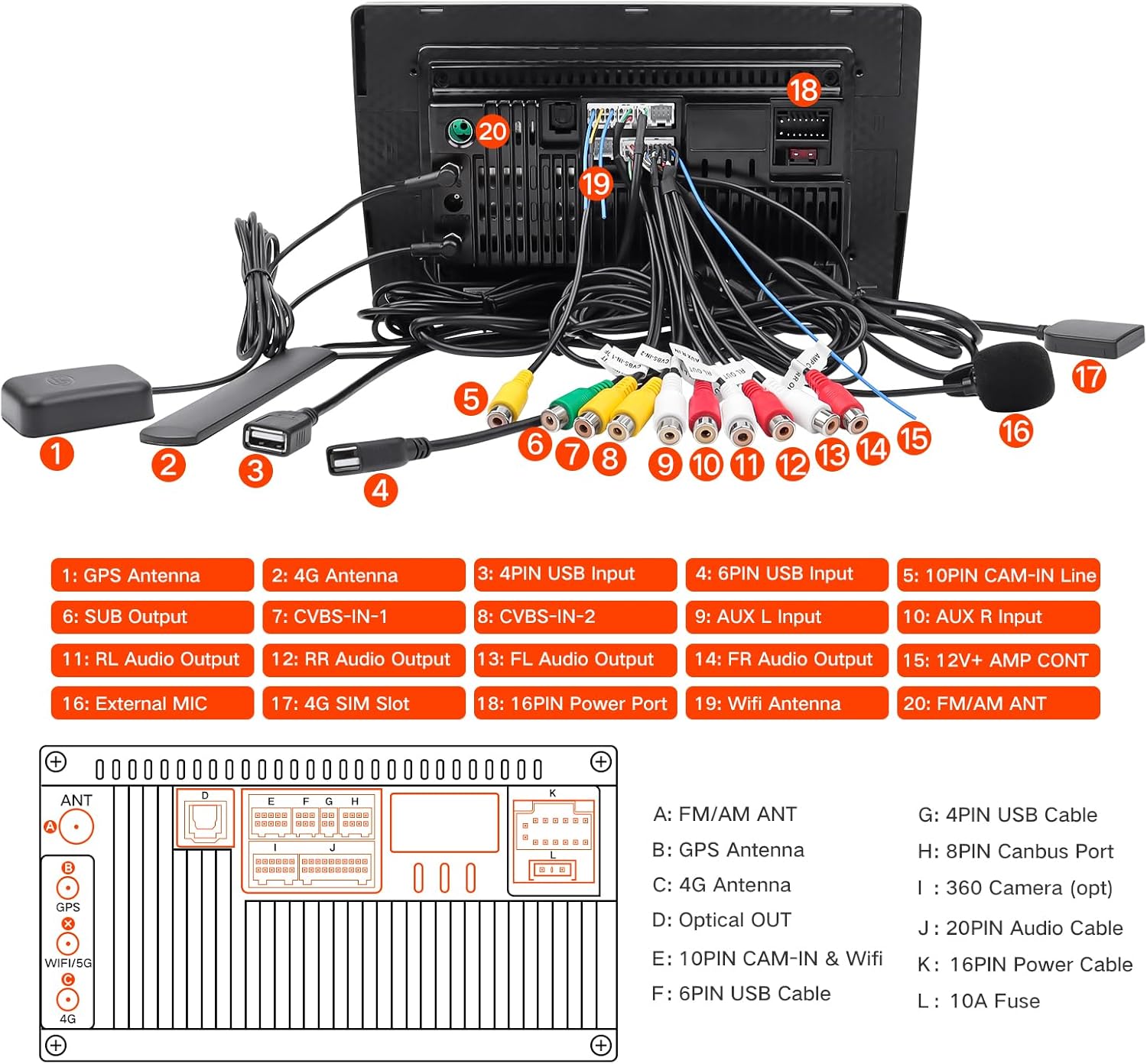
Gambar 3.1: Tukangeun view of the stereo unit with labeled ports and corresponding cable connections.
4. Parentah Operasi
4.1 Operasi Dasar
- Hurungkeun/Pareuman: Press and hold the power button (usually on the front panel) to turn the unit on or off. A short press typically mutes or unmutes audio.
- Kontrol volume: Atur volume nganggo tombol fisik atanapi kontrol dina layar.
- Napigasi layar rampa: Use touch gestures (tap, swipe, pinch-to-zoom) to navigate the Android interface and applications.
- Layar Utama: The main screen provides access to frequently used apps and widgets. Customize it by adding or removing icons.
4.2 CarPlay Nirkabel / Android Auto
- Pastikeun Bluetooth sareng Wi-Fi dina telepon pinter anjeun diaktipkeun.
- On the car stereo, open the 'Tlink5' application.
- Follow the on-screen prompts to pair your phone via Bluetooth. Once paired, the system will automatically establish a Wi-Fi connection for CarPlay or Android Auto.
- For wired Android Auto, connect your phone via a USB cable to one of the stereo's USB ports.
4.3 Konektipitas Bluetooth
The unit features Bluetooth 5.0 for hands-free calling and audio streaming.

Gambar 4.1: Bluetooth music and hands-free calling interface.
- Buka setélan Bluetooth dina stereo.
- Aktipkeun Bluetooth sareng milarian alat anu sayogi.
- Select your phone from the list and pair using the provided PIN (default is usually 0000).
- Once connected, you can make/receive calls and stream audio. The external microphone ensures clear call quality.
4.4 Napigasi
Utilize the built-in GPS module with pre-installed navigation apps or download your preferred ones from the Google Play Store. Connect to Wi-Fi or use a 4G connection for real-time traffic updates and online map services.
4.5 Radio (AM/FM)
Access the Radio application to tune into AM/FM stations. Use the scan function to find available stations and save your favorites for quick access.
5. Pangropéa
Pangropéa anu leres mastikeun umur panjang sareng kinerja optimal stereo mobil anjeun.
- Ngabersihan layar: Use a soft, lint-free cloth to clean the touchscreen. For stubborn smudges, lightly dampen lawon jeung cai atawa cleaner aman layar. Hindarkeun bahan kimia anu kasar atanapi bahan abrasive.
- Apdet parangkat lunak: Periodically check for system updates via the 'Settings' menu to ensure you have the latest features and security patches. A stable internet connection is required for updates.
- Kontrol Suhu: Ulah ngantepkeun unit ka suhu anu ekstrim salami waktos anu lami.
- Sambungan kabel: Pariksa périodik sadaya sambungan kabel pikeun mastikeun aranjeunna aman tur bebas tina karuksakan.
6. Cara ngungkulan
This section addresses common issues you might encounter. If problems persist, contact ViaBecs technical support.
6.1 No Power / Unit Not Turning On
- Check the vehicle's battery connection.
- Verify all power cables are securely connected to the stereo and the vehicle's wiring harness.
- Pariksa kotak sekering kandaraan pikeun sagala sekering ditiup patali jeung kakuatan stereo atawa aksésori.
6.2 Teu Aya Kaluaran Audio
- Pastikeun polumeu teu diam atawa disetel ka minimum.
- Check all speaker wire connections at the back of the unit and to the vehicle's speakers.
- Verify the correct audio source is selected (e.g., Radio, Bluetooth, CarPlay).
6.3 Backup Camera Not Displaying
- Ensure the camera input cable is correctly connected to the stereo's camera input port.
- Verify the camera's power supply is correctly wired and receiving power when the vehicle is in reverse.
- Some factory backup cameras may require specific wiring or adapters not included with the standard harness. Consult ViaBecs support if issues persist.
6.4 Poor Microphone Quality
- Ensure the external microphone is securely plugged into the unit.
- Position the microphone in a clear area, away from air vents or direct road noise, for optimal voice pickup.
- Check microphone settings within the stereo's system settings.
6.5 Steering Wheel Controls Not Working
- Confirm the XC004 plug-and-play harness is correctly installed, as it is designed to retain factory steering wheel controls.
- Access the steering wheel control settings in the stereo's menu to program or recalibrate the buttons if necessary.
7. Spésifikasi
| Fitur | Spésifikasi |
|---|---|
| Nomer modél | XC004 |
| Sistem operasi | Android 12.0 |
| Prosesor | UIS7862 Octa-core, up to 2.0GHz |
| Ram | 6GB |
| Panyimpenan internal | 128GB |
| Ukuran layar | 10.2 inci |
| Tipe Layar | QLED IPS Touchscreen |
| Resolusi layar | 1280 x 720 |
| Konektipitas | Bluetooth 5.0, Wi-Fi (2.4GHz & 5GHz), 4G (external antenna) |
| Napigasi | Built-in GPS, supports Google Maps, Waze, etc. |
| Fitur Audio | Built-in DSP, 48-band Equalizer |
| Fitur husus | Wireless Apple CarPlay, Wireless/Wired Android Auto, Mirror Link, Split-Screen, Steering Wheel Control support |
| Tipe Pamasangan | Dasbor Gunung |
| Diagonal layar katempo | 11" / 26 cm |
| Item Beurat | 4.48 pon |
| Ukuran Paket | 13.58 x 9.96 x 5.75 inci |
8. Garansi jeung Rojongan
The ViaBecs XC004 car stereo is backed by a garansi 1 taun. ViaBecs provides professional technical support for setup assistance, connectivity issues, and troubleshooting.
For technical assistance or warranty claims, please contact ViaBecs customer service through the platform where the product was purchased or refer to the contact information provided on the warranty card included in your package.


