Bubuka
This manual provides essential information for the safe and efficient operation of your Mistral 46-inch Blade-Free Fan with Air Purifier, Model MBFAP460. This appliance combines powerful airflow with advanced air purification technology, featuring a DC motor turbo system, HEPA13 filtration, and UV sterilization. Please read these instructions thoroughly before use and retain them for future reference.
Parentah Kasalametan
Pikeun ngurangan résiko seuneu, shock listrik, atawa tatu, salawasna turutan pancegahan kaamanan dasar ieu:
- Pastikeun catu daya voltage cocog sareng labél rating dina alat.
- Do not operate the appliance with a damaged cord or plug. If damaged, contact qualified service personnel.
- Keep the appliance away from water or other liquids. Do not immerse any part of the appliance in water.
- Unplug the appliance from the power outlet before cleaning, performing maintenance, or when not in use.
- Do not insert fingers or foreign objects into any openings of the appliance.
- Perkakas ieu kanggo panggunaan rumah tangga di jero rohangan wungkul.
- Ngawaskeun barudak pikeun mastikeun aranjeunna henteu maén sareng alat.
Eusi pakét
Pastikeun yén sadaya item aya dina bungkusan:
- Mistral Blade-Free Fan with Air Purifier Main Unit
- Kadali jauh
- HEPA13 Filter (pre-installed or separate)
- Manual pangguna (dokumén ieu)
Disetél
The Mistral MBFAP460 requires minimal assembly. Follow these steps to prepare your unit for operation:
- Ngabongkar bungkusan: Sacara saksama miceun sadaya komponén tina bungkusan. Simpen bungkusan pikeun neundeun atanapi transportasi ka hareup.
- Kantétan Dasar (upami misah): If the base is separate, align it with the main unit and secure it according to the markings. Ensure it clicks into place or is fastened securely.
- Pamasangan Filter: If the HEPA13 filter is not pre-installed, locate the filter compartment (usually at the base or rear of the unit), remove the cover, insert the filter with the correct orientation, and replace the cover.
- panempatan: Place the fan on a firm, level surface, ensuring adequate space around the unit for optimal airflow and purification.

Gambar 1: Hareupeun view of the Mistral MBFAP460 Blade-Free Fan with Air Purifier.
Parentah Operasi
Your Mistral MBFAP460 can be operated using the control panel on the unit or the included remote control.
Kontrol Panel Langkungview

Figure 2: Close-up of the control panel, showing the digital display and touch-sensitive buttons for various functions.
Operasi Dasar
- Hurungkeun/Pareuman: Pencét tombol kakuatan (U) dina panel kontrol atawa jauh pikeun ngahurungkeun atawa mareuman unit.
- Modeu hawa: Cycle through the 5 available air modes: Auto, Turbo, Sleep, Natural, and Normal. Each mode adjusts fan speed and purification settings for different environments.
- Osilasi: Activate or deactivate the automatic left-right oscillation feature. Select from 30, 60, 90, or 120-degree oscillation angles to distribute air across a wider area.
- Sterilisasi UV: The unit features UV sterilization to kill up to 99.99% of most viruses, airborne bacteria, and mold. This function operates automatically with the air purification system.
- Indikator ngagantian saringan: The control panel will display an indicator when the HEPA13 filter requires replacement. Refer to the Maintenance section for instructions.
Pangropéa
Regular maintenance ensures optimal performance and longevity of your Mistral MBFAP460.
Ngabersihkeun Unit
- Salawasna cabut colokan unit saméméh beberesih.
- Ngusap permukaan luar kalayan lemes, damp lawon. Ulah make cleaners abrasive atawa pangleyur.
- Pastikeun euweuh cai asup kana komponén internal.
HEPA13 Filter Replacement
The HEPA13 filter removes up to 99.97% of allergens, pollutants, and dust as small as 0.3 microns. Replace the filter when the filter replacement indicator illuminates on the control panel.
- Cabut colokan alat tina stop kontak listrik.
- Locate the filter compartment, usually at the base of the unit.
- Buka panutup kompartemen filter.
- Leupaskeun filter heubeul jeung buang eta leres.
- Insert a new Mistral HEPA13 replacement filter, ensuring correct orientation.
- Tutup panutup kompartemen filter kalawan aman.
- Plug in the unit and reset the filter indicator (refer to specific instructions in the full manual if a reset button is present).
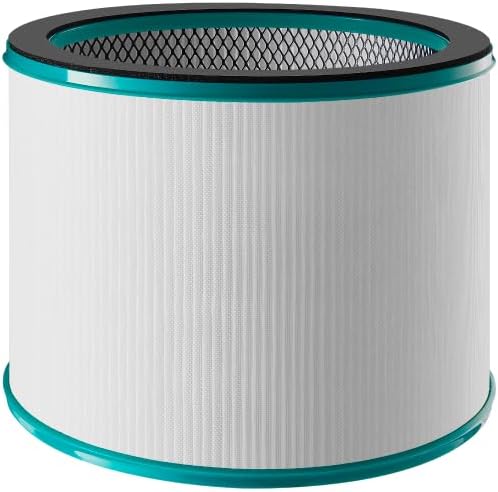
Figure 3: Mistral HEPA13 replacement filter, essential for maintaining air purification efficiency.
Pamérésan masalah
If you encounter issues with your Mistral MBFAP460, consult the following table for common problems and solutions.
| Masalah | Mungkin Cukang lantaranana | Solusi |
|---|---|---|
| Unit teu hurung. | No power supply. Power cord not securely plugged in. | Check if the power cord is firmly plugged into a working outlet. Ensure the power switch (if any) is on. |
| Lemah atanapi henteu aya aliran hawa. | Air intake/outlet blocked. Filter is dirty or clogged. | Ensure no obstructions are blocking the air intake or outlet. Check and replace the HEPA13 filter if dirty. |
| Noise mahiwal salila operasi. | Unit not on a level surface. Foreign object inside. | Place the unit on a stable, level surface. Unplug and carefully inspect for any foreign objects. |
| Indikator panggantian filter tetep hurung saatos ngaganti filter. | Indikator filter teu ngareset. | Refer to the full manual for specific instructions on how to reset the filter replacement indicator. |
Lamun masalah persists sanggeus nyobian solusi ieu, mangga ngahubungan rojongan customer.
spésifikasi
| Fitur | Rincian |
|---|---|
| Modél | MBFAP460 |
| merek | MISTRAL |
| Dimensi produk | 38D x 35.8W x 116.2H séntiméter |
| Item Beurat | 5.5 kg |
| Sumber Daya | Kabel Listrik |
| Métode kontrol | Jauh |
| Jenis Filter | HEPA13 |
| Ukuran ingetan partikel | 0.3 mikron |
| Panutup Wewengkon Lantai | 700 suku pasagi |
| Fitur husus | DC Motor Turbo System, UV Sterilisation, 5 Air Modes, Auto Oscillation |
| Majelis Diperlukeun | Sumuhun |
| Star énergi Certified | Sumuhun |
Garansi sareng Rojongan
This product comes with a manufacturer's warranty. Please refer to the warranty card included in your package for specific terms and conditions. For technical support, replacement parts, or service inquiries, please contact Mistral customer service through their official websitus atanapi inpormasi kontak anu disayogikeun dina dokuméntasi jaminan anjeun.


