Muse M-980 BT Wireless Bluetooth Speaker User Manual
Model: M-980 BT
Bubuka
The Muse M-980 BT is a powerful and portable wireless Bluetooth speaker designed to deliver high-quality audio with vibrant LED lighting. Featuring 300W output, IPX6 water resistance, and over 10 hours of music playback, it's perfect for various environments. This manual provides detailed instructions on how to set up, operate, and maintain your speaker, ensuring you get the most out of its features.
Émbaran Kasalametan penting
- Baca parentah ieu taliti saméméh ngagunakeun produk.
- Simpen manual ieu kanggo rujukan ka hareup.
- Ulah ngalaan speaker ka suhu ekstrim, kalembaban, atawa sinar panonpoé langsung.
- Do not immerse the speaker in water, despite its IPX6 rating. IPX6 protects against strong water jets, not submersion.
- Anggo ngan ukur kabel daya anu disayogikeun pikeun ngecas.
- Ulah nyobian ngabongkar atawa ngaropéa speaker.
- Jauhkeun tina jangkauan barudak.
- Pastikeun ventilasi ditangtoskeun nalika operasi.
Eusi pakét
Mangga parios heula sadaya barang anu didaptarkeun di handap ieu kalebet kana pakét anjeun:
- Muse M-980 BT Wireless Bluetooth Speaker
- Kabel Daya
- Kabel Ngecas USB-C
- Kabel Aux-In
- Manual Pamaké (Dokumén ieu)
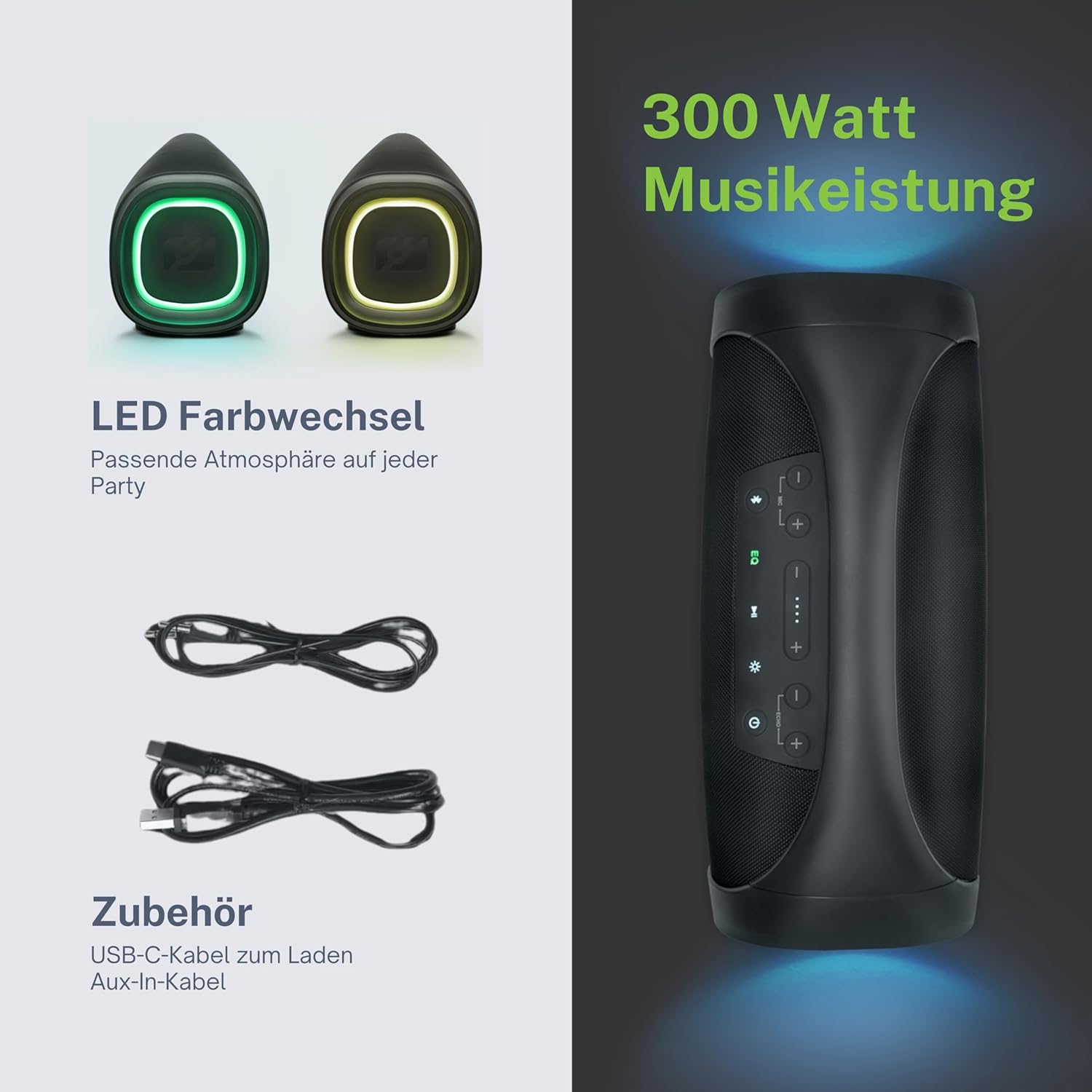
Produk Leuwihview
Familiarize yourself with the various parts and controls of your Muse M-980 BT speaker.


Panél kontrol
The top panel of the speaker features various buttons for controlling playback, volume, and other functions:
- Tombol Daya: Pencét jeung tahan pikeun ngaktipkeun atawa mareuman speaker.
- Tombol Bluetooth: Pencét pikeun ngasupkeun mode papasangan Bluetooth.
- Tombol EQ: Adjust equalization settings (Bass/Treble).
- Tombol Luhur / Turun: Ningkatkeun atawa ngurangan polumeu.
- Tombol Puter/Reureuh: Kadalikeun pamuteran audio.
- Tombol Mode Lampu: Cycle through different LED light modes.
Ports and Inputs
- Port ngecas USB-C: Pikeun ngecas batré internal speaker.
- Port USB: Pikeun muterkeun MP3 files ti USB drive.
- Input AUX: Sambungkeun alat audio éksternal nganggo kabel audio 3.5mm.
- Microphone Jacks (x2): Connect microphones for karaoke or public address.
Disetél
Ngecas Speaker
Before first use, fully charge the speaker. Connect the provided USB-C charging cable to the speaker's USB-C port and the other end to a suitable USB power adapter (not included) or a computer's USB port. The battery indicator display will show the charging status. A full charge provides over 10 hours of music playback.
Ngahurungkeun/Pareuman
Pencét jeung tahan tombol Tombol Daya on the top panel for a few seconds to turn the speaker on. You will hear an audible prompt. To turn off, press and hold the Tombol Daya deui.
Parentah Operasi
Sambungan Bluetooth
- Turn on the Muse M-980 BT speaker. It will automatically enter Bluetooth pairing mode, indicated by a flashing Bluetooth indicator light.
- Dina alat sélulér anjeun (smartphone, tablet, komputer), aktipkeun Bluetooth teras milarian alat anu sayogi.
- Select "M-980 BT" from the list of devices.
- Sakali disambungkeun, lampu indikator Bluetooth bakal padet, sarta anjeun bakal ngadéngé sora konfirmasi.
- Anjeun ayeuna bisa muterkeun audio tina alat Anjeun ngaliwatan speaker.
AUX Mode Input
To play audio from a device without Bluetooth, use the AUX input:
- Connect one end of the 3.5mm Aux-In cable to the AUX port on the speaker.
- Sambungkeun tungtung kabel anu sanésna kana jack headphone atanapi output audio alat éksternal anjeun.
- Spiker bakal otomatis ngalih ka modeu AUX, atanapi anjeun panginten kedah mencét tombol modeu (upami sayogi).
- Kadalikeun putereun sareng volume tina alat anjeun anu nyambung atanapi kontrol spiker.
USB Playback
The speaker supports playing MP3 audio files directly from a USB flash drive:
- Selapkeun USB flash drive nu ngandung MP3 files kana port USB dina spiker.
- The speaker will automatically detect the USB drive and begin playing the audio files.
- Use the speaker's playback controls (Play/Pause, Next/Previous) to manage your music.
Ngagunakeun Mikropon
The Muse M-980 BT features two microphone jacks for karaoke or public speaking:
- Connect your microphones (not included) to the MIC 1 and/or MIC 2 jacks.
- Adjust the microphone volume using the dedicated controls on the speaker (if available, or through main volume).
- Ensure the main volume of the speaker is set to a comfortable level.
Modeu Lampu LED
The speaker features dynamic LED lights that enhance your listening experience:
- Pencét éta Tombol Mode Lampu to cycle through various pre-set lighting effects and colors.
- Press the button repeatedly to find your preferred light show.
Stereo Pairing (TWS)
You can pair two Muse M-980 BT speakers together for a true wireless stereo experience:
- Pastikeun duanana spiker dihurungkeun sareng henteu nyambung ka alat Bluetooth mana waé.
- On one speaker (this will be the primary speaker), press and hold the Bluetooth button until you hear a specific pairing tone.
- The two speakers will automatically connect to each other. Once connected, the primary speaker's Bluetooth indicator will flash slowly, and the secondary speaker's will be solid.
- Now, connect your mobile device to the primary speaker via Bluetooth as described in the "Bluetooth Connection" section.
- Audio ayeuna bakal diputer dina stereo ngaliwatan duanana speaker.
Bass jeung Treble adjustment
Ngagunakeun éta Tombol EQ on the control panel to adjust the bass and treble levels to suit your audio preference.
Pangropéa
beberesih
Wipe the speaker with a soft, dry cloth. Do not use abrasive cleaners, waxes, or solvents. Ensure all ports are dry before charging or connecting devices.
Panyimpenan
Lamun teu dipaké pikeun période nambahan, nyimpen speaker dina tiis, tempat garing jauh ti sinar panonpoé langsung jeung hawa ekstrim. Disarankeun ngeusi batre sahenteuna sakali unggal tilu bulan pikeun ngajaga umurna.
Pamérésan masalah
| Masalah | Mungkin Cukang lantaranana | Solusi |
|---|---|---|
| Speaker teu hurung. | Batré béak. | Ngecas spéker nganggo kabel USB-C anu disayogikeun. |
| Taya sora. | Volumena leutik teuing atawa teu pati jelas. Modeu inputna salah. | Increase volume on both the speaker and the connected device. Ensure the correct input mode (Bluetooth, AUX, USB) is selected. |
| Sambungan Bluetooth gagal. | Spiker teu dina modeu pairing. Alatna jauh teuing. Gangguan. | Ensure speaker is in pairing mode. Move device closer to speaker. Turn off other Bluetooth devices. Forget "M-980 BT" on your device and re-pair. |
| Distorsi sora. | Volume too high. Audio source quality. | Leutikan volume. Coba sumber audio anu béda atanapi file. Adjust EQ settings. |
| Lampu LED teu jalan. | Modeu lampu pareum atanapi gangguan fungsi. | Press the Light Mode Button to activate or cycle through modes. If issue persists, contact support. |
spésifikasi
| Ngaran modél | M-980 BT |
| Nomer modél | 322950 |
| Daya Kaluaran | 300 Watt |
| Téhnologi konektipitas | Bluetooth, USB, AUX |
| Kahirupan batré | Nepi ka 10 jam |
| Tahan cai | IPX6 (Tahan cipratan) |
| Ukuran (L x W x H) | 49.54 x 20.4 x 27.28 cm (19.5 x 8.0 x 10.7 inci) |
| Beurat | 5.02 Kilogram (11.07 lbs) |
| Warna | Hideung |
| Bahan | Plastik atawa karét |

Garansi sareng Rojongan
Your Muse M-980 BT speaker comes with a limited warranty. Please refer to the warranty card included in your package for specific terms and conditions. For technical support, troubleshooting assistance, or warranty claims, please contact Muse customer service through their official websitus atawa inpo kontak disadiakeun kalawan pameseran Anjeun.
For the latest information and support, visit the official MUSE websitus: www.muse-europe.com


