Bubuka
Welcome to the GOBOULT UFO True Wireless Earbuds user manual. These earbuds are designed to provide a superior audio experience with features like extended playtime, low latency gaming, advanced noise cancellation, and robust bass drivers. Please read this manual carefully to ensure proper use and optimal performance of your device.
Naon dina Box
- GOBOULT UFO True Wireless Earbuds
- Kasus Ngecas Nirkabel
- Type-C Fast Charging Cable
- Pasangan tambahan tina Eartips
- Manual pamaké
- Kartu Garansi
Produk Leuwihview
The GOBOULT UFO earbuds feature a distinctive design with integrated breathing LEDs on both the earbuds and the charging case. They are equipped with 13mm drivers for rich bass and Quad Mic ENC for clear calls.

Image: GOBOULT UFO Earbuds and Charging Case. This image highlights key features such as Bluetooth 5.3 connectivity, 48 hours of playtime, Quad Mic ENC, 13mm drivers, 45ms low latency, and Type-C fast charging.
LEDs engapan
The breathing LEDs on the case and earbuds provide visual feedback for various actions, including opening/closing the case, charging, and when buds are connected.

Image: The GOBOULT UFO charging case and earbuds displaying their distinctive breathing LED lights, which indicate various operational states.
Kualitas Audio
Experience high-fidelity sound with precision-tuned 13mm drivers, ensuring clear audio across all frequencies and rich bass. The Quad Mic ENC (Environmental Noise Cancellation) system ensures crystal-clear, interference-free calls.
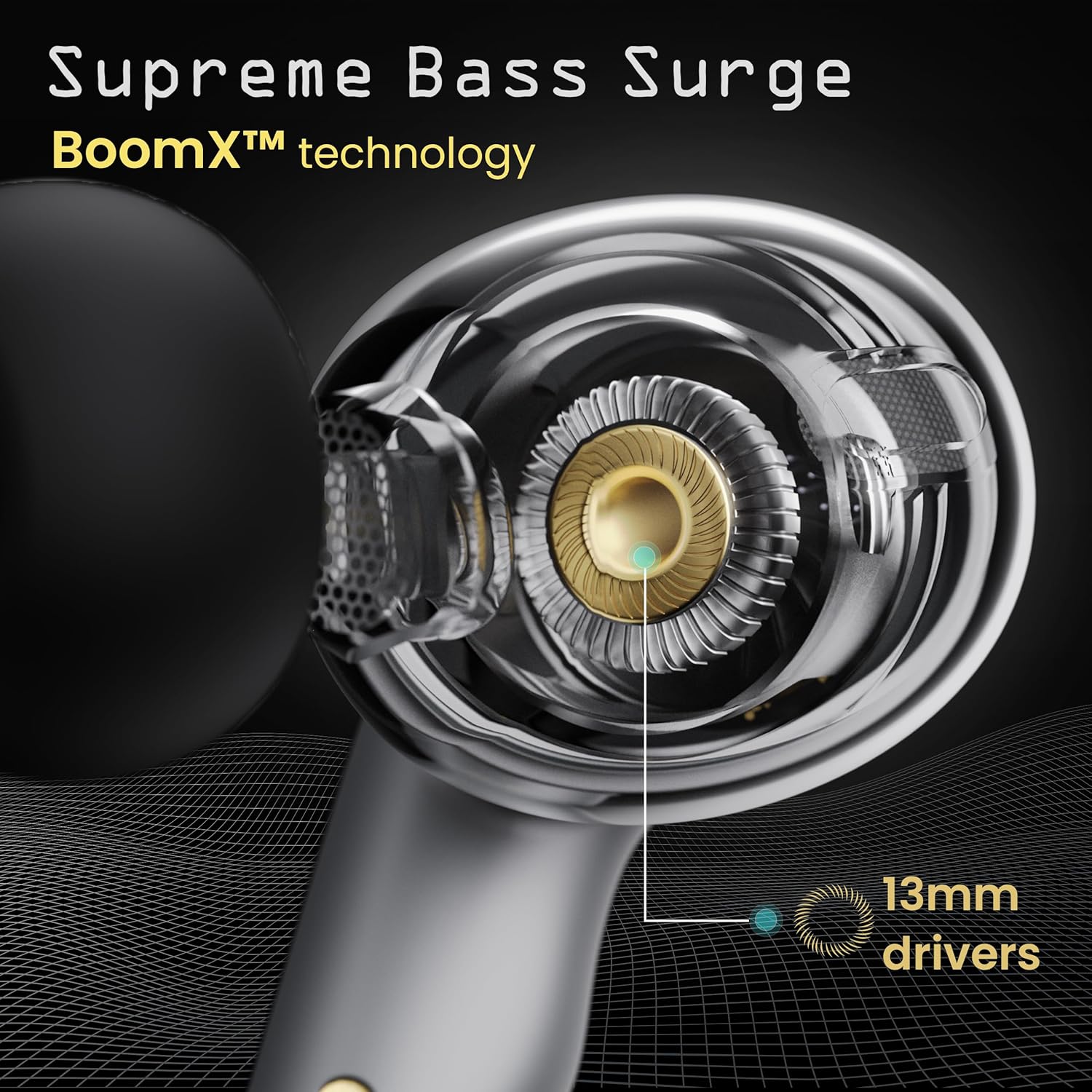
Image: A close-up of a GOBOULT UFO earbud, highlighting the 13mm drivers responsible for supreme bass surge.

Gambar: A lengkep view of a GOBOULT UFO earbud, showcasing the AI-powered Quad Mic AI-ENC technology for high-definition call clarity and Zen™ mode for silence.
Disetél
Papasangan Awal
- Buka wadah ngecas. Earbuds bakal otomatis asup kana mode papasangan.
- Dina alat Anjeun (smartphone, tablet, jsb), aktipkeun Bluetooth.
- Milarian pikeun "GOBOULT UFO" in the list of available Bluetooth devices and select it to connect.
- Once connected, you will hear an audio prompt, and the LED indicators on the earbuds will change.
The earbuds utilize Bluetooth 5.3 for stable and efficient connection, featuring Blink & Pair™ technology for fast pairing.

Image: GOBOULT UFO Earbuds illustrating stable connectivity with Bluetooth 5.3 and fast pairing technology.
Rojongan App
Enhance your experience by downloading the dedicated GOBOULT app. The app allows you to:
- Switch between 6 Equalizer Modes.
- Sesuaikeun kadali touch.
- Ganti ngaran earbud anjeun.
- Aksés setélan sareng fitur tambahan.
Parentah Operasi
Toél Kontrol
The GOBOULT UFO earbuds feature intuitive touch controls on each earbud.
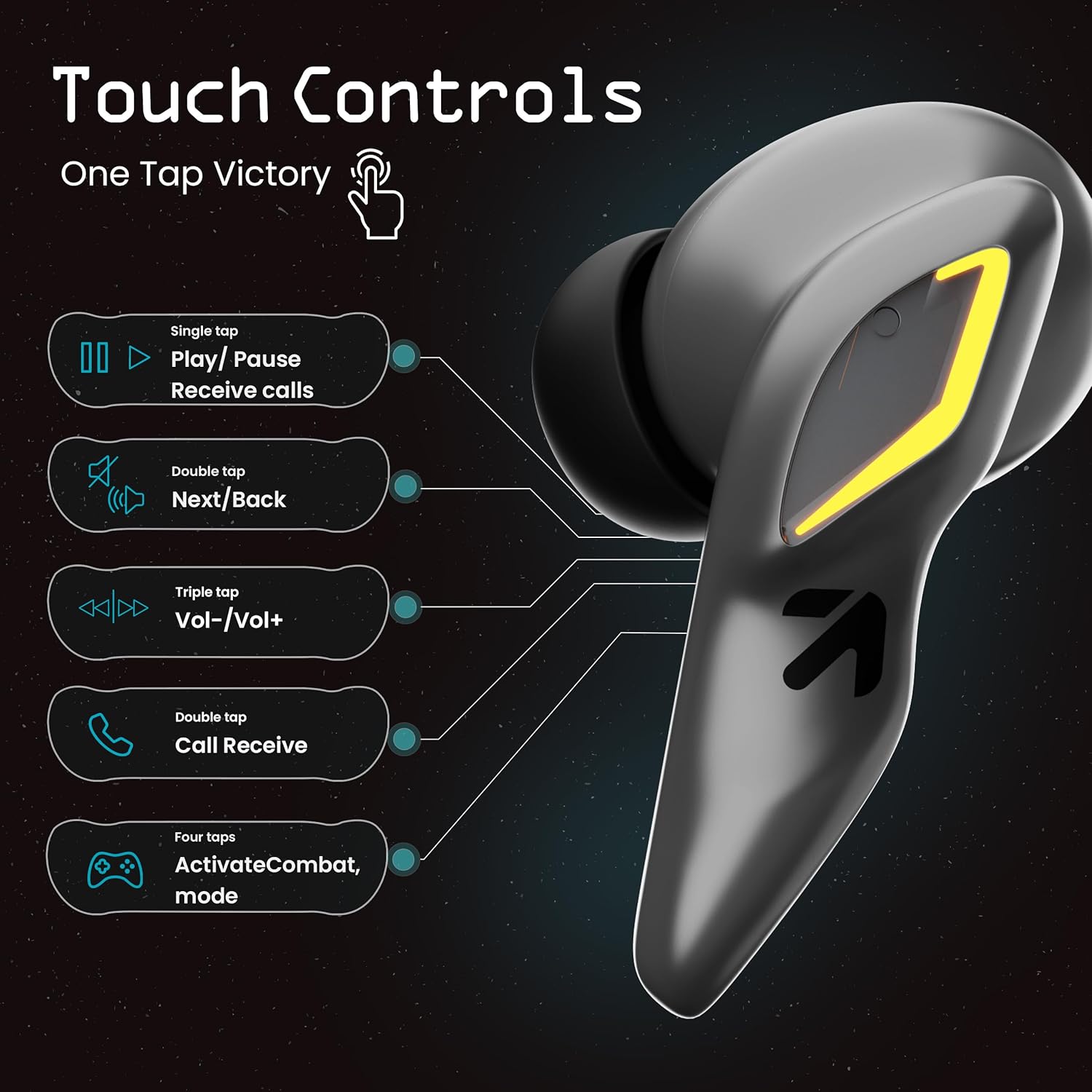
Image: A visual guide to the touch controls on the GOBOULT UFO Earbuds, detailing single, double, triple, and four-tap functions.
- Ketuk Tunggal: Play/Pause music, Receive calls.
- Ketok Ganda: Next/Back track.
- Ketuk Tripel: Volume Kaluhur/Turun.
- Four Taps: Activate Combat Mode (Gaming Mode).
- Pencét Panjang: Activate Voice Assistant (Google Assistant, Siri).
Gaming Mode (Combat Mode)
Activate Combat Mode for an ultra-low latency experience of 45ms, ideal for gaming. Tap the earbud four times to toggle this mode.

Image: The GOBOULT UFO Earbuds case open, highlighting the Combat Gaming Mode with 45ms ultra-low latency, activated by four taps.
Asisten sora
Long press the touch control area on either earbud to activate your device's voice assistant (e.g., Google Assistant, Siri).

Image: GOBOULT UFO Earbuds demonstrating the long-press gesture to activate the voice assistant feature.
Ngecas
The GOBOULT UFO earbuds offer up to 48 hours of total playtime with the charging case.
Ngecas Case sareng Earbuds
- Teundeun earbuds kana wadah ngecas. Pastikeun aranjeunna leres seated.
- Connect the Type-C fast charging cable to the charging port on the case and to a power source.
- Indikator LED dina kasus bakal nunjukkeun status ngecas.
- A full charge for the earbuds and case takes approximately 100 minutes.
- With Type-C fast charging, a 10-minute charge can provide up to 1.5 hours of playtime.
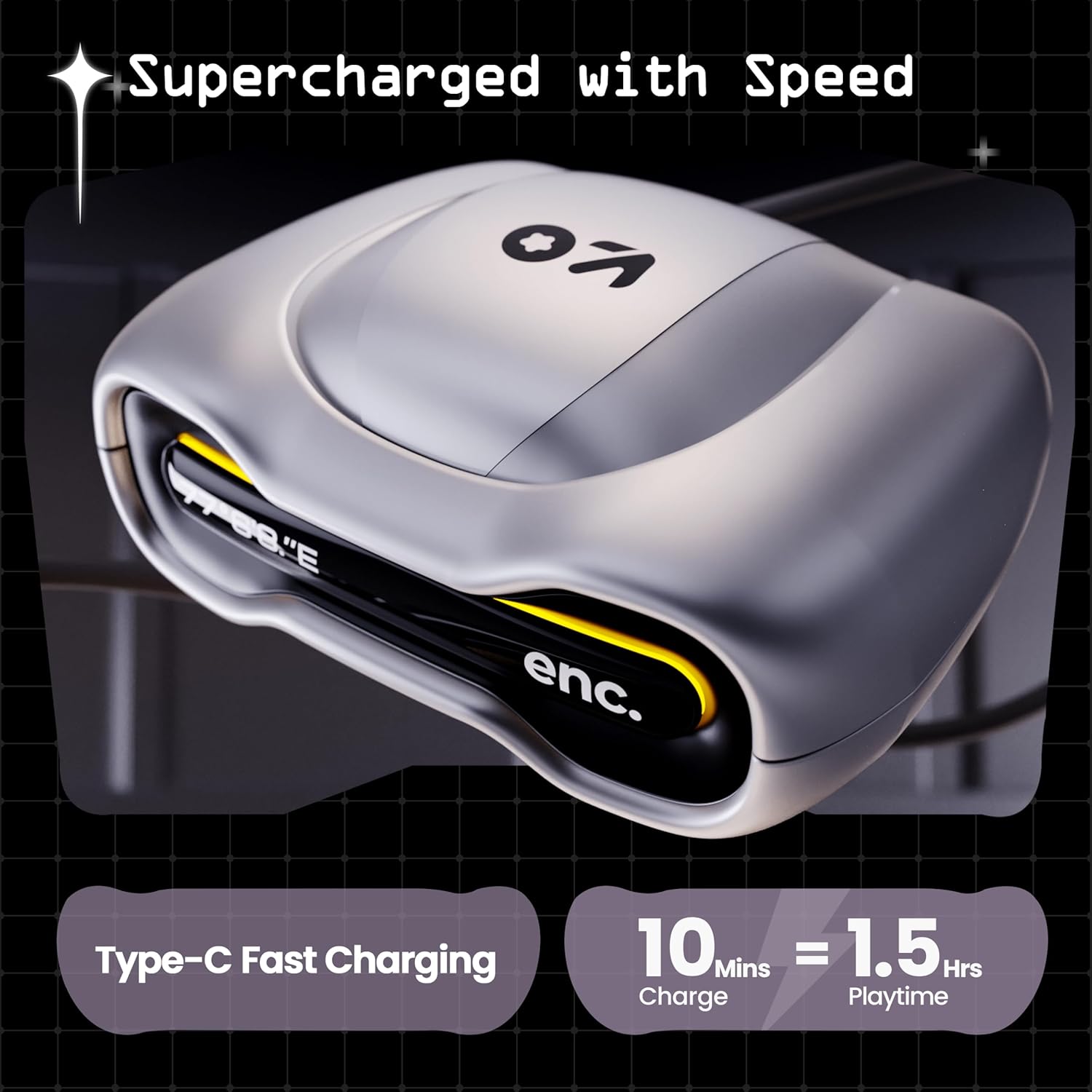
Image: The GOBOULT UFO charging case, illustrating its Type-C fast charging capability, providing 1.5 hours of playtime from a 10-minute charge.
Pangropéa
Tahan cai
The GOBOULT UFO earbuds are IPX5 water-resistant, making them sweatproof, rainproof, and splashproof. This protection allows for use during workouts or in light rain.

Image: GOBOULT UFO Earbuds on a metallic surface, indicating their IPX5 water resistance, making them suitable for sweat, rain, and splashes.
beberesih
Pikeun ngajaga kinerja sareng kabersihan anu optimal, bersihan earbud sareng wadah ngecas anjeun sacara rutin.
- Anggo lawon anu lemes, garing, sareng henteu buluan pikeun ngusap earbud sareng wadahna.
- Keur kokotor bandel, rada dampen lawon jeung cai. Ulah make bahan kimia kasar atawa bahan abrasive.
- Pastikeun kontak ngecas dina earbud sareng wadahna bersih sareng bébas tina kokotor.
- Allow all components to dry completely before placing earbuds back in the case or charging.
Pamérésan masalah
If you encounter any issues with your GOBOULT UFO earbuds, please refer to the following common solutions:
- Henteu aya sora: Ensure earbuds are charged and properly connected to your device. Check device volume.
- Masalah pasangan: Pastikeun Bluetooth diaktipkeun dina alat anjeun. Cobi hilapkeun alatna dina setélan Bluetooth anjeun teras pasangkeun deui. Pastikeun earbud parantos dicas pinuh.
- Hiji Earbud Teu Gawé: Place both earbuds back in the case, close it, and then open it again. This often resets the connection.
- Kualitas Telepon goréng: Ensure microphones are clean. Check for strong Bluetooth connection.
- Kadali Toel Teu Responsif: Pastikeun ramo anjeun beresih jeung garing. Coba hurungkeun deui earbuds ku cara nempatkeun kana wadahna sareng cabut.
For further assistance, please contact GOBOULT customer support.
spésifikasi
| Fitur | Rincian |
|---|---|
| Ngaran modél | UFO (Airbass Earbuds) |
| Vérsi Bluetooth | 5.3 |
| Waktu maén | Nepi ka 48 Jam (kalayan wadah ngecas) |
| Latén Audio | 45 Milidetik (Modeu Kaulinan) |
| Supir | 13mm Supir dinamis |
| Mikropon | Quad Mic ENC (Environmental Noise Cancellation) |
| Tahan cai | IPX5 (Tahan Késang, Tahan Hujan, Tahan Cipratan) |
| Port ngecas | Ngecas Gancang Tipe-C |
| Waktu Ngecas | Kira-kira. 100 Menit |
| Rentang Bluetooth | 10 Méter |
| Réspon Frékuénsi | 20 Hz |
| Sensitipitas | 115 dB |
| Impedansi | 32 ohm |
| Item Beurat | 60 gram |
| Dimensi produk | 4.7 x 9 x 10 cm |
| Bahan | logam |
Garansi sareng Rojongan
Émbaran jaminan
The GOBOULT UFO True Wireless Earbuds come with a 1 Taun Garansi Produsén from the date of purchase. Please retain your proof of purchase for warranty claims. The warranty covers manufacturing defects. It does not cover damage caused by misuse, accidents, or unauthorized modifications.
Rojongan Palanggan
For any questions, technical support, or warranty claims, please contact GOBOULT customer service.
Pabrikan: Exotic Mile Pvt. Ltd.
Alamat: B67 Wazirpur Industrial Area, New Delhi 110052, India.
Please refer to the warranty card included in your product packaging for specific contact details and procedures.


