1. Bubuka
Hatur nuhun pikeun meuliasing the MUSE M-295 ANC Bluetooth Stereo Headphones. This manual provides detailed instructions for the proper use, setup, and maintenance of your headphones. Please read this manual carefully before use and retain it for future reference.
2. Émbaran Kasalametan
- Ulah ngalaan headphone ka suhu ekstrim, kalembaban, atawa zat korosif.
- Hindarkeun leupaskeun atanapi nahan headphone kana dampak anu kuat.
- Ulah ngabongkar atanapi nyobian ngalereskeun headphone sorangan. Ieu bakal ngabatalkeun jaminan.
- Bersihkeun headphone ku kaén anu lembut sareng garing. Ulah make cleaners cair.
- Dengekeun dina tingkat polumeu sedeng pikeun nyegah karuksakan dédéngéan.
- Jauhkeun tina jangkauan barudak.
3. Eusi Paket
Punten parios yén sadaya barang aya dina pakét anjeun:
- MUSE M-295 ANC Bluetooth Stereo Headphones
- Mikropon anu tiasa dicabut
- Kabel Ngecas USB-C
- 3.5mm Audio Cable (for wired use)
- Pelindung Mawa Case
- Manual pangguna (dokumén ieu)
4. Produk Langkungview
Familiarize yourself with the various parts and controls of your MUSE M-295 ANC headphones.
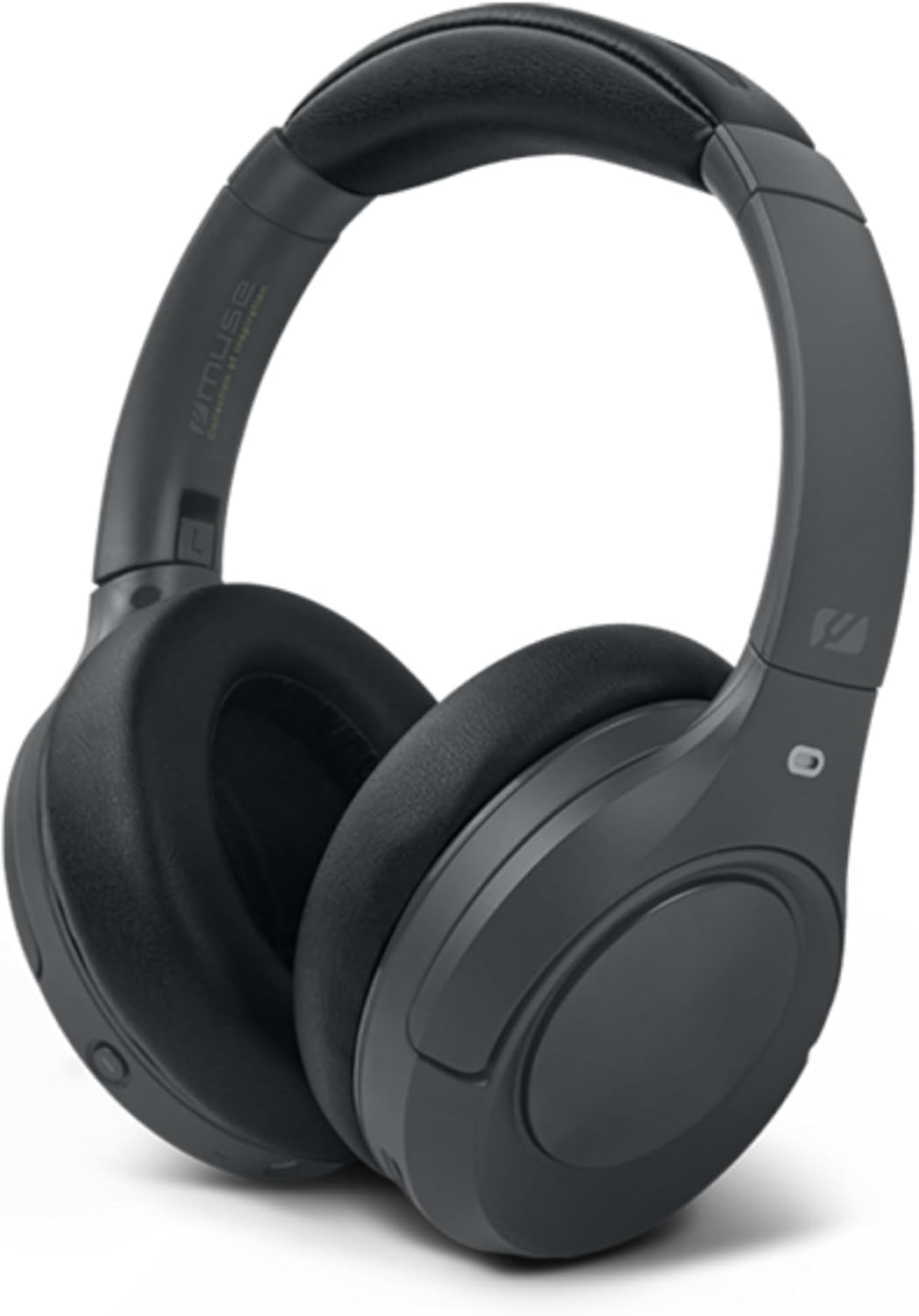
Gambar 4.1: Hareupeun view of the MUSE M-295 ANC Bluetooth Stereo Headphones.

Gambar 4.2: Leuwihview of headphone features including ANC, hands-free calling, USB-C charging, detachable microphone, up to 60 hours music time, AUX input, and adjustable design.
4.1 Komponén headphone
- Headband adjustable: Pikeun nyaman dianggo.
- Ceuli: Soft, circum-aural earcups for comfort and passive noise isolation.
- Tombol kontrol: Power, Volume Up/Next Track, Volume Down/Previous Track, Multi-function Button (Play/Pause, Call Answer/End), ANC/Transparent Mode Button.
- Palabuhan USB-C: Pikeun ngecas headphone.
- 3.5mm Audio Jack: Pikeun sambungan kabel.
- Port mikropon: For attaching the detachable boom microphone.
- Indikator LED: Mintonkeun kakuatan, ngecas, sareng status papasangan.
5. Setélan
5.1 Ngecas Headphone
- Sambungkeun kabel ngecas USB-C anu disayogikeun kana port USB-C dina headphone.
- Sambungkeun tungtung kabel anu sanés ka adaptor kakuatan USB (teu kalebet) atanapi port USB komputer.
- Indikator LED bakal nembongkeun status ngecas (misalna beureum keur ngecas, biru keur dicas pinuh).
- A full charge takes approximately 2 hours and provides up to 60 hours of playback.

Figure 5.1: Key features including Bluetooth 5.3, lightweight design (0.26 kg), up to 60 hours of battery life, and fast charging (2 hours).
5.2 Nyapasangkeun Bluetooth
- Pastikeun headphone dicas.
- Press and hold the Power button for 3-5 seconds until the LED indicator flashes blue and red, indicating pairing mode.
- Dina alat anjeun (smartphone, tablet, komputer), aktipkeun Bluetooth sareng milarian alat anu sayogi.
- Select "MUSE M-295 ANC" from the list of devices.
- Sakali dipasangkeun, indikator LED bakal kedip-kedip biru lalaunan atanapi janten biru padet.
5.3 Sambungan kabel
To use the headphones without battery power or Bluetooth:
- Sambungkeun hiji tungtung kabel audio 3.5mm ka jack audio dina headphone.
- Sambungkeun tungtung nu sejen ka kaluaran audio 3.5mm alat Anjeun.
- In wired mode, Bluetooth and ANC functions may be unavailable or have limited functionality depending on the headphone's power status.
6. Parentah Operasi
6.1 Daya Hurung/Pareuman
- Daya Hurung: Press and hold the Power button for 3 seconds. The LED will flash blue.
- Pareum listrik: Pencét terus tahan tombol Daya salami 3 detik. LED bakal pareum.
6.2 Puterkeun Musik
- Puter / Reureuh: Pencét tombol Multi-fungsi sakali.
- Volume Up: Pencét tombol 'Volume Naék'.
- Volume Turun: Pencét tombol 'Volume Turun'.
- Lagu salajengna: Press and hold the 'Volume Up' button.
- Lagu Sateuacanna: Press and hold the 'Volume Down' button.
6.3 Manajemén Telepon
- Ngajawab / mungkas Telepon: Pencét tombol Multi-fungsi sakali.
- Nolak Telepon: Pencet sareng tahan Tombol Multi-fungsi salami 2 detik.
- Asistén Sora: Pencét dua kali tombol Multi-fungsi.
6.4 Active Noise Cancellation (ANC) and Transparent Mode
The MUSE M-295 ANC headphones feature 35 dB hybrid noise reduction.

Figure 6.1: The MUSE M-295 ANC headphones actively reducing ambient noise.

Figure 6.2: Features such as the detachable microphone, 60-hour battery life, and acoustic isolation with ANC.
- Aktipkeun ANC: Press the dedicated ANC button once. The LED indicator will turn green.
- Activate Transparent Mode: Press the ANC button a second time. This mode allows you to hear your surroundings while still enjoying your audio.
- Deactivate ANC/Transparent Mode: Press the ANC button a third time. The green LED will turn off.
6.5 Mikropon anu tiasa dicabut
The headphones come with a detachable boom microphone for enhanced call clarity.
- Pasangkeun Mikropon: Insert the detachable microphone into the dedicated microphone port on the earcup until it clicks into place.
- Detach Microphone: Gently pull the microphone out of the port.
- When the detachable microphone is connected, it will automatically be used for calls. The integrated dual microphones will be used when the detachable microphone is not connected.
7. Pangropéa
- beberesih: Anggo lawon anu lemes, garing, henteu lint pikeun ngabersihan headphone. Ulah make cleaners abrasive, alkohol, atawa pangleyur kimiawi.
- Panyimpenan: When not in use, store the headphones in the provided protective carrying case to prevent damage. Avoid storing in direct sunlight or extreme temperatures.
- Perawatan batré: Pikeun manjangkeun umur batre, ulah miceun headphone sacara sering. Ngeusi batre rutin, sanajan teu dipaké pikeun période nambahan.
8. Cara ngungkulan
| Masalah | Mungkin Cukang lantaranana | Solusi |
|---|---|---|
| Headphone teu hurung. | batré lemah. | Ngecas headphone nganggo kabel USB-C. |
| Teu bisa masangkeun via Bluetooth. | Headphone henteu dina mode papasangan; Bluetooth ditumpurkeun dina alat; alat jauh teuing. | Ensure headphones are in pairing mode (flashing blue/red LED). Enable Bluetooth on your device. Move device closer to headphones. |
| Taya sora. | Volume teuing leutik; headphone teu nyambung; sumber audio salah. | Increase volume on headphones and device. Re-pair Bluetooth or check wired connection. Ensure correct audio output is selected on your device. |
| ANC henteu tiasa dianggo sacara efektif. | ANC teu diaktipkeun; pas teu pantes. | Press the ANC button to activate (green LED). Adjust headphones for a snug fit over your ears. |
| Mikropon teu jalan. | Mikropon anu tiasa dicabut teu nyambung kalayan leres; setélan mikropon alat. | Ensure the detachable microphone is fully inserted. Check your device's audio input settings to confirm the headphone microphone is selected. |
9. Spésifikasi
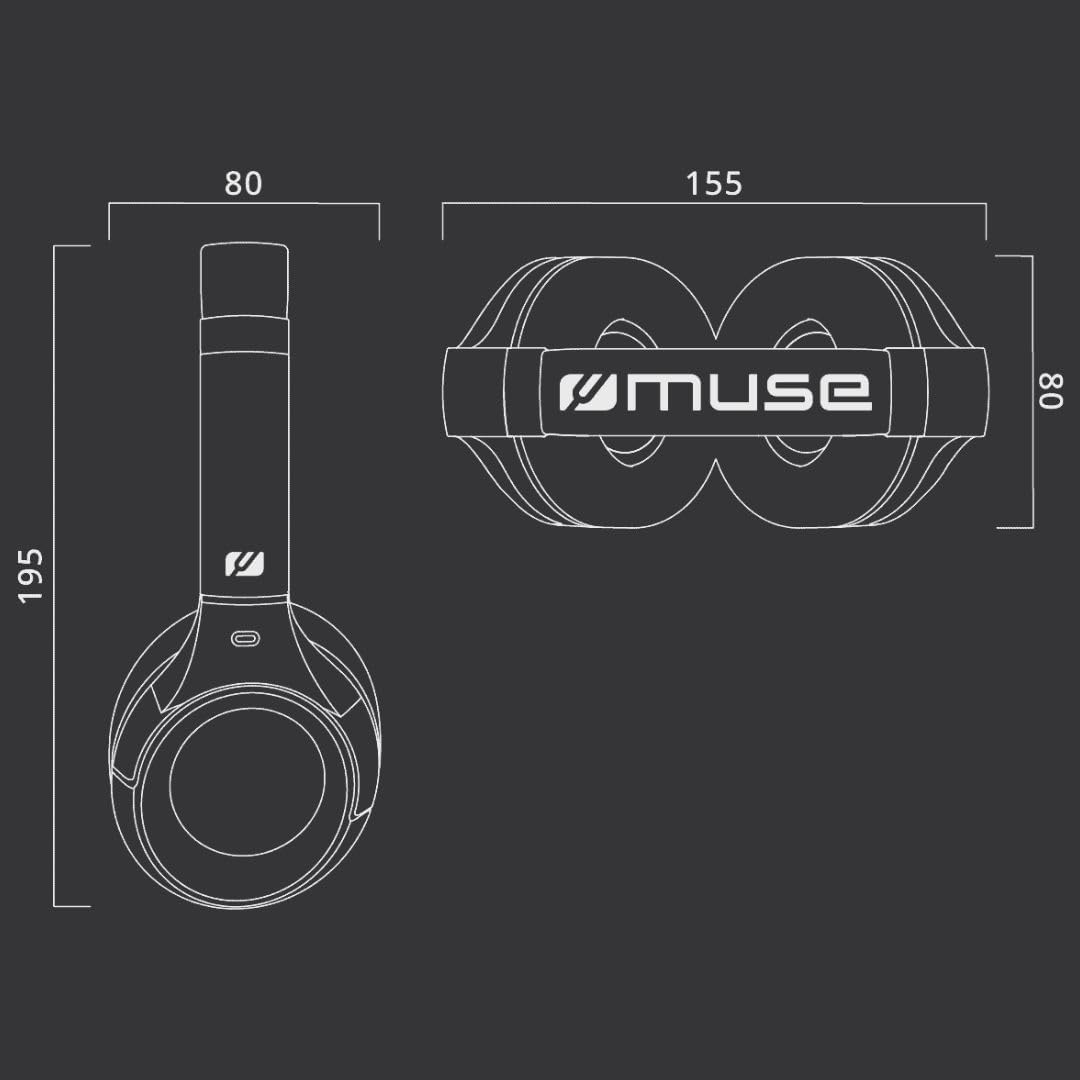
Figure 9.1: Dimensions of the MUSE M-295 ANC headphones (in mm).
- merek: MUSE
- Ngaran modél: M-295 ANC
- Téknologi konektipitas: Nirkabel (Bluetooth), Kabel (AUX 3.5mm)
- Téknologi Komunikasi Nirkabel: Bluetooth 5.3
- Aktif Noise Cancelling (ANC): 35 dB Hybrid Noise Reduction
- Mikropon: Dual integrated, Detachable boom microphone
- Kahirupan batré: Nepi ka 60 jam (waktos musik)
- Waktu Ngecas: Kurang leuwih 2 jam
- Impedansi: 32 emh
- beurat: 260 gram
- Faktor Bentuk: Over-Ear (Circum-Auricular)
- Fitur husus: Noise Cancellation, Rechargeable Battery, Transparent Mode
- Alat anu cocog: Phones, Desktop Computers
- Komponén Kaasup: User Manual, Protective Case, USB-C Charging Cable, 3.5mm Audio Cable, Detachable Microphone
10. Garansi jeung Rojongan
MUSE products are designed and manufactured to the highest quality standards. For detailed warranty information, please refer to the warranty card included with your purchase or visit the official MUSE website. For technical support or customer service inquiries, please contact your retailer or the manufacturer directly.


