1. Bubuka
Welcome to the user manual for your Natec FURY SHOBO SH4F RGB MIDI TOWER PC Case. This guide provides essential information for the proper assembly, installation, operation, and maintenance of your new computer chassis. Please read this manual thoroughly before beginning installation to ensure optimal performance and longevity of your components.
2. Pedoman Kasalametan
- Always disconnect the power supply from the wall outlet before installing or removing any components inside the PC case.
- Handle components with care to avoid damage from electrostatic discharge (ESD). Consider using an anti-static wrist strap.
- Keep small parts, such as screws, away from children.
- Mastikeun ventilasi ditangtoskeun sabudeureun kasus PC pikeun nyegah overheating.
- Do not expose the case to extreme temperatures, humidity, or direct sunlight.
- Avoid placing heavy objects on top of the case.
3. Eusi Paket
Punten parios yén sadaya barang aya dina pakét anjeun:
- Natec FURY SHOBO SH4F RGB MIDI TOWER PC Case
- Accessory box (containing screws, cable ties, and other small parts)
- Manual pangguna (dokumén ieu)
4. Produk Langkungview
The Natec FURY SHOBO SH4F is a MIDI TOWER PC case designed for gaming and general-purpose computing, offering ample space for components and efficient cooling. It features a modern design with RGB lighting.
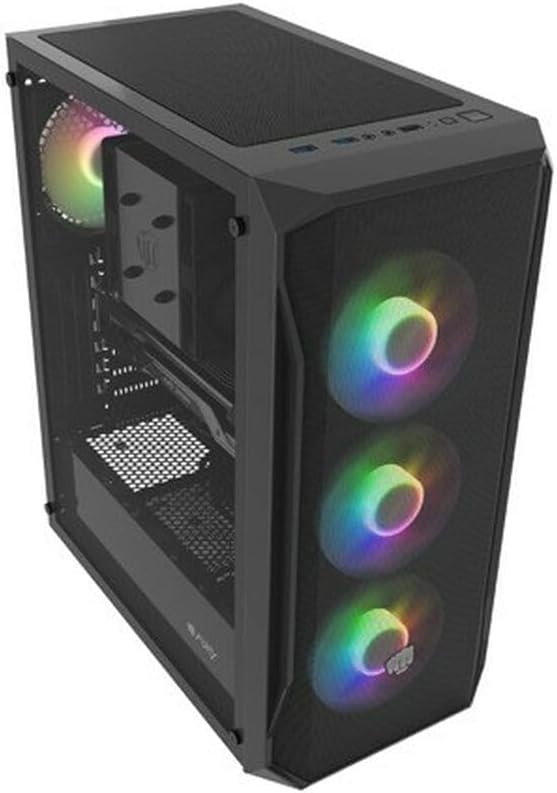
Gambar 4.1: Hiji angled view of the Natec FURY SHOBO SH4F RGB MIDI TOWER PC Case, showcasing its black metal and tempered glass construction. The front panel features a mesh design with three illuminated RGB fans, and a single RGB fan is visible at the rear exhaust. The top panel includes I/O ports and a mesh filter.
4.1 Panel I/O Hareup
- Tombol Daya
- Tombol Reset
- Port USB 2.0 (x1)
- Audio Jacks (Headphone/Microphone)
- RGB Control Button (if applicable)
4.2 Tata Letak Internal
The case supports Micro ATX and Mini ATX motherboards and features a bottom-mounted power supply bay. It includes dedicated areas for storage drives and efficient cable management.
5. Setup jeung Instalasi komponén
Follow these steps to install your PC components into the FURY SHOBO SH4F case.
5.1 Nyiapkeun Pasualan
- Tempatkeun wadahna dina permukaan anu datar sareng stabil.
- Remove the side panels. Typically, the tempered glass side panel is secured with thumbscrews.
5.2 Pamasangan motherboard
- Install the I/O shield (if not pre-installed on your motherboard) into the rear opening of the case.
- Ensure the motherboard standoffs are correctly aligned for your Micro ATX or Mini ATX motherboard. Adjust or install additional standoffs if necessary.
- Sacara ati-ati nempatkeun motherboard kana standoff, saluyukeun liang sekrupna.
- Pasangkeun motherboard nganggo sekrup anu disayogikeun. Ulah kencengkeun teuing.
5.3 Pamasangan catu daya
- Locate the power supply bay at the bottom rear of the case.
- Slide your power supply unit (PSU) into the bay from the rear of the case, ensuring the fan faces downwards (if the case has a bottom vent) or upwards.
- Amankeun PSU nganggo sekrup ti tukangeun casing.
5.4 Pamasangan Girang Panyimpenan
Refer to your case's specific drive bay design for 2.5" SSDs and 3.5" HDDs. Typically, these involve trays or direct screw mounting.
5.5 Expansion Card Installation (e.g., Graphics Card)
- Leupaskeun perlu PCI-E slot nyertakeun ti pungkur kasus.
- Insert your expansion card into the corresponding PCI-E slot on the motherboard.
- Secure the card with a screw or the case's retention mechanism.
5.6 Manajemén kabel
Ngamangpaatkeun cutouts sarta titik dasi-handap tukangeun baki motherboard pikeun jalur jeung kabel aman. Ieu ngaronjatkeun aliran hawa jeung estetika.
5.7 Connecting RGB Fans
The pre-installed RGB fans typically connect to a central RGB controller or directly to your motherboard's RGB headers. Consult your motherboard manual for specific RGB header locations and software control. Ensure all fan power cables are connected to appropriate fan headers on the motherboard or a fan hub.
6. Ngoperasikeun Casing PC Anjeun
6.1 Powering on / Pareum
After all components are installed and cables connected, plug your power supply into a wall outlet. Press the power button on the front I/O panel to turn on your system. To turn off, use the operating system's shutdown function or press and hold the power button for several seconds.
6.2 Kontrol cahaya RGB
If your case features an RGB control button on the front I/O panel, press it to cycle through various lighting modes and colors. For advanced customization, use your motherboard's RGB software (e.g., ASUS Aura Sync, MSI Mystic Light, Gigabyte RGB Fusion) if the fans are connected to compatible headers.
7. Pangropéa
Pangropéa rutin ngabantosan mastikeun kinerja anu optimal sareng manjangkeun umur komponén PC anjeun.
7.1 Lebu Filter beberesih
The FURY SHOBO SH4F case includes dust filters (e.g., on the top and bottom). Periodically remove and clean these filters by rinsing them with water and allowing them to dry completely before re-installing. This prevents dust buildup and maintains airflow.
7.2 beberesih exterior
Ngusap bagian luar kotak ku lemes, damp lawon. Hindarkeun pembersih atanapi pangleyur anu abrasif anu tiasa ngaruksak lapisan atanapi kaca tempered.
8. Cara ngungkulan
Upami anjeun mendakan masalah, tingal léngkah-léngkah ngungkulan umum ieu:
- Henteu aya kakuatan: Ensure the power supply is properly connected to the wall outlet and the motherboard. Check all internal power cables (24-pin ATX, 8-pin CPU, GPU power). Verify the power button cable is correctly connected to the motherboard's front panel header.
- Penggemar Teu Diputer: Check if fan power cables are securely connected to the motherboard or fan hub. Ensure the power supply is functioning.
- Lampu RGB Teu Gawé: Verify RGB cables are correctly connected to the RGB controller or motherboard header. If using a button, try cycling through modes. If using software, ensure it's installed and configured correctly.
- Overheating: Ensure all fans are spinning correctly and oriented for proper airflow (intake/exhaust). Clean dust filters and internal components. Verify CPU cooler and GPU cooler are properly installed.
9. Spésifikasi
| merek | Natec |
| Runtuyan | SH4F |
| Nomer modél | NFO-2154 |
| Jenis Kasus | Midi Tower |
| Motherboard kasaluyuan | Micro ATX, Mini ATX |
| Warna | Hideung |
| Bahan | logam |
| Ukuran produk (L x W x H) | 19.69 x 16.93 x 9.84 inci (50 x 43 x 25 cm) |
| Item Beurat | 9.46 pon (4.3 Kilogram) |
| Power Supply ningkatna Tipe | Gunung handap |
| Métode Cooling | Hawa |
| Jumlah USB 2.0 palabuhan | 1 |
10. Garansi jeung Rojongan
Natec products are manufactured to high-quality standards. For information regarding warranty terms and conditions, please refer to the warranty card included with your product or visit the official Natec website. If you encounter any issues not covered in this manual or require further assistance, please contact Natec customer support through their official channels.
Pabrikan: Natec


