Bubuka
Welcome to the VTech Genius XL Interactive Video Binoculars. This device is designed for children aged 5 and above to explore the world around them through observation, interactive videos, images, and educational games. This manual provides essential information for setup, operation, and maintenance to ensure optimal use and longevity of your product.

Image: The VTech Genius XL Interactive Video Binoculars, showing the main unit with its flip-up color screen and binocular lenses.
Émbaran Kasalametan penting
PERHATOSAN: Henteu cocog pikeun murangkalih di handap 36 bulan kusabab bagian-bagianna alit.
- Salawasna ngawas barudak salila pamakéan.
- Do not look directly at the sun through the binoculars, as this can cause serious eye damage.
- Pastikeun batréna leres diselapkeun.
- Ulah campur accu heubeul jeung anyar atawa tipena béda accu.
- Cabut batré béak geura-giru.
- Buangkeun batréna kalayan tanggung jawab.
Naon dina Box
- 1 Pair of VTech Genius XL Interactive Video Binoculars
- Batteries (4 x LR6-AA)
- Tali beuheung
Disetél
1. Pamasangan batré
- Panggihan kompartemen batré dina alat.
- Ngagunakeun obeng, buka panutup kompartemen batré.
- Insert 4 new LR6-AA batteries, ensuring correct polarity (+/-).
- Ganti tutupna sareng kencengkeun sekrup.
2. Ngalampirkeun Tali beuheung
Thread the provided neck strap through the designated loops on the binoculars. Adjust the strap length for comfortable and secure wearing.

Image: A child wearing the VTech Genius XL Interactive Video Binoculars with the neck strap, demonstrating how it can be worn for outdoor exploration.
Parentah Operasi
1. Daya Hurung / Pareum
Press and hold the power button to turn the device on or off. The device features an automatic shut-off function to preserve battery life.
2. Viewing Modeu
The binoculars offer two primary viewing methods:
- Through the Binoculars: Look directly through the eyepieces (binocular lenses) for traditional observation. The interpupillary distance is adjustable for optimal comfort.
- On the LCD Screen: Flip up the 2.4-inch color LCD screen to view observations digitally.

Image: A child looking through the VTech Genius XL Interactive Video Binoculars, demonstrating the traditional viewmetoda ing.
3. Magnification and Focus
- The binoculars provide up to 10x magnification.
- Use the focus wheel to adjust the image clarity for both binocular and screen viewing.
4. Modeu Visi Peuting
Activate the integrated infrared system for night vision. This mode is exclusively available on the LCD screen, allowing observation in low-light or dark conditions.

Image: The VTech Genius XL Interactive Video Binoculars displaying a night vision image of a hedgehog on its screen, highlighting the night vision feature.
5. Ngarekam Poto sareng Video
The integrated camera allows you to capture images of flora and fauna. The internal memory can store up to 50 photos. A micro-SD card slot (card not included) is available to expand storage capacity and save photos for printing.

Image: The VTech Genius XL Interactive Video Binoculars with multiple captured images of animals and nature displayed around it, illustrating the photo capture function.
6. Interactive Content (BBC Videos & Images)
Explore over 340 official videos and images from the BBC, providing more than 700 educational facts categorized into 9 groups:
- Amphibian
- Artropoda
- Terrestrial Birds
- Flying Birds
- Terrestrial Mammals
- Marine Mammals
- Réptil
- Tutuwuhan Kembangan
- Other Plants and Fungi

Image: The VTech Genius XL Interactive Video Binoculars displaying an image of a mushroom on its screen, with a speech bubble indicating educational information, showcasing the BBC content.
7. Games and Quizzes
- Adventure Game: Navigate through 5 natural environments, encountering over 100 animals and exploring 25 levels.
- Educational Quiz: Test scientific knowledge through a 3-stage quiz (Training, Time Challenge, Clue Game).
- Use the joystick and 12 buttons to navigate through games and features.
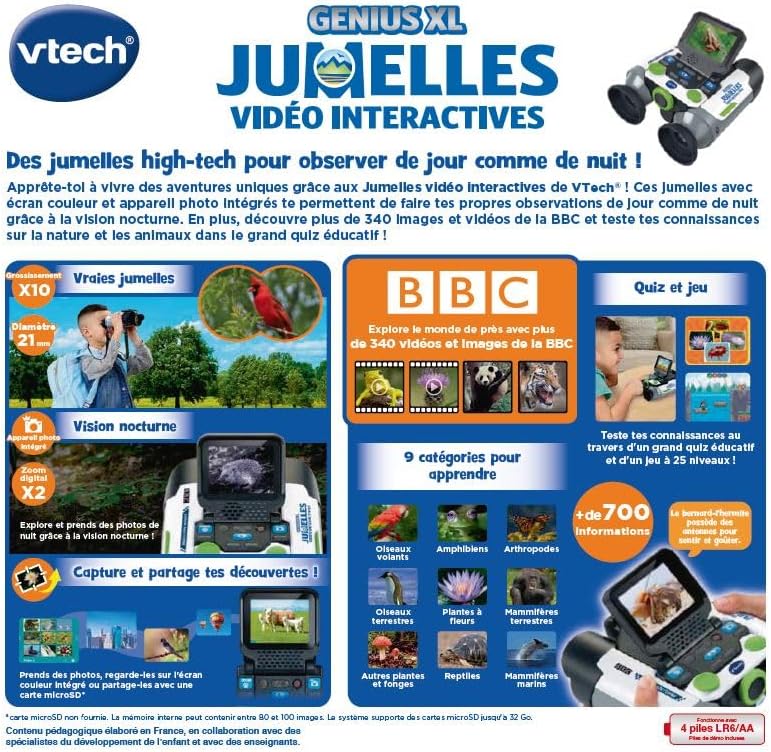
Image: A child holding the VTech Genius XL Interactive Video Binoculars, playing an adventure game on its screen, demonstrating the interactive game feature.
8. Volume Control
Adjust the sound volume using the dedicated controls on the device.
Integrasi Média
Video Produk Resmi
The following video demonstrates the key features and interactive capabilities of the VTech Genius XL Interactive Video Binoculars.
Video: Pra pondokview pidéo casing children using the VTech Genius XL Interactive Video Binoculars to observe nature, take photos, play games, and utilize the night vision mode. It highlights the educational BBC content and interactive features.
This video provides a broader overview of the Genius XL range, including the Interactive Video Binoculars and the Interactive Video Globe.
Video: A preview video demonstrating both the VTech Genius XL Interactive Video Binoculars and the Interactive Video Globe. It shows children engaging with both products, highlighting their educational and interactive aspects, including exploring animals and geography.
Pangropéa
beberesih
Ngusap alat ku rada damp lawon. Ulah make bahan kimia kasar atawa cleaners abrasive. Pastikeun alat geus garing saméméh neundeun.
Panyimpenan
Store the binoculars in a cool, dry place away from direct sunlight. Remove batteries if the device will not be used for an extended period.
Pamérésan masalah
- Alat teu hurung: Pariksa pamasangan batré sareng pastikeun batréna henteu béak. Ganti ku batré énggal upami diperyogikeun.
- Screen is blank or frozen: Try turning the device off and on again. If the issue persists, remove and reinsert the batteries.
- Sound not working: Check the volume settings. If the issue persists after checking volume and restarting, contact customer support.
- Photos lost or unable to access gallery: Ensure a micro-SD card is properly inserted if you are relying on external storage. If using internal storage and experiencing issues, a factory reset might be necessary, but this will erase all stored photos. It is recommended to regularly transfer important photos to an external micro-SD card.
- Image blurry: Atur roda fokus nepi ka gambarna jelas.
spésifikasi
| Fitur | Rincian |
|---|---|
| Dimensi produk | 12.1 x 6.9 x 16.2 cm |
| Beurat | 170 gram |
| Disarankeun Umur | 5 taun ka luhur |
| Ajén Atikan | Learning, Creativity, Animal Discoveries, Interaction |
| Basa | French (Note: Product content is in French as per specifications) |
| Rujukan Produsén | 618605 |
| Jumlah Potongan | 1 |
| Batré Diperlukeun | Yes (4 x LR6-AA) |
| Batré Kaasup | Sumuhun |
| Bahan Utama | palastik |
| Warna | kulawu |
| Fitur husus | Visi Peuting |
| Diaméter lénsa obyektif | 21 milimeter |
| Magnification maksimum | 10x |
| Tipe Pamasangan | Collar (Neck Strap) |
| Ngaran modél | X 21 |
| Binocular Prism Description | Prisma Porro |
Garansi sareng Rojongan
For warranty information and customer support, please refer to the documentation included with your purchase or visit the official VTech websitus. Simpen bukti pameseran anjeun pikeun klaim garansi.
Product support and spare parts availability may vary by region. The manufacturer states that spare parts are unavailable for this product.


