Buku Panduan Pangguna Proyektor Mini BlitzWolf BW-VT2
Your comprehensive guide to setting up, operating, and maintaining your BlitzWolf BW-VT2 Mini Projector.
1. Produk Langkungview
1.1 Eusi pakét
Punten parios yén sadaya barang aya dina pakét anjeun:
- BlitzWolf BW-VT2 Mini Projector
- Kadali jauh
- Adaptor kakuatan
- Kabel HDMI
- Manual pangguna (dokumén ieu)
1.2 Tata Tata Alat
Familiarize yourself with the various parts and ports of your projector.
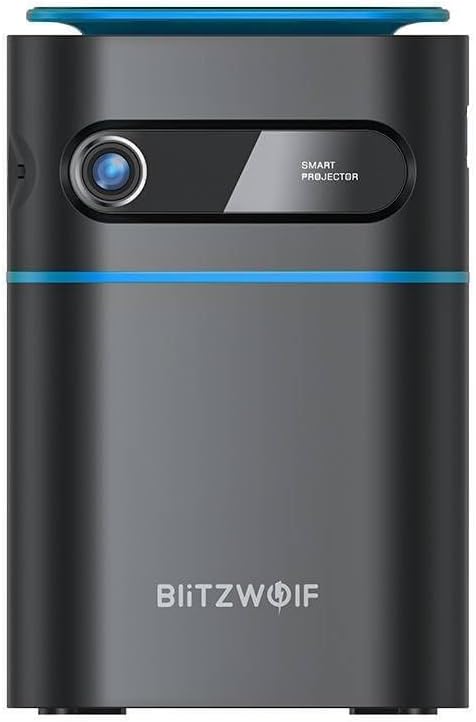
Gambar 1.1: Hareupeun View. This image displays the front of the BlitzWolf BW-VT2 Mini Projector, highlighting the projection lens and the 'SMART PROJECTOR' branding.

Figure 1.2: Projector with Remote Control. This image shows the BlitzWolf BW-VT2 Mini Projector alongside its dedicated remote control, illustrating the compact size of both devices.
Gambar 1.3: Tukangeun View. The rear of the projector is shown, featuring ventilation grilles and various input/output ports.

Gambar 1.4: Sisi View. This image highlights the side of the projector where additional connectivity options such as USB and HDMI ports are located.

Gambar 1.5: Top View. The top surface of the projector is visible, featuring the integrated touch control panel for direct interaction.
1.3 palabuhan sarta kadali
- Port HDMI: Connect to laptops, game consoles, Blu-ray players, etc.
- Port USB: Sambungkeun USB flash drive pikeun playback média.
- Audio Out (3.5mm) Port: Sambungkeun speaker éksternal atawa headphone.
- DC IN Port: Sambungkeun adaptor kakuatan.
- Tombol Daya: Hurungkeun/pareuman proyektor.
- Roda fokus: Saluyukeun kajelasan gambar.
- Panel Kontrol Toél: Navigate menus and control playback directly on the device.
2. Setup Guide
2.1 Powering On
- Sambungkeun adaptor kakuatan ka port DC IN dina projector nu.
- Colokkeun adaptor kakuatan kana stop kontak témbok.
- Press and hold the Power Button on the projector or the remote control until the device powers on.
2.2 Panempatan Awal
Pikeun optimal viewing experience, consider the following:
- Teundeun proyektor dina permukaan datar anu stabil.
- Pastikeun aya ventilasi nyukupan sabudeureun projector pikeun nyegah overheating.
- Position the projector perpendicular to the projection surface (wall or screen) for a rectangular image.
- Adjust the distance to achieve your desired screen size.
2.3 adjustment fokus
After powering on, adjust the focus to ensure a clear image:
- Puterkeun roda fokus anu aya di deukeut lénsa dugi ka gambar anu diproyeksikan katingali seukeut sareng jelas.
2.4 Setup Kontrol Jauh
Insert batteries into the remote control before first use:
- Buka tutup kompartemen batréna dina tonggong kadali jarak jauh.
- Insert two AAA batteries (not included), ensuring correct polarity (+/-).
- Tutup panutup kompartemen batré.
3. Parentah Operasi
3.1 Napigasi
You can navigate the projector's interface using either the remote control or the touch control panel on top of the device.
- Kadali jauh: Use the directional buttons (up, down, left, right) to move through menus and the 'OK' button to select.
- Panel Kontrol Toél: Swipe and tap on the touch-sensitive surface to navigate.
3.2 Nyambungkeun Alat
The BW-VT2 supports various input sources:
- Masukan HDMI: Connect your laptop, game console, or other HDMI-enabled devices using an HDMI cable. Select the HDMI input source from the projector's menu.
- Input USB: Insert a USB flash drive into the USB port. The projector's media player will typically detect the drive automatically, allowing you to browse and play supported media files (pidéo, poto, musik).
- Konektipitas Wi-Fi: Navigate to the 'Settings' menu, then 'Network' or 'Wi-Fi'. Select your Wi-Fi network and enter the password to connect the projector to the internet. This enables access to online streaming apps and updates.
3.3 Fitur OS Android
As an Android-powered projector, the BW-VT2 offers smart functionalities:
- Aksés Aplikasi: Download and install various streaming apps (e.g., Netflix, YouTube) directly from the pre-installed app store or by sideloading APKs.
- Setélan: Customize display settings, audio output, network configurations, and system preferences through the Android settings menu.
- Pangeunteungan layar: Utilize built-in screen mirroring features (e.g., Miracast, AirPlay compatible apps) to project content from your smartphone or tablet wirelessly.
3.4 Kaluaran Audio
The projector has built-in speakers, but you can also connect external audio devices:
- 3.5mm Audio kaluar: Connect headphones or external speakers via the 3.5mm audio jack for enhanced sound.
4. Pangropéa
Pangropéa anu leres mastikeun umur panjang sareng kinerja optimal proyektor anjeun.
4.1 beberesih lénsa
To maintain clear image quality, clean the projector lens regularly:
- Anggo lawon anu lemes sareng henteu ngaganggu anu khusus dirancang pikeun lénsa optik.
- Usap lensa sacara lalaunan ku gerakan bunderan.
- Avoid using abrasive cleaners or excessive force, which can scratch the lens.
4.2 Ventilasi
Ensure proper airflow to prevent overheating:
- Do not block the ventilation vents on the projector.
- Jalankeun proyektor di daérah anu berventilasi saé.
- Periodically clean dust from the vents using a soft brush or compressed air.
4.3 Panyimpenan
When not in use, store your projector properly:
- Store the projector in a cool, dry place, away from direct sunlight and extreme temperatures.
- Anggo bungkus aslina atanapi wadah pelindung pikeun nyegah akumulasi lebu sareng karusakan fisik.
5. Cara ngungkulan
Tingali kana bagian ieu pikeun masalah umum sareng solusina.
| Masalah | Mungkin Cukang lantaranana | Solusi |
|---|---|---|
| Proyéktor teu tiasa dihurungkeun. | Teu aya sambungan listrik; adaptor listrik rusak. | Ensure power adapter is securely connected to both projector and outlet. Try a different outlet. |
| Taya gambar projected. | Incorrect input source selected; loose HDMI/USB cable. | Verify the correct input source is selected in the menu. Check cable connections. |
| Gambar blur. | Focus not adjusted; projector too close/far. | Rotate the focus wheel until the image is clear. Adjust projection distance if necessary. |
| Taya sora. | Volume too low; external audio device not connected properly. | Increase volume. Check connections to external speakers/headphones. Ensure audio output is set correctly in settings. |
| Masalah sambungan Wi-Fi. | sandi salah; masalah router; gangguan sinyal. | Re-enter Wi-Fi password. Restart router. Move projector closer to router. |
| Kadali jauh teu jalan. | Batré pareum; kahalangan; remot teu dipasangkeun. | Ganti batréna. Pastikeun teu aya halangan antara remot sareng proyéktor. |
6. Spésifikasi Téknis
Key specifications of the BlitzWolf BW-VT2 Mini Projector:
| Fitur | Spésifikasi |
|---|---|
| merek | BlitzWolf |
| Nomer modél | BW-VT2EU |
| Warna | Hideung |
| Téhnologi konektipitas | HDMI, USB, VGA, Wi-Fi |
| Resolusi tampilan | 1920 x 1080 (HD lengkep) |
| Tipe tampilan | LCD, LED |
| Faktor Bentuk | Portabel |
| Fitur husus | Portable, Android OS, Wi-Fi, HDMI, USB, VGA |
| Alat nu cocog | Laptops, Smartphones, Game Consoles, Blu-ray Players, Media Players, Wi-Fi enabled devices |
| Dianjurkeun Mangpaat | Bioskop imah |
7. Garansi jeung Rojongan
7.1 Garansi Produsén
The BlitzWolf BW-VT2 Mini Projector comes with a 2-taun jaminan produsén urang. Garansi ieu nyertakeun cacad dina bahan sareng pagawean dina panggunaan normal. Punten tahan bukti pameseran anjeun pikeun klaim garansi.
7.2 Rojongan Palanggan
If you encounter issues not covered in the troubleshooting section or require further assistance, please contact BlitzWolf customer support. Refer to the product packaging or the official BlitzWolf websitus pikeun inpo kontak panganyarna.


