1. Bubuka
Hatur nuhun pikeun meuliasing the Coolfire Vibrating Alarm Clock Wristband, Model 1685B. This device is designed to provide a discreet and effective silent alarm experience through gentle vibrations on your wrist. This manual provides detailed instructions for setup, operation, and maintenance to ensure optimal performance and longevity of your device.
2. Produk Langkungview
The Coolfire Vibrating Alarm Clock is a wristband-style watch featuring a digital display and a silent vibration alarm. It is suitable for individuals who need to wake up without disturbing others, or for those with hearing or visual impairments. The device includes a rechargeable battery and a washable sweatband for comfort and hygiene.
Fitur konci:
- Silent vibration alarm on the wrist.
- Large, bright LCD digital display.
- Up to 6 daily alarms.
- Three adjustable vibration strengths (Low, Medium, High).
- Integrated 24-hour precision 1/100 seconds digital stopwatch.
- Rechargeable lithium battery via USB.
- Soft, washable sweatband.

Gambar 1: Hareupeun view of the Coolfire Vibrating Alarm Clock Wristband, showing the digital display and control buttons.
3. Setélan
3.1 Ngecas Alat
Before initial use, fully charge the device. A full charge takes approximately 4 hours and provides 4-6 weeks of operation.
- Locate the USB charging cable provided with your device.
- Connect the USB cable to any standard USB adapter (not included).
- Release the locking ring from the back of the watch unit and gently push out the watch module from the sweatband.
- Plug the small end of the USB cable into the charging socket located on the back of the watch module.
- Ngidinan alat pikeun ngecas salila 4 jam.
- Once charged, disconnect the cable and reinsert the watch module into the sweatband, securing it with the locking ring.
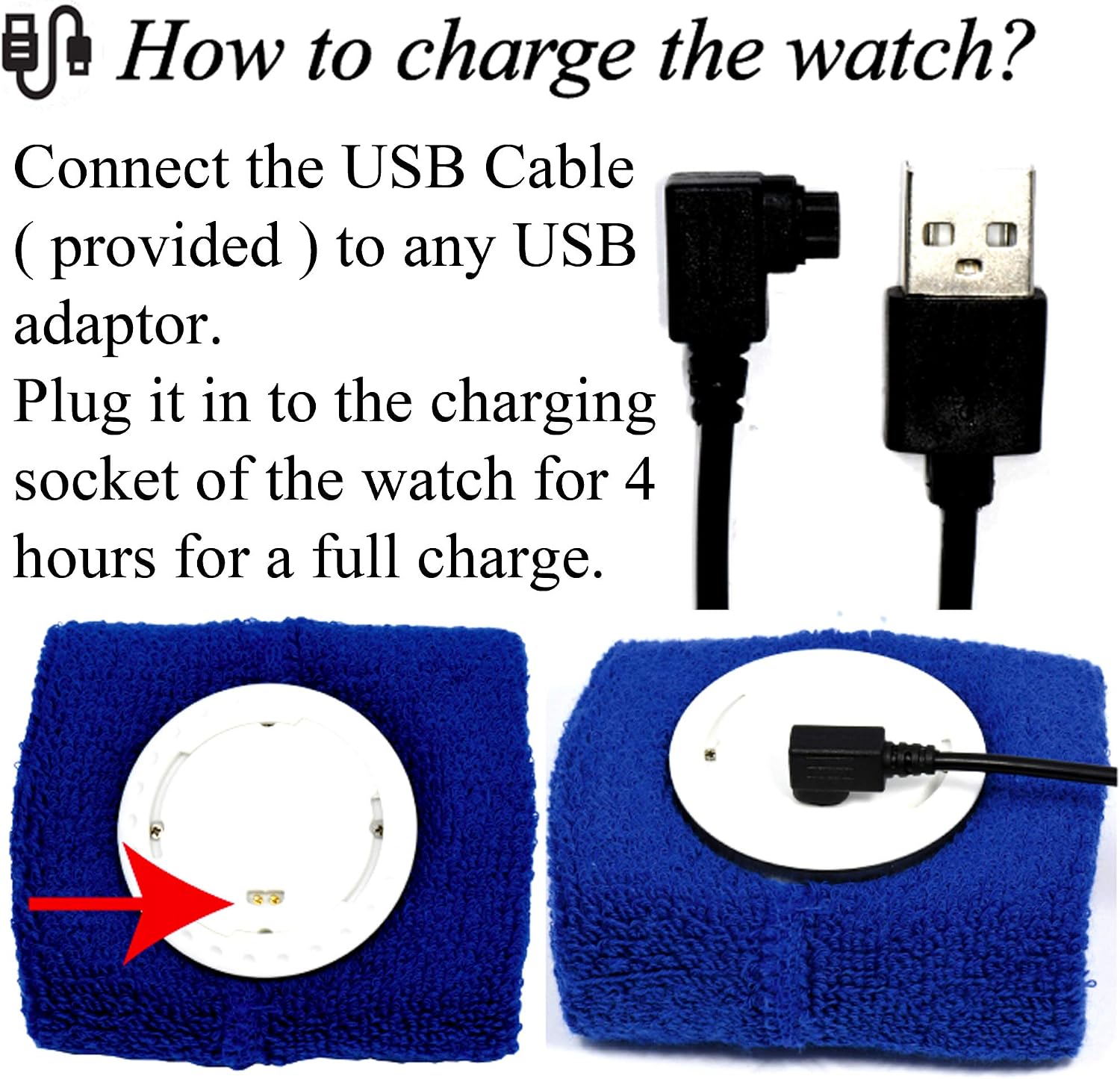
Figure 2: Illustration of connecting the USB cable to the watch module for charging.
3.2 Nganggo Gelang
The wristband is designed for comfortable wear. Ensure the watch module is securely placed within the sweatband.
- The sweatband is adjustable and fits wrist sizes from 6.7 inches (170mm) to 8.5 inches (215mm).
- Wear the wristband snugly enough to ensure good contact for vibration, but not so tight as to be uncomfortable.

Gambar 3: Kelample of the Coolfire Vibrating Alarm Clock Wristband worn on a wrist, indicating suitable wrist sizes.
4. Parentah Operasi
The Coolfire alarm clock features a simple digital display and user-friendly buttons for setting time, alarms, and other functions.
4.1 Fungsi Tombol
The watch module has three primary buttons:
- LAMPU/STW: Activates backlight; in stopwatch mode, starts/stops the stopwatch.
- SET: Enters setting mode for time and alarms.
- WAKTU/ALARM: Toggles between time display and alarm display; in setting mode, adjusts values.
4.2 Nyetel Waktu jeung Kaping
- From the main time display, press and hold the SET tombol nepi ka digit waktu mimiti flash.
- Pencét éta WAKTU/ALARM tombol pikeun nyaluyukeun nilai kedip-kedip (contona, jam, menit).
- Pencét éta SET button again to move to the next setting (e.g., minutes, year, month, day).
- Malikan deui léngkah 2 sareng 3 dugi ka sadaya setélan waktos sareng kaping leres.
- Pencét éta SET button one last time to exit setting mode.
4.3 Nyetel Alarm
Alat ieu ngadukung dugi ka 6 alarm sadinten.
- From the main time display, press the WAKTU/ALARM button repeatedly until "ALARM" is displayed and you see an alarm number (e.g., AL1).
- Pencét jeung tahan tombol SET button until the alarm time digits begin to flash.
- Pencét éta WAKTU/ALARM tombol pikeun nyaluyukeun jam kedip-kedip.
- Pencét éta SET button to move to the minutes.
- Pencét éta WAKTU/ALARM tombol pikeun nyaluyukeun menit kedip-kedip.
- Pencét éta SET button to enable/disable the alarm (an alarm icon will appear when enabled).
- Pencét éta SET button again to save the alarm setting and exit.
- To set additional alarms, repeat steps 1-7, cycling through AL2, AL3, etc., using the WAKTU/ALARM kancing.
4.4 Adjusting Vibration Strength
The device offers three vibration strengths: Low, Medium, and High. The method for adjusting this setting is typically found within the alarm settings or a dedicated mode. Refer to the on-screen prompts or experiment with the SET jeung WAKTU/ALARM buttons while in alarm setting mode to locate this option.
4.5 Ngagunakeun Stopwatch
- From the main time display, press the WAKTU/ALARM button repeatedly until "STW" (Stopwatch) is displayed.
- Pencét éta LAMPU/STW tombol pikeun ngamimitian stopwatch nu.
- Pencét éta LAMPU/STW tombol deui pikeun ngareureuhkeun stopwatch.
- To reset the stopwatch, while paused, press and hold the SET kancing.
- Pencét éta WAKTU/ALARM button to return to the main time display.
5. Pangropéa
5.1 Washing the Sweatband
The sweatband is washable, but the watch module is teu tahan cai. Always remove the watch module before washing the sweatband.
- To detach the watch module, release the locking ring from the back of the watch.
- Gently push the watch module out from the sweatband.
- Machine wash the sweatband as needed, following standard fabric care instructions.
- Pastikeun pita késang garing pisan sateuacan dipasang deui modul jam tangan.
- Reinsert the watch module and secure it with the locking ring.
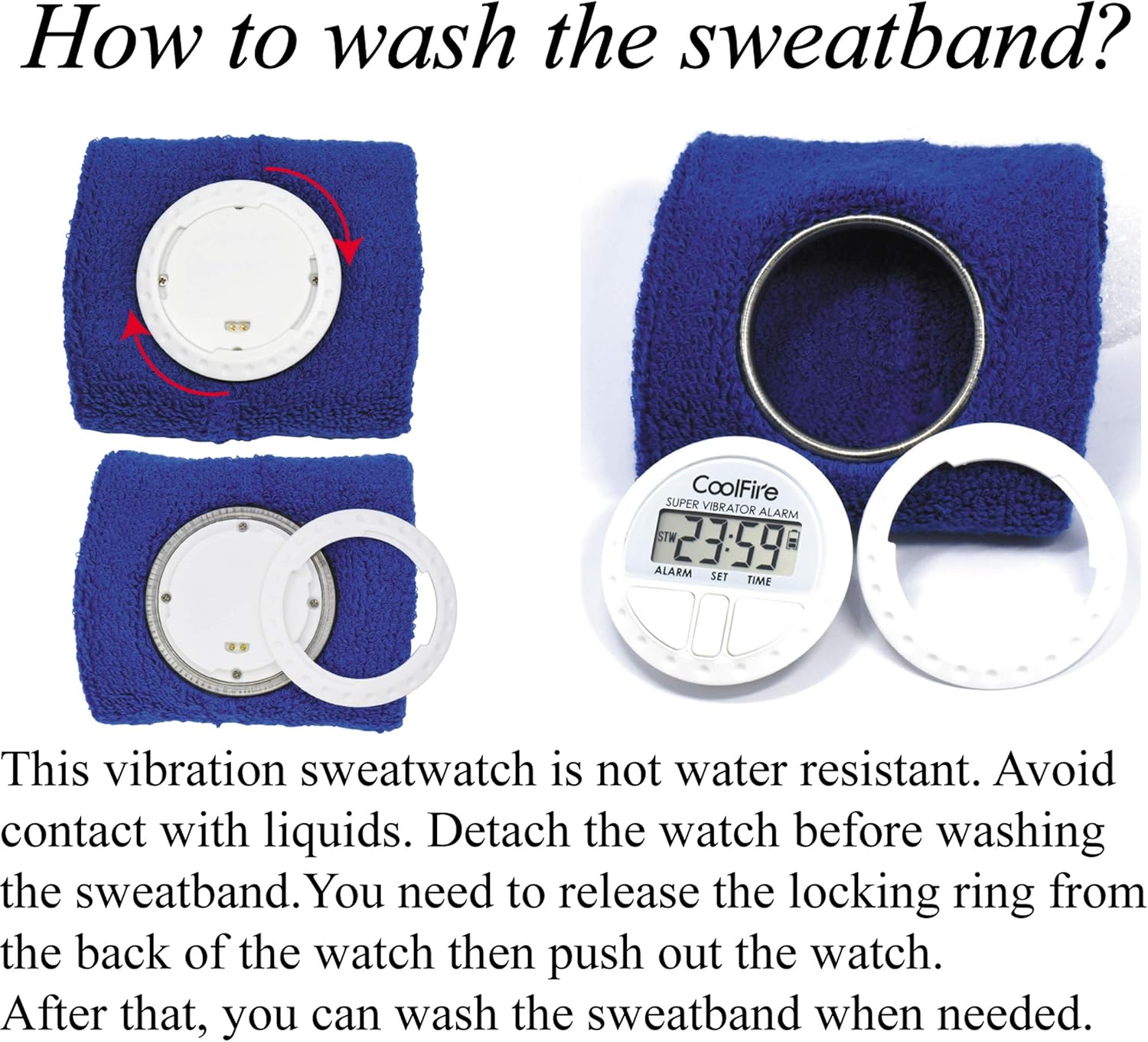
Figure 4: Steps for removing the watch module from the sweatband for cleaning.
6. Cara ngungkulan
| Masalah | Mungkin Cukang lantaranana | Solusi |
|---|---|---|
| Device does not turn on or display is blank. | Batré béak. | Charge the device for 4 hours using the provided USB cable. |
| Vibration alarm is too weak or not felt. | Vibration strength set to Low; wristband is too loose. | Adjust vibration strength to Medium or High. Ensure the wristband is worn snugly. |
| Alarm does not activate. | Alarm is not enabled or set incorrectly. | Verify alarm settings and ensure the alarm icon is displayed, indicating it is active. |
| Tampilanna hésé dibaca. | No backlight activated. | Pencét éta LAMPU/STW tombol pikeun ngaktipkeun lampu tukang. |
7. Spésifikasi
- merek: Seuneu tiis
- Jumlah modél: 1685B
- warna: Hideung (warna séjén bisa jadi sadia)
- Ukuran produk: 8.89 x 3.81 x 8.89 cm (watch module)
- Beurat barang: 10 g (watch module)
- Bahan: Plastic (watch module), Fabric (sweatband)
- Jenis tampilan: LCD Digital
- Sumber Daya: Batré Litium Rechargeable
- Waktu Ngecas: Kurang leuwih 4 jam
- Kahirupan batré: 4-6 weeks on a full charge
- Fitur husus: Silent Clock, Vibrating Alarm, Stopwatch
- Wristband Fit: 6.7" (170mm) nepi ka 8.5" (215mm)
8. Garansi jeung Rojongan
For warranty information and customer support, please refer to the documentation included with your purchase or contact your retailer. Keep your purchase receipt as proof of purchase.
For further assistance, you may visit the official Coolfire websitus atanapi ngahubungi departemén layanan palangganna. Rincian kontak biasana aya dina bungkusan produk atanapi ayana online resmi mérek éta.